

Description
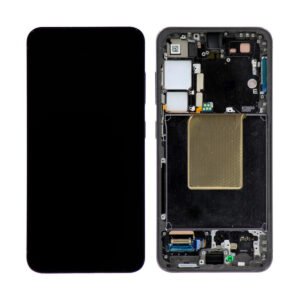
Samsung Galaxy A71 5G LCD Screen Assembly Replacement With Frame – Reliable Visual Restoration at Lower Cost
Restore your Galaxy A71 5G’s usability with this quality aftermarket LCD screen assembly. Designed as a cost-effective replacement, it brings back your phone’s touch functionality and clear visuals—ideal for users who need a working display without the high price of OLED.
Key Features:
Fully compatible with Samsung Galaxy A71 5G (Model A716 / 2020)
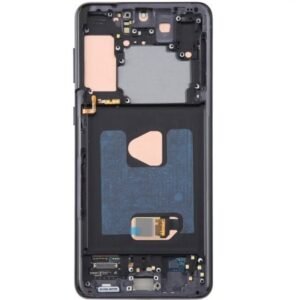
Includes pre-installed frame for easier installation
Clear display with reliable touch response
Suitable for moderate to heavy screen damage
Tested for full functionality and compatibility
This LCD screen assembly is a dependable choice for anyone looking to fix their device quickly without compromising essential display performance.
The Galaxy A71 5G LCD Screen is one of the most important components of your smartphone. It’s not just a display but the part that connects you visually with every feature of your phone. From browsing, watching videos, playing games, to simply texting friends, the LCD screen ensures clarity, smoothness, and responsiveness. When it gets damaged, cracked, or becomes unresponsive, replacing it with a quality LCD screen becomes a necessity.
Why the Galaxy A71 5G LCD Screen Matters
The screen of the Samsung Galaxy A71 5G is large, vibrant, and designed for immersive viewing. With its Full HD+ resolution, it delivers sharp images and vivid colors. The LCD technology provides bright visuals even in daylight, making it easier to use outdoors. A damaged screen doesn’t only affect visibility but also impacts touch sensitivity, responsiveness, and overall user experience.
For instance:
-
A cracked screen can make navigation difficult.
-
Dead pixels or discoloration can ruin video watching and gaming.
-
An unresponsive touch screen affects productivity and communication.
This is why a reliable replacement Galaxy A71 5G LCD Screen is crucial for restoring your device’s performance.
Common Reasons for Screen Damage
Even with careful handling, the screen can get damaged due to:
-
Accidental drops – The most common reason.
-
Excessive pressure – Sitting on the phone or keeping it in tight pockets.
-
Liquid damage – Moisture or water exposure can weaken the screen.
-
Overheating – Prolonged heat exposure can affect pixels.
These issues highlight the importance of having a high-quality replacement LCD screen available when needed.
Benefits of Replacing with a High-Quality LCD Screen
-
Restores Display Quality – Enjoy the same crisp visuals and vibrant colors as the original.
-
Improves Touch Responsiveness – Ensures smooth navigation and better gaming performance.
-
Extends Device Life – A good replacement saves you from buying a new phone too soon.
-
Cost-Effective Solution – Replacing a screen is far more affordable than purchasing a new device.
Features of Galaxy A71 5G LCD Screen Replacement
-
High Resolution – Delivers sharpness and detail for every picture and video.
-
Durability – Built to handle daily wear and tear with improved toughness.
-
Touch Accuracy – Smooth, responsive touch with zero lag.
-
Brightness & Contrast – Optimized for both indoor and outdoor use.
-
Easy Installation – Many screens are designed for direct replacement without complicated steps.
How to Know If You Need a Replacement
You might need a new LCD screen if:
-
The display is cracked or shattered.
-
The touch isn’t responding properly.
-
There are black spots, lines, or discoloration on the screen.
-
The screen flickers or shows irregular brightness.
If these signs are present, replacing your Galaxy A71 5G LCD Screen is the most effective fix.
Tips for Choosing the Best Replacement Screen
When shopping for a replacement LCD screen, consider:
-
Compatibility – Ensure it’s designed specifically for Galaxy A71 5G.
-
Quality assurance – Opt for OEM (Original Equipment Manufacturer) or high-grade replacement.
-
Warranty – Look for suppliers that offer a replacement guarantee.
-
Customer reviews – A quick check helps you choose a reliable product.
Installation: Professional vs. DIY
-
Professional Repair: Ideal for those unfamiliar with smartphone repair. Ensures precision and avoids further damage.
-
DIY Installation: Possible if you have technical experience and repair tools. Saves money but comes with risks.
If you choose DIY, always follow a step-by-step guide and handle the screen carefully to prevent additional damage.
Maintenance Tips for Your LCD Screen
After replacement, protect your screen with:
-
Tempered glass protector – Adds a strong extra layer.
-
Protective case – Reduces shock damage during accidental drops.
-
Regular cleaning – Use a microfiber cloth to avoid scratches.
-
Avoid overheating – Don’t expose the device to direct sunlight for long periods.
Final Thoughts
The Galaxy A71 5G LCD Screen replacement is essential for restoring the functionality and appearance of your phone. A high-quality replacement ensures you continue to enjoy sharp visuals, responsive touch, and the overall smooth experience that Samsung devices are known for. Whether you choose professional installation or go the DIY route, investing in a durable LCD screen keeps your smartphone working like new.
The Samsung Galaxy A71 5G LCD Screen is one of the most important parts of the device, as it ensures smooth visual performance, touch sensitivity, and overall user experience. Whether you use your smartphone for gaming, browsing, video streaming, or professional tasks, the display plays a vital role in how you interact with your device. A damaged, broken, or malfunctioning screen can drastically affect usability. That’s why replacing it with a high-quality Galaxy A71 5G LCD screen is essential.
This detailed guide will help you understand everything about the Galaxy A71 5G LCD Screen — its features, benefits, common problems, replacement process, and why choosing the right screen matters.
Why the Galaxy A71 5G LCD Screen is Important
The LCD screen for Samsung Galaxy A71 5G provides:
-
High resolution display – Offers clear visuals, vibrant colors, and sharp details.
-
Touch responsiveness – Smooth multitouch functionality for gaming and everyday use.
-
Durability – Designed to withstand regular use, minor scratches, and pressure.
-
Visual clarity in sunlight – Brightness levels allow visibility even outdoors.
Without a proper screen, even a powerful smartphone like the Galaxy A71 5G loses its value, making replacement crucial when damaged.
Common Issues with Galaxy A71 5G LCD Screen
Users often face problems such as:
-
Cracked or broken screen due to accidental drops.
-
Touch not working properly or ghost touches.
-
Black spots or dead pixels on the display.
-
Screen flickering or distorted colors.
-
Complete blackout when LCD is damaged internally.
If you face these issues, replacing the Samsung Galaxy A71 5G LCD Screen is the best solution.
Benefits of Replacing with Original Galaxy A71 5G LCD Screen
-
Restores full functionality – Touch and display work like new.
-
Enhances resale value – A device with a perfect screen sells at a better price.
-
Protects internal components – Prevents damage to circuits caused by cracks.
-
Smooth experience – Gaming, browsing, and video streaming feel better.
How to Identify a Faulty Galaxy A71 5G LCD Screen
-
Touch screen not responding properly.
-
Unusual lines or discoloration.
-
Screen stays black despite the phone being on.
-
Pressure marks visible after drops.
If any of these occur, it means the Galaxy A71 5G LCD replacement is necessary.
Replacement Process for Galaxy A71 5G LCD Screen
The replacement should ideally be done by a professional technician. The steps include:
-
Powering off the device.
-
Removing SIM tray and back cover.
-
Disconnecting battery and existing screen.
-
Installing new Samsung Galaxy A71 5G LCD screen.
-
Testing touch and display before sealing.
Why Choose High-Quality Galaxy A71 5G LCD Screen
There are many copies available in the market, but low-quality LCDs can cause:
-
Poor touch sensitivity.
-
Low brightness and dull colors.
-
Quick damage and reduced life span.
Always choose original or premium replacement screens for the best results.
Tips to Maintain Galaxy A71 5G LCD Screen
-
Use a screen protector to prevent scratches.
-
Always keep the phone in a protective case.
-
Avoid exposing screen to direct sunlight for long periods.
-
Clean the screen with a soft microfiber cloth.
Conclusion
The Samsung Galaxy A71 5G LCD Screen is the heart of the smartphone’s usability. Whether you are facing cracks, unresponsive touch, or black spots, replacing the LCD screen restores your phone’s original quality. For durability, better performance, and long-lasting results, always opt for a reliable Galaxy A71 5G LCD replacement screen.
The Samsung Galaxy A71 5G LCD Screen is more than just a display – it’s the core interface between you and your smartphone. From scrolling through social media feeds to attending virtual meetings, streaming your favorite shows, or playing graphic-intensive games, the LCD screen shapes every interaction. Once it breaks or loses touch responsiveness, it significantly reduces the value of your phone. That’s why replacing it with a high-quality LCD screen is one of the smartest decisions you can make.
Why is the Galaxy A71 5G LCD Screen So Important?
Samsung designed the Galaxy A71 5G with a large, high-definition LCD display, known for delivering sharp visuals, bright colors, and smooth transitions. Unlike older screens, this one offers impressive refresh rates and enhanced clarity. But because the screen is the most exposed part of the phone, it is also the most vulnerable.
When the LCD screen is intact:
-
Videos play with cinema-like clarity.
-
Games run smoothly with precise touch response.
-
Text and images appear crisp and easy to read.
-
Outdoor visibility remains strong under direct sunlight.
When the LCD screen is damaged, however, the entire smartphone experience deteriorates.
Common Types of Galaxy A71 5G LCD Screen Issues
Here are some typical problems users face:
-
Cracked or shattered glass – Often caused by accidental drops.
-
Ghost touch – The screen reacts even when not touched.
-
Unresponsive display – The phone is on, but the screen won’t respond.
-
Flickering – The brightness fluctuates randomly.
-
Dead pixels or colored lines – Visual defects that make usage difficult.
-
Dim display – Reduced brightness even at full settings.
Each of these issues signals that a screen replacement is the right solution.
Benefits of Choosing a Replacement LCD Screen
-
Improved functionality – Restores smooth touch operations.
-
Better display quality – Sharp and vibrant colors return.
-
Extended device life – Keeps your phone running for years.
-
Cost-efficient solution – Cheaper than buying a new smartphone.
-
Resale value – A phone with a new screen fetches higher resale prices.
Features of a Quality Galaxy A71 5G LCD Screen
When selecting a replacement, you should look for:
-
Exact Compatibility – Specifically built for Galaxy A71 5G.
-
Full HD+ resolution – For premium visuals and image sharpness.
-
Durable construction – Scratch-resistant, stronger than generic screens.
-
Responsive digitizer – Smooth scrolling and tapping.
-
Brightness calibration – Consistent viewing indoors and outdoors.
Choosing the Right Replacement Screen
Not all LCD screens are built equally. Some sellers offer cheaper alternatives that may compromise performance. Always ensure:
-
The screen is either OEM or high-grade aftermarket.
-
It comes with a warranty or guarantee.
-
The supplier has positive customer reviews.
-
The package includes both LCD + digitizer assembly.
Buying the right part once prevents frustration and repeat costs.
Professional Repair vs. Do-It-Yourself
Professional Replacement
-
Reliable, safe, and ensures correct installation.
-
Ideal for users without technical experience.
-
Saves time and reduces the risk of damaging other parts.
DIY Replacement
-
Cost-effective if you know smartphone repair basics.
-
Requires proper tools (heat gun, suction cup, screwdrivers, adhesive).
-
Must follow a detailed step-by-step repair guide.
For most users, professional repair is the safer option to avoid risks like damaging the motherboard, fingerprint sensor, or internal connectors.
How to Maintain Your Galaxy A71 5G LCD Screen
Once replaced, extend the life of your new screen with these habits:
-
Always use a tempered glass protector.
-
Invest in a sturdy phone case to minimize impact damage.
-
Keep your screen clean with microfiber cloths.
-
Avoid direct sunlight for extended periods to reduce heat damage.
-
Do not overload pockets to prevent pressure cracks.
These preventive steps ensure your replacement screen lasts longer.
Signs You Need to Replace the Screen Immediately
-
The phone turns on but shows a blank display.
-
The touchscreen responds slowly or not at all.
-
Visible vertical or horizontal lines appear.
-
The screen has liquid spots or distorted areas.
-
Using the phone feels inconvenient due to constant display issues.
Ignoring these signs only worsens the damage. Early replacement means fewer risks and better performance.
Cost Factor – Is It Worth It?
Yes! Compared to the high price of purchasing a new Samsung Galaxy A71 5G, replacing the LCD screen is highly cost-effective. It restores nearly 90-95% of your device’s functionality at a fraction of the cost.
The Samsung Galaxy A71 5G LCD Screen plays a central role in making the device one of Samsung’s most popular smartphones. Its large display, smooth performance, and bright visuals make it a favorite among users who enjoy watching videos, gaming, and multitasking. But since the screen is one of the most delicate parts of any smartphone, it’s also the most common component that needs replacement.
This section will guide you through everything you need to know about the Galaxy A71 5G LCD screen, from common issues to repair tips, buying advice, and long-term maintenance.
Understanding the Galaxy A71 5G LCD Screen
The LCD screen is not just a piece of glass. It is a complex assembly that includes:
-
Touch digitizer – Detects your finger movements.
-
LCD panel – Displays images, videos, and text.
-
Backlight – Provides brightness for clear visibility.
When any part of this assembly breaks down, you’ll notice performance issues such as:
-
Black spots
-
Dead pixels
-
Ghost touch
-
Color fading
-
Screen unresponsiveness
In such cases, replacing the entire LCD + digitizer assembly is the only reliable solution.
Why Do Galaxy A71 5G Screens Get Damaged?
There are several reasons why users often face screen problems:
-
Accidental drops – The most common reason for cracked glass and faulty displays.
-
Pressure damage – Keeping the phone in tight pockets or bags.
-
Exposure to water or moisture – Even a small amount can damage display circuits.
-
Excessive heat – Prolonged exposure to sunlight or overheating batteries.
-
Manufacturing defects – Rare, but some users experience early screen failure.
Knowing the cause of damage can help you take better precautions after replacement.
Options for Screen Replacement
When it comes to repairing your Galaxy A71 5G LCD screen, you have two main options:
1. Professional Repair
-
Skilled technicians handle the replacement.
-
Safe and quick process with warranty.
-
Ideal for users who don’t have technical expertise.
2. DIY Replacement
-
More affordable but riskier.
-
Requires a toolkit: suction cup, heat gun, prying tools, adhesive, screwdrivers.
-
Must follow detailed tutorials or repair guides.
If you have no experience in smartphone repair, professional help is always the best choice.
Key Features of a Good Replacement LCD Screen
When buying a replacement, make sure the new screen includes:
-
High-definition resolution – Crisp and clear display.
-
Touch sensitivity – Smooth scrolling and responsive gaming.
-
Durability – Scratch and crack resistance.
-
Brightness calibration – Good outdoor visibility.
-
Compatibility – Specifically designed for Galaxy A71 5G, not generic models.
Things to Check Before Buying
-
Supplier reliability – Buy from trusted sellers with positive reviews.
-
Warranty/return policy – Ensures peace of mind if something goes wrong.
-
Package contents – Should include LCD + digitizer assembly.
-
Quality type – OEM or high-grade replacement screens are best.
A cheaper option may seem attractive, but poor quality screens usually lead to repeated problems.
Steps Involved in Replacement
While professional repair services handle this with precision, here’s a simple breakdown of the process:
-
Power off the device.
-
Heat the back cover and remove it carefully.
-
Disconnect the battery to prevent short-circuiting.
-
Detach the old LCD screen and digitizer.
-
Fit in the new LCD screen assembly.
-
Reconnect battery and test before sealing.
This process looks simple, but it requires expertise and proper tools.
Benefits of Replacing the Galaxy A71 5G LCD Screen
-
Restored functionality – Phone works like new.
-
Improved viewing experience – Bright and sharp visuals.
-
Cost-effective solution – Much cheaper than a new smartphone.
-
Extended device life – Keeps your phone usable for years.
-
Resale value – A phone with a new screen sells at a better price.
How to Protect Your New LCD Screen
After investing in a replacement, you must protect it from future damage:
-
Use a tempered glass protector for scratch resistance.
-
Always keep your phone in a protective case.
-
Avoid using the phone while charging for long hours to prevent heat damage.
-
Clean the screen regularly with a microfiber cloth.
-
Don’t overload pockets or bags where the phone can bend or crack.
With these simple habits, you can extend the life of your screen significantly.
When Is It the Right Time to Replace?
You should consider immediate replacement if:
-
The screen has deep cracks.
-
The phone turns on but shows nothing.
-
Touch response is inconsistent.
-
Lines or black spots appear on display.
-
Using the phone feels inconvenient due to screen issues.
Delaying the replacement can damage other components like the battery or motherboard.
Cost of Replacement vs. Buying a New Phone
A new Samsung Galaxy A71 5G can be expensive, but replacing the screen costs only a fraction of the price. If your phone is in otherwise good condition, screen replacement is the smartest financial choice.
Final Words
The Galaxy A71 5G LCD Screen is the heart of your smartphone experience. From bright visuals to smooth touch functionality, it ensures that every interaction feels seamless. If damaged, replacing it with a high-quality screen is the best way to bring your device back to life.
Whether you choose professional repair services or attempt a careful DIY installation, always ensure you purchase a durable and compatible replacement screen. With the right care, your Galaxy A71 5G LCD screen can serve you reliably for years to come.


Reviews
There are no reviews yet.