

Description
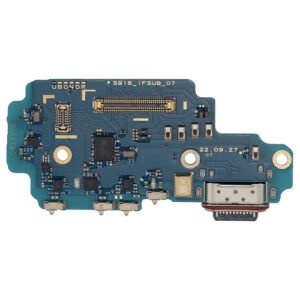
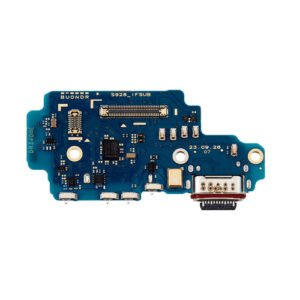
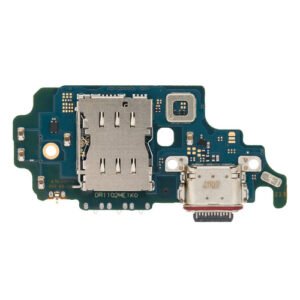
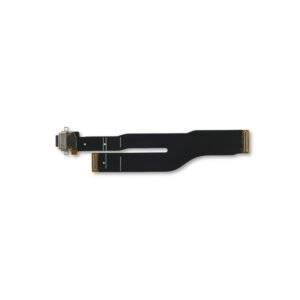
Samsung Galaxy A25 5G Charging Port Board With Headphone Jack Replacement.
This all-in-one replacement board is designed for the Samsung Galaxy A25 5G (A256 / 2023) and includes both the USB-C charging port and 3.5mm headphone jack. It’s ideal for fixing devices with charging issues, USB connection errors, or headphone/audio malfunctions.
Built to OEM specifications, this board ensures stable charging, reliable data transfer, and proper audio output—making it a cost-effective solution for common hardware problems.
Why Choose This Charging Port + Headphone Jack Board?
Designed for Galaxy A25 5G (A256 / 2023)
Combines USB-C charging port and 3.5mm audio jack
Fixes multiple issues in one simple replacement
OEM-style fit and function for reliable performance
Ideal for both repair technicians and DIY users
Restore full power and audio functionality to your Galaxy A25 5G with this dual-feature replacement board.
The charging port is one of the most crucial hardware components in any smartphone, and the Galaxy A25 4G Charging Port is no exception. Without it, a device cannot recharge its battery, transfer data, or connect to accessories that rely on a wired connection. Even though charging ports are designed to be durable, they are subject to daily wear and tear, accidental damage, and environmental factors. This makes them one of the most common parts requiring maintenance or replacement.
This detailed guide explores everything you need to know about the Galaxy A25 4G Charging Port, including its function, importance, common issues, repair process, and best practices to extend its lifespan.
Importance of the Galaxy A25 4G Charging Port
-
Power Supply – The charging port is responsible for delivering energy from your charger into the battery. Without a functioning port, the device cannot recharge.
-
Data Transfer – Beyond charging, it also enables the transfer of photos, music, videos, and documents between the device and a computer.
-
Peripheral Connectivity – Users can connect their phone to external devices like USB drives, headphones, or controllers (with adapters).
-
Device Longevity – A properly functioning charging port prevents strain on the battery, ensuring efficient charging cycles.
Common Problems with Galaxy A25 4G Charging Port
The charging port is one of the most frequently used parts of a smartphone, which means issues can occur over time.
-
Loose Connection – The cable may not stay firmly in place due to worn-out internal pins.
-
Slow Charging – If dirt, debris, or corrosion builds up, power transfer efficiency is reduced.
-
No Charging at All – Complete port damage can prevent the device from powering up.
-
Intermittent Charging – The phone charges only when the cable is held at a certain angle.
-
Overheating – Damaged connectors can cause resistance, leading to excess heat while charging.
Causes of Charging Port Issues
Several factors contribute to the deterioration of the Galaxy A25 4G Charging Port:
-
Dust and Lint Accumulation – Small particles often get trapped inside the port, blocking proper connections.
-
Frequent Plugging/Unplugging – Daily use wears down the connector pins over time.
-
Moisture Exposure – Even a drop of liquid can corrode the metal contacts inside the port.
-
Accidental Damage – Pulling the cable forcefully or dropping the phone while charging may damage the port.
-
Use of Poor-Quality Accessories – Non-certified chargers or cables can put additional stress on the charging system.
Signs You Need a Charging Port Replacement
-
The device does not recognize the charger or cable.
-
Charging takes unusually long compared to normal.
-
Wiggling the cable makes the phone start or stop charging.
-
Computer does not detect the device when connected via USB.
-
The phone heats excessively while plugged in.
Charging Port Repair vs. Replacement
Sometimes, the issue may not require a full replacement. A professional technician may first try cleaning or repairing the port. However, in cases of physical damage or corrosion, a charging port replacement is the most reliable solution.
Repair Options
-
Cleaning – Removing dust and debris using professional tools.
-
Soldering Minor Damage – If only certain connections are loose, micro-soldering may fix it.
Replacement Option
-
If the port is cracked, bent, or burnt, replacing the charging port assembly is the best option to restore proper functionality.
The Replacement Process
Replacing the Galaxy A25 4G Charging Port requires technical expertise and specialized tools. Here’s an overview:
-
Disassembling the Device – The back panel is carefully removed.
-
Disconnecting the Battery – To avoid short circuits, technicians first disconnect the power source.
-
Accessing the Charging Port Module – The internal components are carefully lifted to reach the charging port flex.
-
Removing the Damaged Port – The faulty charging port is detached from the motherboard or flex cable.
-
Installing the New Port – A new genuine charging port is soldered or connected in place.
-
Testing the Device – The technician verifies charging speed, data transfer, and cable stability before sealing the phone.
Professional Replacement vs. DIY Repair
-
Professional Service – Recommended for most users. It ensures safe installation and avoids further damage.
-
DIY Replacement – While tutorials exist online, replacing a charging port requires precision soldering and specialized tools. Mistakes can permanently damage the motherboard.
Cost of Galaxy A25 4G Charging Port Replacement
The cost varies depending on location, service provider, and whether original parts are used. On average:
-
Authorized Service Centers – More expensive but use genuine parts.
-
Third-Party Repair Shops – Often more affordable but may use aftermarket parts.
Investing in a high-quality replacement ensures better performance and longevity.
Tips to Extend Charging Port Life
-
Use only certified charging cables and adapters.
-
Avoid charging the device in dusty or humid environments.
-
Do not yank the charging cable when unplugging—remove it gently.
-
Store your phone in a case that prevents dust entry.
-
Consider wireless charging (if supported by the device) to reduce wear on the port.
The Role of Original Parts
Using genuine Samsung parts is essential for maintaining safety and performance. Aftermarket charging ports may cause:
-
Overheating
-
Inconsistent charging speeds
-
Risk of short-circuiting
Environmental Impact of Charging Ports
Millions of damaged ports contribute to e-waste every year. Replacing the charging port instead of discarding the entire device helps reduce environmental impact and electronic waste.
Future of Smartphone Charging Technology
While charging ports remain essential, the future may shift toward wireless charging and portless devices. However, for now, wired charging remains faster, more reliable, and cost-efficient for most users.
Conclusion
The Galaxy A25 4G Charging Port is a small yet vital part of the smartphone that directly influences daily usability. When it malfunctions, the entire device can become unusable. Understanding its importance, identifying signs of damage early, and opting for timely repairs or replacements can extend the life of your phone.
By using certified accessories, keeping the port clean, and seeking professional repair services, users can ensure smooth charging, reliable data transfer, and long-term device performance.
The Galaxy A25 4G Charging Port is one of the most important yet overlooked components of the smartphone. Every day, users plug and unplug their charging cable without realizing how much strain is placed on this small but powerful connector. In this section, we will explore the design, functionality, common failures, repair processes, and preventive measures in great detail to give you a comprehensive understanding of why the charging port plays such a critical role in device performance and user experience.
1. Understanding the Charging Port
The charging port in the Galaxy A25 4G is designed to provide both power transfer and data exchange. It connects the phone to chargers, computers, and external devices. In most cases, it is a USB Type-C port, known for:
-
Reversible design – No need to check cable orientation.
-
Faster charging capabilities – Supports higher wattage for rapid charging.
-
Efficient data transfer – Quick file movement between phone and PC.
-
Durability – Designed to withstand thousands of insertion cycles.
Although durable, repeated use eventually wears out the connectors, which can lead to issues.
2. Common Problems with Galaxy A25 4G Charging Port
Daily use exposes the port to multiple challenges. Some frequent issues include:
-
Charging Cable Doesn’t Fit Snugly
The cable feels loose, and the phone may not charge consistently. -
Slow Charging or No Charging
Even with an original charger, power may flow slowly or not at all. -
Intermittent Charging
The device charges only when the cable is bent at an angle. -
Overheating Issues
Damaged connectors can cause excess resistance, creating heat. -
Data Transfer Failures
The computer does not recognize the phone when connected.
These problems are frustrating, especially when they interfere with daily use.
3. Causes of Charging Port Failure
Several reasons contribute to charging port damage in the Galaxy A25 4G:
-
Dust and Debris
Small particles accumulate inside the port, blocking the pins. -
Moisture Exposure
Spills, rain, or high humidity can corrode connectors. -
Physical Damage
Forcefully plugging in or yanking out the cable weakens the port. -
Low-Quality Accessories
Cheap cables and chargers strain the internal connections. -
Wear and Tear
With repeated use over months and years, the pins wear out.
4. Warning Signs of a Faulty Charging Port
Knowing the early signs can help prevent complete port failure:
-
The phone stops charging unless the cable is held in a certain position.
-
Charging takes far longer than usual.
-
Visible dirt, lint, or corrosion inside the port.
-
Device disconnects randomly during charging or data transfer.
-
The battery percentage does not increase even when plugged in.
If these signs are ignored, the problem can worsen and eventually render the device unusable.
5. Repair vs. Replacement Options
When dealing with charging port issues, two main approaches exist:
Repair
-
Cleaning – Dust and lint can be carefully removed using professional tools.
-
Micro-Soldering – If pins are loose, technicians may repair connections.
Replacement
-
If the charging port is broken, burnt, or bent, full replacement is required.
-
A charging port flex cable or USB board is installed as a new part.
In most cases, replacement is the long-term solution since it restores full functionality.
6. Charging Port Replacement Process
Professional repair technicians follow these steps:
-
Power off the phone.
-
Remove the SIM tray and back panel carefully.
-
Disconnect the battery to avoid short circuits.
-
Unscrew and remove the protective shields covering the charging board.
-
Detach the damaged charging port flex cable from the motherboard.
-
Install the replacement charging port assembly.
-
Reassemble the device, reconnecting all screws and shields.
-
Test charging, data transfer, and accessory compatibility.
This process requires precision tools, making it unsuitable for most DIY attempts.
7. Risks of DIY Charging Port Repairs
While many tutorials exist online, DIY repair is risky:
-
Improper handling may damage the motherboard.
-
Using incorrect tools can scratch or break components.
-
Non-genuine replacement parts may not support fast charging.
-
Any mistake can void the warranty or cause permanent damage.
That’s why professional repair is always recommended for Galaxy A25 4G Charging Port issues.
8. Cost of Charging Port Replacement
The price varies depending on service type:
-
Authorized Samsung Service Centers – Higher cost but guarantee genuine parts.
-
Local Repair Shops – Lower cost but may use aftermarket parts.
On average, charging port replacement costs are reasonable compared to replacing the entire phone.
9. Preventive Measures for Long Life
You can extend the lifespan of the charging port by following these practices:
-
Always use original Samsung chargers and cables.
-
Keep the port clean and free from dust using soft brushes or air blowers.
-
Avoid using the phone while charging, which strains the connector.
-
Do not expose the phone to liquid or extreme humidity.
-
Gently plug and unplug the cable—never force it.
These small steps can prevent expensive repairs.
10. Why Genuine Parts Matter
Choosing genuine Samsung parts ensures:
-
Safe and consistent charging performance.
-
Proper data transfer speeds.
-
Compatibility with the phone’s battery and software.
-
Reduced risk of overheating and damage.
Aftermarket parts may seem cheaper but can lead to repeated failures.
11. Environmental Perspective
Millions of smartphones are discarded every year due to minor issues like charging port failure. Replacing the Galaxy A25 4G Charging Port instead of buying a new device helps reduce e-waste and saves valuable resources.
12. Future of Smartphone Charging
While wired charging remains dominant, smartphone manufacturers are moving toward wireless charging and even portless designs. However, wired ports continue to provide:
-
Faster charging speeds.
-
Reliable data transfer.
-
Affordability and universal compatibility.
The Galaxy A25 4G Charging Port still remains essential despite these innovations.
Galaxy A25 4G Charging Port
The Galaxy A25 4G Charging Port is more than just a connector; it is the lifeline that keeps your smartphone active, powered, and ready for use. Users often overlook its importance until problems appear. In this section, we’ll go deep into the details of the charging port, highlighting its functionality, failure signs, replacement process, repair benefits, and SEO-friendly aspects that make it a vital keyword for content and e-commerce websites.
1. Role of Galaxy A25 4G Charging Port in Device Functionality
Every Samsung Galaxy smartphone relies on its charging port for power delivery. The Galaxy A25 4G comes with a USB Type-C port that ensures:
-
Fast charging support.
-
Stable and efficient power flow.
-
Data transfer compatibility with PCs, laptops, and accessories.
-
Long-term durability with thousands of plug-in cycles.
Without the Samsung Galaxy A25 4G Charging Port, your device cannot recharge, making this part essential for daily usage.
2. Common Issues with Galaxy A25 4G Charging Port
The charging port faces constant wear and tear. Here are the most common problems users encounter:
-
Loose Charging Port – The cable wiggles inside the port, causing unstable charging.
-
Slow Charging Galaxy A25 4G – Even original Samsung chargers fail to deliver full speed.
-
Port Not Recognized – Computer fails to detect the device when connected.
-
Overheating While Charging – Faulty pins increase resistance, generating heat.
-
Complete Failure – The port no longer works, leaving the phone unchargeable.
These issues highlight why replacing the Galaxy A25 4G Charging Port is often the best solution.
3. Reasons Behind Charging Port Failure
A smartphone charging port can fail for many reasons:
-
Physical Damage – Forceful plugging or yanking of cables.
-
Moisture and Corrosion – Exposure to liquids weakens connectors.
-
Dust and Lint Build-Up – Blocks the connection between pins and cable.
-
Low-Quality Accessories – Cheap cables damage the charging mechanism.
-
Long-Term Usage – Natural wear and tear over years of charging cycles.
Preventive care reduces these risks, but eventual failure is almost unavoidable with heavy daily use.
4. Galaxy A25 4G Charging Port Replacement Process
Replacing the Samsung Galaxy A25 4G Charging Port requires professional repair. The process includes:
-
Powering off the phone and removing the SIM tray.
-
Opening the back panel carefully without damaging the screen.
-
Disconnecting the Galaxy A25 4G Battery for safety.
-
Removing screws and shields protecting the charging port flex cable.
-
Taking out the damaged charging port assembly.
-
Installing a new, genuine charging port flex part.
-
Reassembling the device and testing for charging and data transfer.
This ensures that the Galaxy A25 4G works as new again.
5. Importance of Genuine Galaxy A25 4G Charging Port
When replacing, using genuine parts is critical:
-
Ensures compatibility with Samsung’s fast charging technology.
-
Supports smooth data transfer.
-
Reduces the risk of overheating.
-
Offers durability compared to aftermarket copies.
Using a non-original port may seem cheaper but often leads to repeated issues and additional expenses.
6. Cost of Replacing Galaxy A25 4G Charging Port
The cost depends on the service provider:
-
Samsung Authorized Centers – Slightly more expensive but provide warranty.
-
Third-Party Repair Shops – Lower cost but may lack genuine components.
For long-term reliability, genuine Samsung Galaxy A25 4G Charging Port replacement is always the best option.
7. Signs You Need a Charging Port Replacement
If your phone shows the following symptoms, you likely need a new charging port:
-
Phone charges only at specific angles.
-
Data transfer doesn’t work despite using original cables.
-
Charging takes hours instead of minutes.
-
The charging cable frequently slips out of the port.
-
The battery percentage drops even while charging.
These are clear indicators of a failing Galaxy A25 4G Charging Port.
8. DIY vs Professional Repair
Some users attempt DIY Galaxy A25 4G Charging Port repairs, but this comes with risks:
-
Incorrect tools may damage the motherboard.
-
Improper soldering can break internal circuits.
-
Cheap replacement parts may not support fast charging.
Professional repair services provide:
-
Certified technicians.
-
Genuine Samsung parts.
-
Warranty for the repair.
This makes professional service the safest option for Samsung Galaxy A25 4G Charging Port replacement.
9. Preventive Maintenance for Charging Port
To extend the life of your Galaxy A25 4G Charging Port:
-
Always use original Samsung cables.
-
Keep the charging port free of dust and lint.
-
Avoid charging in damp or wet environments.
-
Do not pull the cable forcefully.
-
Refrain from using the phone while charging to prevent strain.
These steps can minimize wear and extend port life.
10. SEO Importance of “Galaxy A25 4G Charging Port”
From a digital marketing and e-commerce perspective, Galaxy A25 4G Charging Port is a highly searchable keyword. Online stores and repair service providers use it to:
-
Rank in search engines for spare parts queries.
-
Drive organic traffic from users searching for charging port repairs.
-
Boost sales of replacement parts and repair services.
Optimizing content with phrases like “Samsung Galaxy A25 4G Charging Port Replacement”, “Galaxy A25 4G Charging Flex Cable”, and “Charging Port Repair for A25 4G” improves visibility.
11. Environmental Benefits of Charging Port Repair
Instead of discarding a smartphone due to a faulty port, replacing the charging port helps reduce electronic waste. Repairing the Galaxy A25 4G Charging Port is not only cost-effective but also eco-friendly.
12. Future of Smartphone Charging Ports
While manufacturers are experimenting with wireless charging and portless designs, wired charging remains essential for:
-
Faster charging speeds.
-
Secure data transfer.
-
Universal accessory compatibility.
This ensures that the Samsung Galaxy A25 4G Charging Port will continue to be an important component for years to come.
Reviews
There are no reviews yet.