

Description
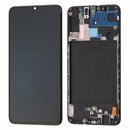
Samsung Galaxy A70 LCD Screen Assembly with Frame Replacement – Reliable Display & Touch Repair
Repair your Samsung Galaxy A70 (SM-A705) with this high-quality LCD screen assembly including frame. Designed for sharp visuals and responsive touch, this replacement restores your phone’s original display performance.
The pre-installed frame allows for easier installation and a secure fit, making it suitable for both DIY and professional repairs.
Why Choose This LCD Screen Assembly with Frame?
Compatible with Samsung Galaxy A70 (SM-A705)
OEM-quality LCD provides clear and bright visuals
Integrated digitizer ensures accurate touch response
Pre-installed frame for faster and cleaner installation
Ideal for replacing cracked, blacked-out, or malfunctioning screens
Bring your Galaxy A70 back to life with this dependable LCD screen and frame replacement.
The Samsung Galaxy A70 LCD Screen is one of the most important components of the device. With its large display, vibrant colors, and smooth performance, the Galaxy A70 became a popular choice among users who love entertainment, gaming, and multitasking. However, like any smartphone, the LCD screen is vulnerable to damage due to drops, scratches, or technical faults. Replacing or repairing the Samsung A70 LCD screen is often the only way to restore the phone’s full functionality. In this guide, we’ll cover everything about the A70 LCD screen — its features, problems, replacement process, costs, and how to keep it safe.
Section 1: Features of the Samsung Galaxy A70 LCD Screen
The Galaxy A70 LCD screen stands out because of its size and quality. Let’s look at its main features:
-
Large Display Size
The Samsung Galaxy A70 comes with a 6.7-inch screen, giving users an immersive viewing experience. Whether it’s movies, gaming, or browsing, the LCD display ensures clarity. -
High Resolution
With Full HD+ resolution (1080 x 2400 pixels), the A70 LCD screen delivers sharp details and vibrant visuals. -
Touch Sensitivity
The screen supports smooth multi-touch gestures, making it ideal for gaming and fast typing. -
Durability
The screen comes with Corning Gorilla Glass protection, which provides resistance against scratches and minor impacts. -
Brightness & Colors
The LCD technology ensures bright visuals with accurate color reproduction, perfect for both indoor and outdoor use.
Section 2: Common Problems with the Galaxy A70 LCD Screen
Even though the Samsung Galaxy A70 LCD screen is durable, it is not indestructible. Users often face the following problems:
-
Cracked Screen – Dropping the phone can cause cracks or shattering of the display.
-
Black Spots or Lines – Internal damage may result in vertical or horizontal lines.
-
Touch Malfunction – Screen becomes unresponsive or delays in detecting touch.
-
Flickering Display – Users sometimes face screen flickering issues.
-
Dead Pixels – Small black or white dots appear permanently on the display.
-
Complete Display Failure – In severe cases, the screen stops showing visuals altogether.
Each of these problems requires professional repair or replacement of the A70 LCD screen.
Section 3: Replacing the Samsung A70 LCD Screen
When the screen is damaged, replacement is often the only option. Here’s what to know:
1. Choosing Genuine Parts
Always ensure that the replacement Galaxy A70 LCD screen is original. Fake or low-quality parts may not provide the same display performance and can fail quickly.
2. Professional Installation
DIY replacement might save money, but it risks further damage. Professional technicians use the right tools and expertise to install the LCD screen properly.
3. Replacement Time
On average, replacing the Samsung A70 LCD screen takes 1–2 hours at a repair shop.
4. Cost of Replacement
The cost depends on whether you choose an original LCD screen or a copy. Genuine screens are more expensive but last longer.
Section 4: How to Care for the New LCD Screen
Once you replace the Samsung Galaxy A70 LCD screen, maintaining it becomes important:
-
Use a screen protector to avoid scratches.
-
Always handle the phone with care, avoiding drops.
-
Do not use cheap charging cables, as voltage fluctuations can affect the display.
-
Avoid exposing the phone to extreme heat or moisture.
Section 5: Benefits of Replacing the A70 LCD Screen
-
Restores the original visual quality of the phone.
-
Brings back smooth touch response.
-
Increases the resale value of the device.
-
Prevents further internal damage.
-
Enhances user experience with vivid colors and clarity.
Conclusion
The Samsung Galaxy A70 LCD Screen is a vital part of the device that ensures smooth functionality and stunning visuals. Whether your screen is cracked, unresponsive, or showing lines, replacing it with a genuine LCD screen will restore the phone’s performance. Taking proper care after replacement ensures long-term use. By investing in professional repair services and high-quality parts, you can extend the life of your Samsung Galaxy A70 and enjoy a flawless smartphone experience.
The Samsung Galaxy A70 LCD screen is one of the most impressive features of the phone. With its 6.7-inch display and Full HD+ resolution, the screen is ideal for movies, gaming, social media, and productivity. However, like any smartphone display, it is prone to issues. In this section, we will discuss the common problems with the Samsung Galaxy A70 LCD screen, their causes, and the possible solutions. If you own a Galaxy A70 and are facing screen troubles, this guide will help you understand whether you need LCD screen repair or LCD replacement.
1. Cracked or Broken LCD Screen
One of the most frequent problems users face is a cracked Samsung A70 LCD screen. A simple slip from your hand or dropping the phone on a hard surface can cause the glass to shatter. While some cracks may only be cosmetic, deep cracks can affect the touch sensitivity and display quality.
-
Symptoms: Visible cracks, glass chipping, unresponsive touch.
-
Solution: In minor cases, a screen protector can prevent further damage. For severe cracks, a Samsung A70 LCD screen replacement is necessary.
Keyword examples used: Samsung A70 LCD screen, A70 screen replacement, cracked LCD screen.
2. Black Spots or Dead Pixels on the Screen
Another common problem is the appearance of black spots or dead pixels on the Samsung Galaxy A70 display. This usually happens due to physical damage or manufacturing defects. Dead pixels appear as small black, white, or multicolored dots that don’t change.
-
Symptoms: Small dots that don’t disappear, discoloration in parts of the display.
-
Solution: Sometimes a software refresh can help, but in most cases, a new Galaxy A70 LCD screen is required.
3. Screen Flickering
Screen flickering is one of the most annoying problems. This happens when the screen brightness fluctuates or the display flashes randomly. For the Galaxy A70 LCD screen, this can be due to software bugs, hardware damage, or faulty connections inside the phone.
-
Symptoms: Display flashes, random brightness changes, unstable visuals.
-
Solution: Start by updating your phone software. If flickering continues, a professional LCD screen repair is recommended.
4. Touch Screen Not Working
Sometimes, the Samsung A70 LCD screen touch may stop responding or become delayed. This makes the phone almost unusable. The reasons could be a damaged digitizer (touch sensor), water damage, or hardware failure.
-
Symptoms: Slow response, ghost touch, complete touch failure.
-
Solution: Restart the device, check for updates, and if the problem continues, replace the Galaxy A70 LCD touch screen.
5. Vertical or Horizontal Lines
Lines on the Samsung Galaxy A70 LCD screen are usually a result of impact damage or internal display connection problems. These lines can be thin or thick and may spread over time.
-
Symptoms: Vertical or horizontal colored lines, partial display visibility.
-
Solution: Only a complete LCD screen replacement can fix this issue.
6. Display Not Turning On
One of the most serious problems is when the Samsung A70 LCD screen won’t turn on at all, even if the phone is powered up. This usually indicates deep internal damage to the screen or motherboard.
-
Symptoms: Phone vibrates or rings but the display remains black.
-
Solution: Try a forced restart. If the issue persists, a Samsung A70 LCD replacement is needed.
7. Water Damage Issues
Although the Samsung Galaxy A70 has some level of protection, it is not fully waterproof. Exposure to water or moisture can damage the LCD screen and lead to blurry visuals or touch problems.
-
Symptoms: Watermarks under the display, unresponsive touch, fading colors.
-
Solution: Drying methods may help temporarily, but most cases require a new A70 LCD screen.
Why Screen Problems Need Immediate Attention
Delaying a Samsung Galaxy A70 LCD repair can make the problem worse. A small crack can spread, dead pixels can increase, and touch issues can expand to the entire display. Additionally, using a damaged LCD screen can cause strain on your eyes and reduce the phone’s lifespan.
How Professionals Fix the A70 LCD Screen
Professional technicians follow a safe process when repairing or replacing the Samsung A70 LCD screen:
-
Powering off the device safely.
-
Removing the back panel with heat tools.
-
Disconnecting the old LCD screen carefully.
-
Installing a new, genuine Samsung Galaxy A70 LCD screen.
-
Testing the display for proper visuals and touch sensitivity.
Average Cost of Repairing the Galaxy A70 LCD Screen
The Samsung A70 LCD screen price depends on whether you choose an original part or a copy.
-
Original LCD screen replacement: Higher cost but better durability.
-
Copy/aftermarket screen: Cheaper but may not last long.
Always choose an authentic Galaxy A70 display to ensure performance and longevity.
Tips to Avoid LCD Screen Problems
-
Always use a tempered glass protector.
-
Use a protective phone case.
-
Avoid dropping the phone on hard surfaces.
-
Keep the device away from water.
-
Don’t press the screen too hard while using.
The Samsung Galaxy A70 LCD screen plays a huge role in the overall performance of your smartphone. When the display gets damaged, many users hesitate about whether to continue using a broken screen or invest in a new one. In this section, we will explore the advantages of replacing your Galaxy A70 LCD screen, the difference between professional repair vs DIY, how to choose the right replacement part, and tips to keep your screen safe for the long run.
1. Why Replacing the Galaxy A70 LCD Screen Is Important
A damaged Samsung A70 LCD screen doesn’t just look bad — it affects your phone’s performance too. Here’s why screen replacement is essential:
-
Better Visibility – A new LCD screen for Galaxy A70 restores clear visuals, accurate colors, and brightness.
-
Improved Touch Sensitivity – Damaged touch panels lead to lag and ghost touches; a new screen restores full responsiveness.
-
Protects the Device – Cracked glass allows dust and moisture to enter, which can damage the motherboard.
-
Boosts Resale Value – If you plan to sell your Samsung A70, a fully functional LCD screen replacement increases its worth.
-
Long-Term Usage – A new screen extends the life of your phone by years.
2. Professional Repair vs DIY Replacement
When it comes to Samsung Galaxy A70 LCD screen replacement, you have two main options:
A. Professional Repair Services
-
Advantages:
-
Expert handling with proper tools.
-
Warranty on the new LCD screen.
-
Reduced chances of damaging other components.
-
-
Best for: Users who want a safe and guaranteed solution.
B. DIY Screen Replacement
-
Advantages:
-
Cost-effective if you buy the Samsung A70 LCD screen online.
-
Can be done at home with the right tools and tutorials.
-
-
Disadvantages:
-
Risk of damaging the motherboard or connectors.
-
No warranty on self-installed screens.
-
-
Best for: Experienced users with technical knowledge.
3. How to Choose the Right Samsung A70 LCD Screen
Not all LCD screens for Galaxy A70 are the same. Some are genuine Samsung parts, while others are cheap copies. To make the best choice, consider:
-
Original vs Copy: Always go for original Samsung A70 LCD screens for durability and brightness.
-
Screen Quality: Look for high-resolution and strong touch response.
-
Seller Reliability: Buy from trusted sellers who provide a warranty.
-
Price Range: Genuine screens are more expensive but last longer.
4. Benefits of Using an Original Samsung A70 LCD Screen
Using an original screen offers many advantages compared to aftermarket copies:
-
Crystal Clear Display Quality
-
Long-Lasting Durability
-
Accurate Touch Sensitivity
-
Better Compatibility with Software Updates
-
Protection Against Overheating Issues
5. Average Price of Samsung Galaxy A70 LCD Screen Replacement
The cost of Samsung A70 LCD screen repair depends on your location and screen type:
-
Original OEM screen: Higher cost but long-lasting performance.
-
Copy or third-party screen: Cheaper but less reliable.
Always compare prices before buying a Galaxy A70 LCD screen online.
6. Step-by-Step Guide to Replacing the LCD Screen (Overview)
If you decide to replace the Samsung A70 LCD display yourself, here’s the general process:
-
Power off the device.
-
Heat the back panel to loosen the adhesive.
-
Gently remove the back cover.
-
Disconnect the battery and screen connectors.
-
Remove the old LCD screen.
-
Install the new Samsung A70 LCD screen.
-
Reassemble the phone and test display quality.
Note: Only attempt this if you have experience. Otherwise, get professional Galaxy A70 screen replacement help.
7. Common Mistakes to Avoid During Screen Replacement
-
Using cheap or fake A70 LCD screens.
-
Forgetting to disconnect the battery before replacing.
-
Applying too much heat and damaging components.
-
Not sealing the phone properly, leading to dust and moisture entry.
8. How to Maintain and Protect the New LCD Screen
After replacing your Samsung A70 LCD screen, take care of it to avoid future issues:
-
Use Tempered Glass: Protects against scratches and cracks.
-
Phone Case: Prevents direct impact on the screen.
-
Avoid Overheating: Prolongs screen life.
-
Keep Away from Water: Moisture is a screen’s worst enemy.
-
Handle with Care: Don’t press the screen too hard while gaming or typing.
9. Why the Galaxy A70 LCD Screen Is Worth Repairing
Unlike some older models, the Samsung A70 LCD display is still powerful and relevant. Its large 6.7-inch AMOLED display makes it perfect for:
-
Watching videos and movies in HD.
-
Playing high-quality mobile games.
-
Using apps with responsive touch.
-
Business and productivity tasks.
Replacing the screen is always a better option than switching phones unnecessarily.
10. Frequently Asked Questions (FAQs)
Q1: Can I use my Samsung A70 with a cracked LCD screen?
Yes, but it will get worse over time and may damage internal components.
Q2: How long does an LCD screen replacement take?
Professional repairs usually take 30–60 minutes.
Q3: Is it worth repairing the Samsung A70 screen?
Yes, because it restores performance and extends the phone’s lifespan.
Q4: Can I buy a Samsung A70 LCD screen online?
Yes, but ensure you buy from reliable sellers with warranty options.
Q5: What if my screen shows lines after replacement?
This usually means a poor-quality replacement or faulty installation.
The Samsung Galaxy A70 LCD screen is one of the most important parts of the phone. Without a high-quality display, you cannot enjoy videos, photos, games, or even basic tasks like texting and browsing. When your A70 LCD screen is damaged, replacing it with a new and reliable Samsung A70 LCD replacement screen is the smartest choice.
1. Advantages of Samsung A70 LCD Screen Replacement
Replacing your Samsung A70 LCD screen comes with several key benefits:
-
Restores Display Quality: With a new Galaxy A70 LCD screen, you get sharp resolution, accurate colors, and smooth performance.
-
Improved Touch Sensitivity: A faulty screen often lags, but a genuine Samsung A70 LCD replacement restores flawless touch response.
-
Device Safety: A cracked screen exposes the phone to dust and water damage; replacing it prevents further internal harm.
-
Cost-Effective: Instead of buying a new phone, an A70 LCD screen replacement gives your device a second life.
-
Better Resale Value: If you plan to sell your Samsung Galaxy A70, a new screen increases its market price.
2. Disadvantages of Using a Damaged A70 LCD Screen
Continuing with a broken or faulty Samsung A70 LCD display can create several problems:
-
Poor Visibility: Cracks and black spots block the view.
-
Unresponsive Touch: Makes typing, gaming, and browsing frustrating.
-
Risk of Complete Failure: Ignoring damage may cause the LCD screen for Samsung A70 to stop working entirely.
-
Higher Repair Cost Later: Delaying replacement often increases repair expenses.
3. Comparing Original vs Copy LCD Screens
When searching for a Samsung A70 LCD replacement screen, you’ll find both original and copy versions:
-
Original A70 LCD Screen:
-
Offers bright colors, long life, and smooth touch.
-
Comes with warranty in most cases.
-
Perfect fit for the device.
-
-
Copy A70 LCD Screen:
-
Cheaper but lower quality.
-
Colors look dull and touch is less accurate.
-
Usually doesn’t last long.
-
Always choose an original Samsung A70 LCD screen replacement for the best results.
4. Best Practices After Replacing the Samsung A70 LCD Screen
To make sure your new Samsung Galaxy A70 LCD screen lasts long:
-
Install a tempered glass protector immediately.
-
Use a strong back cover to reduce shock impact.
-
Avoid exposing your Galaxy A70 LCD screen to water and heat.
-
Clean the screen regularly with a soft cloth.
-
Handle the device carefully during gaming or multitasking.
The Samsung A70 LCD Screen is one of the most important parts of the smartphone because it directly impacts the user experience. Whether you are scrolling social media, playing games, watching videos, or handling professional tasks, the clarity and brightness of the Samsung A70 LCD Screen define the quality of usage. Many users search for Samsung A70 LCD Screen replacement when their original screen gets cracked, damaged, or stops displaying properly. Because of this high demand, the Samsung A70 LCD Screen has become one of the most frequently discussed components in the smartphone repair market.
If your device has display problems, like a flickering screen, dead pixels, or touch not responding, then replacing the Samsung A70 LCD Screen is the most effective solution. Many repair shops and online stores provide Samsung A70 LCD Screen with frame and Samsung A70 LCD Screen without frame, giving customers flexibility based on their needs. The Samsung A70 screen replacement cost can vary depending on quality, originality, and service provider, but choosing the right Samsung A70 LCD replacement ensures long-lasting performance.
For people who love gaming and streaming, the Samsung A70 display screen plays a major role because of its size and resolution. A damaged or low-quality replacement can reduce brightness, create touch lag, or show color distortions. That is why choosing an original Samsung A70 LCD screen or a high-quality aftermarket option is crucial. Many suppliers guarantee that their Samsung A70 LCD replacement screen works exactly like the factory-fitted display.
Online platforms often provide different options, such as Samsung A70 LCD screen original, Samsung A70 display assembly, or Samsung A70 screen with touch digitizer. These terms are important when you search for reliable products. Customers also look for warranties when buying a Samsung A70 LCD display, as it ensures trust and durability.
In addition to technical aspects, using a genuine Samsung A70 LCD screen also improves resale value. A phone with a broken display loses its worth, but after a Samsung A70 screen repair, the device regains its original look and functionality. Repairing the display is not just about usability—it also makes your smartphone look brand-new again.
In short, the Samsung A70 LCD Screen is not just a smartphone component, it is the heart of your device’s performance. For smooth touch response, HD clarity, and premium user experience, investing in a proper Samsung A70 LCD screen replacement is the smart choice. Always make sure to buy from trusted suppliers who provide original or high-quality displays for your Samsung A70 screen repair needs.
-

Reviews
There are no reviews yet.