

Description
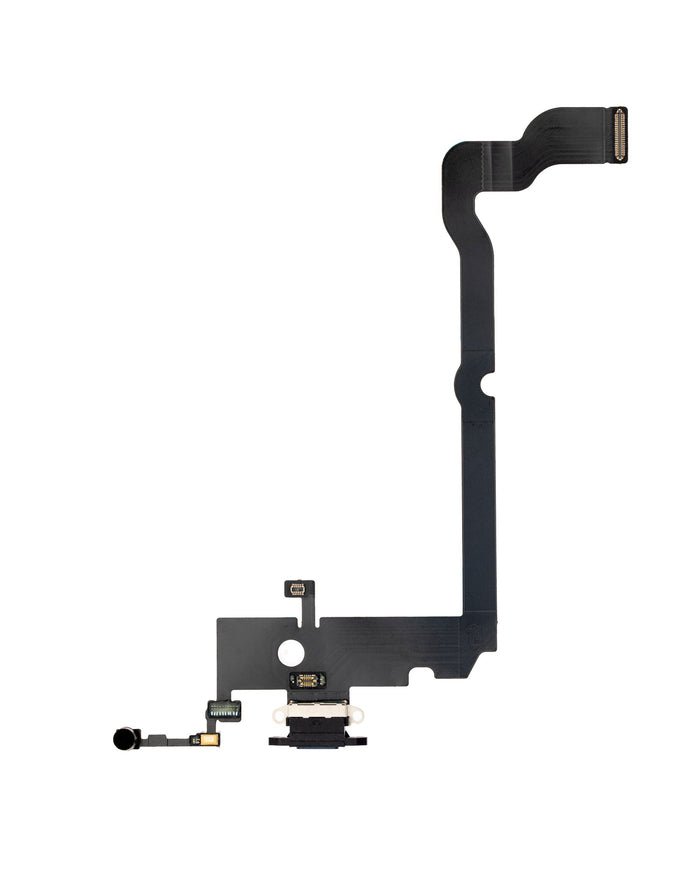
iPhone XS Max Charging Port Replacement – Power Up Without Interruptions
Is your iPhone XS Max refusing to charge or connect to your computer? This iPhone XS Max Charging Port Replacement is the perfect fix. Designed as a high-quality aftermarket solution, this part restores full functionality to your charging and data port without the need for a full device replacement.
Manufactured for precision and durability, the replacement port ensures a snug connection for consistent charging and reliable USB data transfer. Whether your port is loose, damaged, or completely unresponsive, this part brings your device back to life.
Ideal for both DIY users and professional repair technicians, the replacement is fully compatible with all iPhone XS Max Charging Port models and supports key features like fast charging and syncing.
Why Choose Our iPhone XS Max Charging Port Replacement?
Restores full charging and data transfer functionality
Made from durable materials for long-term use
Exact-fit design ensures simple installation
Compatible with fast-charging adapters and USB sync
Helps avoid expensive device replacements
Regain control over your device’s power and connectivity with this reliable charging port replacement—engineered to keep your iPhone XS Max working like new.
The iPhone XS Max Charging Port, launched in 2018, quickly became one of Apple’s flagship devices, blending premium design with outstanding performance. With its massive 6.5-inch Super Retina OLED display, A12 Bionic chip, and elegant glass-and-steel construction, it remains a beloved smartphone even today. However, like all devices that endure heavy daily use, it is not immune to wear and tear. One of the most common yet overlooked problems that iPhone XS Max Charging Port owners face is a faulty or damaged charging port.
For most users, the iPhone XS Max Charging Port is something they never think about — until it stops working. But the reality is that the iPhone XS Max Charging Port is one of the most critical components of the iPhone XS Max Charging Port. Without it, you cannot recharge your device’s battery or transfer data using a Lightning cable. And while wireless charging is supported on this model, it doesn’t completely eliminate the importance of the port, especially when you need iPhone XS Max Charging Port faster charging speeds or reliable data syncing.
In this comprehensive guide, we’ll explore everything you need to know about the iPhone XS Max charging port. From its design and functionality to the most common problems, replacement options, repair costs, and preventive care, this article is designed to be the ultimate SEO-friendly resource for anyone dealing with charging port issues.
Why the Charging Port Matters
The charging port — also known as the Lightning connector on iPhones — is the gateway that keeps your device powered and connected. For the iPhone XS Max Charging Port, it does more than just recharge your battery:
-
Data Transfer: Whether you’re syncing your phone with a computer, backing up files, or restoring your device, the Lightning port is essential.
-
Audio Accessories: For users with wired headphones or adapters, the charging port doubles as an audio jack.
-
Performance Support: When the iPhone XS Max Charging Port malfunctions, your device can suffer from charging delays, interruptions, or even complete charging failure.
In short, without a working charging port, your iPhone XS Max Charging Port becomes far less useful.
The Rise of Charging Port Problems
Many iPhone XS Max Charging Port owners report charging port problems after two to three years of use. This isn’t surprising — the port is one of the most high-contact components of the device. Every time you plug in a cable, you create wear on the connectors. Add dust, dirt, and moisture into the mix, and you have a recipe for damage over time.
Some users also face issues caused by cheap third-party charging cables. Non-certified cables can deliver inconsistent voltage, which not only damages the battery but also accelerates wear on the charging port pins. In other cases, rough handling — like forcing the cable in the wrong way or yanking it out aggressively — can bend or break internal connectors.
Common Symptoms of Charging Port Issues
How do you know if your iPhone XS Max charging port is damaged or malfunctioning? Here are the most common signs:
-
Loose Connection: The charging cable falls out easily or doesn’t “click” securely into the port.
-
Intermittent Charging: The device iPhone XS Max Charging Port only when the cable is held at a certain angle.
-
Slow Charging: The phone takes much longer than usual to iPhone XS Max Charging Port, even with a fast charger.
-
No Charging at All: The device doesn’t respond when plugged in, forcing users to rely solely on wireless charging.
-
Error Messages: Occasionally, users see messages like “Accessory Not Supported”, which often point to port issues.
-
Overheating: A damaged charging port can cause excessive heat during charging sessions, posing risks to both the phone and user safety.
Why Replacement Becomes Necessary
Some users hope that cleaning the port or switching cables will solve the problem, and in minor cases, it does. Dust or lint can accumulate inside the Lightning port, blocking proper contact. However, when physical damage has occurred — such as bent pins, corrosion from liquid exposure, or internal loosening — replacement is the only long-term fix.
Unlike batteries or cases, charging ports are not “optional accessories.” They are essential for device survival. Without a working port, the phone becomes unreliable, inconvenient, and in some cases, unusable.
Apple’s Design Choice: Lightning Port
It’s worth noting that the iPhone XS Max Charging Port uses Apple’s proprietary Lightning connector, not USB-C. While some newer iPhones have transitioned to USB-C (thanks to EU regulations), the XS Max was designed with Lightning. This means:
-
You need certified Lightning cables for safe charging.
-
Replacement ports must be specifically designed for the iPhone XS Max Charging Port model.
-
Any attempt to use aftermarket or low-quality parts risks damaging the logic board.
Why This Guide is Essential
The iPhone XS Max Charging Port is still a valuable device in 2025, even years after its release. Many users hold onto it because it continues to perform well and offers flagship-level features at a fraction of the cost of upgrading. However, a faulty charging port can force users into premature upgrades or costly Apple repairs — unless they understand their options.
This guide aims to provide:
-
Clarity on why charging port issues happen
-
Transparency on replacement costs and options
-
Guidance for choosing between DIY vs professional repair
-
Tips for extending the lifespan of your new charging port
By the end, you’ll not only understand the role of the iPhone XS Max charging port but also know exactly how to fix it if yours fails.
Design & Functionality of iPhone XS Max Charging Port
The iPhone XS Max Charging Port is one of the most important and frequently used components in the device. Known as the Lightning connector, it plays a role far beyond simply recharging the battery. From data transfer and audio connections to accessory compatibility, the charging port is the hub that keeps the iPhone XS Max connected to the outside world. In this section, we’ll take a deep look at its design, technology, functionality, and why Apple’s decision to use the Lightning port continues to matter for millions of users.
Evolution of the iPhone Charging Port
To understand the design of the iPhone XS Max charging port, it’s useful to look back at Apple’s history. Before Lightning, iPhones used the bulky 30-pin connector that debuted with early iPods. While functional, it was large, prone to wear, and limited in speed.
In 2012, Apple revolutionized its ecosystem with the Lightning connector, which was first introduced on the iPhone 5. Compact, reversible, and more efficient, Lightning quickly became a standard across iPhones, iPads, and accessories. By the time the iPhone XS Max Charging Port launched in 2018, Lightning had already been refined for six years, and its presence represented both Apple’s ecosystem control and the port’s proven efficiency.
Technical Design of the XS Max Charging Port
The iPhone XS Max charging port is located at the bottom center of the device, flanked by speaker and microphone grilles. Its compact design conceals impressive functionality:
-
Reversible Connector: Unlike traditional USB ports, Lightning is reversible, meaning you can plug it in either way without worrying about orientation.
-
8-Pin Digital Design: The port uses 8 digital pins that automatically assign roles depending on how the connector is inserted. This allows for charging, data transfer, and accessory communication.
-
Durable Build: Apple designed the Lightning port to withstand thousands of insertions. For the XS Max, the port is soldered directly to the logic board, ensuring stable electrical connections but making replacement more complex.
-
Compact Size: The Lightning port’s slim profile allows Apple to maximize internal space for the large battery and dual speakers, critical for the XS Max’s design.
Role in Charging
The charging port’s most obvious function is to deliver power. When paired with Apple-certified Lightning cables and adapters, the XS Max supports:
-
Standard Charging (5W): Using the basic Apple adapter.
-
Fast Charging (up to 18W): When connected to a USB-C to Lightning cable and a compatible adapter, the iPhone XS Max Charging Port can charge up to 50% in about 30 minutes.
-
Smart Power Management: The port communicates with the device to regulate charging speed, protecting battery health over time.
Without a properly functioning charging port, these features become unreliable or unavailable.
Data Transfer Capabilities
Beyond charging, the Lightning port acts as a data gateway. It allows users to:
-
Sync music, photos, and files with a Mac or PC.
-
Restore the iPhone XS Max Charging Port using iTunes or Finder in case of major software issues.
-
Back up data locally without relying on iCloud.
-
Transfer large files faster compared to wireless methods.
For professionals who rely on wired data transfer for stability, the charging port is still indispensable.
Audio & Accessory Compatibility
Another role of the Lightning port is in audio output. With the removal of the traditional 3.5mm headphone jack in earlier iPhones, the Lightning port became the central hub for wired headphones and adapters. For the iPhone XS Max Charging Port:
-
Users can connect Lightning-based EarPods.
-
Audio adapters allow connection of traditional 3.5mm headphones.
-
External DACs (digital-to-analog converters) and audio equipment also connect via Lightning.
In addition, the charging port communicates with a wide range of accessories, such as:
-
Docking stations
-
External microphones
-
Car adapters
-
Payment readers
This makes the charging port far more versatile than just a charging socket.
Importance of Apple’s Proprietary Lightning Design
Apple’s decision to stick with Lightning for the iPhone XS Max Charging Port — despite the rise of USB-C in the industry — was both strategic and functional.
-
Compact Size: Lightning is smaller than USB-C, allowing Apple to optimize internal space.
-
Durability: Its pin design resists wear compared to older USB ports.
-
Ecosystem Control: Apple’s proprietary design ensures third-party accessory makers must meet MFi (Made for iPhone) certification standards, reducing risks of low-quality cables damaging the device.
-
Consistency: At the time of the XS Max, Lightning was already well-established, ensuring compatibility with millions of existing accessories.
How the Charging Port Interacts with Other Components
The Lightning port is not an isolated component. It connects directly to the logic board, where it communicates with:
-
Battery Management System: To regulate charging speed and prevent overcharging.
-
Audio Processor: For wired headphone use and audio accessories.
-
Data Controllers: For syncing with computers or transferring files.
Because it’s soldered to the motherboard, any damage to the charging port often requires delicate micro-soldering repair techniques. This makes it one of the more challenging repairs on the iPhone XS Max Charging Port.
Durability & Wear Over Time
Despite being engineered for durability, the charging port is still one of the most high-contact and vulnerable parts of the device. Daily plugging and unplugging, exposure to dust and pocket lint, and accidental cable yanks all contribute to gradual wear. Apple designed the port to withstand thousands of cycles, but real-world use often accelerates deterioration.
Over time, the port’s tight fit may loosen, charging may become inconsistent, or certain pins may fail, leading to connectivity issues.
Why the Charging Port Remains Essential in the Wireless Era
Some users assume that because the iPhone XS Max Charging Port supports wireless charging, the port is no longer critical. However, this is far from the truth:
-
Faster Charging: Wired charging through the Lightning port is still significantly faster than wireless charging.
-
Data Transfer: Large file transfers and system restores require a physical connection.
-
Diagnostics & Repairs: Technicians rely on the Lightning port to diagnose issues, update firmware, or restore the device.
-
Accessory Use: From car interfaces to professional audio equipment, many accessories still require the port.
In short, the charging port continues to be an irreplaceable component.
Conclusion on Design & Functionality
The iPhone XS Max Charging Port is a marvel of compact engineering, balancing charging efficiency, data transfer, audio support, and accessory compatibility in a single connector. Its proprietary Lightning design ensures durability and security, though it also makes replacement and repair more specialized.
Understanding its design and functionality helps users appreciate why keeping the charging port in good condition is essential — and why damage to this small component can disrupt so many aspects of the iPhone experience.
Common Problems with iPhone XS Max Charging Port
The iPhone XS Max charging port is one of the most heavily used parts of the device, which makes it vulnerable to a range of issues over time. Since it serves as the hub for power delivery, data transfer, and accessory connectivity, even minor problems can cause major inconvenience. In this section, we’ll explore the most common charging port issues, their causes, and the warning signs that indicate it’s time for cleaning, troubleshooting, or replacement.
1. Dirt, Dust, and Debris Build-Up
One of the most frequent issues iPhone XS Max Charging Port users face is blockage caused by dust or debris inside the Lightning port. Because the port is open and exposed at the bottom of the phone, it easily collects lint from pockets, dust from bags, or other tiny particles. Over time, this build-up prevents the Lightning cable from making a full connection.
Symptoms include:
-
Charging cable not fitting snugly.
-
Intermittent charging or frequent disconnections.
-
iPhone failing to recognize the cable.
In many cases, a professional cleaning or careful use of a soft brush or compressed air can resolve the problem. However, improper cleaning with sharp objects can damage the delicate pins inside the port.
2. Loose or Worn-Out Connections
After repeated use, the charging port can begin to loosen. The internal contacts that grip the Lightning cable may weaken, causing poor electrical connections.
Symptoms include:
-
Charging only works when the cable is held at a certain angle.
-
iPhone randomly stops charging even though the cable is plugged in.
-
Data transfers between phone and computer are unreliable.
This issue is more common in older iPhone XS Max Charging Port devices or phones used with non-certified third-party cables. Over time, the constant plugging and unplugging naturally causes wear.
3. Slow Charging or No Charging
A damaged charging port can disrupt the power delivery system of the iPhone XS Max Charging Port. If the port’s pins are bent, corroded, or obstructed, the device may fail to draw power effectively.
Symptoms include:
-
Phone charging slower than usual, even with fast-charging adapters.
-
Battery percentage not increasing while plugged in.
-
iPhone failing to charge at all.
In some cases, slow charging may also result from using poor-quality cables or adapters, but a faulty port is often the root cause if multiple certified chargers produce the same problem.
4. Overheating Issues
Another common charging port issue is excess heat during charging. This can occur when the Lightning port’s internal contacts are damaged, dirty, or corroded, leading to resistance in the electrical flow.
Symptoms include:
-
iPhone becoming unusually hot while charging.
-
Cable itself heating up near the connector.
-
Charging pausing automatically due to high temperature warnings.
Overheating not only damages the charging port further but can also shorten the lifespan of the iPhone’s battery.
5. Charging Interruptions and Error Messages
Sometimes, a faulty charging port causes the phone to randomly disconnect during charging or display error messages such as “This accessory may not be supported.”
Symptoms include:
-
Charging starts and stops repeatedly.
-
Error notifications appear with genuine Apple cables.
-
iPhone struggles to maintain a stable connection to computers.
These interruptions can be frustrating, especially when they prevent proper charging or syncing of important files.
6. Water or Liquid Damage
Although the iPhone XS Max Charging Port is designed with water resistance, the charging port remains vulnerable to liquid exposure. Water or other liquids inside the port can cause corrosion, short circuits, and long-term damage.
Symptoms include:
-
Warning message: “Liquid detected in Lightning connector.”
-
Inability to charge until the port dries.
-
Permanent malfunction if corrosion develops over time.
Apple recommends allowing the phone to dry completely before attempting to charge again. However, if corrosion sets in, professional repair is often the only solution.
Why Addressing Charging Port Issues Matters
Ignoring problems with the iPhone XS Max charging port can lead to bigger issues over time. What begins as a minor inconvenience, like intermittent charging, can escalate to a completely non-functional device. Since the charging port is also linked to the phone’s logic board, ongoing damage may affect other components if left unresolved.
By recognizing early warning signs—such as loose connections, overheating, or charging delays—users can take action before the issue worsens. In many cases, simple cleaning or using certified accessories can help, but severe damage usually requires charging port replacement.

Reviews
There are no reviews yet.