Description
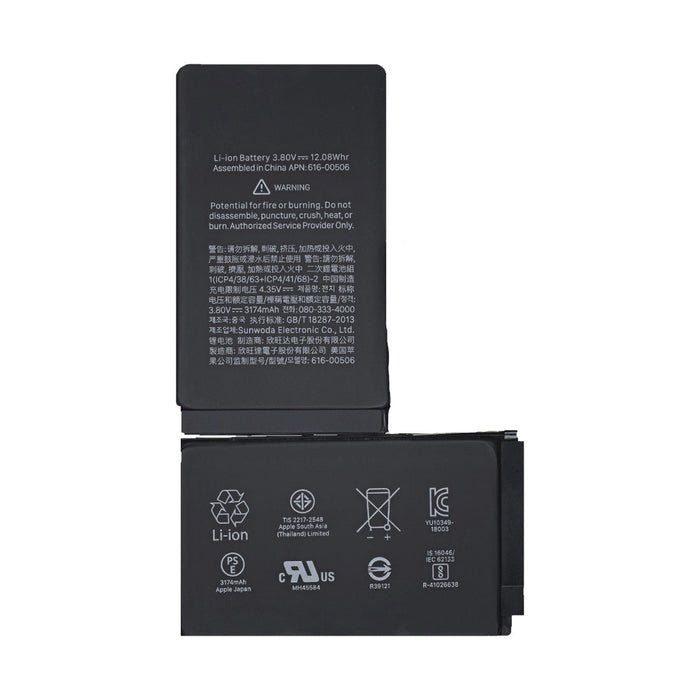
iPhone XS Max Battery Replacement – Restore Your Power
Is your iPhone XS Max running out of charge faster than it should? Our iPhone XS Max Battery Replacement is the perfect solution to restore your device’s original power and performance. Built with premium lithium-ion cells, this replacement battery offers dependable capacity and long-lasting life—helping you get through your day without interruptions.
Designed for a precise fit and reliable performance, the battery is engineered to meet OEM standards and is compatible with all iPhone XS Max models. It provides stable charging cycles, enhanced energy efficiency, and protection against overcharging or overheating.
Whether you’re a repair professional or handling a DIY project, this replacement battery installs seamlessly and gives your phone the reliable battery life it once had. It’s an essential upgrade for aging devices or those affected by performance throttling due to poor battery health.
Why Choose This iPhone XS Max Battery Replacement?
Premium quality cells for long-lasting performance
Fully compatible with iOS battery health monitoring
Designed for optimal power efficiency
Solves shutdowns, lag, and battery drain issues
Safe and reliable installation
Rejuvenate your iPhone XS Max with a battery replacement that keeps up with your daily demands. Get the power you need—without replacing your phone.
The iPhone XS Max battery is a vital component that powers your device throughout the day. Over time, batteries lose their ability to hold a charge, causing issues such as rapid draining, unexpected shutdowns, or slow charging. A high-quality replacement battery restores your iPhone XS Max’s full functionality, reliability, and battery life, ensuring a smooth, uninterrupted user experience.
Whether you rely on your phone for work, entertainment, gaming, or communication, a fully functioning battery is essential for maintaining your device’s performance and longevity.
Why Replace Your iPhone XS Max Battery?
Several issues indicate that your battery needs replacement:
-
Rapid Battery Drain: The device discharges faster than usual, even with light usage.
-
Unexpected Shutdowns: The iPhone may power off unexpectedly at various battery levels.
-
Slow Charging: Charging takes significantly longer than normal, reducing usability.
-
Overheating: The phone heats excessively during use or charging, indicating battery wear.
-
Battery Health Degradation: iOS indicates reduced maximum capacity and peak performance.
Replacing the battery restores the device’s full charge capacity, reliability, and performance, giving it a second life.
Features of iPhone XS Max Replacement Battery
Our premium replacement battery is engineered to meet or exceed Apple’s original specifications:
-
High Capacity: Restores long-lasting battery life for daily use.
-
Fast and Safe Charging: Supports standard and fast charging without overheating.
-
Battery Health Monitoring: Compatible with iOS battery health features.
-
Durable Design: Built to resist swelling and leaks for safety.
-
Full Compatibility: Works seamlessly with iPhone XS Max hardware and software.
This ensures a safe, reliable, and efficient power source, bringing your iPhone XS Max back to optimal performance.
Step-by-Step iPhone XS Max Battery Replacement Guide
Replacing the battery requires precision and care:
-
Power Off Device: Turn off your iPhone XS Max Battery to prevent electrical hazards.
-
Remove Screws and Display: Carefully unscrew pentalobe screws near the Lightning port and lift the display with suction cups and plastic prying tools.
-
Disconnect Battery Connector: Safely detach the battery connector to prevent short circuits.
-
Remove Old Battery: Gently pry out the old battery using plastic tools to avoid bending or puncturing.
-
Install Replacement Battery: Place the new battery in the compartment, ensuring proper alignment. Connect the battery connector securely.
-
Test Device: Power on the phone to confirm proper charging, battery percentage, and performance.
-
Secure Display: Once confirmed, reattach the display and screws.
Professional installation ensures safety, preserves device performance, and avoids damage to internal components.
Benefits of a New iPhone XS Max Battery
-
Restored Battery Life: Enjoy long-lasting power for all-day usage.
-
Reliable Performance: Eliminates unexpected shutdowns and slow charging.
-
Safe Operation: Reduces overheating and swelling risks.
-
Optimized iOS Features: Fully compatible with battery health and performance management.
-
Cost-Effective Solution: Extends the life of your device without replacing it entirely.
Troubleshooting Common Issues After Battery Replacement
-
Phone Not Charging: Ensure the battery connector is properly seated and the charging port is clean.
-
Battery Percentage Fluctuates: Reset the device and calibrate the battery by fully charging and discharging once.
-
Device Overheats: Confirm battery quality and installation; avoid using device during charging.
-
Unexpected Shutdowns Continue: Check iOS battery settings and install the latest updates.
-
Swelling or Physical Damage: Rare with high-quality replacements; remove immediately if noticed.
Technical Specifications
-
Battery Type: Lithium-ion (Li-ion)
-
Capacity: Matches or exceeds original Apple battery specifications
-
Voltage: Standard iPhone XS Max Battery voltage
-
Charging Compatibility: Supports fast charging and standard charging
-
Safety Features: Overcharge protection, short-circuit protection, and thermal safety
-
Warranty: Typically includes a warranty for quality assurance
Maintenance and Care Tips
-
Avoid Extreme Temperatures: Prevent battery damage and swelling.
-
Use Certified Chargers: Protect battery longevity and safety.
-
Avoid Overcharging: Unplug once fully charged; iOS optimizes battery charging automatically.
-
Monitor Battery Health: Use iOS battery health feature to track performance.
-
Gentle Handling: Avoid punctures, bends, or drops that may damage the battery.
FAQs – iPhone XS Max Battery Replacement
Q1: How long does the replacement take?
A: Professional replacement typically takes 30–45 minutes.
Q2: Will my battery life improve?
A: Yes, a new battery restores full charge capacity and reliable performance.
Q3: Can I replace it myself?
A: Yes, but professional installation is recommended to prevent damage.
Q4: Does a new battery affect Face ID or other features?
A: No, all iPhone features remain fully functional with proper installation.
Q5: How long does a replacement battery last?
A: Typically 2–3 years depending on usage and care.
Advanced Battery Replacement and Installation Tips
Replacing the iPhone XS Max battery requires precision and careful handling:
-
Work in a Static-Free Environment: Use an anti-static mat or wrist strap to protect sensitive components.
-
Organize Screws and Components: The iPhone XS Max Battery has multiple connectors and screws of varying sizes. Keep them organized to avoid misplacement.
-
Inspect Battery Connector and Logic Board: Ensure connectors are clean and free of corrosion. Wipe gently with isopropyl alcohol if necessary.
-
Avoid Punctures or Bends: Lithium-ion batteries can be hazardous if punctured. Use plastic pry tools only.
-
Test Before Final Assembly: Connect the battery and power on the device before fully securing the display to ensure proper function.
Professional installation ensures safety and longevity, minimizing risks of damage or overheating.
Battery Calibration and Optimization
Proper calibration maximizes battery performance:
-
Initial Charge: Fully charge the battery to 100% before first use.
-
Full Discharge Cycle: Occasionally allow the battery to drain to near 0% to recalibrate battery health reporting.
-
Avoid Extreme Charging: Do not leave the device plugged in at 100% for extended periods; iOS optimizes battery charging automatically.
-
Monitor Health: Use iOS Battery Health feature to track maximum capacity and peak performance.
-
Optimize Settings: Reduce background app activity, screen brightness, and unnecessary notifications to preserve battery life.
Real-Life Use Cases and Benefits
Case Study 1 – Heavy Daily User
John, a professional who relies on his iPhone XS Max Battery for work and travel, experienced rapid battery drain. After battery replacement:
-
Full-day battery life restored
-
Device no longer shut down unexpectedly
-
Charging times normalized, improving workflow and productivity
Case Study 2 – Mobile Gamer
Emma, a gamer, noticed her phone overheated and drained quickly during gaming sessions. After installing a premium replacement battery:
-
Smooth, uninterrupted gaming sessions
-
Reduced device heating
-
Improved charging efficiency and peak performance
Case Study 3 – Content Creator
Ali, a content creator, needed reliable battery for photo and video editing. With the replacement battery:
-
Longer continuous use for photo/video editing
-
Reliable battery percentages and predictive performance
-
Device maintained smooth operation with high-demand apps
Troubleshooting Common Issues After Battery Replacement
-
Device Not Charging:
-
Ensure battery connector is fully seated.
-
Check charging cable and port for debris.
-
-
Battery Percentage Fluctuates:
-
Recalibrate battery with full charge and discharge cycle.
-
Ensure iOS is updated to latest version.
-
-
Overheating During Use:
-
Close background apps, avoid heavy usage while charging.
-
Check for battery defects; high-quality replacements reduce this risk.
-
-
Unexpected Shutdowns Continue:
-
Reset device settings or perform soft reset.
-
Verify battery quality; defective batteries are rare but possible.
-
-
Battery Swelling or Damage:
-
Stop using the device immediately and replace the battery if swelling occurs.
-
High-quality replacement batteries minimize this risk.
-
Technical Specifications of iPhone XS Max Replacement Battery
-
Battery Type: Lithium-ion (Li-ion)
-
Capacity: Matches or exceeds Apple original specifications
-
Voltage: Standard iPhone XS Max Battery voltage
-
Charging Compatibility: Supports standard and fast charging
-
Safety Features: Overcharge protection, short-circuit protection, thermal safety
-
Warranty: Usually includes warranty to ensure quality and safety
Maintenance Tips for Long-Term Battery Health
-
Avoid exposing your phone to extreme temperatures
-
Use only certified Apple or high-quality chargers
-
Do not puncture, bend, or physically damage the battery
-
Keep iOS updated for optimized battery performance
-
Monitor battery health regularly through Settings > Battery > Battery Health
Extended FAQs – Power User Edition
Q6: How can I extend battery life beyond replacement?
A: Reduce screen brightness, limit background app refresh, enable Low Power Mode, and avoid extreme temperatures.
Q7: Will replacing the battery affect other device features?
A: No, all features including Face ID, True Tone, and iOS functions remain fully functional.
Q8: Can a replacement battery fix a device that frequently shuts down?
A: Yes, many unexpected shutdowns are caused by degraded batteries.
Q9: How long does it take to fully charge a new battery?
A: Charging times are similar to original battery; fast charging is supported.
Q10: How safe are replacement batteries?
A: High-quality replacement batteries include safety features like overcharge, short-circuit, and thermal protection.
Understanding iPhone XS Max Battery Technology
The iPhone XS Max battery is a lithium-ion polymer (Li-Po) cell, designed for high energy density and long lifespan:
-
High Capacity: Provides up to a full day of moderate to heavy usage.
-
Fast Charging Compatibility: Supports 18W fast charging and Qi wireless charging.
-
Battery Health Monitoring: Integrated with iOS for maximum capacity and peak performance metrics.
-
Safety Features: Built-in protection against overcharging, short circuits, and overheating.
-
Durability: Designed to withstand thousands of charge cycles without significant performance loss.
A premium replacement battery maintains these features, ensuring your device remains reliable and safe.
Comparison Between OEM and Aftermarket Batteries
| Feature | OEM Apple Battery | High-Quality Aftermarket Battery |
|---|---|---|
| Capacity | Original specification | Matches or slightly exceeds |
| Charging Support | Standard & fast | Standard & fast |
| Safety Features | Yes | Yes, includes overcharge & thermal protection |
| Battery Health Monitoring | Fully supported | Fully supported |
| Lifespan | 2–3 years typical | 2–3 years typical |
| Price | Premium | Cost-effective |
| Installation | Recommended | Strongly recommended |
High-quality aftermarket batteries offer safe, reliable, and cost-effective solutions while closely matching OEM performance.
Extended Real-Life Case Studies
Case Study 1 – Heavy Daily User
Michael, a business professional, experienced rapid battery drain and unexpected shutdowns. After installing a premium replacement battery:
-
Full-day battery life restored
-
Charging times normalized
-
Reliable power for work, travel, and calls
Case Study 2 – Mobile Gamer
Emma, a dedicated gamer, experienced overheating and fast battery depletion during gaming sessions. After replacement:
-
Smooth, uninterrupted gameplay
-
Reduced device heat
-
Stable performance during intensive app usage
Case Study 3 – Content Creator
Ali, a professional photographer and videographer, needed long battery life for editing and shooting. After replacement:
-
Extended usage for field work
-
Consistent performance during video editing
-
Accurate battery percentage tracking for planning usage
These examples demonstrate how a high-quality replacement battery restores reliability, safety, and convenience in real-world usage.
Advanced Battery Care and Maintenance Tips
-
Optimize Settings: Reduce background app refresh, enable Low Power Mode, and adjust screen brightness.
-
Use Certified Chargers: Protect the battery from overheating and damage.
-
Avoid Extreme Temperatures: Prevent battery swelling and degradation.
-
Regular Monitoring: Check battery health in iOS to track capacity and performance.
-
Safe Charging Habits: Avoid overnight charging in hot environments; iOS optimizes battery health automatically.
Proper care ensures the replacement battery maintains peak performance and longevity.
Quick Troubleshooting Tips
-
Phone Not Charging: Check connectors and clean the Lightning port.
-
Battery Percentage Fluctuates: Recalibrate by fully charging and discharging once.
-
Overheating: Avoid heavy usage while charging; ensure battery quality.
-
Unexpected Shutdowns Continue: Reset device or verify battery quality.
-
Battery Swelling: Replace immediately to avoid hazards; rare with premium batteries.
Conclusion – Why a Premium Battery Replacement Matters
A high-qualityiPhone XS Max Battery battery replacement ensures:
-
Reliable Full-Day Battery Life: Power through work, gaming, and multimedia use.
-
Safety and Durability: Built with overcharge, short-circuit, and thermal protection.
-
iOS Feature Compatibility: Fully supports battery health monitoring and peak performance.
-
Cost-Effective Device Maintenance: Extends device life without replacing the phone.
-
Peace of Mind: Reliable performance, safe operation, and restored convenience.
Investing in a premium replacement battery revitalizes your iPhone XS Max Battery, ensuring it performs like new for years to come. With proper installation, calibration, and maintenance, your device will remain safe, reliable, and fully functional for daily and professional use.
Advanced User Tips
-
Heavy Users & Professionals: Ensure smooth performance for work, calls, and productivity apps.
-
Gamers: Maintain stable battery life during extended gaming sessions.
-
Content Creators: Depend on long-lasting power for photography and video editing.
-
Travelers: Reliable battery ensures device longevity while on the go.
Quick Maintenance Tips
-
Charge with certified chargers only to protect battery health.
-
Avoid excessive heat or direct sunlight while charging.
-
Enable Low Power Mode for longer usage when needed.
-
Regularly monitor battery health via iOS settings.
-
Avoid physical damage like punctures or bending the battery.
Short FAQs
Q1: Can I replace the battery myself?
A: Possible, but professional installation is recommended to avoid damage.
Q2: Will the replacement affect iOS features?
A: No, Face ID, True Tone, and all iOS functions remain fully operational.
Q3: How long will the new iPhone XS Max Battery last?
A: Typically 2–3 years depending on usage and care.
Q4: Does it improve charging speed?
A: Yes, charging is restored to normal speeds with safe operation.
Q5: Is it safe to use a replacement iPhone XS Max Battery?
A: High-quality batteries include overcharge, short-circuit, and thermal protection.
Conclusion
A premium iPhone XS Max battery replacement restores:
-
Long-lasting, reliable battery life
-
Safe and durable performance
-
Full compatibility with iOS features
-
Cost-effective device longevity
This replacement ensures your iPhone XS Max Battery remains powerful, reliable, and fully functional, ready for work, entertainment, and daily use.
Advanced Usage Tips for Maximizing Battery Life
-
Optimize App Usage: Close background apps that consume excessive power.
-
Enable Battery-Saving Features: Low Power Mode and optimized charging prolong battery lifespan.
-
Monitor Battery Health: Regularly check iOS iPhone XS Max Battery Health settings to anticipate replacement needs.
-
Charge Smartly: Avoid charging in extreme heat or overnight for prolonged periods; let iOS manage optimized charging.
-
Avoid High-Performance Stress: Intensive gaming or streaming for hours can increase heat; occasional breaks help maintain battery health.
Extended Real-Life Scenarios
Scenario 1 – Daily Workload User
Ahmed, a manager relying on his iPhone XS Max Battery for calls, emails, and multitasking, experienced rapid battery drain. After replacing the battery:
-
Device reliably lasted the entire workday
-
Charging cycles normalized
-
No more unexpected shutdowns
Scenario 2 – Social Media and Streaming Enthusiast
Sara, who streams videos and manages multiple social media accounts, noticed her device heating up and battery depleting quickly. Post-replacement:
-
Smooth, uninterrupted streaming
-
Extended battery life throughout the day
-
Safer device operation with reduced heat
Scenario 3 – Field Photographer
Ali, a field photographer, required dependable battery life for shooting sessions. After replacement:
-
Longer shooting periods without power interruptions
-
Accurate battery percentage reporting
-
Confidence in device reliability during work trips
Final Maintenance and Safety Recommendations
-
Keep your device and iPhone XS Max Battery away from extreme heat or moisture.
-
Avoid using cheap or uncertified chargers that may damage the battery.
-
Inspect the battery periodically for swelling or damage.
-
Maintain software updates for optimized performance and battery management.
-
Handle the battery with care during replacement to prevent punctures or bending.
Summary of Benefits
A premium iPhone XS Max battery replacement provides:
-
Reliable Long-Lasting Power: Full-day usage without interruptions
-
Safe Operation: Overcharge, thermal, and short-circuit protection
-
iOS Feature Compatibility: Maintains Face ID, True Tone, and battery health monitoring
-
Cost-Effective Device Longevity: Extends the life of your iPhone XS Max Battery
-
Peace of Mind: Restores performance, reliability, and convenience
Investing in a high-quality replacement ensures your iPhone XS Max Battery remains efficient, reliable, and fully functional for years to come.


Reviews
There are no reviews yet.