


Description
iPhone XR Charging Port Replacement – Reliable Power & Data Connectivity Restored
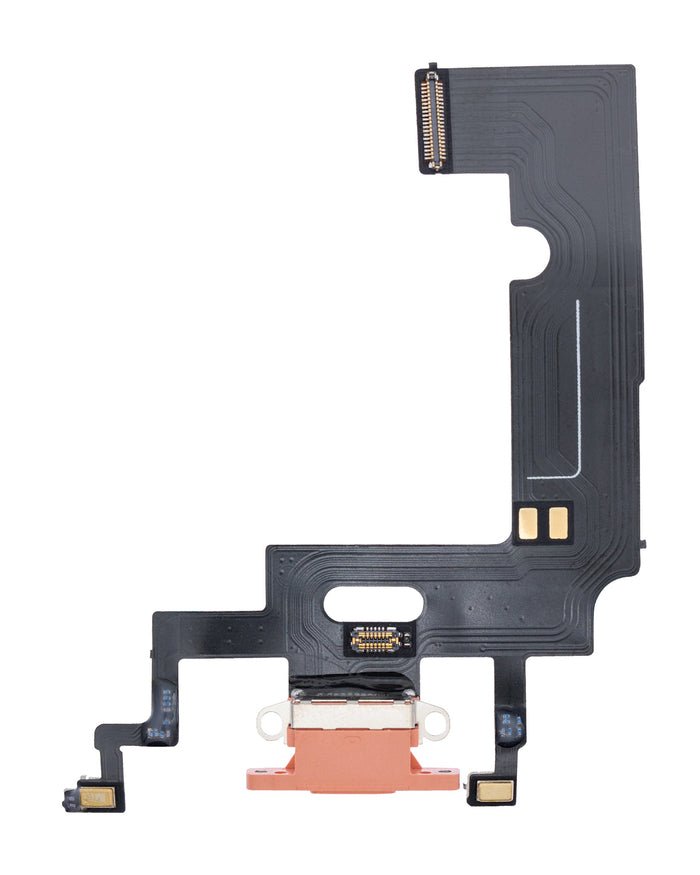
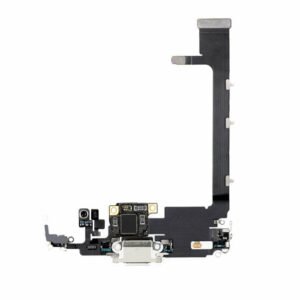
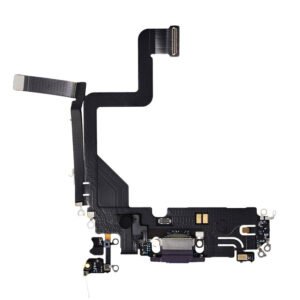
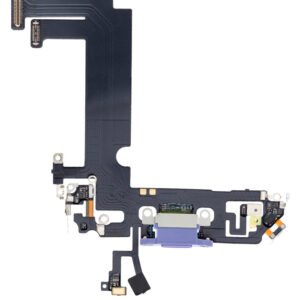
Having trouble charging your iPhone XR or syncing it with your computer? Our iPhone XR Charging Port Replacement is an all-in-one solution that restores charging, data transfer, and audio routing functionality in one professional-grade flex cable assembly.
This replacement part includes the lightning connector, microphone, antenna, and other essential components. It’s built to match OEM specifications for a perfect fit and smooth installation. Whether your charging port is physically damaged, corroded, or simply worn out from daily use, this part helps revive your phone’s core functionality.
Ideal for both DIY techs and professional repair shops, the flex assembly is pre-assembled and engineered for reliable long-term use.
Why Choose Our iPhone XR Charging Port Replacement?
Fixes charging and data sync issues
OEM-style flex cable for optimal compatibility
Includes microphone and antenna module
Easy to install with proper tools
Helps avoid costly device replacements
Restore power and performance to your iPhone XR with this premium aftermarket replacement.
The iPhone XR Charging Port Replacement is one of the most essential and in-demand repair solutions for Apple users worldwide. As one of the most widely used iPhone models, the XR still serves millions of people as their daily companion for communication, entertainment, work, and study. But with time and heavy use, one of the first components to fail is often the charging port. When this small yet critical part stops functioning correctly, your device becomes nearly unusable. Fortunately, a professional iPhone XR charging port replacement can restore your device’s charging and syncing capabilities, extend its lifespan, and save you from the costly purchase of a brand-new smartphone.
This long guide will cover everything you need to know about the iPhone XR charging port — its role, reasons for failure, signs of damage, the full replacement process, benefits of choosing high-quality parts, FAQs, customer scenarios, preventive tips, and why this particular replacement part is trusted by repair shops and customers alike.
The Importance of the iPhone XR Charging Port
At first glance, the charging port seems like a small feature, but it is one of the most critical parts of your phone. Without it, your iPhone XR would lose multiple key functions:
-
Power Supply & Charging – The Lightning port is the primary way to transfer power from a wall charger, power bank, or car adapter into your iPhone’s battery. A faulty port means your phone can’t stay powered.
-
Data Transfer & Syncing – The charging port is also your gateway to connecting the iPhone XR with computers, laptops, and external devices. Through this connection, you back up files, transfer photos, restore iOS, and sync content.
-
Audio Connection – Since Apple removed the headphone jack, the charging port also doubles as the connection point for Lightning-based headphones and adapters.
-
Accessory Compatibility – From card readers and car kits to microphones and docks, countless accessories rely on the charging port.
So, when this small connector stops working properly, the entire usability of your iPhone XR is compromised.
Common Symptoms That Indicate Charging Port Damage
It’s easy to confuse charging problems with battery issues, but in many cases, the port itself is to blame. Here are the most common signs that your iPhone XR charging port replacement is needed:
-
Phone does not charge at all, even when using a known working cable and adapter.
-
Charging works only when the cable is angled or pressed in a certain way.
-
Intermittent charging, where the phone starts and stops charging repeatedly.
-
Slow charging, taking hours to reach even 50%.
-
iTunes or computer not detecting your iPhone XR when connected via USB.
-
Visible dust, dirt, or corrosion inside the port.
-
Overheating during charging, caused by a faulty connection.
-
No audio output when using Lightning headphones.
If you notice one or more of these symptoms, the charging port is very likely the issue.
Why Do iPhone XR Charging Ports Fail?
Even though Apple builds durable devices, wear and tear eventually catches up. Some of the most common causes of charging port failure include:
-
Frequent plugging and unplugging of chargers wearing out the internal pins.
-
Pocket lint, dust, and debris collecting inside the port and blocking connections.
-
Moisture or liquid exposure, causing corrosion or short circuits.
-
Low-quality charging cables damaging the delicate Lightning connector pins.
-
Physical impact or drops that loosen or misalign the connector.
-
Improper insertion of cables or accessories, bending the metal pins inside.
This explains why charging ports are among the top five most common smartphone repairs.
Benefits of iPhone XR Charging Port Replacement
Replacing the charging port comes with multiple benefits:
-
Restores full charging function – Your phone charges quickly and consistently.
-
Data transfer works again – Backups and iOS restores are possible.
-
Saves money – Much cheaper than buying a new phone.
-
Eco-friendly solution – Keeps your device in use instead of adding e-waste.
-
Reliable accessory use – Headphones and add-ons work smoothly again.
-
Extends lifespan – You can continue using your iPhone XR for years.
The Replacement Process: Step by Step
A professional technician follows a careful process when performing an iPhone XR charging port replacement:
-
Initial Testing – The device is tested to confirm the charging port is indeed faulty (and not just the cable or battery).
-
Power Down & Disassembly – The iPhone XR is powered off, and the pentalobe screws are removed.
-
Screen Removal – The display is carefully opened using suction tools and spudgers, keeping Face ID components intact.
-
Battery Disconnection – The battery is disconnected to prevent short circuits.
-
Component Removal – Several components, including the Taptic Engine and speaker, must be removed to access the port assembly.
-
Charging Port Assembly Removal – The faulty charging port flex cable is detached.
-
New Port Installation – A brand-new replacement part is carefully installed.
-
Reassembly – The device is reassembled in the reverse order.
-
Final Testing – Charging, data transfer, and microphone functionality are tested to ensure success.
This delicate repair requires precision, which is why high-quality parts and skilled technicians are crucial.
DIY vs. Professional Repair
Some people may attempt DIY repair, but the iPhone XR is a complex device. Here’s a comparison:
-
DIY Repair
-
Pros: Saves money if done correctly.
-
Cons: High risk of damaging Face ID, screen, or logic board. No warranty.
-
-
Professional Repair
-
Pros: Safe, reliable, fast, usually includes warranty.
-
Cons: Slightly higher cost than DIY.
-
In most cases, professional iPhone XR charging port replacement is the safer and smarter option.
FAQs About iPhone XR Charging Port Replacement
Q1: How long does replacement take?
A professional repair usually takes 30–60 minutes.
Q2: Does replacement affect Face ID or other features?
No, when done correctly, Face ID and other functions remain intact.
Q3: Can I still use wireless charging?
Yes, wireless charging still works regardless of port replacement.
Q4: Is it better to replace the battery instead?
If the issue is specifically charging or syncing, the charging port replacement is necessary. A battery replacement alone will not solve the problem.
Q5: How much does it cost?
Prices vary by region and repair shop, but it’s usually far cheaper than upgrading to a new iPhone.
Comparison With Other iPhone XR Repairs
-
Screen Replacement – Needed for cracks or touch/display issues.
-
Battery Replacement – Required for poor battery health.
-
Charging Port Replacement – Required when charging, syncing, or accessory connection fails.
Many customers who replace their charging port often pair it with a new battery for a complete refresh of their iPhone XR.
Customer Experience Scenarios
-
Student – Needs reliable charging for online classes and social media.
-
Professional – Relies on data transfer and fast charging during business trips.
-
Traveler – Uses power banks constantly, causing faster wear on the charging port.
-
Parent – Uses the phone daily for calls and videos, needs a stable connection.
In all these cases, a new iPhone XR charging port provides peace of mind and reliability.
Preventive Tips After Replacement
To keep your new charging port working longer:
-
Use only MFi-certified Lightning cables.
-
Clean the port occasionally with compressed air.
-
Avoid moisture and humidity.
-
Don’t forcefully insert cables.
-
Use wireless charging when possible to reduce wear.
Why Choose This iPhone XR Charging Port Replacement
-
High-quality OEM-grade part
-
Durable and long-lasting
-
Compatible with iOS updates
-
Restores full functionality
-
Affordable and reliable
Conclusion
The iPhone XR Charging Port Replacement is not just a repair — it’s a way to give your phone a new life. Instead of dealing with constant charging frustration or spending a large amount on a new iPhone, this replacement provides a cost-effective, reliable, and eco-friendly solution. With a professional installation and premium-quality part, you’ll regain fast charging, smooth data transfers, and reliable accessory connectivity.
For anyone experiencing charging issues, the iPhone XR charging port replacement is the best choice to restore your device’s power and performance.
The iPhone XR charging port is not just about powering your device. It serves multiple critical purposes that keep your smartphone functioning at its best. Every time you connect your Lightning cable to charge, sync data, or use wired headphones (through the Lightning port), you are relying on this small yet powerful component. Without a properly working charging port, your iPhone XR becomes limited and unreliable, making it difficult to enjoy the premium Apple experience.
Unlike wireless charging—which may be slower and less consistent—the Lightning port provides a fast, stable, and reliable connection. For professionals, students, and everyday users, the ability to charge quickly and transfer data efficiently is essential. A damaged port can interrupt work, stop file transfers, or leave you with a dead phone at the most inconvenient times. This is why replacing a faulty iPhone XR charging port can completely transform your user experience and restore your phone to its original reliability.
Common Issues With the iPhone XR Charging Port
The charging port on the iPhone XR can develop several issues over time. Here are the most common problems users face:
-
Slow Charging or No Charging at All
-
The most noticeable issue is when your iPhone XR stops charging. Sometimes, it may only charge when the cable is bent or positioned at a specific angle. This indicates internal wear or a loose connector.
-
-
Data Transfer Failures
-
Many users connect their iPhone XR to computers for syncing or backing up data. A faulty charging port can prevent your device from being detected, making data management difficult.
-
-
Accessory Compatibility Issues
-
Apple-certified Lightning accessories, such as headphones or adapters, may stop working or disconnect frequently if the port is damaged.
-
-
Dust and Debris Accumulation
-
Over time, lint, dust, or small particles can clog the charging port. This not only weakens the connection but may also cause the cable to not fit properly.
-
-
Moisture Damage
-
Exposure to water or moisture can corrode the charging port, leading to long-term performance issues.
-
-
Overheating During Charging
-
A faulty port can cause your iPhone XR to overheat while charging, which not only affects performance but also impacts battery health.
-
By replacing the damaged iPhone XR charging port, you can resolve all these issues and restore full charging and data transfer functionality.
Signs You Need an iPhone XR Charging Port Replacement
It’s important to know when your charging port has reached the point where replacement is necessary. Some common warning signs include:
-
Your iPhone XR does not charge even with new cables and adapters.
-
The cable feels loose when plugged in, and the connection is unstable.
-
Charging only works intermittently or when the phone is held in a certain position.
-
Your computer does not recognize your iPhone XR when connected.
-
You notice rust, corrosion, or discoloration inside the charging port.
-
The phone frequently overheats while charging.
If you’re experiencing one or more of these problems, it’s time to consider a high-quality iPhone XR charging port replacement.
Benefits of Replacing the iPhone XR Charging Port
Investing in a replacement charging port for your iPhone XR comes with several benefits:
-
Restored Charging Speed: Get back to fast and efficient charging without interruptions.
-
Reliable Data Transfers: Sync your device with computers, laptops, and accessories smoothly.
-
Cost-Effective Solution: Instead of buying a new phone, replacing the charging port is affordable and extends your device’s life.
-
Improved Device Lifespan: A fully functional charging port reduces strain on the battery and motherboard, keeping the phone running longer.
-
Peace of Mind: No more worrying about your phone dying unexpectedly due to charging failures.
The Replacement Process
While many users may attempt DIY repairs, it’s recommended to seek professional help to replace the iPhone XR charging port. The process typically includes:
-
Powering off the device.
-
Removing the display assembly carefully.
-
Disconnecting the battery to prevent short circuits.
-
Removing screws, adhesive, and protective plates around the charging port flex cable.
-
Detaching the damaged charging port assembly.
-
Installing the new charging port with precise alignment.
-
Reassembling the device and testing for charging, data transfer, and accessory support.
This delicate process requires specialized tools and expertise to avoid damaging other components, such as the logic board or battery.
Troubleshooting Before Replacing the Charging Port
Before committing to a full iPhone XR charging port replacement, it’s worth exploring a few troubleshooting steps. Sometimes, the issue may not be as serious as it seems. Here are some things you can try:
-
Clean the Port Carefully
-
Use a soft brush, compressed air, or a toothpick (gently) to remove lint, dirt, and debris. Often, clogged dust is the main reason your iPhone XR doesn’t charge properly.
-
-
Test with Multiple Cables and Adapters
-
Sometimes the fault lies with the cable or adapter, not the phone. Always try using an original Apple Lightning cable and adapter to rule out accessory issues.
-
-
Check for iOS Updates
-
Outdated software can occasionally cause charging problems. Ensure your iPhone XR is updated to the latest iOS version.
-
-
Restart or Force Restart Your iPhone XR
-
A simple restart can reset temporary glitches. Hold the power and volume buttons until you see the Apple logo.
-
-
Inspect for Water Damage
-
Shine a light inside the port; if you notice green or white residue, it might indicate corrosion from water damage.
-
If these steps don’t resolve the issue, it’s highly likely the port itself is physically damaged and needs replacement.
Why Professional Replacement Is Better Than DIY
Many people are tempted by DIY repair kits for the iPhone XR charging port, but this approach carries risks. The charging port is directly connected to the phone’s logic board and battery, meaning one small mistake can cause costly damage. Here’s why professional repair is a smarter choice:
-
Expert Tools: Professionals use specialized screwdrivers, heat stations, and anti-static tools.
-
Skill and Experience: Certified technicians handle delicate parts without breaking connectors.
-
Warranty Coverage: Reputable repair centers often provide warranties on parts and labor.
-
Time-Saving: A DIY attempt may take hours or even days, while professionals can finish in under an hour.
-
Guaranteed Results: DIY attempts sometimes end up worsening the damage, while professionals deliver reliable repairs.
By investing in a professional iPhone XR charging port replacement, you get peace of mind and long-term reliability.
Wireless Charging vs. Wired Charging: Which One Should You Rely On?
The iPhone XR supports Qi wireless charging, which provides a cable-free alternative to power up your device. However, wireless charging is not a complete replacement for the Lightning port. Let’s compare both methods:
1. Charging Speed
-
Wired Charging (Lightning Port): Much faster, especially with Apple’s fast-charge adapters.
-
Wireless Charging: Generally slower and less consistent.
2. Data Transfer
-
Wired: Essential for transferring photos, videos, and backups to your computer.
-
Wireless: Only charges your phone; no data transfer capability.
3. Convenience
-
Wired: Reliable but requires cables.
-
Wireless: Easy and clutter-free, but you must place the phone precisely on the pad.
4. Reliability
-
Wired: Works in almost all conditions unless the port is damaged.
-
Wireless: Can be disrupted by thick cases or misalignment.
In conclusion, even though wireless charging is convenient, the iPhone XR charging port remains the primary and most reliable way to charge and sync your device. That’s why keeping it in top condition through timely replacement is essential.
Cost Comparison: Replacement vs. Buying a New Phone
One of the biggest questions users ask is: “Should I replace my charging port or buy a new iPhone?”
Let’s compare:
-
Charging Port Replacement: Affordable, typically a fraction of the cost of a new device.
-
Buying a New iPhone: Can cost several hundred dollars (or more than $1,000 for the latest models).
Unless your iPhone XR has multiple other hardware issues, replacing the charging port is a cost-effective solution that restores full functionality at a much lower price.

Reviews
There are no reviews yet.