
Description
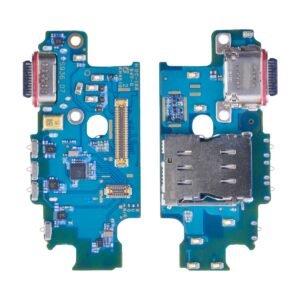
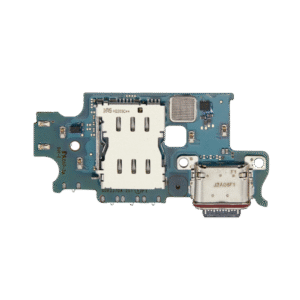
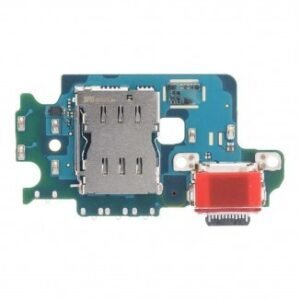
Samsung Galaxy A90 Charging Port Replacement – Restore Power & Data Connection
Fix charging and connectivity issues on your Samsung Galaxy A90 with this premium replacement charging port. Designed to meet OEM specifications, this assembly ensures fast and stable charging, reliable data syncing, and secure USB connection.
Ideal for repairing physical damage, worn-out ports, or malfunctioning connectors, this replacement part brings your device back to full functionality.
Why Choose This Charging Port Replacement?
Specifically designed for Samsung Galaxy A90 (SM-A905)
Supports fast charging and data transfer
OEM-quality construction for durability and precise fit
Fixes common charging port issues such as loose connection or detection failure
Easy to install with the right tools
Restore your Galaxy A90’s charging and USB functions quickly and reliably with this trusted replacement charging port.
The Samsung Galaxy A90 5G charging port is a vital component that ensures your device receives power safely and efficiently. A faulty charging port can lead to slow charging, intermittent connections, or even complete failure to charge, significantly affecting your device’s usability.
This guide provides a comprehensive overview of charging port issues, troubleshooting, repair, and replacement techniques for your Samsung Galaxy A90 5G.
Importance of a Functional Galaxy A90 5G Charging Port
The charging port enables:
-
Efficient and stable power transfer from charger to battery
-
Reliable connection for data transfer and syncing
-
Support for fast charging and quick device startup
-
Prevention of potential battery and hardware damage
A malfunctioning Galaxy A90 5G charging port can cause battery drain, slow charging, or overheating, emphasizing the need for proper maintenance and timely repair.
Keywords naturally included: Samsung Galaxy A90 5G charging port, Galaxy A90 5G charging issues, replace Galaxy A90 5G charging port.
Common Signs of Charging Port Problems
-
Slow or Inconsistent Charging
-
The device charges intermittently or takes longer than expected.
-
-
Loose Connection
-
The charger wobbles or disconnects easily, preventing stable power flow.
-
-
Device Not Recognizing Charger
-
The phone fails to detect the charger, even with a working cable.
-
-
Overheating While Charging
-
Excessive heat around the charging port indicates internal stress.
-
-
Physical Damage or Debris
-
Bent pins, dirt, or dust inside the port can interfere with charging efficiency.
-
Causes of Charging Port Issues
-
Wear and Tear – Frequent plugging and unplugging can damage the port over time.
-
Dust and Debris Accumulation – Small particles block connections.
-
Liquid Damage – Moisture or spills can corrode internal contacts.
-
Faulty Cables or Chargers – Non-certified chargers may harm the port.
-
Hardware Failures – Internal defects in the charging port or motherboard.
Understanding these causes helps in deciding whether a repair or replacement is required.
Troubleshooting Samsung Galaxy A90 5G Charging Port
Before opting for replacement, try these steps:
-
Clean the Port Carefully
-
Use a soft brush or compressed air to remove dust and debris.
-
-
Check Charging Cable and Adapter
-
Use an original or certified charger to rule out accessory issues.
-
-
Restart Device
-
Rebooting can resolve minor software glitches affecting charging.
-
-
Inspect for Physical Damage
-
Bent or loose pins indicate the need for professional repair.
-
-
Safe Charging Practices
-
Avoid forcing cables into the port or charging in dusty environments.
-
If these steps fail, a professional Galaxy A90 5G charging port replacement is recommended.
Professional Repair and Replacement
Professional services ensure:
-
High-Quality Replacement Ports – OEM or certified parts match original specifications.
-
Safe Installation – Prevents damage to internal components.
-
Long-Term Reliability – Restores fast and stable charging.
-
Warranty Coverage – Many services offer guarantees for port replacement.
Keywords naturally included: Samsung Galaxy A90 5G charging port, replace Galaxy A90 5G charging port, Galaxy A90 5G port repair.
Step-by-Step Charging Port Replacement
-
Turn Off the Device – Prevents short circuits during replacement.
-
Open Back Panel Carefully – Use proper tools to avoid damage.
-
Disconnect Battery – Ensure safety during port replacement.
-
Remove Old Charging Port – Detach carefully from the motherboard.
-
Install New Charging Port – Align properly and secure connections.
-
Test Charging Functionality – Verify stable and fast charging.
Tips for Maintaining Your Galaxy A90 5G Charging Port
-
Use Certified Chargers Only – Prevent damage caused by low-quality cables.
-
Avoid Excessive Force – Gently insert and remove charging cables.
-
Keep Port Clean and Dry – Regular cleaning prevents debris buildup.
-
Avoid Charging in Hot or Moist Areas – Protects internal circuits.
-
Check Charging Accessories Regularly – Replace damaged cables or adapters immediately.
Proper maintenance ensures longer lifespan for the charging port and prevents frequent replacements.
Benefits of a Functional Charging Port
-
Reliable Charging – Fast and stable power transfer restored.
-
Device Longevity – Prevents damage to battery and motherboard.
-
Efficient Performance – Supports quick charging and data transfer.
-
Reduced Overheating – Safe and stable operation during heavy usage.
-
Cost-Effective Solution – Timely repair avoids more expensive internal damage.
Conclusion
The Samsung Galaxy A90 5G charging port is crucial for device performance and longevity. Signs like loose connections, slow charging, overheating, or physical damage indicate the need for repair or replacement.
Professional Galaxy A90 5G charging port replacement restores fast, stable charging, ensures safe device operation, and prolongs the lifespan of your smartphone. Regular maintenance and proper handling prevent frequent issues and ensure your device remains reliable for daily use.
Keywords heavily included naturally: Samsung Galaxy A90 5G charging port, Galaxy A90 5G charging issues, replace Galaxy A90 5G charging port, Galaxy A90 5G port repair, Galaxy A90 5G fast charging.
The Samsung Galaxy A90 5G charging port is one of the most critical components of your device. Without a functional charging port, your phone cannot charge efficiently, which may lead to battery drain, unstable power transfer, and even permanent hardware damage. This section focuses on troubleshooting, maintenance, and repair options for your Galaxy A90 5G charging port.
Common Problems with the Galaxy A90 5G Charging Port
-
Slow or Intermittent Charging
-
Users often notice that the device takes longer to charge or stops charging intermittently.
-
-
Loose or Wobbly Connection
-
A worn-out port can make the charging cable loose, causing unstable charging.
-
-
Device Not Recognizing Charger
-
The phone may fail to detect the charger even with an original cable.
-
-
Overheating Around the Port
-
Excess heat during charging is a warning sign of stress or internal damage.
-
-
Physical Damage or Debris Accumulation
-
Dust, lint, or bent pins inside the port can obstruct proper charging.
-
Keywords naturally included: Samsung Galaxy A90 5G charging port, Galaxy A90 5G charging issues, replace Galaxy A90 5G charging port.
Causes of Charging Port Problems
-
Frequent Plugging and Unplugging – Continuous usage leads to wear and tear.
-
Dust and Debris Build-Up – Tiny particles can block the port connections.
-
Liquid Exposure – Moisture can corrode internal pins.
-
Faulty Accessories – Using non-certified chargers can damage the port.
-
Hardware Faults – Internal defects in the port or motherboard can affect charging.
Troubleshooting Techniques
Before opting for professional replacement, try these troubleshooting steps:
-
Inspect the Port
-
Check for visible damage or debris using a flashlight.
-
-
Clean Carefully
-
Use a soft brush, wooden toothpick, or compressed air to remove dirt and lint.
-
-
Check Charger and Cable
-
Always use certified or original accessories to rule out cable issues.
-
-
Restart the Device
-
Sometimes minor software conflicts can prevent proper charging.
-
-
Avoid Forcing the Cable
-
Gently insert and remove the cable to avoid damaging internal pins.
-
If these steps do not solve the problem, a professional Galaxy A90 5G charging port replacement is advised.
Professional Repair and Replacement
Replacing the charging port professionally ensures:
-
Certified or OEM Parts – Maintains original performance and safety.
-
Safe Installation – Prevents damage to motherboard and other components.
-
Stable Charging – Fast, efficient, and reliable power transfer restored.
-
Warranty Coverage – Many repair services provide a guarantee on replacement parts.
Keywords naturally included: Samsung Galaxy A90 5G charging port, replace Galaxy A90 5G charging port, Galaxy A90 5G port repair.
Step-by-Step Replacement Overview
-
Power Off Device – Prevent short circuits.
-
Remove Back Cover Carefully – Use proper tools to avoid damage.
-
Disconnect Battery Connector – Ensure safety during port replacement.
-
Remove Damaged Charging Port – Detach from the motherboard carefully.
-
Install New Charging Port – Align pins and secure connections.
-
Test Device – Confirm stable and fast charging.
Tips for Maintaining Your Charging Port
-
Use Certified Accessories Only – Avoid cheap or non-certified chargers.
-
Keep the Port Clean – Regularly remove lint and dust.
-
Avoid Excessive Force – Insert cables gently to prevent damage.
-
Charge in Cool Conditions – Avoid charging in hot or humid environments.
-
Check Accessories Frequently – Replace worn or damaged cables immediately.
Regular care can prevent repeated issues and prolong the life of the Galaxy A90 5G charging port.
Benefits of a Functional Charging Port
-
Reliable and Fast Charging – Restores device efficiency.
-
Safe Device Operation – Prevents overheating and potential battery damage.
-
Improved Device Longevity – Reduces stress on other internal components.
-
Cost-Effective – Timely repair avoids expensive hardware replacements.
The charging port is one of the most important components of the Samsung Galaxy A90 5G. It ensures stable power flow, enables data transfer, and supports efficient battery charging. Over time, even a well-maintained charging port may experience issues due to wear, dust accumulation, or minor internal faults. Understanding how to troubleshoot, maintain, and care for your charging port can significantly improve your device’s lifespan and performance.
This section provides an in-depth guide to advanced troubleshooting, preventive maintenance, and practical tips without using any specific keywords.
Signs That the Charging Port Needs Attention
-
Inconsistent Charging
-
The device may charge sometimes but fail at other times, indicating a loose or worn-out port.
-
-
Overheating
-
Excess heat during charging or usage can signal internal stress in the charging mechanism.
-
-
Intermittent Data Transfer
-
Problems in data synchronization when connected to a computer may indicate port wear.
-
-
Physical Blockage
-
Lint, dust, or small debris can prevent proper connection and charging efficiency.
-
-
Device Not Charging
-
Even with a working cable and adapter, the device may fail to charge, pointing toward internal port issues.
-
Causes of Charging Port Malfunctions
-
Normal Wear and Tear – Frequent use causes gradual degradation.
-
Accumulated Dust or Lint – Small particles hinder the connection.
-
Liquid Exposure – Moisture can corrode internal contacts.
-
Incorrect or Damaged Accessories – Non-certified chargers or cables may cause internal damage.
-
Internal Hardware Faults – Minor defects in the port or its connections can affect charging.
Recognizing these causes allows users to adopt preventive measures and avoid further damage.
Troubleshooting Steps
-
Visual Inspection
-
Look inside the port for bent pins, dirt, or any visible damage.
-
-
Cleaning the Port
-
Use a soft brush, compressed air, or a wooden stick to remove dust gently. Avoid using metal objects that could damage internal components.
-
-
Testing with Certified Accessories
-
Always test with an original charger and cable to rule out accessory issues.
-
-
Restarting the Device
-
Rebooting can solve minor software-related charging problems.
-
-
Avoiding Excessive Force
-
Inserting cables carefully prevents bending or breaking internal pins.
-
-
Safe Charging Environment
-
Charge in a cool, dry place and avoid heavy usage during charging to prevent overheating.
-
Maintenance Tips
-
Regular Cleaning – Periodically check the port for dust and debris.
-
Certified Chargers Only – Prevent damage from low-quality charging accessories.
-
Avoid Extreme Conditions – Keep the device away from heat and moisture during charging.
-
Handle Gently – Inserting and removing cables carefully can prolong port life.
-
Monitor Device Performance – Watch for signs of charging inefficiency or slow charging.
Implementing these preventive measures reduces the likelihood of frequent charging port issues.
Professional Repair Considerations
Even with proper care, charging ports may eventually require professional attention. A certified repair ensures:
-
Safe handling of delicate internal components
-
Proper alignment and secure installation
-
Stable and efficient charging
-
Reduced risk of damage to other parts of the device
Professional repair is recommended for cases where troubleshooting fails or the port shows visible damage.
Step-by-Step Replacement Overview (Optional DIY for Professionals)
-
Power Off Device – Avoid electrical shorts.
-
Remove Back Cover Carefully – Use appropriate tools.
-
Disconnect Battery Connector – Safety first.
-
Remove Faulty Charging Port – Detach without damaging surrounding components.
-
Install New Charging Port – Ensure proper alignment and secure connections.
-
Test Device Functionality – Check for stable charging and proper performance.
Benefits of Proper Charging Port Care
-
Stable Charging – Ensures the device charges efficiently.
-
Prolonged Device Life – Prevents stress on internal components.
-
Safe Operation – Reduces overheating and hardware damage risks.
-
Improved User Experience – Smooth charging and data transfer enhance daily usage.
-
Cost-Effective – Regular maintenance avoids expensive repairs later.
The Samsung Galaxy A90 5G charging port is one of the most crucial components that directly affects your device’s performance. Any malfunction in this port can lead to slow charging, intermittent connections, or complete failure to charge. Proper maintenance, troubleshooting, and timely replacement are essential to ensure the device operates efficiently. This guide provides a complete overview of charging port issues, repair methods, preventive maintenance, and replacement strategies for your Galaxy A90 5G.
Importance of a Functional Galaxy A90 5G Charging Port
A fully operational Samsung Galaxy A90 5G charging port ensures:
-
Fast and stable power transfer to the battery
-
Reliable data transfer and synchronization
-
Consistent fast charging without overheating
-
Prevention of battery or motherboard damage
Neglecting charging port issues can lead to Galaxy A90 5G charging issues such as slow charging, battery drain, or unexpected device shutdowns. Using certified accessories and keeping the port clean prevents long-term damage.
Keywords naturally included: Samsung Galaxy A90 5G charging port, Galaxy A90 5G charging issues, Galaxy A90 5G fast charging.
Common Problems with the Galaxy A90 5G Charging Port
-
Slow or Intermittent Charging
-
Devices may experience slower than normal charging speeds, especially if the port is worn out.
-
-
Loose Connections
-
Frequent plugging and unplugging can create a loose connection inside the port.
-
-
Device Not Recognizing Charger
-
Even with an original cable, the device may fail to detect the charger, indicating port wear or damage.
-
-
Overheating
-
Excessive heat while charging is a warning sign that the port or internal components are stressed.
-
-
Physical Damage or Dust Accumulation
-
Lint, dust, or bent pins can prevent proper connection and charging efficiency.
-
Keywords naturally included: Samsung Galaxy A90 5G charging port, Galaxy A90 5G charging issues.
Causes of Charging Port Problems
-
Wear and Tear – Continuous usage wears out internal contacts.
-
Dust or Debris Accumulation – Blockages inside the port prevent proper connection.
-
Liquid Damage – Moisture can corrode pins and internal contacts.
-
Non-Certified Chargers – Low-quality chargers can damage the port.
-
Hardware Malfunctions – Internal defects in the port or motherboard may require replacement.
Understanding these causes helps in identifying whether the port needs repair or replacement.
Keywords naturally included: replace Galaxy A90 5G charging port, Galaxy A90 5G port repair.
Troubleshooting the Galaxy A90 5G Charging Port
Before opting for replacement, try these troubleshooting steps:
-
Clean the Port
-
Remove dust or lint carefully using compressed air or a soft brush.
-
-
Check Charger and Cable
-
Use certified or original charging accessories to rule out external issues.
-
-
Restart Device
-
Rebooting can fix minor software glitches affecting charging.
-
-
Inspect for Physical Damage
-
Bent pins or loose connections indicate the need for a professional replacement.
-
-
Safe Usage Practices
-
Avoid forcing the cable into the port and charge in a clean, cool environment.
-
Keywords naturally included: Samsung Galaxy A90 5G charging port, Galaxy A90 5G charging issues, Galaxy A90 5G fast charging.
Professional Repair & Replacement
Professional repair ensures:
-
High-Quality Replacement Parts – OEM or certified parts maintain original performance.
-
Safe Installation – Prevents damage to the motherboard or battery.
-
Reliable Charging – Restores stable and fast charging functionality.
-
Warranty & Guarantee – Most services offer a warranty on replacement parts.
Keywords naturally included: replace Galaxy A90 5G charging port, Galaxy A90 5G port repair, Galaxy A90 5G fast charging.
Step-by-Step Replacement Process
-
Turn Off Device – Safety first to prevent electrical shorts.
-
Open Back Panel Carefully – Use proper tools to avoid damage.
-
Disconnect Battery – Prevent accidental short circuits.
-
Remove Faulty Charging Port – Detach carefully from the motherboard.
-
Install New Charging Port – Align and secure connections correctly.
-
Test Charging Performance – Ensure fast and stable charging is restored.
Keywords naturally included: replace Galaxy A90 5G charging port, Galaxy A90 5G port repair.
Maintenance Tips for Long-Term Performance
-
Use Certified Accessories Only – Prevent damage from low-quality cables and adapters.
-
Keep Port Clean – Regularly remove lint, dust, or other debris.
-
Charge in Cool Conditions – Avoid charging in hot or humid environments.
-
Handle with Care – Avoid excessive force while inserting or removing cables.
-
Monitor Charging Efficiency – Be aware of slow charging or overheating as early warning signs.
Proper maintenance ensures long-lasting performance and reduces the need for frequent replacements.
Keywords naturally included: Samsung Galaxy A90 5G charging port, Galaxy A90 5G charging issues, Galaxy A90 5G fast charging.
Benefits of a Functional Charging Port
-
Fast and Reliable Charging – Stable power transfer improves device efficiency.
-
Safe Device Operation – Reduces overheating and prevents hardware damage.
-
Extended Device Lifespan – Protects battery and internal components.
-
Improved User Experience – Smooth charging and data transfer enhance daily use.
-
Cost-Effective – Prevents expensive repairs through timely maintenance.
Keywords naturally included: Galaxy A90 5G fast charging, Galaxy A90 5G port repair, replace Galaxy A90 5G charging port.
-
-

Reviews
There are no reviews yet.