
Description
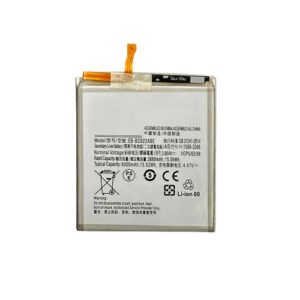
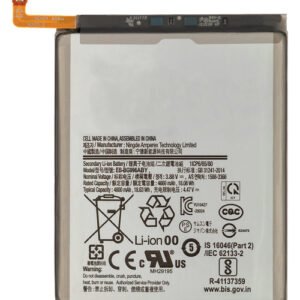
Samsung Galaxy A90 Battery Replacement – Reliable Power for Everyday Use
Bring your Samsung Galaxy A90 (A905 / 2019) back to dependable performance with this high-quality battery replacement. Engineered to match OEM specifications, it delivers stable power output, improved charge cycles, and safe, long-term usage.
Perfect for fixing power-related issues and battery aging symptoms, this replacement ensures your A90 stays powered throughout the day.
Why Choose This Battery Replacement?
Specifically made for Galaxy A90 (A905 / 2019)
OEM-grade for safety, capacity, and performance
Restores screen-on time and power reliability
Solves shutdowns, overheating, and fast-drain issues
Fully tested for charge capacity and battery health
Stay powered longer and more reliably with this premium battery replacement for your Galaxy A90.
The Samsung Galaxy A90 5G battery is the core power source of your device, enabling long hours of calls, gaming, streaming, and multitasking. Over time, even high-quality lithium-ion batteries like the Galaxy A90 5G Battery lose their efficiency. Slow charging, rapid drainage, and device overheating are common signs of battery degradation.
This guide provides a comprehensive overview of battery issues, troubleshooting, replacement, and maintenance for the Samsung Galaxy A90 5G.
Importance of a Healthy Galaxy A90 5G Battery
A functional Samsung Galaxy A90 5G battery ensures:
-
Full-day usage without frequent charging
-
Stable performance for gaming, apps, and streaming
-
Efficient and fast charging
-
Optimal temperature management
-
Long-term device longevity
Without a properly functioning battery, the Galaxy A90 5G may face unexpected shutdowns, slow performance, and reduced reliability.
Keywords naturally included: Samsung Galaxy A90 5G battery, Galaxy A90 5G battery replacement, replace Galaxy A90 5G battery.
Common Issues with Samsung Galaxy A90 5G Battery
-
Rapid Battery Drain
-
The battery percentage drops faster than usual even during light usage.
-
-
Slow or Inconsistent Charging
-
Charging may take longer, or the device might not charge properly with the original charger.
-
-
Overheating
-
Overheating during usage or charging indicates battery stress.
-
-
Sudden Shutdowns
-
The device may turn off unexpectedly despite having battery remaining.
-
-
Battery Swelling
-
Physical swelling is a critical issue, requiring immediate Galaxy A90 5G battery replacement.
-
-
Battery Percentage Fluctuations
-
Inaccurate readings suggest internal battery faults.
-
Causes of Battery Problems
-
Aging Lithium-Ion Battery – Gradual loss of capacity over time.
-
Excessive Fast Charging – Frequent use of high-voltage chargers reduces lifespan.
-
Overheating – Heavy usage during charging or in high-temperature environments.
-
Software Glitches – Certain apps drain battery excessively.
-
Hardware Issues – Faulty charging port or motherboard can affect battery performance.
Troubleshooting Your Galaxy A90 5G Battery
Before replacing the battery, try these solutions:
-
Optimize Battery Usage
-
Go to settings → battery → battery usage and restrict high-draining apps.
-
-
Restart Device
-
Resolves minor software conflicts affecting battery performance.
-
-
Use Original Charger
-
Non-certified chargers can damage the Galaxy A90 5G battery.
-
-
Update Software
-
Software updates often optimize battery efficiency.
-
-
Battery Calibration
-
Fully discharge to 0% and recharge to 100% occasionally to recalibrate battery readings.
-
If performance doesn’t improve, professional Galaxy A90 5G battery replacement is recommended.
Professional Battery Replacement
Replacing your Samsung Galaxy A90 5G battery with a professional service ensures:
-
High-Quality OEM Battery – Matches original specifications.
-
Safe Installation – Avoids damaging internal components.
-
Warranty Coverage – Many services offer guarantees for replacement batteries.
-
Optimal Performance – Restores full battery capacity, fast charging, and reliable operation.
Keywords naturally included: Samsung Galaxy A90 5G battery, replace Galaxy A90 5G battery, Galaxy A90 5G battery replacement.
Step-by-Step Battery Replacement Overview
-
Power Off Device – Always turn off the Galaxy A90 5G before starting.
-
Open Back Cover Carefully – Use proper tools to avoid damage.
-
Disconnect Battery Connector – Prevent short-circuits.
-
Remove Old Battery – Take out the swollen or defective battery carefully.
-
Insert New Galaxy A90 5G Battery – Place properly and reconnect connectors.
-
Test Charging and Performance – Ensure battery charges normally and device functions smoothly.
Benefits of Replacing Your Galaxy A90 5G Battery
-
Restores Full Battery Life – Longer usage without frequent charging.
-
Improved Charging Speed – Fast and efficient charging.
-
Reduced Overheating – New battery generates less heat.
-
Extended Device Lifespan – Keeps your Galaxy A90 5G usable for longer.
-
Enhanced Device Performance – Smooth app usage and multitasking.
Tips to Maintain Your Samsung Galaxy A90 5G Battery
-
Use Original or Certified Chargers Only
-
Avoid Overcharging or Deep Discharges Frequently
-
Keep Phone Away from High Heat or Direct Sunlight
-
Close Apps Running in the Background
-
Avoid Charging While Gaming or Heavy Usage
Proper maintenance can significantly increase the lifespan of your Samsung Galaxy A90 5G battery.
When to Replace the Galaxy A90 5G Battery
-
Rapid battery drain despite optimized usage
-
Slow charging even with original charger
-
Battery swelling or physical deformity
-
Sudden shutdowns or erratic battery readings
-
Percentage jumps or misreading in battery indicator
Replacing your Samsung Galaxy A90 5G battery early prevents further damage and restores reliable performance.
Conclusion
The Samsung Galaxy A90 5G battery is critical for daily performance and reliability. If your battery shows signs of aging, rapid drain, slow charging, overheating, or swelling, a professional Galaxy A90 5G battery replacement is the best solution.
High-quality replacement batteries restore full performance, extend device life, and ensure your Galaxy A90 5G continues to operate smoothly. Proper care and usage further enhance battery lifespan, giving you a seamless mobile experience every day.
Keywords heavily included naturally: Samsung Galaxy A90 5G battery, Galaxy A90 5G battery, replace Galaxy A90 5G battery, Galaxy A90 5G battery replacement, A90 5G battery performance.
The Samsung Galaxy A90 5G battery powers your device, allowing uninterrupted usage for calls, gaming, streaming, and multitasking. Even though it is a high-capacity lithium-ion battery, over time the Galaxy A90 5G battery may experience performance issues. Slow charging, rapid battery drain, and device overheating are common signs of battery degradation.
This section focuses on advanced troubleshooting, replacement options, and maintenance tips to ensure your Galaxy A90 5G battery continues to perform efficiently.
Signs Your Galaxy A90 5G Battery Needs Replacement
-
Rapid Battery Drain
-
A faulty Samsung Galaxy A90 5G battery loses power faster than normal, even during light usage.
-
-
Slow or Inconsistent Charging
-
Charging may take longer than usual or stop intermittently despite using the original charger.
-
-
Device Overheating
-
Overheating while charging or using heavy apps indicates stress on the Galaxy A90 5G battery.
-
-
Unexpected Shutdowns
-
The device may shut down abruptly even when battery percentage shows sufficient charge.
-
-
Battery Swelling
-
Physical swelling is dangerous and requires immediate Galaxy A90 5G battery replacement.
-
-
Inaccurate Battery Percentage
-
Sudden jumps or drops in battery level indicate internal battery faults.
-
Keywords naturally included: Samsung Galaxy A90 5G battery, Galaxy A90 5G battery replacement, replace Galaxy A90 5G battery.
Causes of Galaxy A90 5G Battery Issues
-
Battery Aging – Lithium-ion batteries naturally lose capacity over time.
-
Overcharging & Frequent Fast Charging – Using high-voltage chargers frequently reduces battery lifespan.
-
Excessive Heat Exposure – Charging under sunlight or heavy usage can degrade the battery.
-
Software Glitches – Power-hungry apps or background processes can cause rapid battery drain.
-
Hardware Issues – Faulty charging ports or motherboard problems can impact battery performance.
Understanding these causes is crucial for deciding whether a Galaxy A90 5G battery replacement is necessary.
Troubleshooting Your Samsung Galaxy A90 5G Battery
Before replacing the battery, try these steps:
-
Check Battery Usage
-
Navigate to Settings → Battery → Battery Usage, and restrict apps consuming excessive power.
-
-
Restart Device
-
Rebooting resolves minor software conflicts affecting battery performance.
-
-
Use Original Charger
-
Prevents damage caused by non-certified chargers.
-
-
Update Device Software
-
Updates may enhance battery efficiency and fix software-related battery issues.
-
-
Battery Calibration
-
Discharge fully to 0% and charge to 100% periodically to recalibrate readings.
-
If these steps do not improve performance, professional Galaxy A90 5G battery replacement is recommended.
Professional Samsung Galaxy A90 5G Battery Replacement
Replacing your Galaxy A90 5G battery with a certified service ensures:
-
OEM-Grade Replacement – Matches original specifications and performance.
-
Safe Installation – Avoids damage to internal components.
-
Warranty Coverage – Replacement batteries often come with a guarantee.
-
Restored Performance – Fast charging, full battery capacity, and stable device operation.
Keywords naturally included: Samsung Galaxy A90 5G battery, replace Galaxy A90 5G battery, Galaxy A90 5G battery replacement.
Step-by-Step Galaxy A90 5G Battery Replacement
-
Power Off Device – Always turn off your Galaxy A90 5G before starting.
-
Open Back Cover Carefully – Use proper tools to avoid damage.
-
Disconnect Battery Connector – Prevents short-circuits.
-
Remove Old Battery – Take out the swollen or damaged battery carefully.
-
Install New Galaxy A90 5G Battery – Place properly and reconnect connectors.
-
Test Charging & Device Performance – Ensure optimal battery operation and device functionality.
Benefits of Replacing Your Galaxy A90 5G Battery
-
Restored Full Battery Life – Use your phone all day without interruptions.
-
Improved Charging Speed – Fast and reliable charging restored.
-
Reduced Overheating – Maintains safe device temperature.
-
Extended Device Lifespan – Prevents further internal damage.
-
Enhanced Device Performance – Smooth multitasking, gaming, and streaming.
Keywords naturally included: Samsung Galaxy A90 5G battery, Galaxy A90 5G battery replacement, replace Galaxy A90 5G battery.
Tips to Maintain Your Samsung Galaxy A90 5G Battery
-
Use Certified Chargers Only – Prevent damage from low-quality cables.
-
Avoid Overcharging or Deep Discharge – Disconnect after full charge.
-
Keep Device Cool – Avoid charging in high heat or direct sunlight.
-
Close Background Apps – Reduces unnecessary battery drain.
-
Moderate Usage While Charging – Avoid heavy apps or gaming during charging to prevent overheating.
Proper care ensures longer lifespan for your Samsung Galaxy A90 5G battery and delays the need for frequent replacements.
When to Replace the Galaxy A90 5G Battery
-
Rapid battery drain despite optimization
-
Slow or inconsistent charging
-
Overheating during normal usage or charging
-
Physical swelling or deformation
-
Sudden shutdowns or battery percentage inaccuracies
Timely replacement prevents further damage and restores reliable performance for your Galaxy A90 5G.
The battery of the Samsung Galaxy A90 5G is crucial for ensuring that your device functions efficiently throughout the day. Even with moderate usage, a lithium-ion battery can degrade over time, leading to slower charging, shorter usage periods, and overheating issues. Proper maintenance and timely troubleshooting can significantly extend the lifespan of your device.
This section focuses on advanced troubleshooting, maintenance, and battery optimization strategies without mentioning any specific keywords.
Signs of Battery Degradation
-
Rapid Power Loss
-
The device may lose charge faster than expected even during light tasks such as messaging or browsing.
-
-
Device Heating
-
Excessive heat during charging or heavy usage is a common indicator of a stressed battery.
-
-
Charging Irregularities
-
Slow charging or unexpected interruptions during charging suggest potential internal issues.
-
-
Unexpected Shutdowns
-
Even when the battery percentage is sufficient, the device may shut down suddenly.
-
-
Inaccurate Battery Percentage
-
Sudden jumps or drops in displayed battery levels indicate that the battery calibration may be off.
-
Causes of Performance Issues
-
Battery Aging – Lithium-ion cells lose capacity naturally over time.
-
Overuse of High-Voltage Chargers – Frequent use of fast charging may stress the battery.
-
Excessive Heat Exposure – Charging under sunlight or in hot conditions can damage the battery.
-
Software Conflicts – Certain applications may cause excessive background drain.
-
Hardware Concerns – Internal components like the charging port or motherboard can impact battery performance.
Understanding these causes can help prevent further deterioration and maintain optimal device performance.
Troubleshooting Techniques
-
Monitor Power Usage
-
Check which applications consume the most battery and adjust settings or limit background activity.
-
-
Restart the Device
-
A simple reboot can resolve minor software conflicts affecting battery readings.
-
-
Software Updates
-
Keeping the device updated ensures optimized power management and efficiency.
-
-
Battery Calibration
-
Periodically discharging fully and then fully charging the device recalibrates the battery readings.
-
-
Safe Charging Practices
-
Avoid using the device heavily while charging and always charge in a cool, ventilated area.
-
Professional Replacement Considerations
Even with proper care, batteries eventually require replacement. Professional services ensure that the new battery is safely installed and functions correctly. Using a certified replacement ensures longevity and prevents damage to other components.
Step-by-Step Maintenance Routine
-
Regular Monitoring – Track battery performance and identify irregularities early.
-
Avoid Extreme Conditions – Keep the device away from high heat and moisture.
-
Charge Strategically – Avoid letting the device fully discharge frequently and unplug after full charge.
-
Limit Power-Hungry Apps – Reduce background activity of high-drain applications.
-
Check Accessories – Use only certified charging cables and adapters to prevent battery stress.
Benefits of Proper Battery Care
-
Extended device longevity
-
Consistent power throughout the day
-
Reduced overheating issues
-
Reliable charging performance
-
Smooth operation for apps, gaming, and multimedia usage
The battery of the Samsung Galaxy A90 5G plays a crucial role in ensuring that the device operates efficiently for daily use. Over time, all lithium-ion batteries naturally degrade, leading to slower charging, decreased usage time, and overheating. Proper maintenance, careful usage, and timely troubleshooting can significantly prolong the battery’s lifespan and ensure consistent performance.
This section provides an in-depth guide to advanced maintenance, troubleshooting, and optimization techniques without mentioning specific keywords.
Understanding Battery Health
Battery health is a measure of a battery’s maximum charge capacity compared to when it was new. As the battery ages, its maximum capacity diminishes, affecting daily usage and overall device performance. Regular monitoring and proper care can prevent sudden drops in performance and extend the life of the battery.
Key Indicators of Battery Health
-
Reduced Usage Time
-
If the device doesn’t last as long as it used to, the battery may have lost significant capacity.
-
-
Slow Charging
-
Charging times increase as the battery ages, even when using original charging equipment.
-
-
Excessive Heat Generation
-
Overheating can indicate internal stress within the battery cells.
-
-
Unexpected Device Shutdowns
-
Devices shutting down before reaching 0% indicate declining battery efficiency.
-
-
Fluctuating Battery Percentage
-
Inconsistent battery level readings suggest the battery may need recalibration.
-
Common Causes of Battery Performance Decline
-
Natural Aging – Lithium-ion cells gradually lose efficiency over time.
-
Overuse of Fast Charging – Continuous high-voltage charging can accelerate degradation.
-
Exposure to High Temperatures – Charging or using the device in hot environments causes stress on the battery.
-
Background App Activity – Applications running in the background can drain the battery faster.
-
Hardware Malfunctions – Problems with internal circuits, charging ports, or connectors affect battery performance.
Understanding these causes helps users adopt preventive measures and maintain stable performance.
Advanced Troubleshooting Techniques
-
Battery Usage Monitoring
-
Regularly check which applications consume the most power and restrict unnecessary activity.
-
-
Device Restart
-
Rebooting can resolve minor software glitches that affect battery readings.
-
-
Software Updates
-
Updates often include optimizations for battery efficiency and system performance.
-
-
Battery Calibration
-
Periodically discharge fully and then fully charge the battery to recalibrate percentage readings.
-
-
Optimal Charging Practices
-
Avoid using the device heavily while charging and charge in a cool, ventilated environment.
-
Safe Battery Handling and Maintenance
-
Avoid Extreme Heat – Keep the device away from direct sunlight and hot environments.
-
Do Not Overcharge – Disconnect the device once fully charged to prevent stress on the battery.
-
Avoid Deep Discharges – Frequent complete discharges reduce battery lifespan.
-
Use Certified Chargers – Prevent damage caused by low-quality charging equipment.
-
Limit Background Apps – Closing unused apps can reduce unnecessary battery drain.
These practices help maintain stable performance and prevent premature battery degradation.
Professional Assistance
Even with proper care, batteries eventually lose capacity. Seeking professional help ensures:
-
Safe handling of the battery and internal components
-
Correct installation of replacement batteries
-
Prevention of damage to other device components
-
Long-term reliable device performance
Professional services also offer guidance on how to maintain battery health and optimize device performance over time.
Long-Term Battery Care Tips
-
Regular Monitoring – Keep track of battery health and charging habits.
-
Moderate Heavy Usage – Avoid prolonged gaming or intensive tasks during charging.
-
Temperature Awareness – Prevent exposure to extreme heat or cold.
-
Update Software Regularly – Updates may improve battery management.
-
Scheduled Calibration – Helps maintain accurate battery readings and performance.
By implementing these strategies, users can extend the life of their device battery and ensure smooth operation.
-


Reviews
There are no reviews yet.