
Description
Samsung Galaxy A71 5G Battery Replacement – Dependable Power You Can Trust
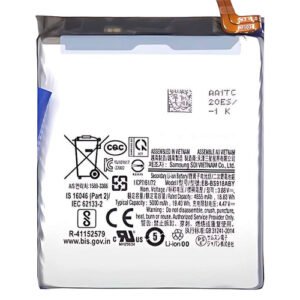
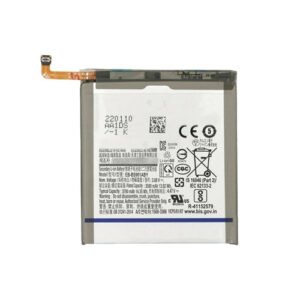
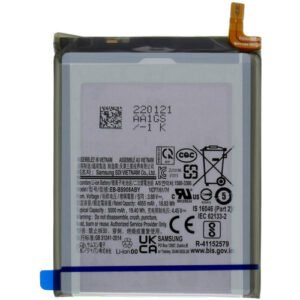
Restore your Galaxy A71 5G’s battery life with this high-performance replacement. Built to meet OEM standards, it ensures long-lasting power, safe charging, and consistent performance for everyday use.
Key Features:
Designed for Samsung Galaxy A71 5G (Model A716)
High-capacity 4500mAh battery for all-day usage
Built-in IC chip to prevent overcharging & overheating
Ideal solution for degraded or swollen batteries
Reliable, safe, and efficient – tested for quality assurance
Get your device running like new with this brand-new battery – perfect for reviving power-hungry phone
The Samsung Galaxy A71 5G battery is a powerful component that keeps the smartphone running smoothly. With its 4500 mAh capacity and 25W fast charging support, the battery is designed to last throughout the day, even with heavy usage. However, just like all smartphone batteries, the Galaxy A71 5G battery can degrade over time, leading to faster drain, overheating, or charging problems. In such cases, the best solution is a Samsung Galaxy A71 5G battery replacement.
Why the Galaxy A71 5G Battery is Important
The Samsung A71 5G battery ensures that you can enjoy long hours of browsing, gaming, video calls, and social media without worrying about charging frequently. A healthy battery provides:
-
Stable performance
-
Longer screen-on time
-
Reliable standby hours
-
Efficient support for 5G connectivity
Once the battery starts to wear out, it affects not just power but also the overall user experience. That’s why many users choose a Galaxy A71 5G replacement battery when performance drops.
Signs You Need a Samsung A71 5G Battery Replacement
-
Phone drains faster than usual.
-
Device heats up even with normal usage.
-
Battery percentage drops suddenly.
-
Charging takes longer than before.
-
The phone shuts down unexpectedly.
If you notice these issues, it’s a clear sign that you should consider a Samsung Galaxy A71 5G battery replacement.
Galaxy A71 5G Battery Replacement Process
Replacing the Samsung A71 5G battery requires care and the right tools.
-
Power off the phone.
-
Gently remove the back cover.
-
Disconnect the old battery.
-
Place the new Galaxy A71 5G battery inside.
-
Reconnect all parts and close the device.
-
Fully charge the phone to test the new battery.
It is always recommended to get a professional Samsung A71 5G battery replacement service if you’re not confident about doing it yourself.
How to Extend Galaxy A71 5G Battery Life
A new Samsung Galaxy A71 5G battery can last longer if maintained properly:
-
Use original Samsung chargers.
-
Avoid letting the battery drop below 10%.
-
Don’t overcharge overnight.
-
Keep the phone away from excessive heat.
-
Enable power-saving mode when needed.
Following these tips will help you keep your Galaxy A71 5G battery in good health for a long time.
Benefits of Using an Original Samsung Galaxy A71 5G Battery
-
Supports fast charging without issues.
-
Provides longer standby and talk time.
-
Protects your phone from overheating and swelling.
-
Ensures safe and reliable performance.
-
Comes with warranty in most cases.
Choosing an original Galaxy A71 5G replacement battery is always better than going for cheap alternatives that may damage your phone.
The battery is one of the most important parts of any smartphone, and in the case of this device, it plays a major role in delivering a smooth and consistent experience. A strong battery allows the user to enjoy calls, gaming, browsing, and video streaming without worrying about constant charging. It also supports fast charging, which helps reduce the time spent waiting for the phone to recharge.
Over time, every battery starts to lose its capacity. It may begin draining quickly, taking longer to charge, or even cause the phone to heat up during normal use. When this happens, it becomes clear that a replacement is needed to restore the phone’s performance to its original condition.
Why Battery Health Matters
Battery health directly impacts how long the phone can be used in a single charge. A healthy battery ensures longer screen time, smooth multitasking, and a reliable standby mode. On the other hand, when the battery becomes weak, you may notice issues such as:
-
Sudden drops in percentage
-
Unexpected shutdowns
-
Shorter usage time
-
Difficulty in holding charge
All of these can make daily use frustrating, which is why keeping an eye on the condition of the battery is so important.
Common Signs That Indicate Replacement
It is normal for batteries to wear out after a certain period of time. The most common signs include:
-
The phone discharges even when not in use
-
Overheating during charging
-
The back of the phone feels warm constantly
-
The phone dies before reaching 0%
-
Charging takes much longer than before
These signs are clear indicators that the battery is no longer functioning at its best and needs attention.
Replacement Process
Replacing a smartphone battery is a technical process. It involves carefully removing the back cover, disconnecting the old unit, and installing a new one. The steps are generally as follows:
-
Power off the device completely.
-
Heat the edges of the back panel to loosen the adhesive.
-
Gently lift the cover without damaging the components.
-
Disconnect the existing battery from the connector.
-
Place the new battery properly in the slot.
-
Connect the battery and close the back panel.
-
Fully charge the phone to test its performance.
While this process may sound simple, it requires proper tools and skill. Attempting it without experience may damage the device.
Benefits of Getting a Replacement
Installing a fresh battery provides multiple benefits, such as:
-
Longer usage time throughout the day
-
Stable performance under heavy usage
-
Compatibility with fast charging features
-
Reduced heating issues
-
Improved overall device reliability
A new battery brings back the confidence of using the phone without constantly worrying about running out of charge.
Caring for the Battery
Taking good care of the battery can extend its lifespan. Some simple habits can make a big difference:
-
Avoid letting the phone completely drain before charging.
-
Do not keep it plugged in for hours after reaching 100%.
-
Keep the phone away from extreme heat or cold.
-
Use original chargers and cables.
-
Enable power-saving features when not using the phone heavily.
By following these steps, the battery can remain in good condition for a much longer time.
Cost of Replacement
The cost of getting a replacement depends on the type of battery and where it is purchased. Official replacements may cost more, but they usually provide better performance and longer life compared to cheaper alternatives. While third-party options might seem attractive due to their lower price, they often lack durability and can sometimes damage the phone.
Professional Replacement Services
Many people choose to get their battery replaced at a professional repair center. The main reasons include:
-
Trained technicians handle the process safely
-
High-quality parts are used
-
Warranty is often provided
-
The risk of damaging the device is reduced
-
Quick and efficient replacement saves time
This is often the most reliable way to ensure that the phone continues working properly after a new battery has been installed.
Conclusion
The battery is a vital part of the smartphone experience. When it begins to show signs of weakness, replacing it restores the performance and makes the device feel like new again. Whether done through a professional service or carefully at home with the right tools, getting a replacement at the right time ensures smooth usage, reliability, and peace of mind.
Using a smartphone over a long period of time shows the true quality of its components, and the battery is one of the most noticeable aspects. A fresh unit works smoothly, providing long hours of screen time, quick charging, and stable performance. However, as months and years pass, natural wear and tear begins to show. This is something every user eventually experiences, regardless of how carefully the device is handled.
Daily Performance with a Healthy Battery
When the battery is in excellent condition, it allows the phone to handle multiple tasks without interruptions. Watching videos, playing games, making long calls, and browsing the internet all become seamless experiences. Even with background apps running, the device feels smooth and reliable. Charging sessions are short, and the phone can last comfortably throughout the day.
Challenges as the Battery Ages
As time goes by, the performance begins to shift. The most common challenges include:
-
Reduced screen-on time
-
Unexpected drops in charge level
-
The need to recharge more than once a day
-
Heating issues during normal tasks
-
Difficulty maintaining stable power during gaming or video calls
These changes may start gradually, but they eventually affect the overall experience. A once-reliable phone can start to feel inconvenient.
User Habits and Their Impact
How the device is used has a significant influence on how long the battery stays strong. For example:
-
Heavy gaming drains it faster and may shorten its life.
-
Using the phone in direct sunlight can cause overheating.
-
Keeping it plugged in for too long puts unnecessary stress on the cells.
-
Frequent fast charging may speed up wear compared to standard charging.
On the other hand, careful usage can extend its lifespan. Moderate charging, avoiding extreme temperatures, and keeping the phone updated with software improvements can all help.
Signs of a Weak Battery in Daily Life
Everyday use makes it easy to notice when the battery is no longer at its best. Some signs include:
-
Having to carry a power bank or charger everywhere.
-
The device turning off while still showing some percentage.
-
Charging sessions taking much longer than before.
-
Inconsistent behavior, such as jumping from 20% to 5% suddenly.
These are indicators that replacement is becoming necessary.
The Psychological Side of Battery Performance
Interestingly, battery issues affect more than just the technical performance—they also influence how users feel about their device. A weak battery can cause frustration, anxiety about running out of charge, and dissatisfaction with the overall phone experience. On the other hand, a strong, long-lasting battery gives peace of mind and makes the device enjoyable to use again.
Balancing Convenience and Care
Modern smartphones are designed to be convenient, offering fast charging and power-saving features. However, convenience sometimes conflicts with care. For example, while fast charging saves time, using it too frequently may put more stress on the cells. Similarly, keeping the phone always at 100% might seem practical, but it can reduce the overall lifespan of the battery. Striking the right balance is key for long-term satisfaction.
When to Consider a Replacement
The right time to replace the battery depends on the level of inconvenience faced. If the phone still manages to last through the day with moderate use, replacement may not be urgent. But when it becomes a daily struggle to keep the phone powered, investing in a new unit is the smartest decision. This not only restores functionality but also extends the overall life of the device.
Practical Experience After Replacement
Once the battery is replaced, the difference is clear almost immediately. Charging is faster, usage time is longer, and performance feels more consistent. The user no longer has to worry about sudden shutdowns or carrying extra accessories everywhere. It brings back the confidence to rely on the phone in important moments, whether for work, travel, or entertainment.
A smartphone is only as reliable as its battery, and the Galaxy A71 5G Battery is the powerhouse that fuels every task—from communication to entertainment. Users depend on it daily for calls, gaming, social media, and professional use, which makes battery health one of the most crucial aspects of the Samsung Galaxy A71 5G experience. Over time, however, even the original Galaxy A71 5G battery starts to degrade, leading to shorter backup times and reduced overall efficiency. This is where understanding the importance of Galaxy A71 5G battery replacement becomes vital.
Why the Galaxy A71 5G Battery Matters
The Samsung Galaxy A71 5G battery is engineered to provide long hours of uninterrupted performance. With its high-capacity design, users can enjoy streaming, gaming, and multitasking without worrying about frequent charging. A strong Galaxy A71 5G battery life ensures that the device remains dependable during travel, business meetings, or daily activities. However, when the battery weakens, the user experience takes a significant hit.
A smartphone with a failing battery is inconvenient—it may shut down unexpectedly, heat up during use, or drain too quickly. That is why investing in an original Galaxy A71 5G battery or opting for professional Galaxy A71 5G battery repair can make all the difference.
Common Problems with the Galaxy A71 5G Battery
As time passes, even the best Samsung A71 5G batteries face challenges. Some of the most common issues include:
-
Fast Drainage – The battery loses charge quicker than expected, forcing multiple recharges a day.
-
Overheating – Long usage or charging may cause excessive heat, damaging performance.
-
Unexpected Shutdowns – The phone may power off even with remaining charge.
-
Slow Charging – A sign that the battery’s cells are weakening.
-
Reduced Screen-on Time – Gaming, video streaming, or calls drain power much faster.
These issues directly impact Galaxy A71 5G battery life, making replacement the only practical solution for many users.
Galaxy A71 5G Battery Replacement Options
When it comes to fixing battery issues, users have two main choices:
-
Samsung Authorized Service Centers – Provide guaranteed original Galaxy A71 5G batteries, though often at a higher cost.
-
Third-party Repair Shops – May offer affordable Galaxy A71 5G battery replacement, but users must ensure that they are getting a genuine, high-quality product.
No matter which option is chosen, it is critical to avoid low-quality alternatives. Cheap replicas may not only reduce performance but can also pose safety risks. Always prioritize buying Galaxy A71 5G battery online from trusted sellers or visiting certified repair centers.
Samsung Galaxy A71 5G Battery Price and Value
One of the most frequent questions is about the Samsung A71 5G battery price. Costs vary depending on the seller, warranty, and whether installation is included. While some users look for the cheapest deal, it is always recommended to choose quality over cost.
A slightly higher investment in an original Galaxy A71 5G battery ensures:
-
Longer lifespan
-
Better performance
-
Compatibility with the device
-
Manufacturer warranty
Cheap alternatives may appear attractive but can cause problems such as overheating, swelling, or even permanent damage to the phone’s internal components.
Buying Galaxy A71 5G Battery Online
With e-commerce platforms becoming popular, it is easy to buy Galaxy A71 5G battery online. However, users should pay attention to authenticity. Trusted platforms clearly mention whether the product is original, provide warranty details, and display customer reviews.
When shopping online:
-
Always search for “original Galaxy A71 5G battery.”
-
Check seller ratings.
-
Confirm warranty availability.
-
Compare prices before purchase.
By following these steps, users can ensure that they receive a long-lasting Galaxy A71 5G battery that restores their device’s performance.
Extending Galaxy A71 5G Battery Life
Even with a brand-new battery, proper care is necessary to extend Galaxy A71 5G battery life. Here are some expert tips:
-
Avoid Overcharging – Keeping the device plugged in at 100% for too long weakens battery health.
-
Use Original Chargers – Always use Samsung-approved charging accessories to protect the Galaxy A71 5G battery.
-
Enable Power Saving Modes – Reduce background apps to preserve charge.
-
Keep Software Updated – Updates often include battery optimization features.
-
Prevent Overheating – Avoid heavy usage in direct sunlight or hot environments.
By following these steps, users can maximize the lifespan of their Samsung Galaxy A71 5G battery.
Professional vs. DIY Galaxy A71 5G Battery Repair
Some users attempt Galaxy A71 5G battery replacement at home. While this may seem like a cost-saving option, it carries risks such as damaging the phone or installing a faulty battery. Professional technicians ensure safe Galaxy A71 5G battery repair, guaranteeing proper installation and performance testing.
If you are not experienced with smartphone repairs, it is always better to choose professional help for your Samsung Galaxy A71 5G battery replacement.
Benefits of a New Galaxy A71 5G Battery
Upgrading to a fresh original Galaxy A71 5G battery brings multiple benefits:
-
Extended daily usage without constant recharging.
-
Faster and more efficient charging.
-
Improved gaming and multimedia performance.
-
Reduced heating and performance issues.
-
Restored confidence in the device’s reliability.
These improvements make the phone feel almost new again, proving the importance of timely Samsung Galaxy A71 5G battery replacement.

Reviews
There are no reviews yet.