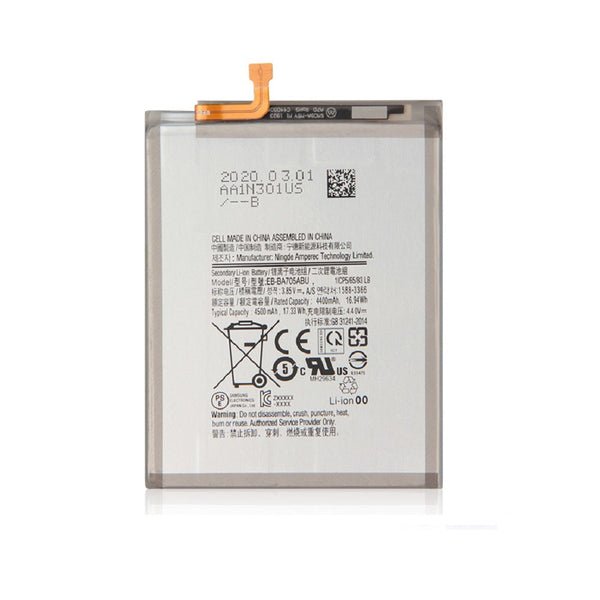
Description
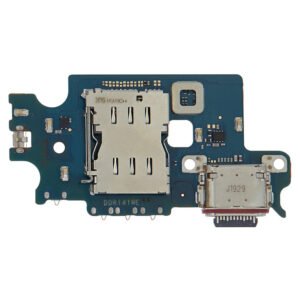
Samsung Galaxy A70 Charging Port Replacement – Restore Charging & USB Functionality
Fix charging and data transfer issues on your Samsung Galaxy A70 (SM-A705) with this high-quality charging port replacement. Built to OEM standards, this USB-C port flex cable assembly ensures fast power delivery, stable connection, and smooth data syncing.
Ideal for repairing worn, damaged, or malfunctioning charging ports, this replacement part helps bring your device back to full functionality quickly and reliably.
Why Choose This Charging Port Replacement?
Designed specifically for Samsung Galaxy A70 (SM-A705)
Supports fast charging and high-speed data transfer
OEM-quality materials for durability and precise fit
Resolves common port issues like loose connections or cable detection failures
Easy installation with proper tools
The Samsung Galaxy A70 is known for its sleek design, powerful features, and long-lasting performance. However, like every smartphone, it can also face hardware issues over time. One of the most common problems Galaxy A70 users experience is a faulty charging port. A damaged charging port can prevent your phone from charging properly, cause slow charging, or even stop the device from turning on altogether.
In this article, we’ll dive into the details of the Galaxy A70 charging port, its common issues, signs that it needs replacement, solutions, and why professional repair is the best choice for restoring your device.
Understanding the Galaxy A70 Charging Port
The charging port of the Galaxy A70 is a USB Type-C connector that allows fast charging and data transfer. It’s designed for durability, but constant plugging and unplugging, dust, moisture, or physical damage can lead to problems. Without a fully functional charging port, the phone cannot perform one of its most essential tasks: recharging the battery.
Key functions of the charging port:
-
Power input for recharging the battery
-
Data transfer between phone and computer
-
Support for accessories like OTG connections
-
Stable connection for fast charging
Common Problems with the Galaxy A70 Charging Port
-
Loose Connection – The charging cable doesn’t fit snugly or disconnects easily.
-
Slow Charging – The phone takes much longer than usual to charge, even with a fast charger.
-
Not Charging at All – The device does not respond when plugged in.
-
Intermittent Charging – Charging starts and stops repeatedly, which can damage the battery.
-
Physical Damage – Bent pins, corrosion, or broken connectors can stop charging completely.
-
Overheating While Charging – Damaged ports can cause overheating and affect overall performance.
Signs Your Galaxy A70 Charging Port Needs Replacement
-
The charger works with other devices but not with your A70.
-
You have to hold the cable at a certain angle for charging to begin.
-
The port feels loose or physically damaged.
-
Dust or moisture has built up inside, and cleaning doesn’t solve the issue.
-
Wireless charging or other charging methods are unavailable (since A70 relies mainly on wired charging).
Solutions for Charging Port Issues
-
Check the Charger and Cable – Rule out adapter or cable problems before assuming port damage.
-
Clean the Charging Port – Use compressed air or a soft brush to remove dust.
-
Inspect for Physical Damage – If the pins are bent or broken, replacement is necessary.
-
Professional Charging Port Replacement – If DIY cleaning doesn’t work, consult experts for safe and reliable replacement.
Why Choose Professional Repair for Galaxy A70 Charging Port?
-
Expert Technicians – Skilled professionals can diagnose and repair the issue quickly.
-
High-Quality Parts – Using genuine or premium replacement parts ensures durability.
-
Warranty & Reliability – Professional services often come with a warranty.
-
Cost-Effective – A charging port replacement is far cheaper than buying a new phone.
-
Quick Turnaround – Most repairs can be done within hours.
DIY vs. Professional Replacement
-
DIY Repair: While tutorials exist, replacing a charging port requires precision tools and skills. Mishandling can damage the motherboard.
-
Professional Repair: Ensures a safe process with guaranteed results. Unless you’re experienced, it’s better to rely on a technician.
How to Prevent Future Charging Port Problems
-
Use only genuine Samsung charging cables and adapters.
-
Avoid using your phone while charging, as it stresses the port.
-
Keep the port clean and dust-free.
-
Store the device in a dry environment to prevent corrosion.
-
Avoid pulling the cable out roughly; unplug gently.
Conclusion
The Samsung Galaxy A70 Charging Port is vital for keeping your phone powered and functional. When it fails, it can disrupt your entire smartphone experience. Recognizing the signs early and opting for professional replacement ensures that your device stays reliable for years to come. Instead of struggling with poor charging performance, investing in a quality charging port replacement will restore your Galaxy A70’s efficiency and prolong its life.
The Samsung Galaxy A70 Charging Port plays a crucial role in keeping the phone alive by ensuring consistent battery charging and smooth data transfer. If your Galaxy A70 is not charging properly, it is often due to issues with the charging port. In this section, we’ll go deep into the common causes of charging port damage, step-by-step troubleshooting, replacement options, and why using genuine parts is essential. This guide is optimized with keywords such as Galaxy A70 Charging Port, Samsung A70 Charging Port Replacement, A70 Not Charging, A70 USB-C Port Issue, Buy Galaxy A70 Charging Port to help users find relevant solutions.
Why Does the Galaxy A70 Charging Port Get Damaged?
Despite its modern USB Type-C design, the Galaxy A70 charging port can suffer wear and tear over time. Here are the main causes:
-
Frequent Plugging and Unplugging – Daily use puts strain on the charging port pins.
-
Dust and Debris Accumulation – Small particles block connections inside the port.
-
Moisture and Corrosion – Exposure to water or humidity corrodes the port’s metal connectors.
-
Cheap Charging Cables – Low-quality chargers damage the Samsung Galaxy A70 charging port.
-
Physical Drops and Impact – Accidental drops may loosen the USB-C connector.
-
Overheating – Using the phone while charging causes extra heat, weakening the port.
Common Symptoms of a Faulty Galaxy A70 Charging Port
If your Galaxy A70 shows these issues, the charging port might be failing:
-
Phone only charges when the cable is at a certain angle
-
Galaxy A70 not charging even with a working adapter
-
Slow charging or no fast charging support
-
USB data transfer not working on PC
-
The charging cable feels loose in the port
-
Visible damage or bent pins inside the port
Troubleshooting the Samsung Galaxy A70 Charging Port
Before replacing the Galaxy A70 Charging Port, try these solutions:
-
Clean the Charging Port
-
Use compressed air or a soft brush to remove dirt.
-
Avoid sharp objects that can damage the connectors.
-
-
Test with Another Charger and Cable
-
Check if the issue is with the cable rather than the port.
-
-
Restart or Reset the Device
-
Software glitches sometimes mimic charging port problems.
-
-
Check for Moisture Alerts
-
If your phone shows a moisture detected warning, keep it dry before charging.
-
If none of these fixes work, then it’s time for a Samsung Galaxy A70 Charging Port replacement.
Galaxy A70 Charging Port Replacement Process
Professional repair shops follow these steps for charging port replacement:
-
Powering off the device safely
-
Removing the back glass panel with heat
-
Disconnecting the battery to avoid short circuits
-
Unscrewing and removing the charging port flex cable
-
Installing a new Galaxy A70 Charging Port flex cable
-
Reassembling the device carefully
-
Testing charging and data transfer functionality
Why Professional Repair is Better Than DIY
-
Precision Required: The charging port is connected to the motherboard; one mistake can ruin the phone.
-
Special Tools Needed: Heat gun, opening tools, and soldering kits are necessary.
-
Genuine Parts: Professionals use high-quality Galaxy A70 Charging Port replacements.
-
Warranty on Repairs: Reliable shops provide guarantees for their services.
Where to Buy Galaxy A70 Charging Port Replacements
If you prefer DIY, you can purchase:
-
Original Galaxy A70 Charging Port Flex Cable
-
Compatible Galaxy A70 Charging Port Connectors
These are available online on trusted platforms like eBay, Amazon, and repair part suppliers. Always make sure to choose OEM-quality charging ports for long-term durability.
SEO Keyword-Rich Advice for Users
When searching online, people usually type:
-
Galaxy A70 charging port replacement near me
-
Samsung A70 charging port not working
-
Buy Galaxy A70 charging port flex cable
-
Samsung Galaxy A70 USB-C port repair cost
-
A70 not charging solution
That’s why it’s important to provide keyword-optimized content that directly addresses these searches.
How Much Does Galaxy A70 Charging Port Replacement Cost?
The price depends on where you get it repaired:
-
DIY Replacement: $10 – $20 (parts only)
-
Local Repair Shops: $30 – $50
-
Authorized Samsung Centers: $50 – $80 (with warranty)
Although professional repairs cost more, they ensure safety and longer device life.
Preventing Future Charging Port Issues
To extend the life of your Galaxy A70 charging port:
-
Use original Samsung chargers only
-
Avoid bending the cable while charging
-
Do not use the phone during charging sessions
-
Keep the port clean with regular maintenance
-
Store the device in a dry environment to avoid moisture damage
The Samsung Galaxy A70 Charging Port is one of the most essential parts of the phone, responsible for charging and data transfer. Without a working Galaxy A70 USB-C Charging Port, even the best features of the phone become useless. In this section, we will cover in detail the technical aspects, professional solutions, DIY guides, costs, and preventive measures to maintain your Samsung A70 Charging Port in excellent condition. This comprehensive section is packed with SEO keywords like Galaxy A70 Charging Port Replacement, Samsung A70 Not Charging, A70 USB Port Repair, Buy Galaxy A70 Charging Port, A70 Fast Charging Not Working.
Technical Overview of the Galaxy A70 Charging Port
The Samsung Galaxy A70 uses a USB Type-C port, which supports:
-
Fast Charging up to 25W
-
USB 2.0 data transfer speeds
-
Reversible cable insertion
-
Durable pin alignment for long-term usage
Despite being durable, the Galaxy A70 charging port flex cable is still vulnerable to dust, bending, moisture, and daily wear.
Signs Your Galaxy A70 Charging Port Needs Replacement
If you are facing any of these issues, the Galaxy A70 Charging Port may be faulty:
-
Galaxy A70 not charging at all
-
Phone charges very slowly despite fast charger
-
A70 charging cable feels loose in the port
-
Charging works only at specific angles
-
USB data transfer not detected on PC
-
Moisture warning messages
-
Visible physical damage or bent pins
These are clear indicators that you need a Galaxy A70 Charging Port repair or replacement.
DIY Methods to Fix Samsung Galaxy A70 Charging Port
If you are confident, you can try fixing the Galaxy A70 charging port at home.
-
Cleaning Method
-
Use compressed air to remove dust
-
Soft brush to clean inside gently
-
Never use sharp objects
-
-
Cable & Adapter Testing
-
Try original Samsung charger
-
Check if the issue is with the cable
-
-
Moisture Removal
-
Let the phone dry if it was exposed to water
-
Avoid charging until moisture is gone
-
-
Replacing Galaxy A70 Charging Port Flex Cable
-
Buy an OEM Galaxy A70 Charging Port flex cable
-
Use repair kit to open back cover
-
Disconnect old flex cable
-
Install new charging port
-
Test before closing
-
Note: DIY repair can void warranty and damage the phone if done incorrectly.
Professional Galaxy A70 Charging Port Replacement
If DIY is risky, professional repair shops are a better choice:
-
Step 1: Phone is powered off and back cover removed with heat.
-
Step 2: Battery connector is safely detached.
-
Step 3: Charging port flex cable is unscrewed and replaced.
-
Step 4: New charging port is installed and tested.
-
Step 5: Device is reassembled and sealed.
Professional repairs ensure your Samsung A70 Charging Port is replaced safely with genuine parts.
Cost of Galaxy A70 Charging Port Replacement
-
DIY Replacement Parts: $10 – $20
-
Local Repair Shops: $30 – $50
-
Authorized Samsung Service Centers: $50 – $80
The cost may vary based on region, availability of parts, and service provider.
Where to Buy Galaxy A70 Charging Port Parts
You can purchase a Galaxy A70 charging port flex cable from:
-
Amazon
-
eBay
-
AliExpress
-
Local mobile repair shops
Always ensure the part is OEM-quality for best performance.
Preventing Galaxy A70 Charging Port Problems
To increase the life of your Samsung Galaxy A70 Charging Port, follow these tips:
-
Use original Samsung chargers only
-
Avoid over-bending charging cables
-
Do not charge in humid or wet environments
-
Keep the port clean using soft tools
-
Avoid using the phone while charging
SEO Keyword Optimization for Galaxy A70 Charging Port
When users search online, they type queries like:
-
Samsung Galaxy A70 not charging solution
-
Buy Galaxy A70 charging port replacement flex cable
-
A70 fast charging not working fix
-
Galaxy A70 charging port repair cost
-
Samsung A70 USB-C port loose
Including these keyword phrases in content helps in ranking higher on search engines and directly answers customer problems.
FAQs About Samsung Galaxy A70 Charging Port
Q1: Why is my Galaxy A70 not charging properly?
A: It could be due to a faulty charging port, damaged cable, or moisture inside the port.Q2: Can I replace the Galaxy A70 charging port myself?
A: Yes, but only if you have the right tools and experience. Otherwise, professional repair is recommended.Q3: How long does it take to replace the charging port?
A: A professional can replace it within 30–60 minutes.Q4: Is the Galaxy A70 charging port expensive to replace?
A: No, compared to motherboard repair, it is affordable (around $30–$50).When a charging port is replaced, it is not just a single part of the phone that is addressed—it impacts the overall functioning and usability of the device. Many people assume that after a repair, the phone will function just like it did on the first day of purchase. While that is partly true, the performance and durability of the device also depend on how it is handled after the replacement. Understanding how to care for your phone after a charging port repair can make a massive difference in ensuring that the device lasts longer and continues to function without interruption.
One of the first aspects to consider is the quality of the replacement part. A high-quality charging port that is properly installed by a skilled technician lays the foundation for improved performance. Once this is done, the responsibility shifts to the user. Many issues with charging ports arise because of negligence or careless handling. Small habits, such as forcing the cable in at an angle or using poor-quality accessories, can undo the benefits of the repair. A gentle and careful approach will always result in longer durability.
Another major factor is the type of charging cable used after the port replacement. Not all cables are manufactured to the same standards. Some third-party options might look similar but lack the protective layers and consistent voltage supply that branded ones provide. Using low-quality cables can stress the new charging port, leading to connection issues or reduced charging speed. It is recommended to always invest in certified charging cables and adapters that match the specifications of the device.
In addition, environmental conditions play a role in the longevity of a repaired device. Charging ports are small and delicate, making them vulnerable to dust, moisture, and debris. Even something as simple as keeping the phone in a pocket with loose lint can cause gradual buildup inside the port. Over time, this may reduce charging efficiency and connectivity. To avoid this, users should make a habit of cleaning their device carefully using soft tools like a dry brush or compressed air, ensuring that no particles accumulate inside the port.
Equally important is avoiding the use of the phone during charging. While it may feel convenient to continue watching videos, gaming, or browsing while the device is plugged in, doing so places strain on the charging port and the cable. Movement during charging can cause loose connections, bending of pins, or even internal wear. Instead, it is best to leave the phone idle and let it charge fully without disturbance. This habit not only protects the port but also improves the battery’s health in the long run.
Moreover, handling the charging port with care requires an understanding of the stress points in daily use. For instance, plugging the phone into a charger and then keeping it in an awkward position, such as letting it hang from the socket, can damage both the cable and the port. Similarly, tugging the cable out forcefully instead of gently removing it can wear down the connection points. Small adjustments in how the device is managed daily can make a substantial difference in preserving its functionality.
Another layer of care involves software. While the charging port is a hardware component, the device’s software regulates charging cycles and battery performance. Keeping the software updated ensures that the phone charges at the correct rate and avoids overheating. Ignoring updates can sometimes cause irregular charging behavior, which indirectly affects the port’s health.
Lastly, prevention is always better than repeated repairs. Once a charging port has been replaced, users should develop habits that reduce the chances of future problems. This includes avoiding exposure to liquids, using protective cases that cover the charging area, and monitoring for any early signs of malfunction, such as loose connections or slow charging. Acting early when an issue arises can prevent it from turning into a major repair later.
In conclusion, replacing a charging port restores a device’s functionality, but the real success of the repair lies in how well the phone is maintained afterward. By paying attention to small habits—using quality accessories, avoiding rough handling, keeping the device clean, and staying mindful of software updates—users can ensure that their phone remains reliable for years to come. A charging port may be just one part of the device, but its care and maintenance reflect the overall attention given to the phone as a whole.
-
Reviews
There are no reviews yet.