
Description
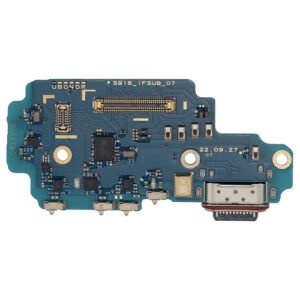
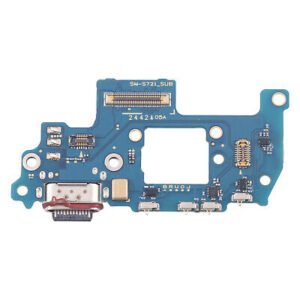
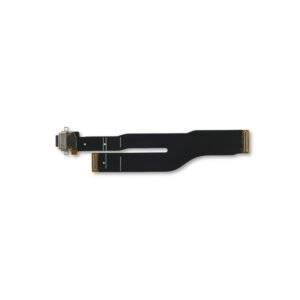
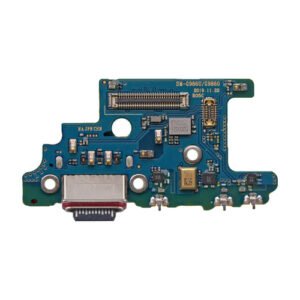
Samsung Galaxy A51 4G (A515 / 2020) Charging Port Board Replacement – Reliable Power & Audio Restoration
Restore power and communication to your Samsung Galaxy A51 4G with this high-quality charging port board replacement. It includes the USB Type-C port and integrated microphone circuitry, ensuring reliable charging, data transfer, and voice functionality.
Perfect for fixing charging instability or audio issues due to port damage or wear.
Why Choose This Charging Port Board?
Specifically designed for Galaxy A51 4G (A515 / 2020)
Supports fast charging and USB-C data syncing
Integrated microphone circuit restores audio clarity
OEM-grade build ensures durability and perfect fit
Fully tested for voltage, charging, and mic performance
Power up and stay connected with this dependable charging port replacement for your A51 4G.
The Galaxy A51 4G Charging Port is one of the most vital components of the device, ensuring that your smartphone remains powered up and ready for use. Without a properly functioning charging port, the phone cannot receive adequate power supply or sync data effectively. As smartphones have become essential in our everyday lives, maintaining the charging port’s efficiency has become just as crucial as preserving the battery or display.
In this guide, we’ll cover everything you need to know about the Galaxy A51 4G Charging Port, including common problems, repair solutions, maintenance tips, and why using quality replacement parts is critical.
Importance of the Galaxy A51 4G Charging Port
The charging port of the Galaxy A51 4G does far more than simply transfer power. It acts as a data hub, enabling the connection between your smartphone and external devices. Whether you want to back up files, sync media, or update software, the charging port plays a central role.
A defective charging port can lead to issues like:
-
Slow charging
-
Intermittent connection
-
Phone not charging at all
-
Data transfer problems
These problems not only cause frustration but can also reduce the phone’s overall life span if not addressed promptly.
Common Issues with the Galaxy A51 4G Charging Port
Several factors can contribute to charging port problems:
-
Dust and Debris Accumulation – Small particles often get lodged inside the port, causing weak connections.
-
Loose Connection – Continuous plugging and unplugging of the charger can loosen the port.
-
Water Damage – Exposure to moisture or liquid spills can corrode the port’s internal components.
-
Physical Damage – Rough usage, bending cables, or accidental drops may damage the charging connector.
-
Faulty Cables/Chargers – Sometimes the issue lies with the accessories rather than the port itself.
How to Diagnose a Faulty Charging Port
Before replacing the charging port, it is important to confirm whether the issue actually lies in the port itself. Here are a few simple tests:
-
Try using different chargers and cables.
-
Inspect the port for visible dirt or bent pins.
-
Connect the phone to a computer to see if it is detected.
-
Check if wireless charging (if available) works; if it does, the issue is likely with the port.
Galaxy A51 4G Charging Port Replacement Process
If cleaning or testing does not fix the issue, a replacement may be required. Here’s a general breakdown of the replacement process:
-
Power Down the Device – Safety first. Always switch off the smartphone before repair.
-
Remove the Back Cover – The Galaxy A51 4G has a sealed design that requires careful heating to loosen adhesive before opening.
-
Disconnect the Battery – To avoid short circuits during repair.
-
Access the Charging Port Assembly – Remove screws and disconnect the flex cable to reach the charging module.
-
Replace with New Charging Port – Install the new charging port module compatible with Galaxy A51 4G.
-
Reassemble the Device – Secure everything back in place and test functionality.
Maintenance Tips for Galaxy A51 4G Charging Port
To extend the life of your charging port:
-
Always use original Samsung cables and adapters.
-
Avoid pulling the cable forcefully.
-
Clean the port gently using a soft brush or compressed air.
-
Keep the phone away from liquid or damp environments.
-
Use protective covers to minimize dust accumulation.
Why Choose Genuine Galaxy A51 4G Charging Port Replacements?
Using third-party or low-quality charging ports may temporarily fix the issue but can lead to further damage. Genuine replacement parts ensure:
-
Proper compatibility
-
Faster charging speeds
-
Stable data transfer
-
Longevity of the device
Conclusion
The Galaxy A51 4G Charging Port is a small yet powerful component that keeps your phone functional. Understanding its importance, recognizing early signs of issues, and opting for genuine replacement parts can save you from bigger problems in the long run. Whether you are a casual user or a heavy smartphone user, maintaining your charging port ensures that your device remains reliable, efficient, and long-lasting.
The Galaxy A51 4G Charging Port is one of the most frequently used and most vulnerable components of your smartphone. Whether you charge your phone daily or transfer data through USB cables, the charging port undergoes constant wear and tear. A damaged or faulty Galaxy A51 4G Charging Port can make your phone almost unusable, as it directly affects charging efficiency and data transfer capability. That is why understanding everything about the Galaxy A51 Charging Port Replacement and Galaxy A51 Charging Connector Repair is extremely important.
Why the Galaxy A51 4G Charging Port is Essential
Without a functional Galaxy A51 4G Charging Port, your device cannot perform even the simplest task of charging. Imagine being in the middle of an important call, gaming session, or work presentation, and suddenly your phone refuses to charge due to a faulty port. This is where timely Galaxy A51 4G Charging Port Repair becomes necessary.
The charging port not only transfers power but also enables:
-
Data Synchronization – connecting your Galaxy A51 to a laptop or PC.
-
Fast Charging Compatibility – only works with a healthy charging connector.
-
Software Updates – essential for maintaining phone security and performance.
Most Common Problems in Galaxy A51 4G Charging Port
The Galaxy A51 4G Charging Port can face a variety of issues. Some of the most common include:
-
Loose Charging Connector – The cable doesn’t fit properly, leading to intermittent charging.
-
Slow Charging – Due to dirt buildup or partial damage inside the port.
-
No Charging at All – A completely dead charging connector requires immediate replacement.
-
Data Transfer Failure – When the Galaxy A51 Charging Port fails, your phone won’t connect to computers or external devices.
-
Overheating While Charging – Damaged pins in the port may cause irregular current flow.
Signs You Need Galaxy A51 Charging Port Replacement
If you notice any of the following, it’s time to get a Galaxy A51 Charging Port Replacement:
-
Phone only charges when the cable is positioned at a certain angle.
-
Original Samsung charger is not working, but works with other devices.
-
Frequent disconnections during data transfer.
-
No fast charging symbol appears.
-
Charging cable becomes unusually hot.
Galaxy A51 4G Charging Port Replacement Process
The process of Galaxy A51 Charging Port Repair or replacement involves technical steps:
-
Power Off the Device – Safety first before working with electronics.
-
Heat and Remove Back Cover – Adhesive needs to be softened.
-
Disconnect Battery – To avoid electrical damage during repair.
-
Access the Charging Module – Remove screws and protective shields.
-
Replace the Galaxy A51 Charging Port Assembly – Install a new, genuine charging connector.
-
Reassemble and Test – Ensure the Galaxy A51 4G Charging Port works for both charging and data transfer.
Why Genuine Galaxy A51 4G Charging Port is Important
Using a fake or low-quality charging connector can lead to:
-
Reduced charging speeds
-
Risk of overheating
-
Short circuit issues
-
Damage to the battery and motherboard
Always insist on genuine Galaxy A51 4G Charging Port Replacement Parts for maximum reliability.
DIY Cleaning Tips Before Repair
Sometimes the issue isn’t a broken port but dirt inside. You can try:
-
Using a soft brush to gently clean the Galaxy A51 Charging Port.
-
Blowing compressed air to remove dust.
-
Avoid using sharp objects, as they can damage the pins inside.
If cleaning doesn’t fix the issue, then a Galaxy A51 4G Charging Port Repair is necessary.
Preventive Maintenance for Galaxy A51 4G Charging Port
To keep your Galaxy A51 Charging Connector safe:
-
Avoid over-bending or pulling the charging cable.
-
Use only Samsung-certified chargers.
-
Keep your phone away from liquids and humidity.
-
Use a dust-proof phone case.
Professional Galaxy A51 Charging Port Repair Services
While DIY attempts may seem tempting, professional Galaxy A51 4G Charging Port Replacement is always safer. Experts use the right tools and ensure the new connector is properly installed, protecting your phone from further damage.
The Galaxy A51 4G Charging Port may look like a small part of the phone, but its role is undeniably huge. Without it, your device simply cannot stay alive. In this section, we’ll explore the practical importance of the charging port, how it affects daily usage, common user experiences, real-world problems, and why timely attention to this component is so crucial.
Everyday Importance of the Galaxy A51 Charging Port
Most people charge their Galaxy A51 4G at least once or twice every day. That means the charging port is constantly in use. Each time you plug or unplug the charger, the connector pins inside the port undergo pressure and friction. Over months or years, this natural wear and tear can cause problems.
A stable charging port ensures:
-
Consistent Charging Speed – No unexpected pauses.
-
Reliable Data Transfer – Smooth connection with laptops or PCs.
-
Support for Fast Charging – Essential for users who charge quickly on the go.
User Experiences with Faulty Charging Ports
Many Galaxy A51 4G users share similar stories when the port starts to fail:
-
“My phone only charges when I hold the cable at an angle.”
– This indicates looseness inside the charging port. -
“I bought a new charger, but the phone still won’t charge properly.”
– This usually points towards the Galaxy A51 Charging Port Replacement being necessary. -
“Sometimes it shows charging, but the battery percentage doesn’t increase.”
– Damaged pins or dust blocking the connection may cause this.
Common Causes of Charging Port Damage
The Galaxy A51 4G Charging Port can stop working for several reasons:
-
Dust and Lint Accumulation – Daily use in pockets and bags causes dirt to collect inside.
-
Moisture and Spills – Even small drops of liquid can corrode the metal connectors.
-
Cheap Charging Cables – Non-certified cables often put strain on the port.
-
Accidental Pulls – Yanking the cable while charging weakens the port.
How to Identify Early Symptoms
Catching the problem early can save your phone from bigger damage. Some early signs include:
-
Slow charging even with a fast charger.
-
Charger disconnects if the phone is moved slightly.
-
Inconsistent data transfer.
-
No response when connecting to a PC.
If you notice these, it’s time to consider Galaxy A51 Charging Port Repair before the issue worsens.
DIY Fixes vs. Professional Repair
Some users try simple DIY solutions before going for professional repair. Cleaning the Galaxy A51 Charging Connector with compressed air or a soft brush can sometimes solve minor problems. But if the issue is internal, such as broken pins or loose soldering, then professional Galaxy A51 Charging Port Replacement is the only reliable solution.
DIY Works Best For:
-
Dust removal
-
Lint cleaning
-
Checking with another charger
Professional Repair Needed For:
-
Damaged or burnt pins
-
Broken charging connector
-
Loose or faulty soldering
The Replacement Process Explained Simply
When professionals replace a Galaxy A51 4G Charging Port, the process typically includes:
-
Opening the device carefully using heat and tools.
-
Disconnecting the battery for safety.
-
Accessing the charging board.
-
Removing the old, faulty port.
-
Soldering and installing the new charging connector.
-
Reassembling the device and testing it.
This ensures your phone works like new again.
Why Genuine Parts Matter
A genuine Galaxy A51 Charging Port ensures compatibility and longevity. Fake or low-quality replacements might work temporarily but often cause bigger problems such as overheating, short-circuiting, or damaging the battery.
Preventive Tips to Protect Your Galaxy A51 Charging Port
-
Use Original Cables and Chargers – They are designed for safe voltage and current flow.
-
Charge on Stable Surfaces – Avoid charging on beds or couches where cables bend sharply.
-
Avoid Overcharging – Unplug once the phone is full to reduce port stress.
-
Keep It Clean – Regularly check for dust or lint inside the port.
Long-Term Benefits of Timely Repair
Getting a Galaxy A51 4G Charging Port Replacement at the right time ensures:
-
Better charging efficiency.
-
Longer battery health.
-
Smooth data transfer for work or entertainment.
-
Peace of mind without worrying about sudden shutdowns.
You said:
ChatGPT said:
-
Reviews
There are no reviews yet.