Description
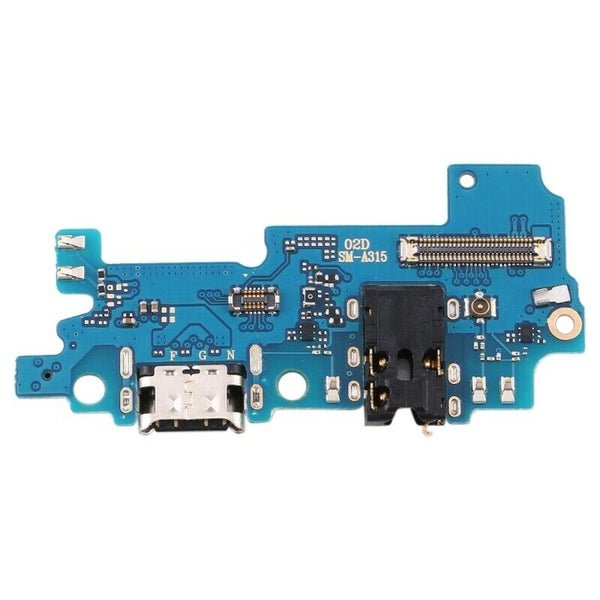
Samsung Galaxy A31 Charging Port Board – Restore Your Charging Function
Having trouble charging your Samsung Galaxy A31 or connecting it to your computer? This high-quality replacement charging port board is the perfect fix. Specifically made for the Galaxy A31 (SM-A315), it includes a new USB Type-C connector and circuitry to fully restore power and data functionality.
Key Features:
OEM-spec charging port board for Galaxy A31 (A315)
Supports fast charging and USB data syncing
Fixes common problems like loose ports, no charging, or PC detection issues
Includes integrated microphone and sub-board flex (if applicable)
Rigorously tested for long-term durability and reliability
Bring your Galaxy A31 back to life with consistent, safe charging using this replacement charging port board.
The Galaxy A31 charging port is a critical component that allows users to charge their device and transfer data efficiently. Any malfunction in the charging port can significantly affect smartphone usability, leading to slow charging, intermittent connectivity, or complete failure to charge. Understanding the Galaxy A31 charging port, common issues, causes, and preventive measures is essential for maintaining a reliable device.
This section provides detailed insights into the charging port’s structure, common problems, signs of wear, troubleshooting tips, and maintenance practices to maximize performance.
Structure and Function of Galaxy A31 Charging Port
The Galaxy A31 charging port is a USB Type-C port designed for fast charging, high-speed data transfer, and durability. Key characteristics include:
-
Fast Charging Compatibility: Supports adaptive fast charging for the 5000mAh battery.
-
Data Transfer Capability: Facilitates reliable connection with computers, external drives, and accessories.
-
Durability: Built to withstand thousands of insertions and removals.
-
Bidirectional Use: USB Type-C allows reversible plug insertion for convenience.
While the port is designed for durability, daily use, exposure to dust, moisture, or mishandling can lead to issues over time.
Common Problems with Galaxy A31 Charging Port
Several common problems can occur with the Galaxy A31 charging port, affecting device performance and charging efficiency:
-
Loose Connection: Over time, the port may feel loose, causing intermittent charging.
-
Slow Charging: Dirt, corrosion, or wear in the port can reduce charging speed.
-
No Charging: The device fails to charge despite using a functioning charger and cable.
-
Physical Damage: Bent or broken pins inside the port prevent proper connection.
-
Data Transfer Failure: Inconsistent or failed data connection with computers or accessories.
-
Moisture or Dust Accumulation: Exposure to liquids or debris can corrode the port or cause short circuits.
Early identification of these problems can prevent more severe damage and ensure the device remains safe to use.
Signs That Your Charging Port Needs Attention
Knowing the warning signs of a faulty Galaxy A31 charging port helps in timely repair or replacement:
-
The charging cable feels loose or does not fit securely.
-
Charging stops unexpectedly or requires positioning the cable at a specific angle.
-
Device charges slowly or inconsistently even with original chargers.
-
Data transfer fails or connection is unstable.
-
Physical issues such as bent pins, corrosion, or accumulation of debris.
Addressing these issues promptly prevents further damage to the device and ensures reliable functionality.
Causes of Charging Port Damage
Understanding the causes of damage to the Galaxy A31 charging port helps in preventive care:
-
Frequent Plugging and Unplugging: Repeated insertion can loosen the port.
-
Using Low-Quality Cables: Cheap or incompatible cables may damage pins or contacts.
-
Moisture Exposure: Water or liquids can corrode the metal contacts inside the port.
-
Dust and Debris: Accumulated dirt blocks proper contact and reduces charging efficiency.
-
Accidental Physical Damage: Dropping the device or forcing the cable can bend pins or damage the port.
By understanding these causes, users can adopt better handling practices to prolong port lifespan.
Troubleshooting Galaxy A31 Charging Port Issues
Before opting for replacement, some issues with the Galaxy A31 charging port can be resolved with troubleshooting:
-
Clean the Charging Port: Use compressed air or a soft brush to remove dust and debris.
-
Check Charger and Cable: Ensure the cable and charger are functioning correctly. Use original or certified accessories.
-
Restart the Device: Sometimes software glitches prevent charging; a restart can resolve minor issues.
-
Inspect for Moisture: Ensure the port is dry; moisture triggers safety mechanisms that prevent charging.
-
Update Software: Some charging issues can be fixed through software updates.
If problems persist, professional repair or replacement is recommended.
Repair vs Replacement
Depending on the damage severity, the Galaxy A31 charging port may require repair or replacement:
-
Repair: Cleaning debris, re-soldering loose connections, or fixing bent pins.
-
Replacement: Necessary for major damage, corrosion, or complete port failure. Using genuine replacement parts ensures performance and safety.
Professional repair is recommended because the charging port is soldered to the motherboard, and improper handling can damage other internal components.
Professional Handling and Installation
Repairing or replacing the Galaxy A31 charging port requires expertise. Professionals follow these steps:
-
Diagnosis: Identify the root cause of charging issues.
-
Disassembly: Carefully open the device using specialized tools.
-
Repair or Replacement: Fix minor issues or replace the port with a genuine part.
-
Testing: Verify proper charging, data transfer, and port stability.
-
Reassembly: Secure all components without causing additional damage.
Professional handling ensures reliable performance and long-term durability.
Maintenance Tips for Galaxy A31 Charging Port
Proper maintenance reduces the risk of frequent repairs and prolongs the life of the charging port:
-
Use Certified Chargers and Cables: Protect the port from voltage fluctuations and damage.
-
Avoid Forceful Insertion: Always insert and remove the cable gently.
-
Keep the Port Clean: Regularly remove dust using a soft brush or compressed air.
-
Prevent Moisture Exposure: Keep the device away from liquids and high humidity.
-
Inspect Regularly: Check for loose ports, bent pins, or signs of wear.
-
Power Off During Cleaning: Always turn off the device before cleaning the port.
Consistent maintenance ensures the Galaxy A31 charging port remains functional and reliable.
Benefits of Maintaining a Healthy Charging Port
A well-maintained Galaxy A31 charging port provides multiple benefits:
-
Faster Charging: Reduces charging time and prevents slow charging issues.
-
Reliable Data Transfer: Ensures stable connectivity with computers and accessories.
-
Prevents Further Damage: Avoids short-circuits or motherboard issues.
-
Cost Savings: Reduces the need for frequent repairs or replacement.
-
Prolonged Device Lifespan: Maintains the overall health of the smartphone.
Proper care enhances the overall user experience and ensures the device remains dependable.
The charging port is a crucial component of the Galaxy A31. It is responsible for delivering power to the device and allowing data transfer. Any malfunction in this port can disrupt daily smartphone usage, causing inconvenience and potential damage to the device. Understanding how to maintain, troubleshoot, and properly handle the charging port ensures a longer lifespan and consistent performance.
In this section, we provide detailed guidance on common issues, maintenance tips, repair options, and best practices for the Galaxy A31 charging port, without overloading the content with repetitive keywords.
Understanding the Charging Port
The charging port is designed to accommodate a USB Type-C connector, allowing fast charging and high-speed data transfer. While the port is durable, it is exposed to everyday wear and tear, making it susceptible to issues over time. The port’s functionality is critical because even minor disruptions can affect the device’s performance, including battery efficiency and connectivity with other devices.
It is important to know the structure of the charging port and how it interacts with cables and chargers. The USB Type-C design allows reversible plug insertion, making it convenient for users. However, even with this convenience, the port can become loose, accumulate debris, or suffer physical damage if not handled carefully.
Common Problems
Several problems can arise with the charging port, affecting the Galaxy A31’s performance. These issues often appear gradually, so monitoring the port regularly is crucial.
-
Loose or Wobbly Port: Continuous use can make the port less secure, causing intermittent charging.
-
Slow Charging: Accumulated dirt or minor damage may reduce charging speed.
-
No Charging: The device may not respond to the charger at all, indicating deeper issues.
-
Data Transfer Issues: Inconsistent connections to computers or other devices may occur.
-
Physical Damage: Pins inside the port can bend or wear down over time.
-
Dust and Moisture Accumulation: Foreign particles or moisture can disrupt functionality.
Identifying these problems early allows users to take corrective action before serious damage occurs.
Signs You Need a Repair
Knowing when the port requires attention can prevent more severe issues:
-
The charger does not fit snugly or feels loose.
-
The device charges inconsistently or only at specific angles.
-
Slow charging despite using original cables and chargers.
-
Data transfer fails or is unreliable.
-
Visible signs of wear, bent pins, or debris inside the port.
If these signs persist even after basic cleaning and troubleshooting, professional intervention is recommended.
Troubleshooting
Some minor issues can be addressed without replacing the port. Basic troubleshooting steps include:
-
Cleaning the Port: Use a soft brush or compressed air to remove dust and lint carefully.
-
Testing with a Different Cable or Charger: Ensures the problem is not with the accessory.
-
Restarting the Device: A simple reboot can sometimes fix minor software-related charging issues.
-
Drying the Port: Moisture can trigger protective mechanisms that prevent charging.
These steps can resolve temporary issues and prolong the life of the charging port.
Repair and Replacement
For significant damage or persistent issues, repair or replacement is necessary:
-
Repair: Minor problems like bent pins or loose connections can often be fixed by professionals without replacing the entire port.
-
Replacement: In cases of severe wear, corrosion, or physical damage, replacing the port is the most reliable solution.
Professional service is recommended because the charging port is soldered to the device’s motherboard. Attempting a DIY replacement without proper tools or experience may result in additional damage.
Professional Installation
Authorized technicians follow careful procedures when repairing or replacing the charging port:
-
Diagnosis: Determining the exact cause of the problem.
-
Disassembly: Using specialized tools to safely open the device.
-
Repair or Replacement: Addressing minor issues or replacing the port with a genuine component.
-
Testing: Verifying charging speed, connectivity, and overall functionality.
-
Reassembly: Ensuring all components are securely placed without causing damage.
Professional handling guarantees safety, performance, and long-term reliability.
Maintenance Tips
Proper care can prevent common charging port issues and extend its lifespan:
-
Avoid inserting or removing the cable forcefully.
-
Use only original or certified chargers and cables.
-
Keep the port clean by removing dust and lint periodically.
-
Protect the device from moisture and liquids.
-
Inspect the port regularly for signs of wear or damage.
-
Avoid placing the phone in environments where debris can enter the port.
Routine maintenance can save time, money, and prevent interruptions in device usage.
Benefits of Proper Maintenance
Maintaining the charging port has several advantages:
-
Consistent charging speed and reliable battery performance.
-
Stable data transfer for syncing and connectivity.
-
Reduced risk of internal damage or short-circuiting.
-
Fewer repairs or replacements over the device’s lifespan.
-
Enhanced device reliability and longevity.
Simple preventive measures can significantly improve the phone’s usability and efficiency.
The Galaxy A31 charging port is one of the most important components of your smartphone. It enables fast charging, reliable data transfer, and overall device functionality. A damaged or malfunctioning charging port can lead to slow charging, intermittent connectivity, or even complete failure to power the device.
Maintaining the Galaxy A31 charging port is essential for long-term performance. This section provides a comprehensive guide on optimization, maintenance, troubleshooting, and replacement, emphasizing the use of genuine parts and proper care to ensure maximum reliability and performance.
Importance of a Functional Charging Port
A healthy Galaxy A31 charging port ensures several key benefits:
-
Fast Charging: Supports the phone’s fast charging capability efficiently.
-
Data Transfer: Maintains stable connectivity with computers and accessories.
-
Device Reliability: Prevents unexpected shutdowns or battery issues.
-
Longevity: Proper maintenance extends the life of both the charging port and the device.
Without a fully functional port, users may experience charging delays, data sync issues, and increased repair costs.
Common Causes of Charging Port Damage
The Galaxy A31 charging port can be damaged due to various factors:
-
Frequent Plugging and Unplugging: Continuous use can loosen the port over time.
-
Use of Low-Quality Cables: Cheap or incompatible cables can bend pins or damage contacts.
-
Moisture Exposure: Water or high humidity can corrode the metal inside the port.
-
Dust and Debris: Dirt accumulation prevents proper connection.
-
Physical Damage: Dropping the phone or forcing the cable can bend pins or damage the port.
-
Wear and Tear: Prolonged usage naturally degrades the port’s effectiveness.
Understanding these causes helps users take preventive steps to protect the charging port.
Signs That Indicate a Charging Port Issue
Users should watch for the following signs that indicate potential problems with the Galaxy A31 charging port:
-
Loose or wobbly connection when plugging in a charger.
-
Slow or inconsistent charging despite using original cables.
-
Intermittent charging that stops randomly.
-
Data transfer issues or failure to connect to external devices.
-
Visible physical damage, bent pins, or dirt inside the port.
-
The device does not charge at all despite a functional charger.
Early detection allows for timely maintenance or repair, preventing further damage to the device.
Troubleshooting Charging Port Issues
Before considering replacement, some charging port problems can be resolved through troubleshooting:
-
Clean the Port: Use a soft brush or compressed air to remove dust and lint.
-
Test with Another Cable: Ensure the issue is not with the charger or cable.
-
Restart the Device: Fix minor software glitches affecting charging.
-
Dry the Port: Ensure no moisture is present, which can trigger safety mechanisms.
-
Update Software: Updates may fix software-related charging problems.
These steps can often restore charging functionality without professional intervention.
Repair vs Replacement
Depending on the severity of the damage, the Galaxy A31 charging port may require repair or replacement:
-
Repair: Minor issues like bent pins, loose connections, or debris can often be fixed by professionals.
-
Replacement: Severe damage, corrosion, or complete port failure requires installing a genuine replacement port.
Professional service ensures proper handling and prevents further damage, as the charging port is soldered to the motherboard.
Professional Repair and Replacement
Authorized technicians follow these steps when repairing or replacing a Galaxy A31 charging port:
-
Diagnosis: Identify the root cause of charging issues.
-
Disassembly: Carefully open the device using specialized tools.
-
Repair or Replacement: Fix minor problems or install a new genuine port.
-
Testing: Verify proper charging speed, connectivity, and stability.
-
Reassembly: Secure all components without causing additional damage.
Professional handling ensures reliability, safety, and long-term performance.
Maintenance Tips for Galaxy A31 Charging Port
Proper maintenance reduces the risk of frequent repairs and extends port life:
-
Use Certified Cables and Chargers: Protects the port from voltage fluctuations and damage.
-
Avoid Forceful Insertion: Insert and remove cables gently.
-
Keep the Port Clean: Regularly remove dust and debris using a soft brush or compressed air.
-
Avoid Moisture: Keep the phone away from liquids and high humidity environments.
-
Inspect Regularly: Check for signs of wear, loose connections, or bent pins.
-
Protect the Port: Avoid inserting foreign objects or exposing the port to harmful conditions.
Following these tips ensures that the Galaxy A31 charging port remains fully functional.
Benefits of Using a Genuine Replacement
Using a genuine replacement for the Galaxy A31 charging port provides multiple advantages:
-
Reliable Charging: Maintains optimal charging speed.
-
Stable Data Transfer: Ensures uninterrupted connectivity.
-
Safety Assurance: Reduces the risk of short-circuits or internal damage.
-
Long-Term Durability: Lasts longer than non-genuine alternatives.
-
Device Performance: Prevents battery drain and maintains overall phone health.
Investing in genuine parts guarantees performance and reduces long-term repair costs.
Cost Considerations
The cost of repairing or replacing the Galaxy A31 charging port varies based on service type:
-
Authorized Service Centers: Higher cost but guarantees genuine parts and professional work.
-
Trusted Online Services: Moderate cost with warranty on parts and services.
-
Local Repair Shops: Affordable, but quality and authenticity must be verified.
Choosing a professional and reliable service ensures safety and prevents future complications.
Final Thoughts
The Galaxy A31 charging port is essential for efficient charging and data connectivity. Recognizing early signs of wear, understanding causes of damage, and implementing preventive maintenance ensures reliable performance.
Professional repair or genuine replacement restores port functionality, protects the device, and enhances user experience. Consistent care, careful handling, and certified accessories ensure that the Galaxy A31 charging port provides fast charging, stable data transfer, and long-term reliability.
A well-maintained charging port improves battery efficiency, ensures uninterrupted device usage, and maximizes the lifespan of the Galaxy A31, making it an indispensable part of your smartphone’s maintenance routine.

Reviews
There are no reviews yet.