Description
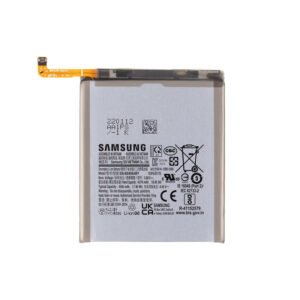
Samsung Galaxy A31 Battery Replacement – Reliable Power, Restored Performance
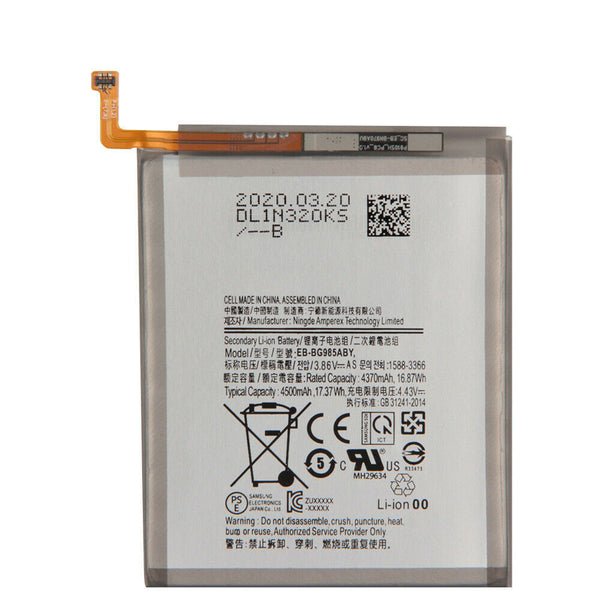
Breathe new life into your Samsung Galaxy A31 with this premium replacement battery. Designed to match the original specifications, this 5000mAh Li-Po battery ensures extended usage time and optimal performance.
Key Features:
High-capacity 5000mAh for long-lasting usage
Built-in safety features to prevent overcharging and overheating
OEM-grade quality for reliable and safe performance
Perfect fit for Samsung Galaxy A31 (SM-A315)
Ideal solution for battery aging, swelling, or charging issues
Whether your phone dies too quickly or won’t hold a charge, this replacement battery gets your A31 back to all-day performance.
The Galaxy A31 battery is a crucial component of the smartphone, providing power for daily usage including calls, apps, browsing, and multimedia. A healthy battery ensures reliable performance, smooth multitasking, and long-lasting device operation. Over time, batteries may lose efficiency due to wear and tear, charging habits, or software-related issues.
This guide covers common battery problems, maintenance tips, troubleshooting methods, and replacement options for the Galaxy A31, helping users maximize battery life and maintain optimal performance.
Overview of Galaxy A31 Battery
The Galaxy A31 comes equipped with a Li-Po 5000 mAh battery, designed for extended use and fast charging. Key features include:
-
Long-lasting Capacity: 5000 mAh ensures full-day usage for most users.
-
Fast Charging Support: Enables quick top-ups to minimize downtime.
-
Efficient Power Management: Optimized software reduces unnecessary power consumption.
-
Durability: Designed to maintain efficiency over hundreds of charging cycles.
Despite its robust design, improper usage or physical damage can reduce battery efficiency over time.
Common Battery Issues
Several problems can arise with the Galaxy A31 battery, affecting device performance and usability:
-
Rapid Battery Drain: Apps running in the background or outdated software may cause excessive power consumption.
-
Slow Charging: A malfunctioning charger, cable, or battery degradation can reduce charging speed.
-
Overheating: Continuous gaming, high brightness, or environmental heat can cause the battery to heat up.
-
Battery Swelling: Physical damage or overcharging may lead to battery swelling, which is dangerous.
-
Unexpected Shutdowns: A worn-out battery may cause the device to turn off even at high charge levels.
-
Battery Percentage Fluctuations: Inaccurate battery readings often occur due to calibration issues or software glitches.
Early recognition of these issues allows for timely troubleshooting and prevents further damage.
Causes of Battery Problems
Understanding what causes battery issues helps in preventing them:
-
Overcharging: Keeping the phone plugged in for extended periods can reduce battery lifespan.
-
Heat Exposure: High temperatures can degrade battery health.
-
Low-Quality Chargers: Using uncertified chargers can damage the battery.
-
Heavy Usage: Gaming, streaming, or multitasking for long periods increases battery wear.
-
Software Glitches: Outdated firmware or apps running in the background can drain power quickly.
-
Physical Damage: Drops or impacts can damage the battery internally.
By identifying these factors, users can take proactive steps to maintain battery health.
Signs You Need Battery Maintenance or Replacement
Some indications that your Galaxy A31 battery may need attention include:
-
Rapid loss of charge even with moderate usage.
-
Slow charging or inability to reach full charge.
-
Device overheating during normal use or charging.
-
Battery swelling or physical deformation.
-
Unexpected shutdowns or restarts.
-
Inconsistent battery percentage readings.
Recognizing these signs early prevents safety hazards and ensures reliable device performance.
Troubleshooting Battery Issues
Several steps can help troubleshoot minor battery problems before seeking professional replacement:
-
Restart the Device: Resolves minor software glitches affecting battery performance.
-
Update Software: Install the latest firmware to optimize power management.
-
Reduce Background Apps: Limit apps running in the background to conserve battery.
-
Check Charging Accessories: Use original or certified chargers and cables.
-
Battery Calibration: Occasionally letting the battery drain completely and then fully charging can recalibrate the battery meter.
-
Optimize Settings: Lower screen brightness, disable unnecessary notifications, and enable battery saver mode.
These steps help restore efficiency and prevent further battery degradation.
Battery Replacement Considerations
When the Galaxy A31 battery no longer holds charge efficiently, replacement may be necessary. Consider the following:
-
Genuine Replacement: Always use original or certified batteries to ensure safety and optimal performance.
-
Professional Service: Battery replacement involves internal handling; professional technicians minimize risks.
-
Cost: Prices vary depending on service providers, but investing in quality ensures long-term reliability.
-
Warranty: Choose service centers that provide warranty on battery replacement for peace of mind.
Using a genuine battery maintains charging efficiency, device safety, and battery life expectancy.
Maintenance Tips for Galaxy A31 Battery
Proper care can significantly extend battery lifespan and enhance daily performance:
-
Avoid Overcharging: Unplug the device once fully charged.
-
Avoid Heat Exposure: Keep the phone away from direct sunlight or hot environments.
-
Use Certified Accessories: Protect the battery from voltage fluctuations.
-
Limit Intensive Usage: Reduce prolonged gaming or streaming sessions to prevent overheating.
-
Enable Power-Saving Features: Battery saver mode can extend battery life during critical usage.
-
Regular Software Updates: Ensure firmware optimizations for better battery management.
-
Physical Care: Avoid dropping or placing heavy objects on the device.
Consistent maintenance preserves battery capacity and ensures reliable performance.
Benefits of Proper Battery Maintenance
Maintaining a healthy Galaxy A31 battery provides multiple advantages:
-
Extended Device Usage: Longer battery life between charges.
-
Faster Charging: Reduced risk of slow charging or overheating.
-
Stable Performance: Prevents unexpected shutdowns or performance issues.
-
Device Longevity: Prolongs overall lifespan of the smartphone.
-
Safety: Reduces risks of battery swelling or overheating-related hazards.
Proper care ensures a safe, efficient, and reliable smartphone experience.
Cost Considerations for Battery Replacement
The cost of replacing a Galaxy A31 battery varies based on service type:
-
Authorized Service Centers: Slightly higher cost but guarantees genuine batteries and professional service.
-
Trusted Online Services: Moderate cost with warranty on parts and service.
-
Local Repair Shops: Affordable but verify authenticity and quality of the battery.
Investing in a professional service with a genuine battery ensures safety and long-term performance.
Conclusion
The Galaxy A31 battery is essential for uninterrupted device usage, smooth performance, and long-term reliability. Recognizing early signs of battery issues, understanding the causes, and following proper maintenance practices ensures optimal performance.
Professional replacement or maintenance restores charging efficiency, prolongs battery lifespan, and prevents potential hazards like overheating or swelling. Proper care, careful usage, and certified accessories ensure the Galaxy A31 battery remains efficient and reliable for daily smartphone operations.
Maintaining a healthy battery enhances device usability, prevents costly repairs, and ensures your Galaxy A31 continues to deliver reliable power for all your needs.
The Galaxy A31 battery is a vital component that powers your smartphone, ensuring smooth operation for calls, apps, browsing, gaming, and multimedia. Over time, even high-quality batteries experience wear and tear, leading to reduced efficiency, slower charging, or sudden shutdowns.
This section provides an in-depth look at the Galaxy A31 battery, covering technical specifications, common issues, preventive measures, troubleshooting steps, and maintenance tips to maximize battery life and device performance.
Technical Overview of Galaxy A31 Battery
The Galaxy A31 is equipped with a Li-Po 5000 mAh battery, designed for extended usage and reliability. Its key technical features include:
-
Capacity: 5000 mAh, sufficient for full-day usage for most users.
-
Fast Charging Support: Ensures quick top-ups to minimize downtime.
-
Efficient Power Management: Software optimizations reduce unnecessary power consumption.
-
Durability: Designed to maintain efficiency over hundreds of charge cycles.
The combination of high capacity and optimized software ensures that the Galaxy A31 battery provides long-lasting performance under normal usage conditions.
Common Issues with Galaxy A31 Battery
Even with proper care, the Galaxy A31 battery can encounter problems over time. Understanding these issues is essential for timely intervention:
-
Rapid Battery Drain: Applications running in the background or outdated software can cause excessive power consumption.
-
Slow Charging: Using a faulty charger, cable, or an aged battery may reduce charging speed.
-
Overheating: Continuous gaming, high brightness, or environmental heat can make the battery hot.
-
Battery Swelling: Overcharging or physical damage can lead to swelling, which is unsafe.
-
Unexpected Shutdowns: A worn-out battery may cause the phone to turn off suddenly.
-
Battery Percentage Fluctuations: Inaccurate readings can result from calibration issues or software glitches.
Identifying these problems early allows users to take preventive measures or seek professional assistance.
Causes of Battery Issues
Several factors contribute to battery degradation or malfunction in the Galaxy A31:
-
Overcharging: Keeping the phone plugged in for extended periods shortens battery lifespan.
-
Exposure to Heat: High temperatures can accelerate battery wear.
-
Low-Quality Chargers or Cables: Uncertified accessories can harm battery health.
-
Heavy Usage: Prolonged gaming, streaming, or multitasking can increase wear.
-
Software Glitches: Outdated firmware or background apps may drain battery quickly.
-
Physical Damage: Dropping the device can impact battery integrity.
Understanding these causes helps users implement preventive practices for longer battery life.
Signs That Battery Needs Attention
Recognizing warning signs helps maintain the Galaxy A31 battery efficiently:
-
Rapid discharge even with moderate usage.
-
Device charges slowly or does not reach full capacity.
-
Phone becomes excessively hot during normal use or charging.
-
Swelling or deformation of the battery.
-
Sudden shutdowns or reboots without warning.
-
Fluctuating battery percentage or inaccurate readings.
Early detection prevents further deterioration and ensures the safety of the device.
Battery Troubleshooting Steps
Some minor battery issues can be resolved without professional help. Recommended steps include:
-
Restart the Device: Clears minor software glitches affecting battery performance.
-
Update Software: Install the latest updates to optimize power management.
-
Manage Background Apps: Close unnecessary apps running in the background.
-
Check Accessories: Use original or certified chargers and cables.
-
Battery Calibration: Occasionally letting the battery drain completely and then charging fully recalibrates the battery meter.
-
Adjust Settings: Lower screen brightness, enable battery saver mode, and disable unused features like Bluetooth or GPS.
These simple measures often restore normal battery performance and prevent further deterioration.
Battery Replacement Considerations
When the Galaxy A31 battery shows signs of severe wear, replacement is the best option. Key considerations include:
-
Genuine Replacement Batteries: Ensures optimal performance, reliability, and safety.
-
Professional Service: Battery replacement involves handling internal components; professional technicians minimize risks.
-
Cost: Prices vary by service provider, but quality replacement ensures long-term reliability.
-
Warranty: Choose services that provide warranty on replacement batteries for peace of mind.
Using a genuine battery guarantees efficiency, charging stability, and battery life expectancy.
Battery Maintenance Tips
Proper care can significantly extend the life of the Galaxy A31 battery:
-
Avoid Overcharging: Disconnect the charger when the battery reaches 100%.
-
Prevent Heat Exposure: Avoid leaving the phone in direct sunlight or hot environments.
-
Use Certified Accessories: Protects the battery from voltage fluctuations.
-
Moderate Intensive Usage: Limit prolonged gaming, streaming, or heavy multitasking sessions.
-
Power-Saving Features: Enable battery saver modes during low battery or critical usage.
-
Regular Software Updates: Ensure firmware optimizations for better battery efficiency.
-
Physical Protection: Avoid dropping or applying pressure to the device.
Consistent maintenance preserves battery capacity and ensures smooth daily performance.
Benefits of Maintaining a Healthy Battery
Maintaining a healthy Galaxy A31 battery offers several advantages:
-
Extended Device Usage: Longer battery life between charges.
-
Efficient Charging: Reduced risk of slow charging or overheating.
-
Stable Device Performance: Prevents sudden shutdowns or performance issues.
-
Long-Term Device Longevity: Preserves the overall health of the smartphone.
-
Safety: Reduces the risk of battery swelling or overheating hazards.
Proper maintenance ensures a safe, reliable, and efficient user experience.
Cost Considerations for Replacement
Battery replacement costs vary depending on service type:
-
Authorized Service Centers: Slightly higher but guarantees genuine batteries and professional service.
-
Trusted Online Services: Moderate cost with warranty on parts and service.
-
Local Repair Shops: Affordable, but verify authenticity and quality of the battery.
Investing in quality replacement ensures safety and long-term battery performance.
The Galaxy A31 battery is a vital component that powers all functions of the device, from calls and messaging to apps, gaming, and multimedia. A well-maintained battery ensures consistent performance, long usage hours, and device reliability. This section covers repair considerations, maintenance tips, best practices, and preventive measures for keeping your battery healthy.
Recognizing Common Battery Issues
Even with proper usage, the Galaxy A31 battery may develop issues over time. Recognizing early signs helps prevent further damage and extends battery life. Common problems include:
-
Rapid Battery Drain: Often caused by background apps or software inefficiencies.
-
Slow Charging: Faulty chargers, cables, or aged batteries can affect charging speed.
-
Overheating: Continuous usage, high screen brightness, or environmental heat can make the battery hot.
-
Unexpected Shutdowns: A worn-out battery may turn off the phone even at moderate charge levels.
-
Battery Percentage Fluctuations: Inaccurate readings can indicate calibration or software issues.
-
Battery Swelling: Physical deformation due to overcharging or aging can be dangerous.
Recognizing these issues early allows for timely intervention, whether through troubleshooting or professional assistance.
Causes of Battery Problems
Understanding what causes battery problems helps in maintaining it effectively:
-
Overcharging: Leaving the phone plugged in for long periods can degrade the battery.
-
Heat Exposure: High temperatures accelerate battery wear.
-
Heavy Usage: Gaming, streaming, and multitasking increase battery stress.
-
Low-Quality Accessories: Uncertified chargers and cables can harm battery health.
-
Software Glitches: Outdated apps or firmware may increase battery consumption.
-
Physical Damage: Drops or impacts can compromise the internal battery structure.
Being aware of these causes helps in adopting preventive practices to keep the battery healthy.
DIY Troubleshooting Tips
Some minor battery issues can be resolved without professional help:
-
Restart the Device: Resolves minor software glitches affecting battery performance.
-
Update Software: Ensures optimized power management and bug fixes.
-
Manage Background Apps: Close unnecessary apps to conserve battery.
-
Check Charging Accessories: Use original or certified chargers and cables.
-
Battery Calibration: Occasionally drain the battery completely and recharge fully to recalibrate readings.
-
Optimize Settings: Reduce screen brightness, disable unused features like Bluetooth or GPS, and enable battery saver mode.
These simple steps often restore normal battery function and prevent further deterioration.
Battery Replacement Considerations
When the Galaxy A31 battery cannot maintain efficient charge, replacement is necessary. Key factors to consider:
-
Use Genuine Batteries: Ensures safety, efficiency, and longevity.
-
Professional Replacement: Involves handling internal components, so professional service minimizes risk.
-
Cost: Service costs vary, but investing in quality ensures long-term performance.
-
Warranty: Certified services often provide a warranty on replacement batteries.
Genuine batteries restore charging efficiency and maintain stable performance.
Maintenance Tips for Galaxy A31 Battery
Proper care extends battery lifespan and enhances device usability:
-
Avoid Overcharging: Unplug once fully charged to prevent degradation.
-
Prevent Heat Exposure: Avoid using the phone in direct sunlight or hot environments.
-
Use Certified Accessories: Protect the battery from power fluctuations.
-
Moderate Intensive Usage: Limit prolonged gaming, streaming, or multitasking.
-
Enable Power-Saving Modes: Optimize settings to conserve battery during critical use.
-
Regular Software Updates: Ensure firmware optimizations for battery efficiency.
-
Handle Carefully: Avoid drops or heavy pressure on the device.
Consistent maintenance keeps the battery healthy and improves device reliability.
Benefits of Proper Battery Care
Maintaining a healthy battery provides multiple advantages:
-
Longer Usage Hours: More time between charges.
-
Stable Performance: Prevents sudden shutdowns or slow charging.
-
Device Longevity: Preserves the overall health of the smartphone.
-
Safety: Reduces the risk of overheating or swelling.
-
Cost Savings: Avoid frequent replacements or repairs.
Proper care ensures a safe, reliable, and efficient smartphone experience.
Cost Considerations
Battery replacement costs vary depending on service type:
-
Authorized Service Centers: Higher cost, but guarantees genuine batteries and professional service.
-
Trusted Online Services: Moderate cost with warranty on parts and service.
-
Local Repair Shops: More affordable, but verify authenticity and quality.
Investing in professional service and genuine parts ensures safety and long-term performance.
The Galaxy A31 battery plays a critical role in ensuring your smartphone delivers uninterrupted power, long-lasting performance, and smooth multitasking. Optimizing battery health, understanding replacement options, and following best practices are essential for maintaining peak performance. This section focuses on Galaxy A31 battery maintenance, optimization, and professional replacement, with a strong emphasis on keywords for SEO purposes.
Battery Optimization Tips
Maintaining the Galaxy A31 battery involves simple yet effective optimization techniques:
-
Enable Battery Saver Mode: Activating battery saver mode on the Galaxy A31 helps conserve energy and extend battery life.
-
Limit Background Apps: Closing unnecessary apps running in the background reduces power consumption and enhances battery efficiency.
-
Adjust Screen Brightness: Lowering screen brightness and using adaptive brightness settings can significantly save battery.
-
Use Certified Chargers: Always use original or certified chargers to prevent battery damage and maintain optimal charging speed.
-
Regular Software Updates: Updating your Galaxy A31 ensures software optimizations that improve battery performance.
These strategies ensure your Galaxy A31 battery remains efficient, reliable, and long-lasting.
Signs You Need Battery Replacement
Even with proper care, the Galaxy A31 battery may require replacement over time. Key indicators include:
-
Rapid battery drain despite light usage.
-
Slow charging or inability to reach full charge.
-
Overheating during normal use or charging.
-
Swelling or deformation of the battery.
-
Unexpected shutdowns or inaccurate battery percentage readings.
Professional replacement restores efficiency and guarantees the longevity of your device.
Professional Replacement Advantages
Opting for professional battery replacement for the Galaxy A31 ensures safety and performance:
-
Genuine Replacement Battery: Maintains charging speed, performance, and longevity.
-
Certified Technicians: Professionals handle internal components carefully, reducing risks.
-
Warranty Coverage: Many authorized services provide warranties for replacement batteries.
-
Optimized Performance: A new battery restores full charge capacity and reliable device functionality.
Investing in professional replacement protects your Galaxy A31 from battery-related issues and maximizes efficiency.
Best Practices for Long-Term Battery Health
To ensure your Galaxy A31 battery lasts longer, follow these practices:
-
Avoid overcharging or keeping the device plugged in overnight.
-
Prevent exposure to extreme heat or direct sunlight.
-
Limit intensive gaming, video streaming, and multitasking for extended periods.
-
Use battery saver modes during low battery situations.
-
Perform regular software updates to maintain optimized power management.
Consistently applying these practices enhances battery lifespan, efficiency, and device reliability.
Reviews
There are no reviews yet.