
Description
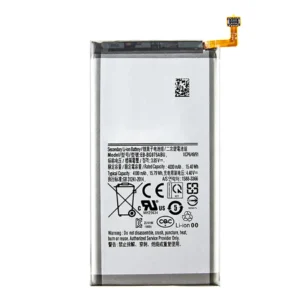
Samsung Galaxy A30 (A305 / 2019) Battery Replacement – Restore Reliable Power
Bring your Samsung Galaxy A30 back to life with this high-quality battery replacement. Engineered to meet OEM standards, it delivers dependable performance, safe charging, and extended screen-on time—ideal for resolving battery-related issues caused by age or damage.
Why Choose This Battery Replacement?
Specifically designed for Galaxy A30 (A305 / 2019)
OEM-grade build ensures long life and safety
Restores original battery performance and charge retention
Fully tested for capacity, voltage stability, and temperature control
Fixes issues like overheating, fast drain, or shutdowns
Keep your A30 running strong with this reliable replacement battery.
Galaxy A30 Battery – Complete Overview
The Samsung Galaxy A30 is a smartphone that gained popularity for offering solid performance, a vibrant display, and dependable features at a budget-friendly price. Among its key components, the battery plays one of the most crucial roles in ensuring smooth day-to-day usage. A well-performing battery determines how long you can use your phone for work, entertainment, or communication without constantly needing to recharge. In this detailed guide, we will explore the Galaxy A30 battery in depth, including its specifications, performance, lifespan, charging habits, and common issues that users may face.
Understanding the Galaxy A30 Battery
The Samsung Galaxy A30 comes with a 4000 mAh lithium-polymer (Li-Po) battery, which is designed to provide a balance between capacity, longevity, and weight. Unlike older lithium-ion cells, the Li-Po battery technology helps minimize thickness, allowing Samsung to design the phone with a sleek body while still packing enough energy to last through heavy daily use.
A 4000 mAh capacity was considered above average at the time of the Galaxy A30’s release. For the majority of users, this capacity ensures a full day of usage on a single charge, even with tasks such as streaming videos, browsing social media, using messaging apps, and light gaming.
Battery Life in Everyday Use
For an average user, the Galaxy A30 battery offers:
-
Up to 20–22 hours of talk time on 3G networks.
-
Around 12–14 hours of web browsing on Wi-Fi or mobile data.
-
13–15 hours of video playback, depending on screen brightness and volume.
-
Standby time that can stretch several days if the phone is not heavily used.
The efficiency of Samsung’s Exynos chipset, combined with AMOLED screen technology, plays a big role in optimizing power consumption. AMOLED displays allow individual pixels to turn off when showing black, helping extend battery life in darker themes or when using night mode.
Charging Performance
The Galaxy A30 supports 15W fast charging, which was a significant improvement for mid-range devices at the time. With a compatible charger, users can charge the phone from 0% to around 50% in about 30 minutes. A full charge typically takes around 90 minutes.
While this isn’t as fast as some flagship-level charging technologies available today, it remains practical for daily use. Many users appreciate that they can top up their phone’s charge quickly during short breaks.
Battery Longevity and Lifespan
No matter how efficient a battery may be, it naturally degrades over time. The Galaxy A30’s lithium-polymer battery is designed to last around 500–800 charge cycles before experiencing noticeable capacity reduction. For a typical user, this translates to 2–3 years of optimal performance.
Signs of battery wear include:
-
Faster battery drain than usual.
-
The phone shutting down unexpectedly, even with charge remaining.
-
Heating issues during charging or regular use.
-
Taking longer to recharge fully.
To maximize lifespan, users should avoid exposing the phone to excessive heat, avoid letting the battery drain completely on a regular basis, and try to use original or certified charging accessories.
Common Battery Issues with the Galaxy A30
Over time, users may encounter common problems related to the Galaxy A30 battery, such as:
-
Rapid Battery Drain – Often caused by background apps, aging cells, or excessive screen brightness.
-
Overheating – Can occur if the phone is left charging in hot environments, or if the battery begins to fail.
-
Charging Problems – Slow charging or no charging might stem from cable issues, charger compatibility, or a worn-out charging port rather than the battery itself.
-
Unexpected Shutdowns – A classic sign of a degraded battery that can no longer provide stable voltage.
How to Optimize Galaxy A30 Battery Performance
To keep the Galaxy A30 battery in top shape, users can follow these best practices:
-
Enable power-saving modes: Samsung provides built-in battery-saving features that limit background activity.
-
Use dark mode: Since the phone has an AMOLED screen, dark themes reduce power consumption.
-
Limit background apps: Closing unused apps can prevent unnecessary battery drain.
-
Optimize charging habits: Try to keep the battery level between 20% and 80% for prolonged health.
-
Update software: System updates often include battery optimization improvements.
Battery Replacement for the Galaxy A30
Eventually, every smartphone battery needs replacement. The Galaxy A30 battery is not user-removable in the traditional sense, meaning it requires technical skills or professional repair service to replace it. A replacement battery usually restores the phone’s original stamina, giving it a new lease on life.
Professional technicians typically use specialized tools to open the phone, detach the worn-out battery, and install a genuine replacement. Choosing original batteries is critical, as third-party or counterfeit options may not provide the same reliability, safety, or performance.
Environmental Considerations
Samsung has been working toward making devices more environmentally friendly, and the Galaxy A30 battery is no exception. Proper disposal or recycling of old batteries helps reduce harmful waste. Users should avoid throwing batteries in the trash and instead take them to certified recycling centers or authorized service providers.
Future of Battery Technology
While the Galaxy A30 uses lithium-polymer technology, the smartphone industry continues to research advancements such as solid-state batteries and graphene-based solutions. These innovations aim to provide higher capacity, faster charging, and longer lifespans. Though the Galaxy A30 won’t benefit from these developments, understanding the direction of battery technology highlights why newer devices often showcase improvements in battery efficiency.
Final Thoughts
The Galaxy A30 battery is a well-balanced component that offers dependable daily performance for the average user. With its 4000 mAh capacity, support for 15W fast charging, and energy-efficient AMOLED display, it provides a reliable experience for communication, entertainment, and productivity.
Like all smartphone batteries, it will eventually degrade, but proper care and maintenance can extend its lifespan. For users facing severe battery issues, replacement with a genuine component ensures the phone continues to perform as expected. The Galaxy A30 remains a practical choice for those who value affordability, and its battery plays a central role in maintaining that practicality.
Galaxy A30 Battery – Performance, Replacement & Buying Guide
The Samsung Galaxy A30 battery is one of the most important parts of this smartphone, and for users who rely on their devices daily, understanding its performance, care tips, and replacement options is essential. In this section, we will cover everything you need to know about the Galaxy A30 Battery Life, charging habits, repair options, and where to buy original Galaxy A30 batteries online or offline. If your phone is showing signs of battery failure, this detailed guide will help you make the best decision between maintenance and replacement.
Galaxy A30 Battery Specifications
The Galaxy A30 battery comes with a 4000 mAh Li-Po (Lithium Polymer) cell, designed to support long hours of usage with moderate to heavy activity. Below are the official specifications:
-
Type: Non-removable Li-Po battery
-
Capacity: 4000 mAh
-
Charging: Supports 15W fast charging
-
Talk Time: Up to 22 hours (3G)
-
Video Playback: 13–15 hours
-
Web Browsing: 12–14 hours
-
Music Playback: Up to 80 hours
These numbers make it clear why the Galaxy A30 battery life was one of the strongest selling points when the phone launched.
Signs Your Galaxy A30 Battery Needs Replacement
Every smartphone battery has a limited lifespan. If you’ve been using the phone for 2–3 years, you may begin to notice performance issues. Some common signs include:
-
Fast Battery Drain – Even when you are not using heavy apps, the battery percentage drops quickly.
-
Phone Overheating – While charging or gaming, the Galaxy A30 battery heats up abnormally.
-
Sudden Shutdowns – The phone powers off even when the battery still shows 10–20% remaining.
-
Charging Problems – The battery takes too long to charge or doesn’t hold charge for long.
-
Swollen Battery – Rare, but dangerous. If you notice the back cover bulging, stop using immediately.
If you are facing any of these issues, a Samsung Galaxy A30 battery replacement is the best solution.
Benefits of Replacing Your Galaxy A30 Battery
Replacing a weak or dead battery can completely change your experience. Some key benefits include:
-
Restores original Galaxy A30 battery life with full-day performance.
-
Prevents unexpected shutdowns.
-
Protects your phone’s motherboard from power instability.
-
Improves charging speed efficiency.
-
Extends the overall life of your smartphone.
Investing in an original Samsung Galaxy A30 battery instead of continuing with a failing one ensures reliability and safety.
Original vs. Fake Galaxy A30 Batteries
When searching online for a Galaxy A30 battery price, you will find plenty of sellers offering cheap alternatives. While tempting, fake or low-quality batteries pose serious risks, including overheating, shorter lifespan, and in extreme cases, device damage.
Here’s how to identify an original Galaxy A30 battery:
-
Samsung hologram or branding.
-
Correct model number (EB-BA305ABU).
-
Consistent weight (fake ones are lighter).
-
Proper packaging and certification marks.
For best results, always buy from trusted retailers or official Samsung service centers.
Galaxy A30 Battery Price – Region Wise
The Galaxy A30 battery price varies depending on your region and whether you buy online or offline. Here are approximate ranges:
-
Galaxy A30 Battery Price in Pakistan: PKR 2,000 – PKR 3,500
-
Galaxy A30 Battery Price in India: INR 800 – INR 1,400
-
Galaxy A30 Battery Price in USA: $15 – $25
-
Galaxy A30 Battery Price in UK: £12 – £20
Prices depend on whether you are purchasing an original Samsung Galaxy A30 battery or a third-party option.
Where to Buy Galaxy A30 Battery Online
For users who prefer online shopping, the Galaxy A30 replacement battery is available on major platforms:
-
Amazon – Wide range of sellers, ensure to pick “Samsung Original” tag.
-
eBay – Affordable options, but check reviews before purchase.
-
AliExpress – Competitive pricing, but shipping takes longer.
-
Daraz (Pakistan) – Trusted for local Samsung spare parts.
-
Flipkart (India) – Easy returns and warranty for batteries.
If you’re searching specifically, type “Buy Galaxy A30 Battery Online” along with your region to filter results.
Battery Replacement Options
1. DIY Battery Replacement
Tech-savvy users may attempt to replace the Galaxy A30 battery themselves. This involves:
-
Using specialized tools to open the back cover.
-
Disconnecting the old battery.
-
Inserting the new one carefully.
However, improper handling can damage the phone.
2. Professional Replacement Service
The safer option is to take your phone to a Samsung service center or certified repair shop. Professional replacement ensures that the Galaxy A30 battery installation is done correctly with genuine parts.
Galaxy A30 Charging Tips for Longer Battery Life
If you are not ready for a replacement yet, here are some Galaxy A30 charging tips that can help extend battery life:
-
Use only original Samsung chargers or certified 15W fast chargers.
-
Avoid letting the battery drop below 10%.
-
Do not overcharge overnight regularly.
-
Enable Battery Saver Mode when traveling.
-
Keep the phone cool – avoid charging in direct sunlight.
Following these tips can help your Samsung Galaxy A30 battery last longer before needing replacement.
Galaxy A30 Battery FAQs
Q1: How long does the Galaxy A30 battery last on a single charge?
A: With moderate use, it lasts a full day (12–15 hours of mixed usage).
Q2: Can I replace the Galaxy A30 battery myself?
A: Technically yes, but it requires tools and skills. Professional replacement is safer.
Q3: What is the original Galaxy A30 battery model number?
A: EB-BA305ABU. Always check this before purchase.
Q4: How much does the Galaxy A30 battery replacement cost?
A: Depends on your region. Usually $15–$25 in the USA, INR 800–1400 in India, PKR 2000–3500 in Pakistan.
Q5: Does fast charging damage the Galaxy A30 battery?
A: No, 15W fast charging is designed to be safe and efficient for this phone.
Understanding Battery Care and Long-Term Usage
Batteries are at the heart of every modern smartphone. They quietly power all the functions we rely on, from messaging and calls to browsing, gaming, and entertainment. While it is easy to overlook them, they have their own life cycle, behaviors, and maintenance needs. The battery inside the Galaxy A30 is no exception, and understanding how it works can help users enjoy smoother performance for years.
How Smartphone Batteries Work
Most smartphones today use lithium-based batteries. These cells are compact, lightweight, and capable of storing a significant amount of energy relative to their size. However, they are not infinite in life. Over time, the materials inside degrade, which causes the battery to hold less charge and eventually require replacement.
A battery goes through charge cycles. Each time you charge it from 0% to 100%, that counts as one cycle. After several hundred cycles, its efficiency begins to decline. For most users, this process takes around two to three years.
Common Misconceptions About Charging
Many people believe certain myths about charging that can actually cause unnecessary worry. For instance:
-
Leaving the phone plugged in overnight – Modern devices are designed to manage power intelligently, so staying plugged in is not as harmful as it once was. However, heat generated during long charging sessions can still shorten the lifespan if repeated excessively.
-
Draining the battery completely before charging – Unlike older nickel-based batteries, lithium cells do not need to be drained fully. In fact, regularly dropping below 10% can put extra stress on the battery.
-
Using fast charging always reduces battery life – While fast charging does generate more heat, most smartphones have built-in protection systems. As long as original or certified chargers are used, the effect on overall life is minimal.
Signs of a Healthy vs. Aging Battery
A healthy battery provides consistent performance throughout the day. Users notice their phone lasting comfortably with normal usage—calls, browsing, and occasional video streaming. The charging time is steady, and the phone doesn’t overheat under routine tasks.
An aging battery, on the other hand, becomes unpredictable. It may lose charge faster, take longer to recharge, or shut down without warning. Some people notice their device heating up more often, even during light use. In rare cases, the back of the phone may bulge due to swelling, which is a clear sign that immediate replacement is necessary.
Daily Habits That Extend Battery Life
While it is impossible to stop natural wear and tear, users can develop habits that slow down the process. A few effective practices include:
-
Avoiding extreme temperatures – Both heat and cold reduce efficiency. Keeping the device in a moderate environment helps.
-
Partial charging – Instead of waiting for the battery to reach 0% before plugging in, topping up between 20% and 80% is gentler on the cells.
-
Using power-saving modes – Built-in settings like battery saver or adaptive battery reduce background activity and prolong daily usage.
-
Managing screen brightness – Since the display consumes the most energy, lowering brightness or enabling auto-brightness conserves power.
-
Disabling unused features – Features like Bluetooth, GPS, and Wi-Fi scanning can be turned off when not required.
Impact of Apps on Battery Performance
Not all apps use power equally. Games with heavy graphics, navigation apps, and streaming platforms are particularly demanding. Social media apps that constantly refresh in the background can also drain power. Regularly reviewing which apps consume the most energy can help users make adjustments, either by limiting their usage or changing background settings.
Psychological Connection With Battery Life
There is also a psychological factor in how people experience their devices. A battery that drains quickly often creates frustration and anxiety, as people fear running out of charge when they need it most. On the other hand, a strong and reliable battery builds trust in the device. It becomes easier to rely on the phone for work, travel, or emergencies when users know it will last.
The Importance of Replacement
Eventually, all batteries reach a stage where replacement is the only option. Some users delay this decision, trying to manage with power banks or constant charging. However, continuing with a failing battery can affect the performance of the phone itself, sometimes even causing issues in the internal components. Replacing the battery at the right time brings the device back to life and often feels like owning a new phone again.
Sustainability and Battery Recycling
Another factor worth considering is sustainability. Discarded batteries should not be thrown into regular trash, as they contain chemicals that can harm the environment. Many service centers and electronic shops offer recycling options. Returning used batteries for proper disposal not only keeps the environment safer but also helps in the recovery of materials that can be reused.

Reviews
There are no reviews yet.