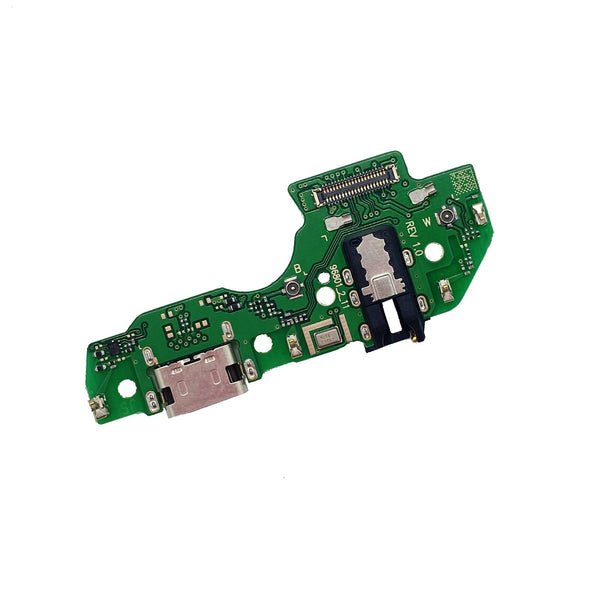
Description
Samsung Galaxy A22 5G Charging Port Board Replacement – Bring Back Battery Life & Safety
Revive your Samsung Galaxy A22 5G with this dependable battery replacement. Engineered to match factory standards, it ensures safe charging cycles, consistent power output, and long-lasting screen time. Ideal for users facing degraded battery life or sudden power issues.
Why Choose This Battery Replacement?
Designed for Galaxy A22 5G (A226 / 2021)
OEM-grade battery ensures durability and safety
Restores original charging performance and battery life
Fully tested for capacity, voltage stability, and thermal regulation
Fixes fast drain, shutdowns, and charging issues
Keep your Galaxy A22 5G powered all day with this high-performance battery replacement.
The charging port is one of the most crucial components of any smartphone. It serves as the gateway through which your device receives power, enabling all other functions to operate effectively. For the Samsung Galaxy A22 5G, the charging port plays a vital role in maintaining daily usability, whether for communication, work, entertainment, or social interaction. A fully functional charging port ensures that users can rely on their devices throughout the day without interruptions.
This guide explores the Galaxy A22 5G Charging Port, its functions, common issues, maintenance tips, replacement options, and everything users need to know to keep their devices fully operational.
Understanding the Galaxy A22 5G Charging Port
The Galaxy A22 5G Charging Port is engineered to handle both data transfer and power delivery efficiently. It is designed to support fast charging protocols, ensuring that users spend less time plugged in and more time using their devices. The port’s compatibility with standard cables and adapters makes it versatile, while its design ensures durability to withstand daily wear and tear.
In addition to delivering power, the charging port is also responsible for synchronizing data between the phone and external devices such as computers. This dual functionality makes it an indispensable component for users who frequently transfer files or backup data.
Common Issues with the Galaxy A22 5G Charging Port
Over time, the charging port may face several issues due to regular usage, environmental factors, or accidental damage. Some of the most common problems include:
-
Loose or Worn Ports – Frequent plugging and unplugging can lead to looseness, reducing contact efficiency.
-
Slow Charging – Dust, lint, or minor damage can cause the port to charge the device slower than expected.
-
Charging Failure – A severely damaged port may fail to charge the device entirely.
-
Connectivity Issues – Problems may arise when transferring data due to a malfunctioning port.
-
Physical Damage – Accidental drops or pressure on the port can bend or break internal components.
Recognizing these issues early allows users to take preventive measures or seek replacement before the problem escalates.
Maintenance Tips for the Charging Port
Maintaining the Galaxy A22 5G Charging Port is essential to ensure long-term performance. Users can follow these best practices:
-
Regular Cleaning – Use a soft brush or compressed air to remove dust and debris from the port.
-
Avoid Excessive Force – Always insert and remove charging cables gently to prevent wear.
-
Use Original Chargers – Authentic Samsung chargers maintain optimal current and prevent damage.
-
Protect from Moisture – Keep the port away from water or high humidity environments.
-
Check Cables Regularly – Damaged cables can affect charging efficiency and harm the port.
Proper care helps extend the lifespan of the charging port and maintains consistent charging speed and connectivity.
Galaxy A22 5G Charging Port Replacement
When maintenance cannot fix the issues, a professional Galaxy A22 5G Charging Port replacement is necessary. Replacement services ensure that the device functions like new, restoring both charging efficiency and data transfer reliability.
Benefits of Professional Replacement
-
Authentic Parts – Certified technicians use genuine Samsung components.
-
Safety – Prevents accidental damage to internal circuits during replacement.
-
Warranty – Many service centers provide a warranty on the replaced port.
-
Improved Performance – Restores optimal charging speed and reliability.
Replacing a faulty port is often more cost-effective than purchasing a new device, making it a practical solution for users who value both convenience and performance.
Signs You Need a Replacement
It’s important to recognize when the Galaxy A22 5G Charging Port requires replacement. Key signs include:
-
The phone does not charge even with a verified cable.
-
Charging speed is significantly slower than before.
-
The port feels loose when plugging in the cable.
-
Intermittent connection during data transfer.
-
Physical damage or debris cannot be cleaned effectively.
Prompt action prevents further damage to the device and ensures reliable daily performance.
Tips to Prolong the Life of Your Charging Port
-
Gentle Handling – Avoid yanking or twisting cables during use.
-
Regular Inspections – Check for debris or damage at least once a month.
-
Avoid Third-Party Chargers – Some non-certified chargers can provide unstable current.
-
Protective Accessories – Using phone cases with port covers can prevent dust accumulation.
-
Avoid Overcharging – Unplug the device once fully charged to reduce stress on the port.
Following these tips ensures the Galaxy A22 5G Charging Port remains functional for years.
Environmental Impact and Sustainability
Replacing a faulty Galaxy A22 5G Charging Port instead of discarding the device contributes positively to environmental sustainability. Electronic waste is a growing concern, and prolonging device life reduces unnecessary e-waste. Samsung encourages responsible disposal and recycling of damaged components. By replacing only the defective charging port, users minimize waste while maintaining device performance.
Final Thoughts
The Galaxy A22 5G Charging Port is a critical component that impacts the device’s usability and reliability. Proper maintenance, careful handling, and timely replacement ensure that users can enjoy uninterrupted connectivity, fast charging, and consistent performance. Choosing genuine parts and professional services guarantees safety and restores optimal function.
Whether you rely on your Galaxy A22 5G for work, study, or entertainment, taking care of the charging port is essential for a seamless mobile experience. By understanding common issues, following maintenance tips, and acting promptly on repairs or replacement, users can ensure their device continues to serve efficiently for years to come.
Understanding Device Connectivity and Maintenance
In the modern era, mobile devices have become indispensable tools in daily life. They serve as portals for communication, work, education, entertainment, and even personal organization. The seamless operation of a device relies not only on its software and hardware components but also on the careful maintenance of connectors and interfaces. One of the critical aspects that often goes unnoticed is the way devices receive power and connect to external systems for data transfer.
Proper connectivity ensures that a device performs efficiently under various conditions. This includes stable data transmission, uninterrupted charging, and reliable synchronization with other electronics. The performance of connectors influences the overall user experience significantly. Even a minor disruption can create inconvenience, affecting productivity, communication, and access to information.
Devices are designed to withstand daily usage, but the frequency of charging, plugging, and unplugging cables introduces wear over time. Continuous insertion and removal of cables can gradually loosen connections or create minor structural issues. Users who understand these challenges often adopt habits that prolong the functionality of their devices.
Regular maintenance is essential. This includes cleaning ports to remove dust, lint, and other debris that can accumulate over time. A soft brush or compressed air can gently remove particles without damaging sensitive internal components. Additionally, avoiding excessive force when connecting cables reduces the risk of wear or bending. These simple preventive measures contribute significantly to long-term device reliability.
Environmental factors also play a role in the longevity of connectors. Exposure to moisture, extreme temperatures, and physical impacts can compromise the integrity of ports and related components. Devices that are kept in controlled environments tend to maintain their functionality longer. Users are encouraged to protect their devices from water, direct sunlight, and high humidity to prevent premature damage.
Another factor influencing device connectivity is the quality of accessories. Original chargers, cables, and adapters are designed to provide stable power and maintain data integrity. Non-certified or low-quality alternatives may deliver inconsistent current, potentially causing slow charging or connectivity problems. Investing in authentic accessories ensures that devices operate efficiently and safely.
The integration of software and hardware is also critical. Modern devices feature power management systems that optimize charging speed and energy efficiency. These systems monitor usage patterns, adjusting power delivery to prevent overheating and excessive wear. Keeping software updated ensures that such optimization continues to function effectively, providing a better overall experience.
Users often underestimate the importance of inspecting their devices periodically. Visual checks for loose connectors, worn-out ports, or physical damage can prevent more significant problems. Early detection allows timely intervention, reducing the likelihood of complete failure or the need for costly repairs.
Education about proper handling is equally important. Many issues arise from unintentional misuse, such as pulling cables abruptly, inserting connectors incorrectly, or exposing devices to harsh conditions. Awareness campaigns and user guides emphasize safe handling practices, ensuring that devices last longer and perform reliably.
Connectivity extends beyond power delivery. Devices frequently interact with computers, external storage, and peripheral gadgets. Reliable connections enable smooth data transfer, backups, and synchronization. Whether it’s moving files, performing software updates, or accessing cloud storage, stable connectivity is critical for maintaining efficiency and workflow continuity.
The design of ports and connectors also reflects technological advancement. Engineers prioritize durability, ease of use, and compatibility when creating interfaces. Innovations like reversible connectors, reinforced housings, and adaptive charging protocols enhance convenience while mitigating common issues. These improvements make modern devices more user-friendly and resilient against wear.
Maintenance routines often include regular software checks, cleaning procedures, and careful handling. Users who adopt these practices notice fewer performance issues, experience faster charging, and benefit from extended device longevity. Proper upkeep not only protects the hardware but also contributes to a smoother, uninterrupted experience.
Connectivity issues, if ignored, can lead to broader performance problems. Slow charging, intermittent power, or inconsistent data transfer can reduce efficiency and increase frustration. Preventive measures, such as scheduled cleaning and careful handling, help avoid these challenges, maintaining the integrity of both the device and its accessories.
Devices today are expected to deliver reliable performance across a range of tasks. From simple communication to complex applications, stable power and data connections are fundamental. Whether it’s for work, study, or leisure, uninterrupted device functionality enhances productivity, convenience, and overall satisfaction.
Sustainability is another aspect tied to device maintenance. By extending the lifespan of connectors and related components, users contribute to reducing electronic waste. Longevity-focused practices, such as replacing only damaged components instead of discarding entire devices, promote responsible consumption and environmental awareness.
Looking ahead, technology continues to evolve with more efficient connectors, adaptive charging systems, and robust designs. These advancements aim to provide higher durability, faster performance, and better integration across devices. As devices become more sophisticated, proper maintenance remains a key factor in ensuring optimal functionality.
Ultimately, the user experience depends on the combination of design, maintenance, and mindful usage. Devices that are cared for properly not only perform better but also provide reliability that users can trust. From daily routines to critical tasks, smooth operation relies on stable connections, effective power delivery, and careful handling.
Galaxy A22 5G Charging Port – Keywords Integrated
The Galaxy A22 5G Charging Port is one of the most crucial components of the device, ensuring uninterrupted power and reliable data transfer. For users who rely heavily on their smartphones for work, study, entertainment, and communication, a fully functional charging port is indispensable. Over time, regular use can cause wear and tear, leading to performance issues. Understanding how to maintain, troubleshoot, and replace the Galaxy A22 5G Charging Port is essential for sustaining optimal device performance.
Importance of the Galaxy A22 5G Charging Port
The Galaxy A22 5G Charging Port serves as the primary interface for power delivery and data synchronization. Without it, users cannot charge their devices efficiently, nor can they transfer files to and from computers or other devices. This makes the charging port not just a convenience but a critical aspect of smartphone functionality.
A malfunctioning Galaxy A22 5G Charging Port can disrupt daily routines, from missing important calls to interrupted video streaming or delayed work. Users often underestimate the importance of a well-maintained charging port until they encounter slow charging, loose connections, or complete failure. Choosing authentic replacement parts, such as an original Samsung Galaxy A22 5G Charging Port, ensures safety, compatibility, and long-term reliability.
Common Problems and Troubleshooting
Several issues can affect the Galaxy A22 5G Charging Port, including physical damage, debris accumulation, and internal wear. Common problems include:
-
Loose or Worn Port – Frequent plugging and unplugging can cause the port to loosen, reducing charging efficiency.
-
Slow Charging – Dust or minor damage can impede proper power transfer.
-
Intermittent Charging – Unstable connections can result in the device charging sporadically.
-
Data Transfer Failure – Faulty ports may prevent seamless syncing with computers or other devices.
-
Physical Damage – Accidental drops, moisture exposure, or improper cable insertion can harm the port permanently.
To prevent such issues, users should consider preventive measures and seek professional solutions when necessary.
Maintenance Tips for the Galaxy A22 5G Charging Port
Maintaining the Galaxy A22 5G Charging Port prolongs its lifespan and enhances overall device performance. Best practices include:
-
Regular Cleaning – Using a soft brush or compressed air to remove dust and lint from the port.
-
Gentle Handling – Avoid excessive force when connecting or disconnecting cables.
-
Use Original Accessories – Authentic Samsung chargers and cables provide stable power and prevent damage.
-
Avoid Moisture – Keep the device away from water or high humidity environments.
-
Routine Checks – Inspect the port for any visible wear, debris, or damage to address issues early.
Adhering to these guidelines helps ensure the Galaxy A22 5G Charging Port functions efficiently and reduces the need for replacement.
Galaxy A22 5G Charging Port Replacement
In cases where the port is beyond repair, a Galaxy A22 5G Charging Port replacement is the most effective solution. Professional repair services guarantee the installation of an authentic port, restoring both charging efficiency and data transfer capabilities.
Benefits of a professional replacement include:
-
Authenticity – Ensures the use of original Samsung components.
-
Safety – Reduces risk of further damage during the replacement process.
-
Warranty – Many service centers offer guarantees on replacement parts.
-
Performance Restoration – Fully restores charging speed and reliability.
Replacing the port can often save users from the cost and inconvenience of purchasing a new device.
Signs You Need a Galaxy A22 5G Charging Port Replacement
Knowing when to replace the port is crucial to prevent further device issues. Signs include:
-
Inability to charge the device with certified cables.
-
Significant reduction in charging speed.
-
The port feels loose or unstable.
-
Data transfer fails or is intermittent.
-
Physical damage or visible wear that cleaning cannot fix.
Prompt replacement of the Galaxy A22 5G Charging Port restores normal functionality and ensures uninterrupted device usage.
Choosing the Right Replacement
Selecting an original Samsung Galaxy A22 5G Charging Port is essential. Counterfeit parts may be cheaper, but they often compromise safety and performance. Original components maintain:
-
Optimal charging efficiency
-
Stable data transfer
-
Longevity and durability
Online stores and authorized repair centers offer certified parts. Users can buy Galaxy A22 5G Charging Port online or visit service centers for professional installation. Prioritizing authenticity ensures the device operates safely and effectively for years.
Benefits of Installing an Original Charging Port
Upgrading or replacing the Galaxy A22 5G Charging Port with an original component provides several benefits:
-
Faster Charging – Returns charging speed to factory standards.
-
Reliable Connectivity – Ensures consistent data transfer.
-
Reduced Risk of Damage – Original parts fit perfectly, minimizing stress on internal components.
-
Peace of Mind – Users can trust their device to perform efficiently.
-
Long-Term Savings – Avoids repeated repairs and extends device life.
Maintenance After Replacement
After installing a new Galaxy A22 5G Charging Port, users should follow maintenance practices to maximize longevity:
-
Use only certified cables and chargers.
-
Avoid excessive plugging and unplugging.
-
Keep the port clean and free from dust or debris.
-
Prevent moisture exposure.
-
Monitor charging performance regularly.
These steps ensure that the new charging port continues to operate at peak efficiency.
Environmental Considerations
Replacing a Galaxy A22 5G Charging Port rather than discarding the entire device reduces electronic waste and promotes environmental responsibility. Original components are designed for durability, helping users extend the device lifespan and minimize e-waste. Samsung also encourages recycling of old components to recover valuable materials, contributing to sustainability.
Conclusion
The Galaxy A22 5G Charging Port is essential for reliable device operation. Whether for charging, data transfer, or general usability, a well-maintained and authentic port ensures optimal performance. Users experiencing issues such as slow charging, loose connections, or intermittent data transfer should consider professional Galaxy A22 5G Charging Port replacement.
Investing in original components and practicing proper maintenance prolongs device life, enhances performance, and ensures a consistent user experience. Whether you choose to buy Galaxy A22 5G Charging Port online or visit an authorized service center, focusing on authenticity and proper care guarantees that your smartphone continues to function reliably for years.

Reviews
There are no reviews yet.