
Description
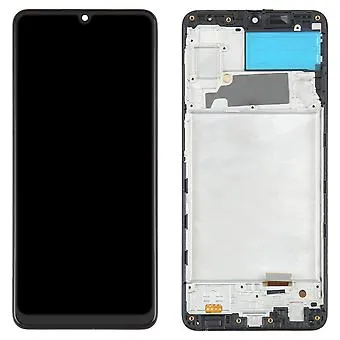
Samsung Galaxy A22 4G LCD Screen Assembly Replacement With Frame – Clear Display, Smooth Touch
Restore your Samsung Galaxy A22 4G to its original performance with this premium LCD replacement assembly. Designed specifically for model A225, this part features a bright, responsive LCD display and comes pre-attached to a sturdy frame for hassle-free installation.
Product Features:
Full LCD screen assembly with digitizer and frame
OEM-grade brightness, touch sensitivity, and resolution
Perfect replacement for damaged, unresponsive, or cracked screens
Includes front bezel/frame to simplify the repair process
Professionally tested for quality and reliability
This replacement is ideal for fixing all screen-related issues, whether it’s a complete display failure or minor cracks. Rejuvenate your device and enjoy a seamless viewing experience again.
The Galaxy A22 4G LCD Screen is one of the most critical components of the device. It is responsible for displaying everything the user interacts with, from simple notifications to high-definition media content. A fully functional LCD screen ensures a smooth visual experience, accurate color representation, and responsive touch capabilities. For users, a damaged or malfunctioning screen can drastically reduce usability, making replacement an essential service for maintaining device performance.
This guide will cover the Galaxy A22 4G LCD Screen, its features, common problems, maintenance tips, replacement options, and the importance of choosing authentic parts for long-lasting performance.
Understanding the Galaxy A22 4G LCD Screen
The Galaxy A22 4G LCD Screen is designed to provide vibrant colors, sharp details, and consistent brightness for all activities. Whether watching videos, playing games, browsing social media, or using productivity apps, the screen delivers clear visuals and smooth touch response. The LCD panel also works alongside the device’s software to optimize power consumption while maintaining a high-quality display.
In addition to visual performance, the screen serves as the primary input interface through its touch functionality. Accurate touch response is essential for gestures, typing, and navigation. Any delay or inconsistency can negatively affect the overall user experience.
Common Issues with the Galaxy A22 4G LCD Screen
Several issues can arise over time due to regular use, physical damage, or environmental factors. Some common problems include:
-
Cracked or Broken Screen – Dropping the device can result in cracks that affect visibility and touch response.
-
Dead Pixels – Small areas of the screen may stop displaying correctly, creating dark or bright spots.
-
Flickering Display – Unstable display can be caused by hardware issues or software glitches.
-
Unresponsive Touch – Damage or wear can reduce touch sensitivity, making navigation difficult.
-
Discoloration – Uneven colors, fading, or screen burn can occur over time.
Recognizing these problems early ensures that users can take action before the device becomes completely unusable.
Maintenance Tips for the Galaxy A22 4G LCD Screen
Proper care and maintenance are essential for preserving the functionality and lifespan of the Galaxy A22 4G LCD Screen. Best practices include:
-
Use a Screen Protector – Protects against scratches, cracks, and minor impacts.
-
Avoid Direct Pressure – Pressing too hard on the screen can damage internal components.
-
Keep the Device Clean – Wipe the screen gently with a microfiber cloth to remove dust and fingerprints.
-
Avoid Exposure to Extreme Conditions – Protect the device from high temperatures, moisture, and direct sunlight.
-
Software Updates – Ensure that the device runs the latest software to maintain display optimization.
Adopting these habits reduces the risk of damage and maintains a high-quality viewing experience.
Galaxy A22 4G LCD Screen Replacement
When maintenance cannot fix the issues, a professional Galaxy A22 4G LCD Screen replacement is necessary. Replacement restores full display functionality and ensures accurate touch response.
Benefits of Professional Replacement
-
Authentic Parts – Certified technicians use original LCD screens.
-
Safe Installation – Minimizes risk of further damage to the device.
-
Warranty – Many service centers offer guarantees on the replaced screen.
-
Improved Visual Experience – Restores color accuracy, brightness, and touch sensitivity.
Investing in a replacement is often more cost-effective than purchasing a new device, providing long-term satisfaction and performance.
Signs You Need a Galaxy A22 4G LCD Screen Replacement
It’s important to recognize when a screen replacement is necessary. Common signs include:
-
Cracks or visible damage that affect usability.
-
Unresponsive or inaccurate touch.
-
Flickering or distorted display.
-
Discoloration, dark spots, or dead pixels.
-
Reduced brightness or uneven backlighting.
Early action prevents further damage and ensures consistent device performance.
Choosing the Right Replacement
Selecting an original Galaxy A22 4G LCD Screen is essential. Counterfeit screens may appear cheaper but often fail to deliver accurate color, proper brightness, and touch sensitivity. Original components maintain:
-
Full color accuracy
-
Smooth touch responsiveness
-
Longevity and durability
Authorized repair centers and verified online stores provide genuine replacement screens. Users can buy Galaxy A22 4G LCD Screen online or visit local service centers for professional installation.
Benefits of Installing an Original LCD Screen
Replacing the Galaxy A22 4G LCD Screen with an authentic component provides several advantages:
-
Enhanced Visual Quality – Restores sharpness, brightness, and accurate colors.
-
Improved Touch Responsiveness – Smooth and accurate touch experience.
-
Device Longevity – Original parts are designed for durability.
-
Warranty Protection – Many original screens come with a service warranty.
-
Peace of Mind – Assurance that the device functions as intended.
Maintenance After Replacement
Once the LCD screen has been replaced, following proper maintenance practices ensures long-term functionality:
-
Use a high-quality screen protector.
-
Handle the device carefully to avoid drops or pressure.
-
Keep the screen clean and free from debris.
-
Avoid exposure to moisture and extreme temperatures.
-
Regularly update device software for optimal performance.
These practices extend the lifespan of the new Galaxy A22 4G LCD Screen and maintain a smooth user experience.
Environmental Considerations
Replacing only the LCD screen instead of discarding the device reduces electronic waste, promoting environmental sustainability. Original components are built for durability, allowing users to extend the life of their device. Responsible disposal of damaged screens further contributes to environmental protection and resource conservation.
Conclusion
The Galaxy A22 4G LCD Screen is a critical component for delivering a smooth and enjoyable user experience. From vibrant visuals to accurate touch response, a fully functional screen is essential for everyday tasks and entertainment. When damage or wear occurs, professional Galaxy A22 4G LCD Screen replacement ensures restored performance, longevity, and reliability.
Choosing authentic parts, following proper maintenance practices, and seeking professional services guarantees that users enjoy the best possible device performance. Whether purchasing from authorized stores or visiting a service center, focusing on quality and durability provides a seamless and satisfying experience with the Galaxy A22 4G.
Understanding Device Display and Maintenance
In today’s technology-driven world, the display of a mobile device plays a central role in how users interact with their smartphones. It serves as the primary interface, allowing users to navigate applications, watch videos, communicate, and access information. The performance and durability of a device’s screen directly influence the overall experience, making proper care and maintenance essential.
A mobile device’s display must handle a wide variety of tasks efficiently. It needs to support vibrant colors, smooth transitions, and responsive touch controls. These characteristics are crucial for activities ranging from video calls to gaming. Without a well-functioning display, even the most powerful smartphone loses much of its usability.
Daily usage introduces significant strain on device screens. Constant tapping, swiping, scrolling, and typing all contribute to wear over time. Devices that are handled carefully tend to maintain visual and touch performance longer, whereas rough usage can result in scratches, cracks, and decreased sensitivity. Protective measures such as screen guards and cases can mitigate these effects, prolonging the lifespan of the display.
Physical impacts, such as drops or bumps, are among the leading causes of screen damage. Even minor impacts can result in dead pixels, discoloration, or unresponsive areas. Users who understand these risks often adopt habits to minimize them, including avoiding placing devices on unstable surfaces, keeping them in protective cases, and using gentle handling during daily operations.
Environmental factors also play a role in screen longevity. Exposure to high temperatures, moisture, or direct sunlight can compromise display quality over time. Extreme temperatures may affect internal components, while moisture can seep into sensitive areas, causing discoloration, touch issues, or permanent damage. Protecting the device from such conditions ensures a longer-lasting and more reliable display.
Cleaning the screen regularly is another key aspect of maintenance. Dust, dirt, and fingerprints not only affect visibility but can also create abrasive conditions when the screen comes into contact with protective covers or cases. Using a microfiber cloth and gentle cleaning solutions helps maintain clarity without risking damage to the surface or underlying components.
Proper device usage extends beyond physical handling. Software optimization is integral to display performance. Modern devices include features that adjust brightness, contrast, and refresh rates according to ambient light and usage patterns. Keeping the software updated ensures that these features continue to function effectively, contributing to better visual experience and energy efficiency.
Over time, screens may begin to exhibit issues such as flickering, unresponsive touch areas, or uneven brightness. These problems can result from a combination of wear, environmental factors, and usage habits. Addressing minor issues early prevents them from escalating into major problems that might necessitate costly replacements.
Users should also be aware of signs that indicate potential display deterioration. Dark spots, inconsistent colors, or delayed touch response signal that the device may need professional attention. Routine inspections allow for early intervention, reducing the risk of more severe damage and extending the useful life of the device.
Technology advances have led to improved screen designs that are more resilient and user-friendly. Reversible connectors, reinforced housings, and adaptive display systems enhance durability and ease of use. These innovations provide better protection against everyday wear and tear while maintaining a high-quality visual experience.
Proper handling, regular inspections, and environmental awareness are crucial for maintaining the functionality of the device’s screen. Educating users about safe handling practices, such as avoiding excessive pressure, keeping the device clean, and preventing exposure to moisture, significantly contributes to the device’s longevity.
Beyond individual convenience, maintaining a device’s display has broader implications. Extending the lifespan of screens helps reduce electronic waste, promoting environmental responsibility. Instead of discarding entire devices due to screen issues, timely maintenance or component replacement can prolong the device’s usability, supporting sustainability efforts.
Looking ahead, the evolution of display technology promises even greater durability, energy efficiency, and visual quality. Adaptive technologies, stronger materials, and more resilient touch interfaces are becoming increasingly common, ensuring that devices can withstand heavier use and maintain consistent performance over time.
Ultimately, the user experience depends on a combination of design, maintenance, and mindful usage. Devices that are properly cared for provide reliable, high-quality visuals and responsive touch controls. Whether for daily communication, entertainment, or productivity, a well-maintained display enhances convenience, efficiency, and satisfaction.
By understanding the importance of display care and implementing regular maintenance routines, users can ensure that their devices continue to function effectively and provide a superior visual experience for years. This proactive approach not only enhances daily usage but also contributes to responsible consumption and environmental sustainability.
Galaxy A22 4G LCD Screen – Keywords Integrated
The Galaxy A22 4G LCD Screen is one of the most vital components of the device, providing both visual clarity and touch functionality. Users rely on this screen for all interactions, making it essential for communication, entertainment, and productivity. A damaged or malfunctioning LCD screen can significantly reduce usability, which is why understanding maintenance, troubleshooting, and replacement options is crucial.
Importance of the Galaxy A22 4G LCD Screen
The Galaxy A22 4G LCD Screen delivers sharp visuals, vibrant colors, and consistent brightness, ensuring that every image, video, and app is displayed accurately. Its touch-sensitive interface allows smooth navigation, typing, and interaction, which is essential for daily smartphone use. Without a fully functional LCD screen, even the most advanced devices can feel frustrating and unreliable.
A faulty or broken Galaxy A22 4G LCD Screen can lead to issues such as unresponsive touch, flickering displays, and inaccurate color representation. Users often notice these problems when performing routine tasks, like scrolling through social media, sending messages, or watching videos. Maintaining the screen’s integrity ensures a seamless experience and prevents further damage to other internal components.
Common Problems with the Galaxy A22 4G LCD Screen
Several issues can affect the Galaxy A22 4G LCD Screen over time:
-
Cracked or Shattered Screen – Dropping the device can cause physical damage that affects both visibility and touch functionality.
-
Dead Pixels – Areas of the screen may stop functioning, appearing as small black or bright spots.
-
Flickering Display – Electrical or software issues can result in inconsistent brightness or screen flicker.
-
Unresponsive Touch – Damage or wear can reduce the sensitivity of the touch interface.
-
Color Distortion – Uneven colors, fading, or screen burn may develop over prolonged use.
Recognizing these problems early allows users to take corrective action, whether through maintenance or replacement.
Maintenance Tips for the Galaxy A22 4G LCD Screen
Proper care can extend the lifespan of the Galaxy A22 4G LCD Screen:
-
Use a High-Quality Screen Protector – Protects against scratches, cracks, and minor impacts.
-
Avoid Excessive Pressure – Pressing too hard on the screen may damage internal layers.
-
Keep the Screen Clean – Regularly wipe with a microfiber cloth to remove dust and fingerprints.
-
Avoid Exposure to Extreme Conditions – Keep the device away from high temperatures, direct sunlight, and moisture.
-
Regular Software Updates – Ensure the latest software is installed to maintain display optimization.
Following these practices helps prevent damage and keeps the screen functioning at peak performance.
Galaxy A22 4G LCD Screen Replacement
If maintenance does not resolve issues, a professional Galaxy A22 4G LCD Screen replacement may be necessary. Using authentic replacement screens ensures proper fit, accurate color reproduction, and reliable touch functionality.
Benefits of professional replacement include:
-
Original Components – Certified technicians use genuine LCD screens designed specifically for the Galaxy A22 4G.
-
Safe Installation – Reduces the risk of damaging other internal parts.
-
Warranty – Many service centers provide a guarantee on the replaced screen.
-
Restored Performance – Full brightness, color accuracy, and touch response are restored.
Replacing the screen is often more cost-effective than buying a new device, making it a practical option for users who want reliable performance without unnecessary expenses.
Signs That You Need a Replacement
Users should consider replacing the Galaxy A22 4G LCD Screen if they notice:
-
Visible cracks or damage affecting usability.
-
Flickering, dead pixels, or discoloration.
-
Unresponsive touch in certain areas.
-
Reduced brightness or uneven backlighting.
Prompt action ensures that minor problems do not escalate into larger, more expensive repairs.
Choosing the Right Replacement
Selecting an authentic Galaxy A22 4G LCD Screen is essential. Non-original parts may appear cheaper but often fail to deliver accurate colors, proper brightness, or reliable touch performance. Using genuine components ensures longevity, safety, and optimal device functionality.
Authorized service centers and verified online stores offer genuine replacement screens. Users can buy Galaxy A22 4G LCD Screen online or visit a certified repair shop for professional installation. Choosing authenticity guarantees a high-quality experience and reduces the risk of future issues.
Environmental Benefits of Replacement
Replacing the Galaxy A22 4G LCD Screen instead of discarding the device reduces electronic waste and promotes sustainability. By extending the life of the device, users minimize environmental impact while maintaining high performance. Recycling old screens responsibly also contributes to resource conservation and reduces e-waste accumulation.
Conclusion
The Galaxy A22 4G LCD Screen is crucial for providing a clear, responsive, and enjoyable user experience. Maintaining and, when necessary, replacing the screen ensures uninterrupted usability, accurate visuals, and long-term device reliability. Users who invest in genuine replacement screens, follow proper maintenance practices, and seek professional services can enjoy a device that continues to perform at its best for years.
Whether purchasing online or visiting a service center, focusing on quality and authenticity guarantees a seamless and satisfying experience with the Galaxy A22 4G LCD Screen.


Reviews
There are no reviews yet.