Description
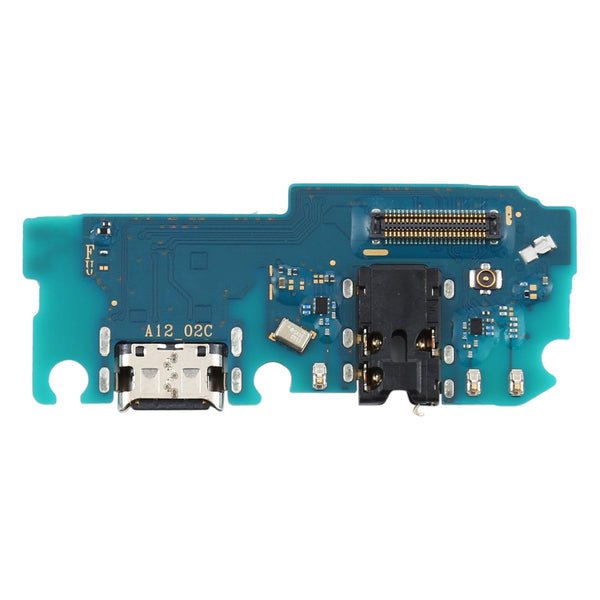
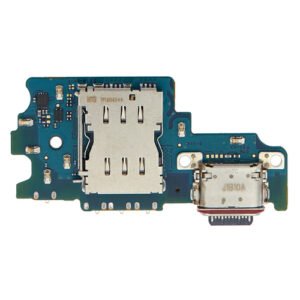
Samsung Galaxy A16 4G Charging Port Board Replacement – USB-C Port + Mic
Is your Samsung Galaxy A16 4G not charging, syncing with a PC, or having microphone issues? This replacement charging port board is the perfect solution. It features a brand-new USB Type-C port along with all necessary board-level components including the sub-PCB and integrated mic.
Engineered for compatibility with the A16 4G, this part is an ideal fix for physical port damage, water exposure, or consistent connection issues. Designed for quick, clean installation, it’s suitable for professional technicians and confident DIYers.
Key Features:
USB-C charging port board for Samsung Galaxy A16 4G (A165 / 2025)
Supports charging and USB data transfer
Includes microphone and sub-board components
OEM-quality design and fit
Solves common port wear and internal PCB issues
Get your device charging reliably again with this essential replacement part.
In today’s fast-paced world, staying connected is essential, and smartphones have become the lifeline of communication, work, and entertainment. Among all components, the charging port holds a special significance because it ensures the device gets the power it needs to function smoothly. For the Galaxy A16 4G, the charging port is not just a tiny part—it’s a critical link between your device and its power source. When the Galaxy A16 4G Charging Port malfunctions, it can disrupt your daily routine and compromise the overall performance of your smartphone.
This article explores everything you need to know about the Galaxy A16 4G Charging Port, from its design and functionality to common issues, troubleshooting tips, repair or replacement, and maintenance practices.
Understanding the Galaxy A16 4G Charging Port
The Galaxy A16 4G Charging Port is designed with durability and efficiency in mind. It supports fast charging, stable power delivery, and seamless data transfer. Located at the bottom of the phone, it connects to chargers, data cables, and accessories.
This port is engineered to handle thousands of plug-in and plug-out cycles without losing efficiency. However, like any hardware component, it is not immune to wear and tear. Dust, debris, moisture, and excessive force are some of the factors that can damage the Galaxy A16 4G Charging Port over time.
Common Issues with Galaxy A16 4G Charging Port
Even though the port is designed to be robust, problems can still arise. Here are some common issues users face:
-
Loose Connection – The charging cable may not fit snugly, leading to intermittent charging.
-
Slow Charging – Damaged pins inside the port can reduce charging efficiency.
-
No Charging – Complete port failure means the phone won’t charge at all.
-
Moisture Damage – Exposure to liquids can corrode the port’s internal components.
-
Debris Accumulation – Dust and dirt often clog the Galaxy A16 4G Charging Port, preventing a proper connection.
Troubleshooting Galaxy A16 4G Charging Port Problems
Before considering replacement, you can try some basic troubleshooting methods:
-
Clean the Port: Use a soft brush or compressed air to remove dust and lint.
-
Test with Another Cable/Adapter: Sometimes, the problem lies in the cable or charger.
-
Restart or Reset the Device: Minor software glitches can affect charging.
-
Check for Moisture Alerts: Samsung devices often show warnings if water is detected in the port.
If none of these solutions work, the Galaxy A16 4G Charging Port may need professional repair or replacement.
Replacement of Galaxy A16 4G Charging Port
When the port is physically damaged or fails completely, replacing it becomes the best solution.
Signs You Need Replacement:
-
Device doesn’t charge at all.
-
Port feels loose or wobbly.
-
Only charges when the cable is placed at a certain angle.
-
Frequent disconnections during data transfer.
Professional Replacement:
A technician can safely replace the Galaxy A16 4G Charging Port with genuine parts, ensuring compatibility and longevity. It’s recommended to always opt for authentic replacement parts to maintain the phone’s performance.
DIY vs Professional Repair
-
DIY Repair: Some users try to replace the port on their own. While this might save money, it carries risks such as damaging other components.
-
Professional Repair: Trained experts use specialized tools to replace the Galaxy A16 4G Charging Port efficiently and safely.
For most users, professional repair is the smarter choice.
How to Protect the Galaxy A16 4G Charging Port
Prevention is always better than cure. Here are some simple steps to keep your port in good condition:
-
Use Original Chargers – Always use Samsung-certified cables and adapters.
-
Avoid Rough Handling – Insert and remove the cable gently.
-
Keep it Dry – Protect your phone from liquids.
-
Regular Cleaning – Prevent dust buildup with occasional cleaning.
-
Wireless Charging (if supported) – Reduce wear on the Galaxy A16 4G Charging Port by using wireless charging options.
Why the Galaxy A16 4G Charging Port is Essential
Without a functioning charging port, even the most advanced smartphone becomes useless. A reliable Galaxy A16 4G Charging Port ensures:
-
Consistent charging speed.
-
Uninterrupted data transfer.
-
Longer lifespan of the battery.
-
Enhanced overall device performance.
Conclusion
The Galaxy A16 4G Charging Port is small in size but plays a massive role in the daily functioning of your smartphone. From powering your device to syncing data, it is a critical component that demands care and attention. By maintaining it properly and opting for timely replacement when needed, you can extend the life of your Galaxy A16 4G and ensure a seamless smartphone experience.
Whether you’re facing slow charging, loose connections, or a completely dead port, understanding how the Galaxy A16 4G Charging Port works and when to replace it will help you keep your device running at its best.
Smartphones are an essential part of daily life, and their ability to stay powered up determines how useful they are throughout the day. While people often think about the display, processor, and camera as the highlights of a phone, one of the smallest components quietly holds everything together—the charging connector. This small yet significant piece is the link that allows energy to move from the charger into the device, enabling the battery to perform at its best.
The connector is often designed to be durable enough to withstand years of daily use. Most users plug and unplug their charging cable several times a day, and over time, that action can slowly wear down the small pins and internal parts. Because of this, manufacturers put careful thought into durability, reinforcement, and materials when designing such parts.
One common issue users face is loose connections. A cable that no longer fits snugly may lead to interrupted power flow. This can create frustrating situations where the device charges only when the cable is adjusted in a certain position. It also puts stress on both the cable and the connector, shortening their overall lifespan.
Another challenge arises from dust and lint. Since the port is open and often kept in pockets or bags, debris can accumulate inside. Even a small particle can prevent the pins from making full contact, leading to charging problems. Cleaning the connector with a soft brush or compressed air can often solve this issue without the need for repair.
Moisture exposure is another enemy of charging efficiency. Even a drop of water can cause corrosion inside the port, leading to unreliable performance or complete failure. This is why it’s important to keep a smartphone away from humid environments or to use protective cases and covers whenever possible.
Technology has also evolved to make charging more efficient. Many modern phones support fast charging, allowing users to quickly power up their devices in minutes rather than hours. However, fast charging requires precise control of voltage and current, and a faulty connector can disrupt this process, leading to overheating or poor charging speeds.
When the port becomes severely damaged, replacement is usually the only option. While some people may attempt do-it-yourself fixes, the small size of the components and the risk of damaging other parts make professional repair the safer route. A trained technician has the proper tools and replacement parts to restore the device to full working condition.
Preventive care goes a long way in extending the life of a charging connector. Gentle handling, using original cables, keeping the port clean, and avoiding unnecessary strain can reduce the likelihood of issues. Simple habits, such as unplugging the cable by holding the connector rather than yanking the cord, make a big difference over time.
In short, the charging port may not get much attention compared to flashy features like cameras or screens, but it is one of the most crucial parts of a smartphone. Without it, the device cannot stay powered, and everything else becomes unusable. By treating it with care and knowing how to recognize early signs of trouble, users can enjoy longer-lasting performance from their devices.
The Galaxy A16 4G Charging Port is a vital component that ensures your smartphone receives consistent power and performs at its best. Designed with durability and reliability in mind, the port supports fast charging, stable current flow, and smooth data transfer. Without a properly functioning Galaxy A16 4G Charging Port, the phone would not be able to charge efficiently, and essential tasks like syncing files or connecting to accessories would be compromised.
One of the most common issues users report is a loose Galaxy A16 4G Charging Port connection. Over time, continuous plugging and unplugging can wear out the internal pins, making it harder for the cable to fit securely. This leads to interrupted charging sessions and can damage both the cable and the port if not addressed quickly.
Another frequent concern is debris inside the Galaxy A16 4G Charging Port. Dust, lint, and small particles can block proper contact between the charging pins and the cable, causing slow or failed charging attempts. Cleaning the port carefully helps restore normal function.
Moisture damage is another risk for the Galaxy A16 4G Charging Port. Exposure to liquids can corrode the metallic components inside, resulting in unstable charging or complete failure. Samsung devices often alert users when moisture is detected, but long-term exposure still weakens the component.
Replacement becomes necessary when the Galaxy A16 4G Charging Port no longer works despite troubleshooting. Symptoms like charging only at certain angles, cables falling out easily, or no charging at all indicate the need for professional repair. A certified technician can replace the damaged port with an original part, ensuring the phone continues to perform as intended.
To maintain the Galaxy A16 4G Charging Port, users should follow simple preventive steps:
-
Use genuine Samsung cables and adapters.
-
Avoid rough handling while inserting or removing the cable.
-
Keep the port clean with occasional dust removal.
-
Store the phone in a protective case to reduce exposure to dirt and moisture.
The Galaxy A16 4G Charging Port is not only responsible for powering the battery but also enables important tasks like transferring files between the phone and a computer. A faulty port disrupts both charging and data functions, making it one of the most critical hardware parts of the device.
When compared to other smartphone components, the Galaxy A16 4G Charging Port might seem small and insignificant, but its role is indispensable. Investing in its maintenance or timely replacement ensures that the smartphone continues to meet the daily demands of modern life.
In conclusion, the Galaxy A16 4G Charging Port is the lifeline of the Galaxy A16 4G. Proper care, regular cleaning, and professional servicing when needed can extend the lifespan of the device and prevent unnecessary interruptions in usage. By keeping the Galaxy A16 4G Charging Port in excellent condition, users can enjoy seamless charging, faster power delivery, and worry-free connectivity every day.
Why the Charging Connector Matters
Every smartphone, no matter how advanced, depends on a reliable method of transferring energy. The connector makes it possible to convert electricity from a charger into stored energy within the battery. Without it, the device cannot charge, and essential daily functions—calls, messages, navigation, or even checking the time—come to a halt. Beyond simply passing current, the port also facilitates data transfer, allowing files, photos, and videos to be synced with other devices.
Common Wear and Tear
Because it is used multiple times a day, the charging connector is highly vulnerable to wear. Inserting and removing a cable places stress on the internal pins, and over months or years, this leads to looseness. A once-snug connection may begin to wiggle, and eventually, the phone may charge only when the cable is positioned at a certain angle. This is one of the first signs of deterioration.
Another common issue is obstruction. The port is an open slot, often exposed to dust, lint, or small debris. Something as small as a particle of fabric can prevent the metal pins from making contact with the charging cable. Users may experience slow charging, inconsistent connections, or a complete lack of response.
Environmental Challenges
The environment plays a major role in the health of a charging connector. Exposure to moisture is especially damaging. Even small amounts of humidity can corrode the delicate metal inside, leading to unreliable performance. Direct water exposure accelerates this process dramatically, and in many cases, corrosion can spread beyond the port to affect other components of the phone.
Temperature extremes also pose a risk. Using the device in very hot or cold conditions stresses the internal materials, potentially leading to cracks or weakened solder joints. Over time, this reduces the overall durability of the connector.
Fast Charging and Port Strain
Modern smartphones often support fast charging, which relies on higher currents and voltages. While this feature is convenient, it puts extra stress on the charging connector. If the port is already worn or slightly damaged, fast charging can worsen the issue, leading to overheating or interruptions in the charging process. Ensuring that the connector remains in good condition is therefore critical to enjoying the benefits of fast charging without risk.
Data Transfer and Connectivity
Beyond powering the device, the connector serves another important role: enabling communication between the phone and other devices. Whether syncing photos to a laptop, transferring music, or performing system updates, the connector ensures smooth data flow. A faulty or damaged port can disrupt these processes, forcing users to rely on wireless alternatives that are often slower or less reliable.
Troubleshooting Charging Issues
When charging problems arise, the cause isn’t always immediately clear. It could be the cable, the charger, the battery, or the connector itself. Basic troubleshooting steps include trying a different charger or cable, checking for visible dirt inside the port, or restarting the device. If problems persist even after these checks, the connector may be at fault.
Sometimes, the issue is as simple as a blocked port. Using a soft, dry brush, wooden toothpick, or compressed air can safely remove debris. However, caution is necessary, as aggressive cleaning attempts can cause more harm than good.
Replacement and Repair
When cleaning and troubleshooting fail, replacement may be the only option. Repairing or replacing a charging connector is a delicate task that requires specialized tools and soldering skills. The port is often attached to the phone’s mainboard, and improper handling can lead to permanent damage. This is why professional repair services are strongly recommended.
A skilled technician can diagnose whether the issue lies in the connector itself or in surrounding circuits. If replacement is required, they use genuine parts to restore the device to its original performance. This ensures reliable charging and data transfer, extending the overall lifespan of the smartphone.
Preventive Measures
Taking care of the charging connector can significantly reduce the risk of damage. A few simple practices go a long way:
-
Handle cables gently, avoiding sudden pulls or twists.
-
Use high-quality charging accessories that are designed for the device.
-
Keep the port clean and dry at all times.
-
Unplug the cable by holding the connector, not the wire.
-
Avoid charging in excessively hot or humid environments.
Adopting these habits minimizes strain and helps ensure the connector continues to function properly over time.
The Bigger Picture
While it may not receive the attention that displays, cameras, or processors do, the charging connector is arguably the most important part of a smartphone. It is the gateway that allows every other component to function. Without it, even the most advanced device is rendered useless.
As technology evolves, there is a growing interest in wireless charging solutions. These systems eliminate the need for a physical connector altogether, reducing the risks of wear and debris. However, they come with their own limitations, such as slower charging speeds and reliance on precise alignment with a charging pad. For now, physical connectors remain the standard for speed, reliability, and versatility.
Conclusion
The charging connector may be small, but its role in keeping smartphones functional is monumental. From powering the battery to enabling data transfer, it is the foundation on which the entire user experience is built. By understanding its vulnerabilities, recognizing the signs of wear, and practicing preventive care, users can extend the life of their devices and avoid unnecessary disruptions.
In the end, the reliability of a smartphone depends not just on flashy features but on the durability of its smallest components. The charging connector proves that sometimes, the most important parts are the ones we pay the least attention to—until they stop working.
Reviews
There are no reviews yet.