Description
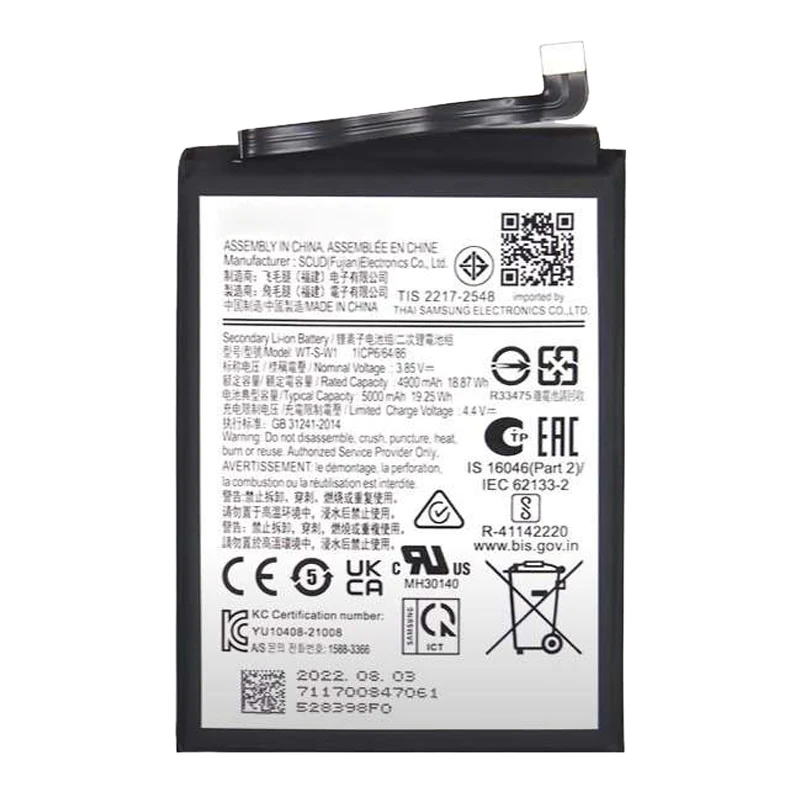
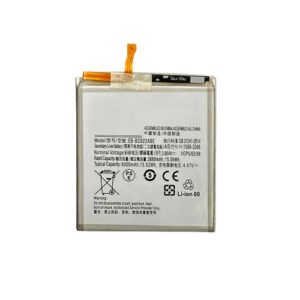
Samsung Galaxy A14 4G Battery Replacement – EB-BA146ABY
Bring your Samsung Galaxy A14 4G back to life with this premium-grade replacement battery. Designed to meet OEM specifications, it delivers reliable performance, optimal capacity, and long service life.
With a capacity of 5000mAh, this battery ensures long-lasting power for calls, browsing, gaming, and media playback. Built-in safety mechanisms protect against overcharging, overheating, and short-circuits.
Features:
Battery Model: EB-BA146ABY
Capacity: 5000mAh
OEM-grade quality for reliable performance
Fully tested for charge retention and safety
Perfect fit for Samsung Galaxy A14 4G models
Note: Professional installation is recommended for best results.
Galaxy A14 4G Battery – Long-Lasting Power and Reliability
The Galaxy A14 4G Battery is a crucial component that determines the overall performance, usability, and convenience of your smartphone. A high-quality battery ensures that your device stays powered throughout the day, handles heavy usage, and supports fast charging efficiently. Understanding the features, maintenance tips, and common issues of the Galaxy A14 4G Battery can help you maximize your device’s performance and longevity.
1. Key Features of the Galaxy A14 4G Battery
The Galaxy A14 4G Battery is designed to provide reliable and long-lasting performance. Key highlights include:
-
High Capacity: Supports long hours of usage, whether for calls, social media, streaming, or gaming.
-
Fast Charging Support: Enables quick top-ups to keep you connected without long waits.
-
Durability: Built to withstand frequent charging cycles without rapid degradation.
-
Safety Features: Includes protection against overheating, overcharging, and short circuits to ensure safe operation.
These features make the Galaxy A14 4G Battery a dependable power source for everyday smartphone activities.
2. Best Practices for Maintaining the Galaxy A14 4G Battery
Proper care of your Galaxy A14 4G Battery can significantly extend its lifespan:
-
Avoid Full Discharges: Keeping the battery level between 20% and 80% reduces stress on the cells.
-
Use Certified Chargers: Original or certified accessories prevent slow charging and potential damage.
-
Monitor Temperature: Avoid charging in extreme heat or cold, which can affect battery performance.
-
Limit Overnight Charging: Disconnect the device once fully charged to maintain battery health.
Following these habits ensures your Galaxy A14 4G Battery continues to deliver reliable performance.
3. Common Issues and Troubleshooting
Even high-quality batteries like the Galaxy A14 4G Battery can face occasional challenges:
-
Rapid Drain: Often caused by background apps or outdated software.
-
Overheating: Heavy usage, streaming, or poor ventilation may lead to high temperatures.
-
Slow Charging: Could be due to damaged cables, dirty ports, or non-certified chargers.
-
Battery Wear: Natural degradation over repeated charging cycles reduces capacity.
Addressing these issues promptly helps maintain the efficiency of your Galaxy A14 4G Battery.
4. Benefits of Proper Maintenance
Maintaining your Galaxy A14 4G Battery offers numerous advantages:
-
Reliable Performance: Ensures full-day usage without interruptions.
-
Extended Lifespan: Reduces degradation over time.
-
Safety: Minimizes the risk of overheating, swelling, or battery failure.
-
Device Protection: Preserves overall smartphone performance and prevents internal damage.
A well-maintained battery guarantees that your device stays powerful and safe, providing a seamless user experience.
5. Tips for Optimizing Battery Life
-
Reduce screen brightness and enable adaptive brightness.
-
Limit background apps and notifications.
-
Use power-saving modes when possible.
-
Avoid heavy gaming or streaming while charging.
-
Regularly update your device software for optimized battery management.
These practices complement the natural durability of the Galaxy A14 4G Battery, ensuring maximum efficiency.
Conclusion
The Galaxy A14 4G Battery is the backbone of your smartphone’s performance. With proper care, regular maintenance, and mindful usage, you can ensure long-lasting, reliable, and safe operation. Following best practices not only extends battery life but also enhances the overall experience of using your Galaxy A14 4G device.
Comprehensive Guide to Smartphone Battery Care and Maintenance
A smartphone’s battery is one of its most critical components, providing the energy necessary for all functions. Proper care, usage habits, and maintenance significantly affect battery performance, longevity, and overall device reliability. Understanding how to handle your smartphone battery can prevent common issues like rapid drain, overheating, and reduced lifespan.
1. Understanding Battery Health
Battery health refers to the battery’s ability to hold a charge over time. Lithium-ion batteries, which are commonly used in smartphones, gradually lose capacity after repeated charging cycles. Several factors influence battery health, including charging habits, temperature, usage patterns, and software management. Monitoring battery performance and understanding warning signs of decline are key to maintaining optimal operation.
2. Best Charging Practices
Proper charging routines are crucial to prolong battery life. Some recommended practices include:
-
Partial Charging: Frequently charging the device between 20% and 80% reduces stress on the battery cells.
-
Avoid Overcharging: Disconnecting the device once fully charged prevents overheating and capacity loss.
-
Use Certified Chargers: Chargers and cables designed for the device ensure efficient energy transfer and prevent damage.
-
Moderate Charging Speed: While fast charging is convenient, using it continuously can generate heat, which accelerates wear.
By following these practices, users can maintain steady performance and minimize premature battery degradation.
3. Temperature and Environmental Factors
Environmental conditions greatly affect battery efficiency. Both high and low temperatures can negatively impact performance:
-
High Heat: Prolonged exposure to heat can cause swelling, reduced capacity, and faster degradation.
-
Cold Conditions: Low temperatures may temporarily reduce battery efficiency and slow charging.
-
Humidity and Moisture: Exposure to water or high humidity can damage internal circuits.
Maintaining moderate temperatures and storing devices properly ensures safe and consistent battery performance.
4. Managing Applications and Usage Patterns
Many apps running in the background consume energy without the user’s knowledge, leading to faster battery drain. Effective management includes:
-
Closing unused applications.
-
Limiting notifications from non-essential apps.
-
Using built-in energy-saving modes or battery optimization settings.
Monitoring and controlling app activity reduces energy consumption, enhances device efficiency, and prolongs battery life.
5. Display Settings and Battery Consumption
The display is one of the largest energy consumers in a smartphone. Optimizing display settings can significantly extend battery life:
-
Lower Brightness Levels: Adjust to comfortable levels to reduce energy usage.
-
Enable Adaptive Brightness: Automatically adjusts brightness according to ambient light.
-
Reduce Screen Timeout: Shorter idle periods conserve power.
-
Use Dark Mode: On OLED screens, dark mode reduces power consumption and eases eye strain.
These adjustments allow the device to operate efficiently without compromising usability.
6. Software Updates and System Maintenance
Keeping the device updated ensures optimal battery management:
-
Software updates often include fixes that reduce unnecessary energy drain.
-
Optimized system processes improve performance and power efficiency.
-
Regular cache clearing and storage management prevent slowdowns that can indirectly affect battery life.
Maintaining software health complements physical maintenance for a comprehensive approach to battery longevity.
7. Daily Habits for Battery Longevity
Lifestyle choices can impact battery lifespan:
-
Avoid intensive gaming or streaming while charging.
-
Enable power-saving modes during low-usage periods.
-
Disconnect Bluetooth, Wi-Fi, or GPS when not required.
-
Give devices short breaks from continuous charging to prevent heat buildup.
Adopting these habits helps maintain stable energy levels, ensuring long-term device reliability.
8. Preparing for Battery Replacement
Even with optimal care, batteries eventually wear out. Preparing for replacement involves:
-
Monitoring signs of declining performance.
-
Scheduling professional battery inspections if needed.
-
Using high-quality replacement batteries when required.
Timely replacement prevents potential device damage and ensures continued reliable performance.
Comprehensive Insights into Galaxy A14 4G Battery – Maintenance, Optimization, and Longevity
A smartphone battery is the lifeblood of any device, determining its usability, performance, and reliability. The Galaxy A14 4G Battery plays a pivotal role in ensuring that your phone operates seamlessly throughout the day. Understanding its features, maintenance strategies, and common challenges helps users maximize performance and extend battery life.
The Galaxy A14 4G Battery is designed to deliver long-lasting power while supporting high-demand activities such as streaming, gaming, and multitasking. Its high-capacity cells and built-in safety features ensure that the device remains reliable even during prolonged usage.
Key Features of the Galaxy A14 4G Battery
-
High Capacity: Allows extended use without frequent recharging.
-
Fast Charging Support: Enables rapid top-ups, ensuring minimal downtime.
-
Durability: Designed to withstand frequent charge cycles without rapid degradation.
-
Safety Protections: Includes overcharge, short-circuit, and thermal protections to safeguard both the battery and the device.
The Galaxy A14 4G Battery ensures that your smartphone remains powered, supporting smooth operation for work, entertainment, and connectivity.
Best Practices for Maintaining Your Galaxy A14 4G Battery
Proper care of the Galaxy A14 4G Battery significantly extends its life:
-
Avoid full discharges; maintaining battery levels between 20% and 80% reduces stress.
-
Use original or certified chargers to prevent damage and ensure fast charging.
-
Avoid exposure to extreme temperatures, which can affect capacity and performance.
-
Disconnect the device after reaching full charge to prevent unnecessary strain on the battery.
By following these tips, the Galaxy A14 4G Battery remains efficient and safe over time.
Common Challenges
Even premium batteries like the Galaxy A14 4G Battery may face occasional issues:
-
Rapid Drain: Often caused by excessive app usage or background processes.
-
Overheating: Can occur during intensive tasks or improper charging practices.
-
Slow Charging: Sometimes caused by debris in the port, non-certified chargers, or aging components.
-
Battery Wear: Gradual reduction in capacity after repeated charging cycles.
Addressing these challenges ensures that the Galaxy A14 4G Battery continues to provide optimal performance.
Smartphone batteries require attention beyond just charging routines. Environmental factors, daily habits, and software management significantly influence battery performance and lifespan.
Environmental Considerations
Temperature plays a vital role in battery efficiency. Excessive heat can lead to swelling or permanent degradation, while extremely low temperatures can temporarily reduce performance. Maintaining devices in moderate conditions ensures consistent power delivery and safety. Humidity and moisture should also be avoided, as they can corrode internal components.
Optimizing Device Usage
Battery efficiency is directly affected by how the device is used:
-
Reduce screen brightness or enable adaptive brightness to conserve energy.
-
Close unused background apps to prevent unnecessary power drain.
-
Enable power-saving modes during periods of low usage.
-
Limit resource-heavy activities such as gaming or streaming while charging.
These steps minimize stress on the battery and promote longer-lasting performance.
Software Maintenance
Keeping devices updated optimizes battery management. Updates can fix bugs, improve energy efficiency, and enhance system performance. Periodic cache clearing and storage management prevent slowdowns that could indirectly affect battery consumption.
Daily Habits for Longevity
Lifestyle habits influence battery lifespan:
-
Avoid using the device continuously while charging to reduce heat generation.
-
Disconnect Bluetooth, GPS, or Wi-Fi when not in use to save power.
-
Give the device breaks during heavy use or extended charging sessions.
-
Limit multitasking or running multiple high-demand apps simultaneously.
These simple changes can significantly prolong battery life and maintain device reliability.
Part 3: With Keywords – Ensuring Reliability of Your Galaxy A14 4G Battery
A well-maintained Galaxy A14 4G Battery guarantees dependable power, consistent performance, and safety. Regular monitoring allows users to detect early signs of wear, such as reduced capacity or slower charging times. Replacing the Galaxy A14 4G Battery with a genuine component ensures continued reliability and protects the internal circuitry of the device.
Tips for Efficient Charging
-
Use the original or certified charger with your Galaxy A14 4G Battery.
-
Avoid using the phone extensively during charging to prevent overheating.
-
Perform regular inspections to ensure the charging port and connectors are clean and intact.
Proper care ensures that the Galaxy A14 4G Battery remains functional for daily usage, supporting connectivity, communication, and entertainment without interruption.
Advantages of Proper Maintenance
-
Reliable Performance: Long-lasting energy throughout the day.
-
Extended Lifespan: Reduces rapid degradation and preserves capacity.
-
Enhanced Safety: Minimizes risks associated with overheating, swelling, or electrical damage.
-
Optimized Device Experience: Maintains overall performance, preventing slowdowns caused by battery issues.
By following these strategies, users can maximize the efficiency, longevity, and safety of their Galaxy A14 4G Battery.
Comprehensive Guide to Smartphone Battery Longevity and Care
Smartphone batteries are among the most critical components of modern mobile devices. Proper care and mindful usage habits can significantly extend battery life, enhance performance, and prevent premature wear. Understanding best practices, environmental factors, and daily usage tips ensures that your device remains reliable and efficient over time.
1. Understanding Battery Lifespan
Battery lifespan refers to the duration over which a battery can hold an optimal charge. Lithium-ion batteries, commonly used in smartphones, gradually lose capacity after repeated charging cycles. Factors that affect battery longevity include:
-
Charging habits
-
Usage intensity
-
Environmental conditions
-
Software management
Monitoring battery health and adopting preventive measures can significantly prolong battery efficiency and overall device performance.
2. Optimal Charging Practices
Charging habits have a profound impact on battery life. Key strategies include:
-
Partial Charging: Keep battery levels between 20% and 80% to reduce stress on battery cells.
-
Avoid Overcharging: Disconnect devices once fully charged to prevent heat-related degradation.
-
Use Certified Chargers: Original or certified accessories ensure safe energy transfer.
-
Moderate Charging Speeds: While fast charging is convenient, continuous use may generate excessive heat, leading to faster battery wear.
Following these practices helps maintain stable performance and reduces the risk of battery damage.
3. Environmental Factors Affecting Batteries
Temperature and humidity are crucial for battery health:
-
Heat Exposure: High temperatures can cause swelling and capacity loss.
-
Cold Conditions: Low temperatures may temporarily reduce charging efficiency.
-
Moisture and Humidity: Exposure to water can corrode internal components, leading to malfunction.
Maintaining devices in controlled, moderate environments ensures safe and consistent energy delivery.
4. Managing Device Usage
Daily usage patterns directly influence battery longevity:
-
Limit running multiple high-demand apps simultaneously.
-
Close unused background applications.
-
Reduce screen brightness or enable adaptive brightness.
-
Avoid gaming or streaming while charging.
Effective management of usage patterns conserves energy and reduces strain on the battery.
5. Display Settings for Efficiency
The display is one of the largest power consumers in smartphones. Optimizing display settings enhances energy efficiency:
-
Lower screen brightness to comfortable levels.
-
Enable adaptive brightness to adjust automatically to ambient light.
-
Reduce screen timeout duration to minimize idle power consumption.
-
Use dark mode where available to conserve energy on OLED screens.
These adjustments help maintain battery performance without compromising usability.
6. Software Maintenance and Updates
Software plays a significant role in battery optimization:
-
Regular updates improve energy management protocols.
-
Fixes and optimizations reduce unnecessary background energy consumption.
-
Periodic cache clearing and storage management prevent slowdowns that could indirectly affect battery efficiency.
Maintaining updated software ensures efficient power usage and optimal device performance.
7. Lifestyle and Daily Habits
Your daily habits can either enhance or degrade battery performance:
-
Avoid using the device while it is charging to reduce heat buildup.
-
Disconnect unnecessary connections like Bluetooth, Wi-Fi, or GPS when not in use.
-
Allow devices short breaks during heavy usage or prolonged charging sessions.
-
Enable power-saving modes during low-usage periods.
Implementing these habits significantly improves battery longevity and reliability.
8. Recognizing Early Signs of Battery Wear
Being proactive helps prevent severe issues:
-
Rapid battery drain despite moderate usage.
-
Device overheating during charging or regular use.
-
Swelling or physical deformation of the battery area.
-
Reduced charging efficiency over time.
Early detection allows for timely maintenance or professional intervention, preventing further damage.
9. Preparing for Battery Replacement
Eventually, batteries degrade despite careful maintenance. Preparing for replacement involves:
-
Monitoring performance and recognizing signs of wear.
-
Consulting professionals for inspection if performance declines.
-
Using high-quality replacement batteries to ensure safety and reliability.
Timely replacement ensures continued optimal device performance and prevents potential damage to other internal components.
Reviews
There are no reviews yet.