
Description
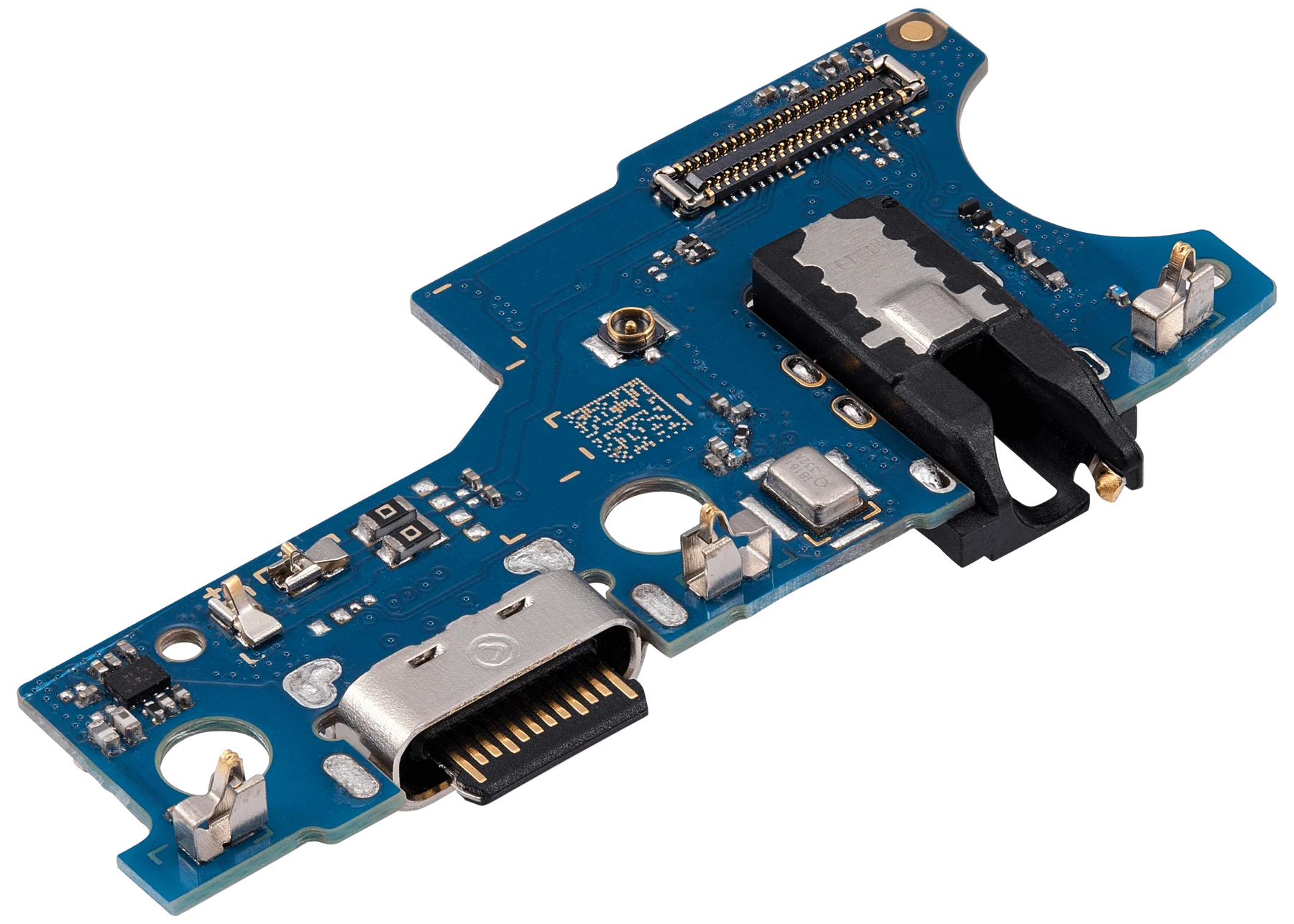
Samsung Galaxy A14 4G Charging Port Board Replacement
Restore charging and data transfer functionality with this OEM-grade charging port board designed for the Samsung Galaxy A14 4G. Made with precision components, it ensures stable power delivery and reliable USB Type-C connectivity.
This replacement part is ideal if your phone experiences charging interruptions, fails to recognize the charger, or struggles with data syncing.
Features:
Connector Type: USB Type-C
OEM-grade board for durability and performance
Fully tested for functionality and fit
Supports both charging and data transfer
Perfect replacement for damaged or faulty ports
Note: Professional installation is recommended to avoid internal damage.
A14 4G Charging Port – Reliable Performance and Maintenance Guide
The A14 4G Charging Port is an essential component of your device, responsible for delivering power from your charger to your phone. A properly functioning charging port ensures that your phone charges efficiently, maintains battery health, and performs reliably throughout the day. Understanding the features, common issues, and maintenance practices of the A14 4G Charging Port can help extend your device’s lifespan and prevent unexpected problems.
Section 1: Key Features of the A14 4G Charging Port
The A14 4G Charging Port is designed to provide consistent power delivery while maintaining compatibility with fast charging protocols and safety features. Key highlights include:
-
Durability: Built to withstand daily wear and tear from frequent plugging and unplugging.
-
High Conductivity: Ensures efficient energy transfer to the device’s battery.
-
Compatibility: Works seamlessly with original chargers and certified accessories.
-
Safety: Protects against short-circuits, overheating, and overcharging issues.
These features make the A14 4G Charging Port a reliable component for everyday smartphone use, whether you’re streaming, gaming, or performing essential tasks.
Section 2: Common Problems and Troubleshooting
Even high-quality charging ports can encounter issues over time. The A14 4G Charging Port may experience:
a. Slow or Inconsistent Charging
This can occur if the port accumulates dust, debris, or lint, which interferes with proper connection. Cleaning the port carefully with a soft brush or compressed air can often resolve this.
b. Loose Connection
Over time, frequent plugging and unplugging can loosen the port’s pins. Ensuring a snug fit with certified cables helps maintain a reliable connection.
c. Physical Damage
Accidental drops or misuse can bend pins or damage the port housing. Avoid using excessive force while connecting chargers and consider protective cases to reduce risk.
d. Compatibility Issues
Using non-certified or low-quality cables may prevent fast charging and could potentially harm the port. Always use original or certified accessories for optimal performance.
Section 3: Benefits of a Well-Maintained A14 4G Charging Port
Maintaining the A14 4G Charging Port provides numerous advantages:
-
Efficient Charging: Fast and consistent energy transfer ensures your device is ready when you need it.
-
Extended Battery Life: Proper charging reduces stress on the battery, preserving its long-term capacity.
-
Safety: A well-maintained port reduces risks of overheating, short circuits, or electrical damage.
-
Device Longevity: Protecting the charging port prevents potential damage to internal components.
Regular inspection and proper care ensure that the A14 4G Charging Port continues to function reliably over the device’s lifespan.
Section 4: Maintenance Tips for the A14 4G Charging Port
1. Regular Cleaning
Dust and debris are the most common causes of charging problems. Use a soft brush, toothpick, or compressed air to clean the port gently without damaging the pins.
2. Use Certified Accessories
Original chargers and cables are designed to fit perfectly, ensuring safe and efficient power transfer. Avoid using cheap or unverified alternatives.
3. Avoid Excessive Force
Plugging or unplugging the cable roughly can damage the pins or port housing. Always insert and remove cables gently.
4. Inspect for Damage
Periodically check the port for bent pins, corrosion, or physical damage. Early detection allows for timely repair and prevents further issues.
5. Professional Repair
If problems persist, seek professional repair services. Replacing a damaged A14 4G Charging Port with a genuine part ensures optimal functionality and safety.
Section 5: Troubleshooting Quick Fixes
-
Device Not Charging: Try a different certified cable and charger.
-
Intermittent Charging: Clean the port and inspect the cable for damage.
-
Overheating While Charging: Disconnect and let the device cool before resuming.
-
Slow Charging: Switch to a high-quality fast charger compatible with the device.
Following these quick fixes can restore normal functionality to the A14 4G Charging Port without immediate replacement.
Section 6: Importance of Using Genuine Parts
Replacing a worn or damaged port with a genuine A14 4G Charging Port is crucial. Non-genuine components can:
-
Cause inconsistent charging.
-
Overheat and damage the device.
-
Reduce overall device performance.
-
Void warranties and create safety risks.
Investing in authentic replacement parts guarantees performance, safety, and longevity.
Section 7: Conclusion
The A14 4G Charging Port is a vital component that ensures your smartphone receives efficient and safe power. Proper care, regular maintenance, and using certified accessories can prevent most common issues, extend battery life, and protect your device from unnecessary damage. For optimal performance, always use genuine parts and address any problems promptly. Maintaining the A14 4G Charging Port is a simple yet essential practice for anyone looking to keep their device reliable, safe, and long-lasting.
Comprehensive Guide to Smartphone Charging Port Care
Smartphone charging ports are essential components that ensure your device receives power efficiently. Proper maintenance, careful handling, and mindful usage habits play a key role in extending the life of these components and the device as a whole. This section explores practical strategies for keeping your charging port functioning reliably.
1. Importance of Proper Charging Habits
Charging habits have a direct impact on the longevity of a smartphone’s internal components. Overcharging, frequent full discharges, and using non-certified chargers can stress both the battery and the port. To optimize performance:
-
Maintain battery levels between 20% and 80%.
-
Avoid leaving the device plugged in overnight.
-
Use certified chargers and cables designed for the specific device.
Following these guidelines reduces strain on the port and internal circuitry, ensuring consistent power transfer and longer device lifespan.
2. Keeping the Port Clean
Dust, lint, and debris can accumulate in the charging port, causing slow or inconsistent charging. To maintain cleanliness:
-
Use a soft-bristled brush or compressed air to remove particles.
-
Avoid inserting sharp objects that could damage the pins.
-
Clean the port regularly, especially if the device is carried in pockets or bags.
A clean port ensures efficient connection and prevents potential damage caused by debris interfering with charging.
3. Handling the Port Gently
Rough handling can bend pins or damage the housing, leading to unreliable charging. Best practices include:
-
Inserting and removing cables gently.
-
Avoiding excessive force during connection.
-
Using cases that allow easy access without applying pressure on the port.
By handling the port carefully, you reduce wear and tear, ensuring consistent performance.
4. Monitoring Performance and Signs of Wear
Regular checks help identify early issues. Common signs that the charging port may need attention include:
-
Intermittent or slow charging.
-
Cable fits loosely or disconnects easily.
-
Visible debris, corrosion, or bent pins.
-
Overheating during charging.
Early detection allows for timely maintenance or professional repair, preventing further damage.
5. Avoiding Environmental Stress
Temperature and humidity play a critical role in the health of charging components. Exposure to extreme conditions can accelerate wear and reduce efficiency. Tips include:
-
Charge devices in moderate temperatures.
-
Avoid using devices under direct sunlight while charging.
-
Keep devices away from moisture or wet surfaces.
Maintaining optimal environmental conditions helps prolong port lifespan and ensures safe charging.
6. Software and Device Optimization
Software updates often improve energy efficiency and device performance. Keeping your smartphone updated ensures that:
-
Charging protocols are optimized.
-
Battery management features are effective.
-
Background processes consume less power.
Periodic software updates, combined with careful port management, maximize overall device efficiency.
7. Lifestyle Habits for Longevity
Daily usage habits impact the longevity of both the battery and charging port:
-
Avoid excessive multitasking during charging.
-
Limit heavy app usage or gaming while the device is plugged in.
-
Enable power-saving modes during low usage periods.
-
Disconnect unnecessary wireless connections when not in use.
Adopting these habits helps maintain stable charging performance and extends device life.
8. Preparing for Repairs or Replacement
Even with careful maintenance, charging ports can wear out. Preparing for repair involves:
-
Recognizing early signs of malfunction.
-
Scheduling professional inspection if needed.
-
Using high-quality replacement components when necessary.
Timely replacement prevents further damage to the device and maintains reliable charging performance.
Conclusion
Maintaining a smartphone’s charging port requires a combination of proper usage, careful handling, environmental awareness, and regular cleaning. By following these guidelines, users can ensure efficient power transfer, extend the life of their device, and prevent costly repairs. Mindful charging habits, gentle handling, and attention to environmental factors collectively contribute to a reliable, long-lasting smartphone experience.
The Ultimate Guide to Smartphone Charging Port Care and Maintenance
Smartphone charging ports are among the most critical yet overlooked components of mobile devices. They are responsible for transmitting power from chargers to the battery, ensuring your device functions properly throughout the day. Proper maintenance, careful handling, and mindful usage habits are essential for maximizing the lifespan of both the charging port and the smartphone itself.
This comprehensive guide explores practical strategies, tips, and best practices to ensure that your charging port remains functional and reliable.
1. Understanding the Importance of a Charging Port
The charging port is more than just a simple connection point. It serves as a bridge between the power source and the internal battery system. A malfunctioning port can lead to slow charging, intermittent connection, overheating, and even permanent damage to internal components. By understanding its importance, users can adopt habits that prevent damage and extend device longevity.
2. Best Practices for Charging Your Device
Charging habits are crucial to maintaining the health of your smartphone. Proper practices include:
-
Avoiding Full Discharges: Frequently draining the battery to 0% can stress internal components. Maintaining the charge between 20% and 80% is optimal.
-
Avoiding Overcharging: Disconnect the charger once the device reaches 100% to reduce stress on the internal circuits.
-
Using Certified Accessories: Chargers and cables designed specifically for your device ensure safe and efficient power transfer.
-
Moderate Charging Speeds: While fast charging is convenient, continuous use of high-speed charging may generate excess heat, accelerating wear.
These practices reduce the risk of overheating and internal damage while ensuring a stable power supply.
3. Cleaning and Maintaining the Charging Port
Accumulation of dust, lint, and debris is a common cause of charging issues. A clean port ensures proper connection and prevents slow or inconsistent charging. Maintenance tips include:
-
Using a soft-bristled brush, toothpick, or compressed air to gently remove debris.
-
Avoiding sharp objects that could bend or damage the pins.
-
Regularly inspecting the port, especially if the device is carried in pockets or bags.
Proper cleaning enhances the efficiency of the charging port and prevents long-term wear.
4. Handling the Charging Port with Care
Rough handling can damage the port, causing intermittent connections or permanent failure. To avoid issues:
-
Insert and remove cables gently without applying excessive force.
-
Use cases that allow easy access to the port without putting pressure on it.
-
Avoid bending the cable while plugged in, which can strain internal components.
Gentle handling reduces wear on the port and ensures consistent performance over time.
5. Recognizing Signs of Port Wear and Damage
Identifying early signs of damage helps prevent more serious problems. Common indicators include:
-
Slow or inconsistent charging.
-
Loose or wobbly cable connection.
-
Visible debris or corrosion in the port.
-
Excessive heat during charging.
Early detection allows for timely cleaning, maintenance, or professional repair, preventing further device damage.
6. Environmental Considerations for Port Longevity
Temperature and humidity significantly impact the charging port’s performance. Key considerations include:
-
Avoiding High Heat: Direct sunlight or hot surfaces can degrade internal components.
-
Avoiding Cold Conditions: Extremely low temperatures can temporarily reduce efficiency.
-
Moisture Protection: Keep the device away from water and high humidity to prevent corrosion.
Maintaining moderate environmental conditions ensures safe and efficient charging.
7. Optimizing Device Performance Through Software
Software plays a key role in energy management. Keeping your device updated ensures:
-
Optimal charging protocols are applied.
-
Background processes are managed efficiently to reduce energy drain.
-
System bugs that affect charging performance are fixed.
Regular updates, combined with proper port care, maximize device efficiency and battery longevity.
8. Lifestyle Habits That Extend Device Life
Daily usage habits impact the longevity of charging ports and the device overall:
-
Limit multitasking or heavy app usage during charging.
-
Disconnect unnecessary wireless connections like Bluetooth or Wi-Fi when not in use.
-
Enable power-saving modes during periods of low usage.
-
Avoid overloading the device with too many apps running simultaneously.
Implementing these habits ensures a more stable and long-lasting device performance.
9. Preparing for Repairs and Replacements
Despite careful maintenance, charging ports eventually wear out. Preparing for replacement involves:
-
Monitoring performance for signs of failure.
-
Scheduling professional inspections when needed.
-
Using high-quality replacement parts when necessary.
Timely repair or replacement prevents additional damage and ensures reliable performance.
10. Additional Tips for Maintaining Charging Efficiency
-
Avoid Using the Device While Charging: Excessive use during charging increases heat and stresses internal components.
-
Store Devices Properly: Avoid keeping phones in tight pockets or bags that could block ventilation.
-
Check Accessories: Inspect chargers and cables for damage regularly.
-
Periodic Rest: Give the device short breaks from continuous charging to maintain battery health.
These tips collectively contribute to a longer-lasting and more reliable charging system.
Conclusion
Maintaining a smartphone’s charging port requires a combination of proper handling, cleaning, environmental awareness, and daily usage habits. Following best practices ensures efficient power transfer, reduces wear on internal components, and prolongs the device’s lifespan. By being mindful of charging routines, software updates, and general maintenance, users can enjoy a consistent, reliable, and long-lasting smartphone experience.
Ensuring Optimal Performance of Your A14 4G Charging Port
The A14 4G Charging Port is a vital component that ensures your device receives consistent and reliable power. A malfunctioning or damaged port can lead to slow charging, intermittent connectivity, or even potential damage to the phone’s battery. Proper maintenance, careful handling, and timely replacement of the A14 4G Charging Port are essential to keep your smartphone running efficiently.
One of the key advantages of a well-maintained A14 4G Charging Port is efficient power transfer. When the port functions correctly, the phone charges quickly and safely, allowing users to enjoy uninterrupted device usage. Whether you are streaming media, browsing the internet, or using productivity apps, a functional A14 4G Charging Port ensures your device remains powered throughout the day.
Regular cleaning is crucial for maintaining the A14 4G Charging Port. Dust, lint, or debris can accumulate in the port over time, causing slow or inconsistent charging. Using a soft brush or compressed air to gently clean the port can prevent connectivity issues and extend the lifespan of the A14 4G Charging Port.
Using certified chargers and cables is another essential practice for protecting the A14 4G Charging Port. Non-certified or low-quality accessories can damage the port, reduce charging efficiency, and even harm the internal circuitry. Always ensure that your A14 4G Charging Port is paired with genuine, compatible accessories for optimal performance.
Physical damage is another common concern for the A14 4G Charging Port. Avoid applying excessive force when plugging or unplugging cables. Inspect the port periodically for bent pins, corrosion, or other signs of wear. Timely maintenance or professional replacement of the A14 4G Charging Port ensures reliable charging and prevents long-term damage to your smartphone.
In conclusion, a properly maintained A14 4G Charging Port guarantees consistent performance, safe charging, and extended device life. Cleaning, using certified accessories, gentle handling, and timely inspection are key practices that keep your A14 4G Charging Port in top condition, ensuring your smartphone remains efficient and reliable every day.

Reviews
There are no reviews yet.