Description
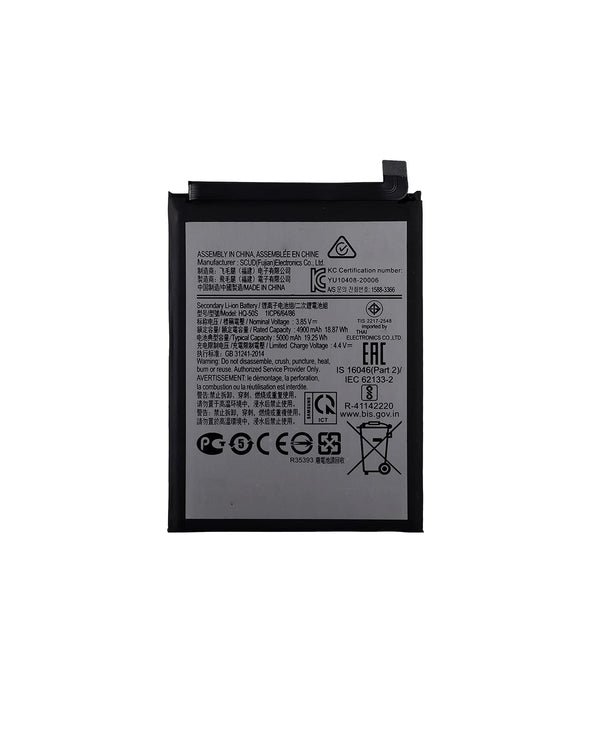
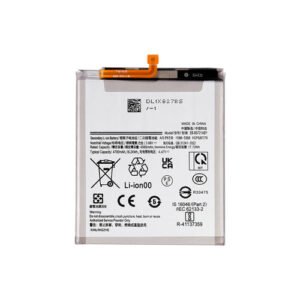
Galaxy A03 Battery Replacement – Reliable Power You Can Count On
Restore your Samsung Galaxy A03 to full power with this high-quality battery replacement. Designed to meet OEM standards, this battery provides consistent performance, safe charging, and extended usage time—ideal for fixing degraded or damaged batteries.
Why Choose This Battery Replacement?
Made specifically for Galaxy A03 (A035 / 2021)
OEM-grade build ensures safety and performance
Brings back fast charging and full-day power
Fully tested for capacity, thermal safety, and voltage stability
Solves issues like fast drain, shutdowns, or overheating
Power your Galaxy A03 with confidence using this durable and reliable battery replacement.
Reliable Power for Your Device
Your smartphone’s power source is the lifeline of the device, providing the energy needed for calls, apps, browsing, and entertainment. A dependable battery ensures that your phone performs optimally throughout the day. Whether you are a traveler, student, or professional, a strong and reliable power source keeps your device ready for any situation.
Section 1: Features of a High-Quality Smartphone Battery
Modern smartphone batteries are designed with durability and efficiency in mind. Key features include:
-
Long-lasting performance: Ensures a full day of use on a single charge.
-
Safety features: Protection against overheating and overcharging.
-
Fast-charging support: Quickly restores power when needed.
-
Device compatibility: Designed to fit perfectly with specific phone models, maintaining optimal performance.
With these features, a high-quality battery is one of the most reliable components for users seeking consistent energy for their smartphones.
Section 2: Common Problems and Solutions
Even high-quality batteries can face issues over time. Common problems include:
-
Rapid power drain: Often caused by heavy app usage or background processes.
-
Slow charging: Usually linked to using non-certified chargers or cables.
-
Overheating: Happens if the device is exposed to extreme temperatures or intensive tasks.
-
Reduced lifespan: Natural wear over months of use.
Solutions include using certified chargers, updating software regularly, limiting background apps, and storing the device in moderate temperatures. Regular care ensures the battery continues performing efficiently.
Section 3: Benefits of Replacing a Worn Battery
Replacing a worn battery offers multiple advantages:
-
Restores full daily battery life.
-
Enhances device performance and responsiveness.
-
Reduces unexpected shutdowns.
-
Improves safety with genuine replacement components.
Investing in a high-quality battery is more cost-effective than purchasing a new phone, while maintaining your device’s reliability and longevity.
Section 4: Tips to Maximize Battery Life
To get the most out of your device’s power source, consider these tips:
-
Charge between 20% and 80% to reduce stress on the battery cells.
-
Use original or certified charging accessories.
-
Keep your phone updated to ensure optimized battery performance.
-
Limit background apps and notifications.
-
Avoid exposure to extreme heat or cold.
Following these steps will help maintain the health and efficiency of your smartphone over time.
Understanding the Galaxy A03 Battery – Features, Benefits, and Maintenance
The Galaxy A03 Battery is the core of your device’s performance, ensuring that your phone can handle calls, apps, media, and multitasking without interruptions. Understanding how it works, how to maintain it, and the benefits of a high-quality replacement can make a huge difference in your device’s lifespan and daily reliability.
1. Key Features of the Galaxy A03 Battery
The Galaxy A03 Battery is designed to offer dependable power, safety, and efficiency. Its main features include:
-
Long-Lasting Performance: The battery is engineered to deliver full-day usage, allowing users to stay connected and productive without frequent recharging.
-
Optimized Safety: Integrated protections guard against overheating, short-circuiting, and overcharging, which safeguards both the battery and the device.
-
Fast-Charging Support: The battery can handle rapid charging cycles, giving users convenience when time is limited.
-
Perfect Compatibility: Designed specifically for the Galaxy A03, ensuring seamless integration and optimal performance.
These features make the Galaxy A03 Battery a reliable choice for daily smartphone use, whether for work, social media, or entertainment.
2. Common Problems and Solutions with the Galaxy A03 Battery
Even a high-quality Galaxy A03 Battery can face issues if not maintained properly. Here are some common problems and how to address them:
a. Rapid Battery Drain
Many users report that their devices lose charge quickly. This is often caused by running multiple apps in the background, high screen brightness, or outdated software. The solution is to monitor battery usage, close unused applications, and keep the phone updated to ensure optimized energy management.
b. Slow Charging
A slow-charging phone can be frustrating, but often the issue lies in the charger or cable rather than the Galaxy A03 Battery itself. Using original or certified accessories and ensuring the charging port is clean can restore normal charging speed.
c. Overheating
Heat can accelerate battery wear. The Galaxy A03 Battery can become warm during heavy gaming, streaming, or charging. Limiting intensive usage while charging and keeping the phone in a cool environment can help prevent overheating.
d. Reduced Lifespan Over Time
Every battery undergoes natural wear through repeated charge cycles. Proper care, including avoiding extreme charge levels and maintaining moderate temperatures, can extend the lifespan of the Galaxy A03 Battery.
3. Benefits of Using a Genuine Galaxy A03 Battery
Investing in a high-quality Galaxy A03 Battery offers several advantages:
-
Restores Full Daily Battery Life: Ensures your device performs as it did when new.
-
Improves Device Responsiveness: A fresh battery reduces lag and unexpected shutdowns.
-
Enhances Safety: Genuine replacements prevent overheating, swelling, and other risks.
-
Cost-Effective Solution: Extending your device’s life with a replacement battery is cheaper than buying a new phone.
By choosing an authentic Galaxy A03 Battery, users can enjoy reliable performance and peace of mind.
4. Maintenance Tips for the Galaxy A03 Battery
Proper maintenance is key to prolonging the life of the Galaxy A03 Battery. Here are essential tips:
-
Optimal Charging Practices: Charge the battery between 20% and 80% to reduce stress on the cells. Avoid keeping it plugged in for extended periods after reaching 100%.
-
Use Certified Accessories: Chargers and cables not designed for the Galaxy A03 can cause slow charging or permanent damage. Always use original or certified accessories.
-
Monitor Background Apps: Applications running in the background can drain the battery quickly. Close unused apps and limit unnecessary notifications.
-
Software Updates: Keep the device updated to take advantage of battery optimizations and bug fixes.
-
Temperature Management: Avoid exposing the device to direct sunlight, high heat, or freezing conditions to protect the battery from damage.
5. Signs It’s Time to Replace the Galaxy A03 Battery
Even with careful maintenance, all batteries eventually degrade. Consider replacing the Galaxy A03 Battery if you notice:
-
Rapid battery drain despite normal usage.
-
The device shuts down unexpectedly.
-
Charging takes unusually long.
-
The phone becomes hot or swollen in the battery area.
Replacing the battery with a genuine Galaxy A03 Battery ensures continued reliable performance and avoids potential damage to your device.
1. Understanding the Galaxy A03 Battery’s Role
The Galaxy A03 Battery is central to the phone’s performance. It powers essential functions, including calls, messaging, social media, streaming, gaming, and productivity apps. A well-maintained Galaxy A03 Battery ensures your device performs efficiently without unexpected shutdowns or lag. Understanding its capacity, charging cycles, and limitations helps users get the most out of their phones.
Modern Galaxy A03 Batteries are built for durability, supporting fast charging and integrated safety features. They are designed to withstand everyday usage while maintaining consistent energy output. However, the battery’s performance can degrade over time due to repetitive charging cycles, environmental factors, or heavy usage.
2. Best Practices for Charging the Galaxy A03 Battery
Proper charging habits are critical for preserving the health of your Galaxy A03 Battery. Experts recommend:
-
Avoid Full Discharges: Keeping the battery between 20% and 80% reduces stress on lithium-ion cells.
-
Use Original Chargers: Non-certified accessories may cause slow charging, overheating, or permanent damage.
-
Avoid Overnight Charging: Leaving your phone plugged in for extended periods after reaching 100% can strain the battery.
-
Monitor Temperature: Charging in extreme heat or cold can reduce battery lifespan.
By following these habits, the Galaxy A03 Battery remains efficient and reliable for longer.
3. Common Challenges and Troubleshooting
Even high-quality batteries like the Galaxy A03 Battery can face challenges. Common issues include:
-
Rapid Drain: Often caused by background apps or outdated software.
-
Overheating: Heavy gaming, streaming, or poor ventilation can heat the device.
-
Slow Charging: Usually linked to damaged cables, dirty ports, or low-quality chargers.
-
Battery Wear: Natural wear over repeated charging cycles reduces capacity.
Troubleshooting involves keeping apps updated, closing unused programs, using certified accessories, and replacing worn batteries with genuine Galaxy A03 Battery components.
4. Benefits of Proper Maintenance
A well-maintained Galaxy A03 Battery offers numerous benefits:
-
Reliable Performance: Full-day usage without interruptions.
-
Extended Lifespan: Slower degradation over time.
-
Safety: Reduced risk of overheating, swelling, or failure.
-
Device Protection: Maintains overall phone performance and prevents damage to internal components.
Proper maintenance ensures that your Galaxy A03 Battery continues delivering power efficiently while preserving the health of your device.
5. General Tips for Smartphone Power Efficiency
Beyond battery-specific care, general habits can improve smartphone longevity. Managing background apps, lowering screen brightness, and enabling power-saving modes significantly enhance daily performance. Notifications should be limited to essential apps to reduce unnecessary device wake-ups.
6. Optimizing Software and Apps
Keeping your phone updated ensures that energy efficiency improvements from software upgrades are applied. Developers often release updates to fix bugs, reduce app consumption, and improve overall power management.
7. Environmental Factors
Temperature plays a critical role in device health. Excessive heat from direct sunlight or prolonged gaming sessions can impact performance. Conversely, very cold conditions may temporarily reduce efficiency. Storing and charging the device in moderate conditions helps protect internal components.
8. Charging Smartly
Even without focusing on a specific battery model, following safe charging habits improves device longevity. Avoid using cheap, uncertified chargers and remove phone cases that trap heat during charging. Using moderate charging speeds rather than rapid charging continuously can extend overall lifespan.
9. Lifestyle Habits for Longevity
Maintaining a balanced approach to smartphone use helps preserve its power system. Avoid overloading the device with too many demanding apps at once. Regularly clearing cache and unnecessary files improves performance. For travelers, using airplane mode in low-signal areas can prevent excessive energy drain.
10. The Importance of Periodic Maintenance
Smartphones benefit from regular checks. Cleaning ports, inspecting for swelling, and monitoring software performance ensures that the device continues operating efficiently. Small daily adjustments—like closing background apps or limiting high-brightness usage—can have a long-term impact on performance.
11. Preparing for Replacement When Needed
Eventually, all batteries degrade. Preparing for replacement by understanding device alerts, charge anomalies, or unexpected shutdowns ensures users can act promptly. Using high-quality replacements maintains reliability and extends the phone’s functional lifespan.
Conclusion
Maximizing smartphone performance requires both device-specific care and general usage habits. Proper management of energy consumption, attention to environmental factors, and following best practices ensures that the device performs smoothly, lasts longer, and provides a seamless user experience. Balanced usage, regular updates, and mindful charging practices are key to keeping your phone running at peak performance.
Maximizing Smartphone Performance and Longevity
Smartphones have become an essential part of modern life, and their efficiency depends largely on how we use and maintain them. While the internal battery is critical, user habits, environmental factors, and software management play an equally important role in extending performance and longevity. This section explores practical strategies and expert tips to help you get the most out of your device.
1. Importance of Proper Charging Habits
One of the most crucial factors influencing smartphone longevity is charging behavior. Users often make mistakes that reduce efficiency or shorten the device’s lifespan. Best practices include:
-
Avoiding Full Discharges: Frequently letting the battery drop to 0% stresses the cells. It’s better to maintain charge levels between 20% and 80% for optimal health.
-
Moderate Charging Speeds: While fast charging is convenient, continuous use of high-speed charging may generate heat, which accelerates wear.
-
Avoiding Overnight Charging: Leaving the phone plugged in after reaching 100% can gradually reduce the battery’s overall capacity.
Following these simple rules ensures the device maintains consistent power delivery over time.
2. Managing Applications and Background Processes
Many apps run silently in the background, consuming energy without visible activity. Reducing background processes can help:
-
Close unnecessary applications.
-
Disable push notifications from non-essential apps.
-
Use built-in battery optimization settings that prioritize essential functions.
By controlling app activity, users can reduce drain, improve performance, and minimize heat generation, all of which contribute to the device’s overall longevity.
3. Display Settings and Energy Consumption
The display is one of the largest consumers of energy in any smartphone. Optimizing display settings can make a significant difference:
-
Reduce Brightness: Lowering brightness to a comfortable level saves energy.
-
Enable Adaptive Brightness: This feature automatically adjusts brightness based on ambient light, balancing visibility and efficiency.
-
Shorter Screen Timeouts: Reducing the time before the screen goes to sleep prevents unnecessary energy consumption.
-
Dark Mode: Using dark mode on OLED or AMOLED screens decreases power use and reduces eye strain.
These simple adjustments can extend daily usage and reduce the frequency of recharging.
4. Software Updates and Device Optimization
Regular software updates often include performance and battery efficiency improvements. Keeping the device updated ensures access to:
-
Bug fixes that reduce unnecessary background energy use.
-
Optimized operating system performance for smoother app management.
-
Security updates that protect device integrity and prevent unexpected shutdowns.
Users should also periodically clear cache, remove unused apps, and monitor storage usage, as overfilled storage can negatively impact system performance.
5. Environmental Considerations
Environmental conditions have a profound effect on smartphone efficiency:
-
Temperature: Extreme heat can accelerate component wear, while cold conditions can temporarily reduce battery performance.
-
Humidity: Avoid exposing devices to excessive moisture, which can damage internal circuits.
-
Direct Sunlight: Prolonged exposure can overheat the device and affect internal components.
Maintaining moderate storage and operating conditions helps ensure consistent performance and prolongs the lifespan of internal components.
6. Lifestyle Habits for Longevity
Daily habits also influence overall device performance:
-
Limit intensive multitasking, especially gaming or streaming multiple apps at once.
-
Use power-saving or energy-efficient modes when possible.
-
Disconnect unnecessary Bluetooth or Wi-Fi connections when not in use.
-
Carry a portable charger for emergency situations to avoid frequent full discharges.
These practical steps complement technical maintenance strategies and help keep your smartphone running efficiently.
7. Preparing for Replacement and Maintenance
Even with careful usage, all smartphone components eventually wear out. Preparing for replacement involves:
-
Monitoring signs of reduced performance or faster energy drain.
-
Periodically inspecting the device for swelling, heat, or unusual behavior.
-
Using high-quality replacement parts when necessary.
Proper maintenance and timely replacement of components ensure the device continues performing at its best and avoids unexpected failures.
Practical Tips for Extending the Life of Your Galaxy A03 Battery
The Galaxy A03 Battery is an essential component that ensures your device remains functional and reliable throughout the day. While it is built for durability, proper care can significantly extend its lifespan and efficiency. Understanding how to handle and maintain the battery is key to getting the most out of your smartphone.
One of the most important tips is to avoid full discharges. Keeping the battery level between 20% and 80% reduces stress on the lithium-ion cells, helping the Galaxy A03 Battery maintain optimal performance over time. Additionally, always use original or certified chargers to prevent potential damage or slow charging issues.
Monitoring background applications is another effective strategy. Many apps continue running without your knowledge, draining power unnecessarily. Closing unused apps and limiting notifications can reduce strain on the Galaxy A03 Battery, ensuring longer daily usage.
Temperature management also plays a crucial role. Exposure to extreme heat or cold can degrade the battery faster. Keeping the device in a moderate environment during usage and charging protects the Galaxy A03 Battery from premature wear.
Finally, regular software updates optimize the device’s energy management. Updates often include features that improve battery efficiency and address bugs that may cause unnecessary drain. Combining these habits—proper charging, managing apps, monitoring temperature, and updating software—ensures that your Galaxy A03 Battery remains reliable, safe, and long-lasting.
Reviews
There are no reviews yet.