Description
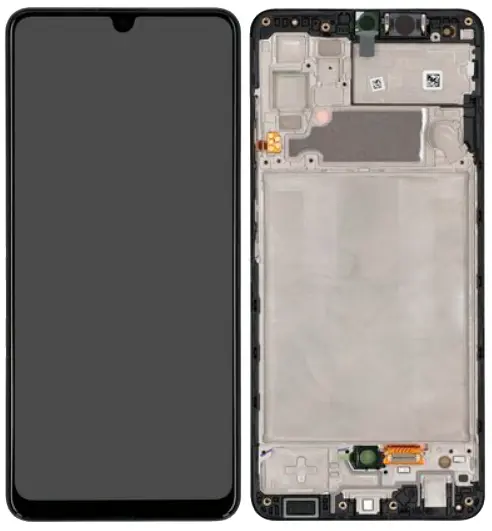
Samsung Galaxy A32 4G (A325 / 2021) OLED Screen Assembly With Frame – Restore Premium Visuals & Touch
Revitalize your Samsung Galaxy A32 4G with this high-grade OLED screen assembly. Built to factory specifications, it delivers vibrant colors, high contrast, and smooth touch accuracy. The pre-installed frame simplifies installation and ensures a secure, clean fit.
Ideal for repairing cracked, malfunctioning, or unresponsive displays while preserving original screen quality.
Why Choose This OLED Screen Assembly?
Specifically designed for Galaxy A32 4G (A325 / 2021)
OLED panel offers vivid color depth and sharp contrast
Pre-installed frame allows quicker and cleaner installation
Fully tested for brightness, touch precision, and durability
Fixes display issues like ghost touches, black screen, or lines
Bring your A32 4G back to life with this premium OLED screen replacement.
The Galaxy A32 4G OLED screen is a premium display component that ensures vibrant colors, sharp visuals, and smooth touch functionality. OLED technology offers deep blacks, high contrast ratios, and energy-efficient performance, making the Galaxy A32 4G OLED screen one of the most important features of the smartphone.
Maintaining the OLED screen is critical to preserve display quality and touch responsiveness. This guide provides a complete overview of Galaxy A32 4G OLED screen repair, replacement, troubleshooting, and maintenance, while integrating keywords strategically for SEO purposes.
Overview of Galaxy A32 4G OLED Screen
The Galaxy A32 4G OLED screen comes with several impressive features:
-
Vibrant Colors: Deep blacks and vivid colors enhance the viewing experience.
-
High Resolution: 1080 x 2400 pixels for sharp and detailed images.
-
Smooth Touch Response: Supports accurate gestures and multitouch functionality.
-
Durability: OLED panel with chemically strengthened glass resists minor scratches.
-
Energy Efficiency: OLED technology consumes less power compared to traditional LCD screens.
Despite its durability, the Galaxy A32 4G OLED screen is susceptible to cracks, dead pixels, flickering, and touch issues if not handled carefully.
Common Problems with Galaxy A32 4G OLED Screen
Even high-quality OLED screens can encounter issues over time. Common problems include:
-
Cracks and Physical Damage: Accidental drops or impacts can crack the OLED screen.
-
Dead Pixels: Small areas of the screen may stop functioning, showing black or colored spots.
-
Touch Responsiveness Issues: Screen may become unresponsive or inaccurate.
-
Screen Flickering: Irregular brightness or ghosting due to software or hardware faults.
-
Color Inaccuracy: Dull or washed-out colors reduce display quality.
-
Backlight or Brightness Issues: Uneven lighting can strain eyes and affect usability.
Early detection of these problems ensures timely repair and avoids further damage to the Galaxy A32 4G OLED screen.
Causes of OLED Screen Damage
Understanding the causes of screen issues helps in preventing them:
-
Accidental Drops: Physical impact is the leading cause of OLED screen cracks.
-
Excessive Pressure: Sitting on or pressing too hard on the screen can damage the panel.
-
Liquid Exposure: Moisture or water damage can impair display functionality.
-
Dust and Debris: Tiny particles can scratch the screen or reduce touch accuracy.
-
Software Glitches: Outdated software can cause flickering or touch lag.
-
Normal Wear and Tear: Frequent usage over time can reduce display performance.
Preventing these causes preserves the Galaxy A32 4G OLED screen and enhances longevity.
DIY Troubleshooting Tips
Some minor issues with the Galaxy A32 4G OLED screen can be fixed at home:
-
Restart Your Device: Fixes minor software glitches affecting display and touch.
-
Software Update: Ensures the OLED screen runs with optimized settings and improved touch accuracy.
-
Clean the Screen: Remove fingerprints, dust, and smudges using a microfiber cloth.
-
Remove Screen Protectors: Thick or misaligned protectors can interfere with touch sensitivity.
-
Check Loose Connections: Inspect internal connections if confident, to ensure proper functioning.
These steps often restore screen performance without professional intervention.
Repair vs Replacement
Depending on the severity, the Galaxy A32 4G OLED screen may require:
-
Repair: Minor cracks, small dead pixel areas, or flickering can often be repaired professionally.
-
Replacement: Severe cracks, extensive dead pixels, or total screen failure require full OLED screen replacement.
Using genuine Galaxy A32 4G OLED replacement screens ensures color accuracy, brightness, and touch responsiveness are restored to original standards.
Professional Repair Process
Certified technicians follow a structured process when servicing the Galaxy A32 4G OLED screen:
-
Diagnosis: Identify the root cause of the screen issue—hardware or software.
-
Disassembly: Carefully remove the damaged OLED screen using specialized tools.
-
Repair or Replacement: Fix minor issues or install a genuine replacement screen.
-
Testing: Check touch functionality, brightness, color accuracy, and display clarity.
-
Reassembly: Reassemble the device carefully to avoid further damage.
Professional service ensures long-term performance and durability of the OLED screen.
Maintenance Tips for Galaxy A32 4G OLED Screen
Proper care extends the lifespan of the Galaxy A32 4G OLED screen:
-
Use a Screen Protector: Protects against scratches and minor cracks.
-
Durable Case: Reduces damage from accidental drops.
-
Regular Cleaning: Remove dust, smudges, and fingerprints regularly.
-
Avoid Excessive Pressure: Don’t press hard on the screen during use.
-
Keep Away from Moisture: Avoid water exposure or humid conditions.
-
Inspect Periodically: Check for early signs of cracks, dead pixels, or touch issues.
Following these practices ensures the OLED screen remains vibrant, responsive, and long-lasting.
Benefits of Genuine Replacement
Choosing professional service with genuine Galaxy A32 4G OLED screens provides several advantages:
-
Accurate Color Display: Maintains original vibrant display quality.
-
Smooth Touch Response: Ensures precise touch interaction.
-
Durable and Long-Lasting: Genuine OLED screens last longer than cheaper alternatives.
-
Optimized Device Performance: Prevents issues caused by incompatible parts.
-
Warranty Protection: Certified screens often include a warranty.
Investing in genuine replacements guarantees optimal performance and reliability.
Cost Considerations
Screen repair or replacement costs vary based on service type:
-
Authorized Service Centers: Higher cost but ensures genuine parts and certified technicians.
-
Trusted Online Services: Moderate cost with warranty.
-
Local Repair Shops: Affordable, but verify the authenticity and quality of the OLED screen.
Professional replacement ensures proper installation and long-term durability of the Galaxy A32 4G OLED screen.
Conclusion
The Galaxy A32 4G OLED screen is essential for sharp visuals, vibrant colors, and responsive touch interaction. Recognizing early signs of damage, proper troubleshooting, and professional repair or genuine replacement ensures long-term performance.
Protective accessories, careful handling, and regular maintenance keep the Galaxy A32 4G OLED screen reliable, efficient, and visually stunning. Following these tips prevents costly repairs, improves usability, and ensures your Galaxy A32 delivers an exceptional OLED display experience for years.
The Galaxy A32 4G OLED screen is one of the most important components of your smartphone. Its vibrant colors, deep blacks, and smooth touch response make it a key feature for gaming, media consumption, and productivity. Maintaining the OLED screen ensures your device continues to deliver an exceptional viewing experience.
This section provides a comprehensive guide to Galaxy A32 4G OLED screen troubleshooting, repair, replacement, and optimization, with emphasis on keywords for SEO purposes.
Common OLED Screen Problems
Even high-quality OLED screens like the Galaxy A32 4G OLED screen can face issues over time. Some common problems include:
-
Cracks and Physical Damage: Accidental drops or impacts can damage the OLED panel.
-
Dead Pixels: Black or colored spots may appear on the display.
-
Touch Responsiveness Issues: The touchscreen may become unresponsive or inaccurate.
-
Screen Flickering: Irregular brightness or ghosting caused by hardware or software issues.
-
Color Distortion: Dull, washed-out, or inaccurate colors reduce display quality.
-
Backlight Problems: Uneven brightness or dim spots make the screen harder to view.
Early detection of these issues prevents further damage to the Galaxy A32 4G OLED screen and ensures timely repair or replacement.
Causes of OLED Screen Problems
Understanding the reasons behind screen issues is essential for preventive care. The main causes include:
-
Accidental Drops and Impacts: The most common cause of cracks or internal damage to the OLED screen.
-
Excessive Pressure: Applying too much pressure can damage the OLED layer and affect touch sensitivity.
-
Liquid Damage: Water or moisture can seep into the screen and affect performance.
-
Dust and Debris: Tiny particles can scratch the screen or interfere with touch accuracy.
-
Software Glitches: Outdated firmware or apps may cause flickering, touch lag, or color distortion.
-
Normal Wear and Tear: Over time, prolonged usage can slightly reduce touch responsiveness and display quality.
Preventing these causes extends the lifespan and performance of the Galaxy A32 4G OLED screen.
DIY Troubleshooting for Galaxy A32 4G OLED Screen
Some minor issues with the Galaxy A32 4G OLED screen can be fixed at home using these steps:
-
Restart the Device: Resolves minor software glitches affecting touch or display.
-
Software Updates: Install the latest firmware to improve screen responsiveness and display performance.
-
Clean the Screen: Regularly clean with a microfiber cloth to remove fingerprints and dust.
-
Remove Screen Protectors: Misaligned or thick protectors can reduce touch sensitivity.
-
Inspect Connections: If comfortable, carefully check internal screen connectors to ensure proper alignment.
These troubleshooting steps can restore screen functionality without requiring professional service.
Repair vs Replacement
Depending on the severity of the problem, the Galaxy A32 4G OLED screen may require either repair or replacement:
-
Repair: Minor cracks, dead pixels, or flickering can often be fixed professionally.
-
Replacement: Severe cracks, extensive dead pixels, or total screen failure necessitate full OLED screen replacement.
Using genuine Galaxy A32 4G OLED replacement screens ensures original brightness, color accuracy, and smooth touch response are maintained.
Professional Repair Process
Professional technicians follow a careful process when servicing the Galaxy A32 4G OLED screen:
-
Diagnosis: Determine if the issue is hardware or software related.
-
Disassembly: Carefully remove the damaged OLED screen using specialized tools.
-
Repair or Replacement: Repair minor issues or install a genuine replacement screen.
-
Testing: Verify touch responsiveness, brightness, color accuracy, and display clarity.
-
Reassembly: Safely reassemble the device to avoid additional damage.
Professional service guarantees long-term durability and performance of the OLED screen.
Optimization Tips for High-Performance OLED Screen
To maintain the Galaxy A32 4G OLED screen at peak performance, follow these optimization tips:
-
Adjust Brightness: Use adaptive brightness to reduce battery consumption and prevent screen strain.
-
Enable Dark Mode: Dark mode saves energy and prolongs OLED screen life.
-
Avoid Overheating: Don’t expose the device to direct sunlight or high temperatures.
-
Limit Heavy Gaming or Streaming: Intensive usage for long periods may affect screen longevity.
-
Regular Software Updates: Keep the device updated for optimized OLED screen performance.
These practices ensure the screen remains bright, responsive, and visually stunning.
Maintenance Tips
Proper maintenance of the Galaxy A32 4G OLED screen extends lifespan and enhances reliability:
-
Screen Protectors: Protect against scratches, cracks, and minor impacts.
-
Durable Cases: Reduces damage from accidental drops.
-
Regular Cleaning: Removes dust, fingerprints, and smudges.
-
Avoid Excessive Pressure: Prevents internal damage to the OLED panel.
-
Keep Away from Moisture: Avoid water exposure and humid environments.
-
Monitor Screen Health: Check periodically for cracks, dead pixels, or touch responsiveness issues.
Following these tips keeps the Galaxy A32 4G OLED screen safe, efficient, and long-lasting.
Benefits of Professional Replacement
Using professional services with genuine Galaxy A32 4G OLED screens provides multiple advantages:
-
Accurate Colors: Maintains original vibrant display quality.
-
Smooth Touch Response: Ensures precise and reliable interaction.
-
Durable and Long-Lasting: Genuine screens outperform cheap alternatives.
-
Optimized Device Performance: Avoids issues caused by incompatible parts.
-
Warranty Protection: Certified screens typically include warranty coverage.
Professional replacement ensures maximum performance and reliability.
Cost Considerations
Repair or replacement costs vary depending on service type:
-
Authorized Service Centers: Higher cost but ensures genuine parts and certified technicians.
-
Trusted Online Services: Moderate cost with warranty.
-
Local Repair Shops: Affordable but verify the authenticity and quality of the OLED screen.
Investing in professional replacement ensures the Galaxy A32 4G OLED screen remains functional and reliable for years.
The Galaxy A32 4G OLED screen is a premium display designed for vibrant visuals, accurate colors, and smooth touch interaction. OLED technology ensures deep blacks, high contrast ratios, and energy-efficient performance, making it one of the most important features of the device.
This section covers detailed repair procedures, replacement strategies, optimization tips, and maintenance guidelines, with an emphasis on keywords for SEO optimization.
Common Galaxy A32 4G OLED Screen Issues
Even high-quality OLED screens like the Galaxy A32 4G OLED screen can face problems due to wear, accidental damage, or software glitches. Common issues include:
-
Cracks and Physical Damage: Dropping the device or applying excessive pressure can crack the screen.
-
Dead Pixels: Black or colored spots that appear due to malfunctioning pixels.
-
Touch Sensitivity Problems: Screen may become unresponsive or inconsistent.
-
Screen Flickering: Uneven brightness, ghosting, or flickering due to hardware or software issues.
-
Color Inaccuracy: Washed-out or distorted colors affecting visual quality.
-
Backlight or Brightness Problems: Uneven lighting makes parts of the screen dim or hard to view.
Recognizing these issues early is crucial to maintain optimal performance of the Galaxy A32 4G OLED screen.
Causes of OLED Screen Damage
Understanding the causes of OLED screen problems helps prevent future damage. Key causes include:
-
Accidental Drops: Physical impact can crack the screen or damage internal OLED layers.
-
Excessive Pressure: Applying force can harm the OLED panel or touch sensors.
-
Liquid or Moisture Exposure: Water can penetrate the screen and damage the display.
-
Dust and Dirt: Small particles can scratch the screen or interfere with touch response.
-
Software Issues: Outdated software or rogue apps can cause flickering or delayed touch response.
-
Normal Wear and Tear: Long-term usage can reduce brightness, touch sensitivity, and color accuracy.
Preventive measures ensure the Galaxy A32 4G OLED screen remains vibrant and responsive for years.
DIY Troubleshooting Tips
Some minor problems with the Galaxy A32 4G OLED screen can be resolved at home:
-
Restart the Device: Clears minor software glitches affecting display and touch.
-
Update Software: Ensures optimal touch responsiveness and display performance.
-
Clean the Screen: Use a microfiber cloth to remove dust and fingerprints.
-
Remove Screen Protectors: Misaligned or thick protectors can reduce touch accuracy.
-
Check Loose Connections: Carefully inspect internal connectors if confident.
These troubleshooting steps can often restore normal screen functionality without professional intervention.
Repair vs Replacement
Depending on the severity of the problem, the Galaxy A32 4G OLED screen may need:
-
Repair: Minor cracks, dead pixels, or flickering may be repaired professionally.
-
Replacement: Severe damage, multiple dead pixels, or total screen failure require full OLED screen replacement.
Using genuine Galaxy A32 4G OLED replacement screens guarantees original display quality, touch responsiveness, and durability.
Professional Repair Process
Professional technicians follow a structured process for repairing or replacing the Galaxy A32 4G OLED screen:
-
Diagnosis: Identify whether the issue is hardware or software-related.
-
Disassembly: Carefully remove the damaged OLED screen using specialized tools.
-
Repair or Replacement: Repair minor issues or install a genuine replacement screen.
-
Testing: Verify touch sensitivity, color accuracy, brightness, and display clarity.
-
Reassembly: Reassemble the device carefully to avoid additional damage.
Professional service ensures long-term durability and reliability of the OLED screen.
Optimization Tips for High-Performance OLED
To maximize performance and longevity of the Galaxy A32 4G OLED screen:
-
Adjust Brightness: Use adaptive brightness to conserve energy and reduce strain.
-
Enable Dark Mode: Reduces power consumption and prolongs OLED lifespan.
-
Avoid Overheating: Prevent prolonged exposure to direct sunlight or high temperatures.
-
Limit Intensive Usage: Avoid long gaming or streaming sessions to protect the OLED panel.
-
Software Updates: Keep the device updated to optimize screen performance.
These optimization tips maintain smooth touch response, vibrant colors, and energy efficiency.
Maintenance Tips
Proper maintenance ensures the Galaxy A32 4G OLED screen remains reliable:
-
Screen Protectors: Protect against scratches, cracks, and minor impacts.
-
Durable Case: Reduces damage from accidental drops.
-
Regular Cleaning: Removes dust, fingerprints, and smudges.
-
Avoid Excessive Pressure: Protects internal OLED layers.
-
Keep Away from Moisture: Prevents water damage and long-term issues.
-
Monitor Screen Health: Regularly check for cracks, dead pixels, flickering, or touch issues.
Following these practices ensures the Galaxy A32 4G OLED screen remains functional, vibrant, and responsive.
Benefits of Genuine Replacement
Professional replacement with genuine Galaxy A32 4G OLED screens offers multiple advantages:
-
Accurate Colors: Maintains original vibrant display quality.
-
Smooth Touch Response: Reliable and precise touch interaction.
-
Durable and Long-Lasting: Genuine OLED screens outperform cheap alternatives.
-
Optimized Device Performance: Avoids issues caused by incompatible parts.
-
Warranty Protection: Certified screens typically include a warranty.
Investing in genuine replacement ensures optimal performance and reliability for the Galaxy A32 4G OLED screen.
Cost Considerations
Repair or replacement costs vary depending on the type of service:
-
Authorized Service Centers: Higher cost, but guarantees genuine parts and certified technicians.
-
Trusted Online Services: Moderate cost with warranty.
-
Local Repair Shops: Affordable, but verify the authenticity and quality of the OLED screen.
Professional replacement ensures long-term functionality, preventing further issues.


Reviews
There are no reviews yet.