Description
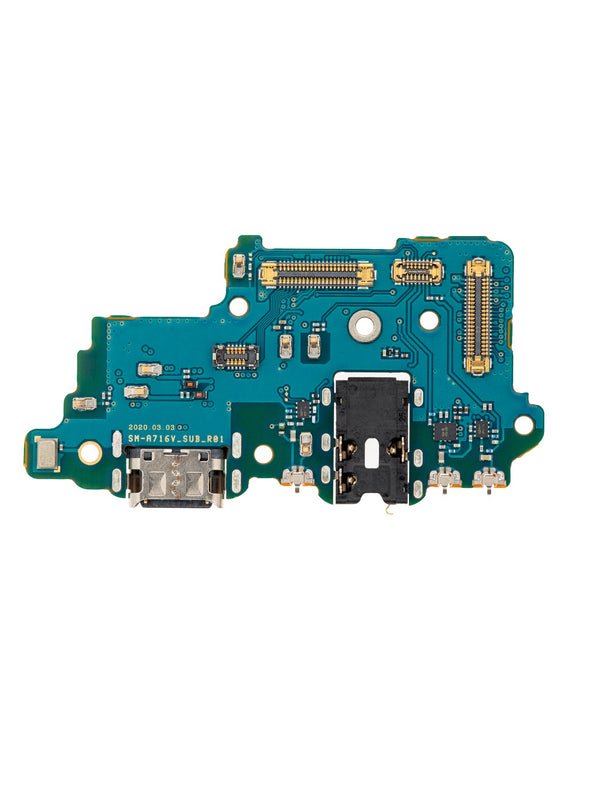
Samsung Galaxy A71 5G Charging Port Board – Restore Power and Performance
If your Galaxy A71 5G (A716 / 2020) isn’t charging or syncing, this replacement charging port board is the solution. Designed to match the original specifications, it brings back fast charging and smooth data connectivity.
Key Features:
Compatible with Samsung Galaxy A71 5G (Model A716)
Includes USB-C charging port for power and data
Ideal fix for damaged or worn charging ports
Durable, high-quality OEM replacement board
Easy to install for professionals or experienced users
Repair your device’s charging and connectivity with this reliable replacement board, ensuring your phone is back to full functionality
The Samsung Galaxy A71 5G is a premium mid-range smartphone that balances speed, performance, and design. One of the most essential parts of this device is its charging port, as it powers the battery and ensures smooth data transfer between the phone and external devices. Without a properly functioning charging port, even the most powerful smartphone becomes useless.
This content explores everything about the Galaxy A71 5G charging port—its role, common issues, signs of damage, replacement process, maintenance tips, and why professional repair is important. Whether you are a smartphone user, technician, or someone searching for a replacement, this guide will provide you with complete knowledge.
Why the Charging Port is Important
The charging port of the Galaxy A71 5G is more than just a connector. It performs multiple functions:
-
Battery Charging – Transfers power from the charger to the phone battery.
-
Data Transfer – Connects to laptops or PCs for file transfers.
-
Accessory Connection – Links with OTG devices, headphones (via adapter), and other accessories.
-
Fast Charging Support – The Galaxy A71 5G supports fast charging, and the charging port is essential for this feature to function.
Without a healthy charging port, your phone cannot hold power or sync data efficiently.
Common Charging Port Issues
Over time, the Galaxy A71 5G charging port can develop problems due to regular use. Some common issues include:
-
Loose Charging Connection – The cable does not stay firmly connected.
-
Slow Charging – Power transfer is interrupted, leading to slow charging.
-
No Charging at All – Complete failure of the charging port.
-
Data Transfer Failure – Computer does not recognize the phone.
-
Debris Accumulation – Dust or dirt blocking the connection.
-
Water Damage – Exposure to moisture causing internal damage.
Signs That Your Charging Port Needs Replacement
It’s important to recognize early warning signs to avoid complete charging failure. Look out for:
-
Your Galaxy A71 5G charges only when the cable is held at a certain angle.
-
The phone vibrates or disconnects while charging.
-
The device overheats during charging.
-
Frequent error messages related to charging.
-
Charger and cable work fine on other devices, but not on your phone.
If you notice any of these issues, the charging port may require cleaning or replacement.
Cleaning vs. Replacement
Not all problems require replacement. Sometimes, a professional cleaning is enough.
-
Cleaning Helps If:
-
Dust, dirt, or lint is blocking the port.
-
Connection is unstable but not physically damaged.
-
-
Replacement is Necessary If:
-
Port pins are broken or bent.
-
Liquid damage has corroded the connectors.
-
The charging port has become physically loose inside the phone.
-
Charging Port Replacement Process
Replacing the Galaxy A71 5G charging port requires skill and proper tools. Here’s how technicians usually perform it:
-
Power off the phone completely.
-
Remove the SIM tray and back cover carefully.
-
Disconnect the battery before touching the port.
-
Unscrew and remove the mid-frame to access the charging port flex cable.
-
Gently detach the old charging port from the motherboard.
-
Replace it with a new, original charging port flex cable.
-
Reassemble the device, connect the battery, and test charging.
⚠️ Note: Attempting DIY repair without proper experience can cause more damage. It is best to consult a professional repair shop.
How to Extend Charging Port Life
Prevention is always better than cure. To make your Galaxy A71 5G charging port last longer:
-
Avoid using low-quality charging cables.
-
Do not charge your phone in dusty or dirty environments.
-
Keep your phone away from liquids.
-
Do not apply excessive pressure while inserting the charging cable.
-
Use wireless charging accessories whenever possible to reduce wear.
Why Choose Professional Repair Services
Getting your charging port replaced by experts has several benefits:
-
Original Parts – Ensures compatibility and durability.
-
Warranty Support – Many repair shops offer service guarantees.
-
Safe Handling – Prevents damage to sensitive internal components.
-
Quick Turnaround – Fast replacement by skilled technicians.
Conclusion
The Samsung Galaxy A71 5G charging port is a small yet crucial component that ensures your device remains powered and connected. If it starts showing signs of damage, don’t ignore the problem—delaying can lead to complete charging failure.
Whether you need a cleaning service, repair, or full replacement, always go for trusted technicians and original parts. Proper care and regular maintenance will extend the lifespan of your phone and keep it running efficiently.
The Samsung Galaxy A71 5G charging port is one of the most critical hardware components of the device. Without a properly functioning charging port, the smartphone cannot recharge, nor can it maintain stable data transfer between the phone and other external devices. This section will provide a detailed overview of the charging port, covering its design, functionality, common issues, repair methods, replacement procedures, and how users can maintain its health to maximize the lifespan of their device.
Design and Technical Specifications
The Galaxy A71 5G uses a USB Type-C charging port, which has become the modern standard for most smartphones due to its reversible design, faster charging capabilities, and efficient data transfer rates. Unlike older micro-USB ports, USB-C offers more durability and can handle higher power inputs, making it compatible with fast charging technologies such as Samsung Adaptive Fast Charging and Qualcomm Quick Charge.
The port is embedded on the lower edge of the phone, soldered directly onto the motherboard through a sub-board assembly. This placement makes it convenient for daily use, but it also exposes the port to dust, lint, and potential physical damage due to frequent plugging and unplugging of cables.
Functionality of the Charging Port
The charging port of the Galaxy A71 5G serves multiple essential functions:
-
Power Input: The most obvious function is to allow charging of the internal battery using the supplied charging adapter and cable.
-
Data Transfer: The port enables users to connect their smartphone to laptops or desktops for transferring files, syncing data, and performing firmware updates.
-
Peripheral Connectivity: Through OTG (On-The-Go) support, users can attach USB devices like flash drives, keyboards, or game controllers.
-
Audio/Video Output: With the right accessories, the port can be used to connect external monitors or headphones.
Because the charging port manages so many critical functions, any damage or malfunction can significantly hinder the overall usability of the Galaxy A71 5G.
Common Issues with Galaxy A71 5G Charging Port
-
Loose Connection: With repeated cable insertions, the port may loosen, leading to unstable charging.
-
Dust and Debris: Lint or dirt can block the port, preventing a proper connection between the charging pin and the cable.
-
Moisture Damage: Exposure to water or humidity can corrode the pins inside the port, resulting in malfunction.
-
Charging Interruptions: Sometimes, the phone may charge intermittently due to damaged connectors or a faulty sub-board.
-
Physical Breakage: Dropping the device with a cable attached may cause the port to detach or crack internally.
Signs of a Faulty Charging Port
-
The phone does not charge even with a working cable and adapter.
-
Charging takes unusually long or stops randomly.
-
Data transfer fails when connecting to a computer.
-
The cable feels loose or falls out easily.
-
Visible dirt, bent pins, or corrosion inside the port.
Recognizing these signs early allows users to take timely action before the port fails completely.
Repair and Replacement Options
Repairing or replacing the Galaxy A71 5G charging port requires precision because it is soldered onto a small circuit board. The replacement process generally involves:
-
Diagnosis: A technician tests whether the charging issue is due to the port, battery, cable, or adapter.
-
Disassembly: The phone’s back cover is removed, followed by screws, and the internal components are carefully separated.
-
Sub-Board Access: The charging port is part of the sub-board, which also contains the microphone and other connectors.
-
Replacement: The faulty sub-board or port is replaced with a new original or high-quality aftermarket component.
-
Reassembly and Testing: The device is reassembled, and charging and data transfer functions are tested for stability.
While minor blockages caused by dust can be cleaned using compressed air or a soft brush, physical damages almost always require professional repair.
Importance of Using Genuine Parts
When replacing the charging port of the Galaxy A71 5G, using genuine Samsung parts or high-grade OEM replacements is crucial. Cheap, low-quality ports may not support fast charging, may fail prematurely, and could even damage the motherboard. Investing in quality parts ensures safety and long-term performance.
Preventive Maintenance Tips
-
Use Quality Accessories: Always use certified Samsung or trusted third-party charging cables and adapters.
-
Avoid Over-Stressing the Port: Do not pull or twist the cable when it is connected to the device.
-
Keep It Clean: Regularly check for dust or lint in the charging port and clean carefully if necessary.
-
Protect Against Moisture: Avoid charging the phone in humid or wet conditions.
-
Use Wireless Charging (if available): Reducing dependency on the port can prolong its lifespan.
Cost of Replacement
The cost of replacing the charging port on the Galaxy A71 5G varies depending on the location and service provider. Generally, it ranges between $50 to $100 for parts and labor. Authorized Samsung service centers may charge more but guarantee genuine components and warranty.
Conclusion
The Galaxy A71 5G charging port is not only essential for powering the device but also for ensuring smooth data transfer and peripheral connectivity. Given its frequent use, the port is vulnerable to damage, but with proper care, it can last for the lifetime of the phone. In cases of malfunction, timely repair or replacement with genuine parts is the best way to restore functionality and avoid long-term damage.
The Samsung Galaxy A71 5G charging port is the lifeline of the device, enabling users to power up their phone, transfer data, and stay connected with accessories. Because smartphones today are not just communication tools but also workstations, entertainment hubs, and productivity devices, the charging port has become a crucial feature that requires proper understanding and maintenance. This section explores the technical aspects, usage patterns, repair challenges, long-term reliability, and user practices related to the charging port in detail.
Why the Charging Port Matters
The charging port of the Galaxy A71 5G plays a central role in the smartphone’s daily functionality. Without it, the device cannot recharge, meaning the high-capacity battery becomes useless. Additionally, it is the primary connection point for wired communication with computers, OTG devices, and sometimes even external displays.
-
Charging Functionality: The USB-C port supports fast charging technologies that allow the large battery to be recharged quickly.
-
Data Syncing: It allows users to back up files, photos, and videos by connecting the phone directly to laptops or desktops.
-
Peripheral Access: Through OTG support, accessories such as USB drives, keyboards, and controllers can be connected.
-
Software Updates: For major firmware issues, the charging port enables wired flashing of the phone’s operating system.
Because of this wide range of uses, the charging port is one of the most stressed and frequently used components in the Galaxy A71 5G.
Design and Build Quality
Samsung designed the Galaxy A71 5G charging port as a USB Type-C port integrated into a sub-board. The port’s symmetrical design makes it user-friendly, allowing the cable to be inserted in either direction.
Key design features include:
-
Reversible Connector: Unlike micro-USB, USB-C eliminates insertion errors.
-
Durability: The port is rated for thousands of plug-and-unplug cycles.
-
Fast Data Transfer: Supports USB 2.0 and above speeds for reliable file sharing.
-
Fast Power Delivery: Compatible with adaptive fast charging and third-party PD chargers.
Despite its durability, continuous usage over months or years can cause wear and tear.
Common Challenges Faced by Users
Even though the Galaxy A71 5G charging port is robust, it can face issues due to improper handling, environmental factors, or physical accidents.
-
Slow Charging or No Charging
-
Caused by dust, corrosion, or damaged internal pins.
-
-
Intermittent Charging
-
The phone charges when the cable is moved or held at an angle, indicating loose connections.
-
-
Data Transfer Failures
-
Users often face errors when trying to connect the phone to a computer.
-
-
Physical Damage
-
Dropping the phone while it is charging may crack the port housing or detach it from the sub-board.
-
-
Overheating While Charging
-
This could result from faulty accessories or damaged port connectors.
-
These challenges are not unique to the Galaxy A71 5G but are more noticeable due to the heavy reliance on the charging port for multiple functions.
Repair vs. Replacement
When the Galaxy A71 5G charging port malfunctions, users are often confused between repairing and replacing the component.
-
Repair: Minor issues such as dirt, loose contact, or minor soldering problems may be fixable.
-
Replacement: If the charging port is physically broken, corroded, or detached, complete replacement of the charging sub-board is usually required.
The replacement process involves disassembling the phone, removing the sub-board, installing a new one, and reassembling the device. Because this requires precision, professional repair is recommended.
Importance of Genuine Parts
Using genuine Samsung charging ports or high-quality OEM parts ensures:
-
Compatibility with fast charging technologies.
-
Long-term durability.
-
Reduced risk of damaging the motherboard.
-
Stable data transfer performance.
Cheap, low-grade replacements may appear cost-effective but often fail quickly, leading to repeated problems.
Maintenance Practices for Long Life
To extend the lifespan of the Galaxy A71 5G charging port, users can adopt simple habits:
-
Use Original Chargers and Cables – Prevents overheating and electrical damage.
-
Clean the Port Carefully – Use compressed air or a soft brush to remove lint.
-
Avoid Charging in Humid Environments – Moisture can corrode the port.
-
Do Not Pull Cables Roughly – Gently disconnect to avoid damaging the connectors.
-
Alternate with Wireless Charging (if available) – Reduces wear on the physical port.
Cost and Availability of Replacement
The replacement cost of the Galaxy A71 5G charging port depends on:
-
Region and Service Center
-
Genuine vs. Third-Party Parts
-
Labor Charges
On average, the cost ranges between $50 to $100, though Samsung-authorized centers may charge more while providing warranty coverage.
Professional vs. DIY Repairs
While some users may attempt DIY repairs, the Galaxy A71 5G charging port is not easy to replace without proper tools and expertise.
-
Professional Repairs: Safe, reliable, and backed by warranties.
-
DIY Repairs: Risk of damaging the sub-board, battery, or even motherboard if not done correctly.
For most users, professional servicing is the best option.
Long-Term Reliability
With proper care, the charging port of the Galaxy A71 5G can last for several years. However, like all hardware components, it has a finite lifespan. The good news is that replacement restores the phone’s full functionality and is significantly cheaper than buying a new device.
Final Thoughts
The Samsung Galaxy A71 5G charging port is not just a simple power connector—it is a multifunctional component responsible for charging, data transfer, peripheral support, and system updates. Given its importance, users should handle it with care, keep it clean, and seek professional repair when needed.
By using genuine replacement parts and adopting preventive habits, users can maximize the reliability and lifespan of their Galaxy A71 5G charging port, ensuring smooth performance for years to come.
Why Choose a Genuine Galaxy A71 5G Charging Port Replacement
The Galaxy A71 5G charging port is one of the most critical parts of the smartphone. Without a properly working Samsung Galaxy A71 5G charging port, the phone cannot charge, cannot sync data, and cannot connect to essential accessories. Users who face problems such as slow charging, intermittent charging, or no charging at all often discover that the main issue lies in the Galaxy A71 5G charging port. Choosing a genuine charging port replacement is the best way to restore full functionality.
Importance of the Galaxy A71 5G Charging Port
The Galaxy A71 5G charging port is not only responsible for power input but also for stable data transfer. Many people use their Samsung Galaxy A71 5G charging port to connect with laptops, desktops, and OTG devices. A faulty Galaxy A71 5G charging port can lead to interruptions during data syncing or even cause the device to overheat. Because of this, timely Galaxy A71 5G charging port repair or charging port replacement becomes a necessity.
Common Issues with Galaxy A71 5G Charging Port
-
Loose charging port connections
-
Dust or lint inside the Galaxy A71 5G charging port
-
Broken or bent pins in the charging port
-
Corrosion due to moisture inside the Samsung Galaxy A71 5G charging port
-
Incompatibility with fast charging when the charging port is damaged
These issues can quickly turn into major problems if not fixed with a quality Galaxy A71 5G charging port replacement.
Why Genuine Galaxy A71 5G Charging Port Replacement Matters
When users replace the Samsung Galaxy A71 5G charging port with genuine or OEM-quality parts, they ensure:
-
Proper compatibility with fast charging features
-
Long-term durability of the charging port
-
Reliable charging cycles without interruptions
-
Smooth data transfer from the Galaxy A71 5G charging port to computers and accessories
-
Better safety for the battery and motherboard
Low-quality or fake Galaxy A71 5G charging port replacements can damage the device and cause repeated issues.
Professional Galaxy A71 5G Charging Port Repair Services
Professional repair services for the Samsung Galaxy A71 5G charging port guarantee expert handling. A technician can open the device, replace the charging port sub-board, and restore the phone to perfect condition. Attempting DIY repairs on the Galaxy A71 5G charging port can cause more harm than good, especially if the user lacks tools and skills.

Reviews
There are no reviews yet.