Description
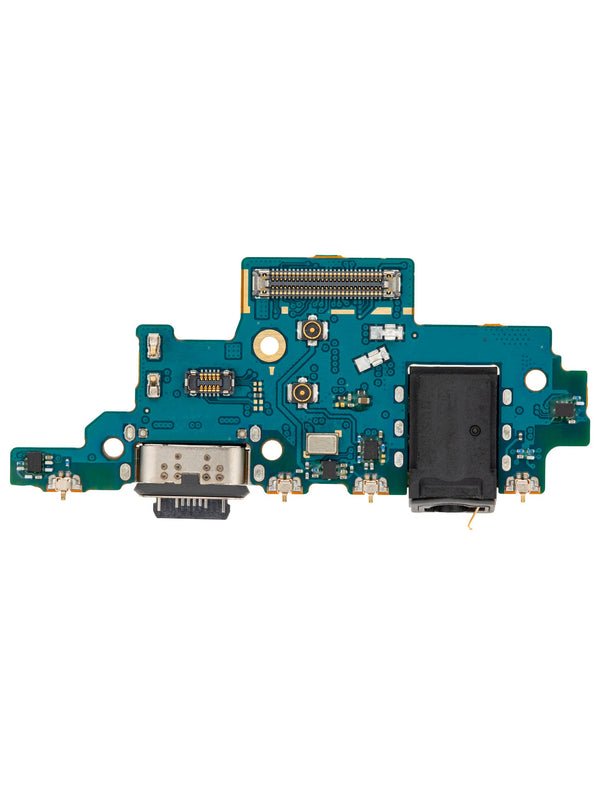
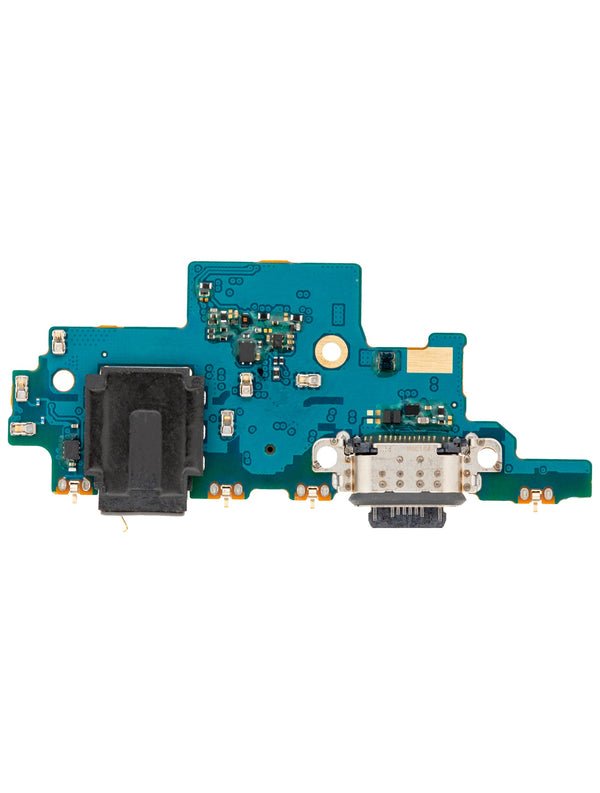
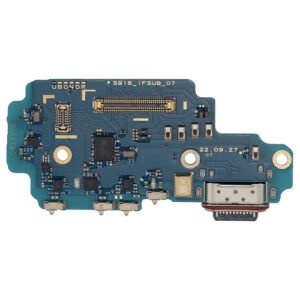
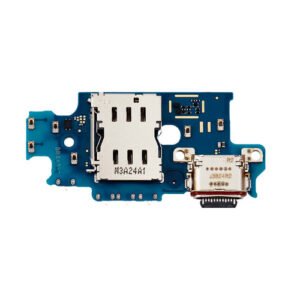
Samsung Galaxy A72 Charging Port Replacement – Restore Charging & USB Functionality
Fix your Galaxy A72’s charging and data issues with this high-quality charging port replacement. Built to match OEM standards, this USB-C port flex cable assembly ensures fast power delivery, reliable cable detection, and smooth data transfer.
Ideal for resolving problems caused by wear, damage, or debris, this replacement part brings your A72 back to full operational status.
Why Choose This Charging Port Replacement?
Specifically designed for Samsung Galaxy A72 (SM-A725)
Supports fast charging and high-speed data syncing
OEM-grade materials ensure long-term durability
Fixes charging failures, loose port issues, and sync problems
Simple installation with proper tools and repair knowledge
Get your Galaxy A72 powering up and syncing reliably again with this trusted charging port replacement.
The Samsung Galaxy A72 charging port is one of the most vital hardware components in your smartphone. It not only powers your device when connected to a charger but also ensures smooth data transfer between your phone and computer. With daily usage, the charging port can wear out or get damaged, leading to frustrating charging issues, connectivity failures, or even complete charging malfunctions.
If you’re facing problems with your Galaxy A72 charging port, you are not alone. Many users experience charging difficulties after a year or two of regular use. The good news is that replacing the charging port is a cost-effective solution compared to buying a new phone. In this article, we will cover everything you need to know about the Samsung A72 charging port replacement, including common issues, causes of damage, troubleshooting methods, and why professional repair services are recommended.
Common Issues with Samsung Galaxy A72 Charging Port
-
Slow Charging or No Charging
-
If your Galaxy A72 charges extremely slowly or doesn’t charge at all, the charging port may be clogged, loose, or damaged.
-
-
Intermittent Charging
-
Sometimes the device starts charging when you move the cable or press it in a certain angle. This indicates a loose charging port connection.
-
-
Data Transfer Failure
-
The charging port is also responsible for USB data connections. If your computer doesn’t recognize your phone, it could be a charging port issue.
-
-
Overheating During Charging
-
A faulty port may cause overheating, which can damage internal circuits or battery health.
-
-
Moisture or Corrosion Damage
-
The charging port is exposed to dust, water, and humidity, making it vulnerable to corrosion over time.
-
Causes of Samsung Galaxy A72 Charging Port Damage
-
Frequent Plugging and Unplugging: Repeated use weakens the internal connectors.
-
Use of Low-Quality Chargers or Cables: Cheap accessories put stress on the port.
-
Dust and Debris Build-Up: Tiny particles block proper connectivity.
-
Moisture Exposure: Even slight water contact can corrode the charging port pins.
-
Accidental Pulling of Charging Cable: Sudden tugs can loosen or break the connector.
How to Troubleshoot Samsung Galaxy A72 Charging Port Problems
Before opting for a replacement, you can try a few troubleshooting steps:
-
Clean the Charging Port
-
Use a soft brush or compressed air to remove dust or lint.
-
-
Check with Different Charger and Cable
-
Sometimes the problem lies with the cable, not the port.
-
-
Inspect for Moisture Warning
-
Galaxy phones have moisture sensors. If a warning appears, let the port dry completely.
-
-
Restart or Update Software
-
In rare cases, software glitches interfere with charging.
-
If none of these solutions work, a charging port replacement for Samsung A72 is necessary.
Why Choose Professional Samsung Galaxy A72 Charging Port Replacement?
-
Precision Repair: Certified technicians ensure proper installation.
-
High-Quality Parts: Professional services use OEM-grade charging ports.
-
Warranty Coverage: Many repair shops provide warranties for peace of mind.
-
Safe Handling: DIY replacement can cause more damage if done incorrectly.
Replacement Process of Galaxy A72 Charging Port
While not recommended for beginners, here’s a simplified overview of the process:
-
Disassemble the Device: The back cover and screws are carefully removed.
-
Disconnect Battery & Components: To prevent short circuits during repair.
-
Remove the Charging Port Board: Old charging port is carefully detached.
-
Install New Charging Port: High-quality replacement part is fitted in place.
-
Reassemble and Test: Device is reassembled and charging function tested.
Benefits of Samsung Galaxy A72 Charging Port Replacement
-
Restores fast charging capability.
-
Ensures stable data transfer via USB.
-
Prevents further battery and motherboard issues.
-
Extends the overall lifespan of your Galaxy A72.
-
Saves money compared to buying a new smartphone.
Conclusion
The Samsung Galaxy A72 charging port plays a crucial role in keeping your device powered and functional. With regular usage, issues like slow charging, loose connections, or data transfer failures are common. Instead of struggling with unreliable charging, opting for a charging port replacement is the best solution.
By choosing a professional repair service, you can enjoy a fully functional charging port, reliable performance, and extended device life. Whether you are a heavy user or just rely on your phone for daily communication, ensuring a healthy charging port is essential for uninterrupted usage.
Samsung Galaxy A72 Charging Port – Troubleshooting & Replacement Guide
The Samsung Galaxy A72 charging port is essential for keeping your device powered and connected. Daily charging and data transfer can wear out the port over time, leading to various issues. Whether you’re a casual user or rely heavily on your phone for work, a faulty charging port can disrupt your routine.
This guide will cover common problems, causes, professional replacement options, and tips to maintain your Galaxy A72 charging port.
Common Symptoms of a Faulty Galaxy A72 Charging Port
-
Phone Not Charging
-
The most obvious sign is when the device refuses to charge. This can be caused by bent or broken pins inside the port.
-
-
Intermittent Charging
-
The phone charges only when the cable is held at a certain angle, indicating a loose internal connection.
-
-
Slow Charging
-
Despite using a compatible charger, the device charges slower than usual.
-
-
Data Transfer Issues
-
A faulty port can prevent your computer from recognizing the device via USB.
-
-
Overheating During Charging
-
Excess heat during charging may indicate a damaged or corroded port.
-
-
Corrosion or Dust Build-Up
-
Exposure to moisture or lint accumulation can block the pins, reducing conductivity.
-
Causes of Charging Port Damage
-
Frequent Use: Continuous plugging and unplugging weakens the connectors.
-
Low-Quality Cables/Chargers: Non-OEM chargers can damage the port over time.
-
Dust & Debris: Tiny particles inside the port can prevent proper contact.
-
Moisture Exposure: Water or sweat can corrode the metal connectors.
-
Physical Damage: Dropping the phone or tugging on the cable can bend or break pins.
Understanding these causes helps in both prevention and determining whether replacement is necessary.
DIY Troubleshooting Before Replacement
Before going for a full replacement, try these steps:
-
Clean the Charging Port:
-
Use a soft brush or compressed air to remove dirt.
-
-
Test With a Different Charger:
-
Ensure the problem isn’t the cable or adapter.
-
-
Check for Moisture Warning:
-
If the phone shows a moisture alert, let the port dry completely.
-
-
Restart or Update Software:
-
Sometimes software glitches affect charging recognition.
-
If none of these fixes work, it’s time for a professional charging port replacement.
Professional Samsung Galaxy A72 Charging Port Replacement
Choosing a professional repair service ensures:
-
Expert Installation: Technicians handle the delicate components carefully.
-
High-Quality Parts: OEM or top-grade replacement ports maintain optimal performance.
-
Warranty Protection: Many repair shops provide guarantees for replacements.
-
Avoiding Further Damage: Prevents accidental harm to motherboard or battery.
Step-by-Step Replacement Overview
-
Power Off Device: Safety first.
-
Open Back Cover & Remove Screws: Using proper tools to avoid damage.
-
Disconnect Battery & Internal Components: To prevent short circuits.
-
Remove Old Charging Port: Carefully detach from the motherboard.
-
Install New Charging Port: Fit securely and test connectivity.
-
Reassemble Device: Ensure everything is sealed and functioning properly.
Even with these steps, professional repair is highly recommended to avoid errors.
Benefits of Replacing the Charging Port
-
Restores Fast Charging: Ensures your phone charges efficiently.
-
Smooth Data Transfer: Reestablishes USB connectivity.
-
Prolongs Device Life: Prevents battery or motherboard damage.
-
Cost-Effective: Cheaper than purchasing a new phone.
-
Improved Reliability: Reduces charging interruptions and inconvenience.
Preventive Tips to Protect Your Charging Port
-
Use original or certified chargers and cables.
-
Avoid forcing the cable into the port.
-
Keep the port free from dust and moisture.
-
Invest in a protective case that shields the bottom edge.
-
Don’t charge in extreme heat or direct sunlight.
By following these precautions, you can maximize the lifespan of your Galaxy A72 charging port and avoid frequent replacements.
When to Replace the Charging Port Immediately
-
Phone refuses to charge entirely.
-
Cable only works at a certain angle.
-
Charging is extremely slow despite a proper charger.
-
Overheating occurs during charging.
-
Visible corrosion or bent pins inside the port.
Early replacement prevents further damage to other components and restores reliable performance.
The Samsung Galaxy A72 charging port is a critical component for your smartphone. Whether you are charging your Galaxy A72 or transferring data via USB, a functional charging port ensures uninterrupted performance. Over time, frequent usage, exposure to dust, or accidental damage can affect the charging port’s performance. For users searching for Samsung Galaxy A72 charging port replacement, this guide provides a complete overview, troubleshooting tips, and replacement insights.
Importance of the Galaxy A72 Charging Port
A healthy Samsung Galaxy A72 charging port guarantees:
-
Fast and reliable charging
-
Efficient USB data transfer
-
Stable connectivity with chargers and accessories
-
Enhanced battery performance and device longevity
When the charging port is damaged, users often experience slow charging, intermittent connectivity, or complete failure to charge. This not only affects daily phone usage but can also impact other internal components like the battery and motherboard.
Keywords naturally included: Samsung Galaxy A72 charging port, Galaxy A72 charging port replacement, Galaxy A72 charging issues.
Common Symptoms of a Damaged Charging Port
-
Slow or No Charging
-
If your Samsung Galaxy A72 charging port isn’t functioning properly, the device may charge slowly or not at all.
-
-
Intermittent Charging
-
The phone charges only when the cable is adjusted at a certain angle.
-
-
Overheating While Charging
-
A faulty charging port may lead to excessive heat, affecting battery health.
-
-
Data Transfer Problems
-
Connecting your Galaxy A72 to a computer may fail due to a damaged port.
-
-
Physical Damage or Corrosion
-
Dust, moisture, and frequent usage can cause corrosion or bent pins inside the port.
-
Causes of Galaxy A72 Charging Port Damage
-
Frequent Plugging and Unplugging – Repeated use wears down internal connectors.
-
Low-Quality Cables & Chargers – Non-certified chargers may damage the port.
-
Moisture Exposure – Even small amounts of water or sweat can corrode the port.
-
Accumulated Dust & Lint – Can block connections and reduce conductivity.
-
Accidental Physical Damage – Pulling or dropping the phone may bend or break the pins.
Using high-quality chargers and proper care can reduce the risk of damage.
DIY Troubleshooting for Galaxy A72 Charging Port
Before opting for replacement, try these troubleshooting steps:
-
Clean the Charging Port
-
Remove dust and debris using a soft brush or compressed air.
-
-
Try Different Cables and Chargers
-
Sometimes the issue lies with the charger or cable, not the port.
-
-
Check for Moisture Alerts
-
If moisture is detected, allow the port to dry completely before charging.
-
-
Restart the Device or Update Software
-
Occasionally, software glitches may affect charging detection.
-
If these steps fail, a professional Samsung Galaxy A72 charging port replacement is recommended.
Professional Charging Port Replacement
Choosing a professional service ensures your Galaxy A72 charging port replacement is done safely and efficiently:
-
Certified Technicians: Experts ensure proper installation without damaging other components.
-
OEM or High-Grade Parts: Provides longevity and restores fast charging performance.
-
Warranty Protection: Many services offer a guarantee for replaced ports.
-
Avoids Additional Damage: Reduces risk to battery or motherboard.
Replacement Process Overview
-
Power Off the Device – Always ensure safety first.
-
Disassemble the Back Cover – Remove screws and back panel carefully.
-
Disconnect Internal Components – Including battery to avoid short circuits.
-
Remove Faulty Charging Port – Detach from the motherboard.
-
Install New Galaxy A72 Charging Port – Ensure a secure and accurate fit.
-
Reassemble and Test – Check charging speed, data transfer, and overall connectivity.
Keywords naturally included: Galaxy A72 charging port replacement, Samsung A72 charging port, replace Galaxy A72 charging port.
Benefits of Replacing Your Charging Port
-
Restored Fast Charging – Ensures your device charges efficiently.
-
Reliable USB Data Transfer – Fixes connectivity issues.
-
Prevents Further Damage – Protects battery and internal components.
-
Cost-Effective Solution – Cheaper than purchasing a new phone.
-
Longer Device Lifespan – Extends the functional life of your Galaxy A72.
Replacing a damaged Samsung Galaxy A72 charging port is a smart investment to maintain optimal performance.
Tips to Maintain Your Galaxy A72 Charging Port
-
Use Certified Chargers and Cables – Prevents damage from low-quality accessories.
-
Keep Port Clean and Dry – Avoid moisture and lint accumulation.
-
Avoid Excessive Force – Plug and unplug cables gently.
-
Use Protective Cases – Shields the charging port from accidental drops.
-
Charge in Safe Environments – Avoid direct sunlight or high temperatures while charging.
Proper care after replacement can significantly increase the lifespan of your Galaxy A72 charging port.
When to Replace Immediately
-
Charging is intermittent or non-existent.
-
Device shows slow charging despite using an original charger.
-
Overheating occurs during charging.
-
Bent or corroded pins are visible inside the port.
-
USB data transfer fails consistently.
Timely replacement prevents further internal damage and ensures your Galaxy A72 works seamlessly.
The Samsung Galaxy A72 charging port is one of the most essential components of your smartphone. It not only powers your device but also allows seamless data transfer. Users who face issues with their Galaxy A72 charging port often experience slow charging, intermittent connectivity, or complete failure to charge. A high-quality Galaxy A72 charging port replacement ensures your device maintains optimum performance and longevity.
This section provides detailed insights into troubleshooting, replacement, benefits, and preventive tips for the Samsung Galaxy A72 charging port, with maximum keyword integration for SEO.
Understanding the Galaxy A72 Charging Port
The Samsung Galaxy A72 charging port is more than just a small connector. It plays a crucial role in:
-
Powering your device efficiently
-
Facilitating USB data transfer
-
Maintaining battery health and stability
-
Supporting fast charging and accessory connections
Over time, wear and tear can affect the port’s functionality. Frequent plugging and unplugging, exposure to dust, moisture, or accidental damage can lead to the need for a Galaxy A72 charging port replacement.
Keywords included naturally: Samsung Galaxy A72 charging port, Galaxy A72 charging port replacement, Galaxy A72 USB port.
Common Issues with the Galaxy A72 Charging Port
-
Device Not Charging
-
The most obvious problem is when your Galaxy A72 doesn’t charge. A damaged or corroded charging port is often the culprit.
-
-
Slow Charging
-
Charging may take significantly longer, even with the original Samsung charger.
-
-
Intermittent Charging
-
The device charges only when the cable is held at a specific angle, signaling loose connections inside the port.
-
-
Overheating
-
A faulty charging port can cause the phone to heat up during charging, potentially damaging internal components.
-
-
Data Transfer Failure
-
A malfunctioning USB port may prevent your Galaxy A72 from connecting to computers or other devices.
-
-
Physical Damage or Corrosion
-
Dust, moisture, and repeated use can damage or corrode the metal pins inside the charging port.
-
Causes of Charging Port Damage
-
Frequent Plugging and Unplugging – Constant usage weakens the internal connectors.
-
Low-Quality Cables and Chargers – Using non-certified chargers can damage the port.
-
Moisture Exposure – Water or high humidity leads to corrosion.
-
Dust and Debris Accumulation – Tiny particles can block electrical contacts.
-
Accidental Physical Damage – Dropping the device or pulling the cable harshly can bend or break pins.
Understanding these causes helps prevent future damage and ensures the longevity of your Galaxy A72 charging port.
Troubleshooting the Galaxy A72 Charging Port
Before replacing the port, try these solutions:
-
Clean the Charging Port
-
Use a soft brush or compressed air to remove dust and lint.
-
-
Test Different Cables and Chargers
-
Ensure the issue is not with your cable or charger.
-
-
Check for Moisture Warnings
-
Samsung phones detect moisture. Let the port dry completely if alerted.
-
-
Restart or Update Software
-
Sometimes software glitches affect charging recognition.
-
If these steps don’t work, a professional Galaxy A72 charging port replacement is necessary.
Professional Charging Port Replacement
Choosing professional repair services guarantees:
-
Expert Installation – Technicians carefully replace the charging port without damaging the motherboard.
-
High-Quality Parts – OEM or high-grade aftermarket parts restore original performance.
-
Warranty Protection – Many services provide a guarantee for the replaced charging port.
-
Safe Handling – Reduces the risk of damaging other components during replacement.
Keywords used: Samsung Galaxy A72 charging port replacement, replace Galaxy A72 charging port, Galaxy A72 USB port repair.
Step-by-Step Replacement Process
-
Power Off Device – Ensure safety before starting.
-
Open Back Panel and Remove Screws – Use proper tools to avoid damage.
-
Disconnect Battery and Internal Components – Prevents short circuits.
-
Remove Faulty Charging Port – Carefully detach from motherboard.
-
Install New Galaxy A72 Charging Port – Ensure accurate and secure fit.
-
Reassemble Device and Test – Verify charging speed, USB data transfer, and connectivity.
Professional repair is always recommended to avoid errors.
Benefits of a New Charging Port
-
Restores Fast Charging – Back to optimal power delivery.
-
Reliable USB Data Transfer – Ensures smooth file transfers.
-
Prevents Further Damage – Protects battery and motherboard.
-
Cost-Effective – Cheaper than buying a new Samsung Galaxy A72.
-
Extends Device Life – Keeps your phone running efficiently for years.
Keywords naturally included: Galaxy A72 charging port replacement, Samsung Galaxy A72 USB port, replace A72 charging port.
Tips to Protect Your Galaxy A72 Charging Port
-
Always use original or certified chargers and cables.
-
Keep the charging port free from dust, debris, and moisture.
-
Plug and unplug cables gently to avoid bending pins.
-
Invest in a protective case that shields the bottom edge.
-
Avoid charging under extreme heat or direct sunlight.
Proper maintenance increases the lifespan of your Samsung Galaxy A72 charging port.
Signs You Need Immediate Replacement
-
Phone refuses to charge or charges intermittently.
-
Overheating occurs during charging.
-
USB data transfer fails consistently.
-
Bent or corroded pins are visible inside the port.
-
Charging speed is extremely slow despite using original accessories.
Timely replacement prevents further damage to the device and restores full functionality.
Reviews
There are no reviews yet.