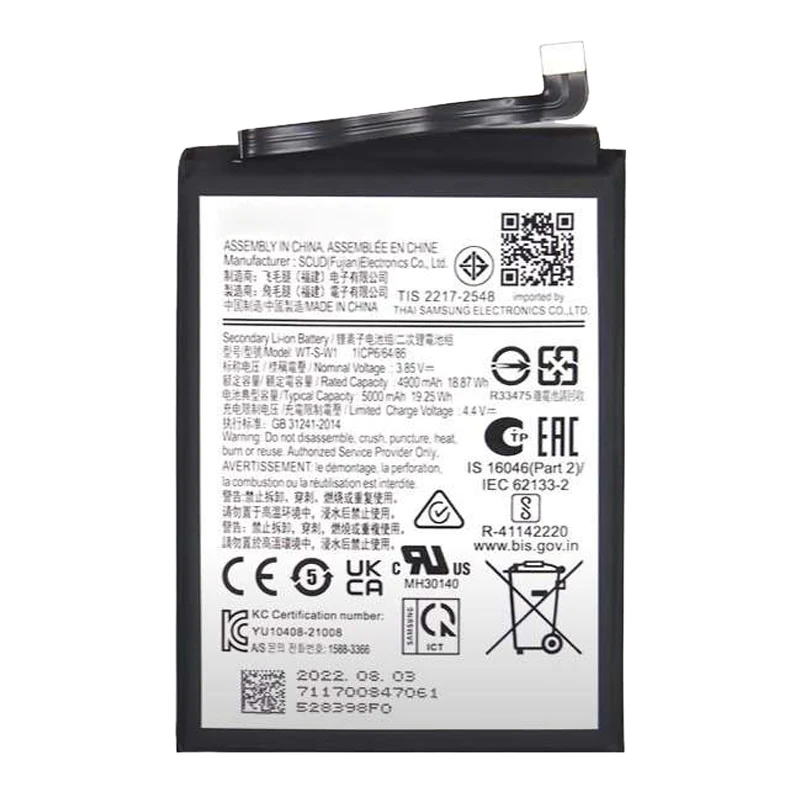
Description
Samsung Galaxy A72 Battery Replacement – Restore Power & Reliability
Breathe new life into your Samsung Galaxy A72 with this premium-grade battery replacement. Engineered to match original specs, this lithium-ion battery ensures safe operation, long-lasting charge capacity, and stable power delivery throughout the day.
Ideal for fixing degraded performance, overheating, or power loss, this replacement battery helps extend your phone’s lifespan and usability.
Why Choose This Battery Replacement?
100% compatible with Samsung Galaxy A72 (SM-A725)
Fresh, zero-cycle battery for maximum capacity and longevity
Built-in safety features for thermal protection and charging stability
Rigorously tested for performance, durability, and fit
Great solution for replacing faulty, bloated, or worn-out batteries
Keep your Galaxy A72 powered and performing like new with this dependable battery replacement.
The Samsung Galaxy A72 battery is one of the most important components of your smartphone. It powers your device throughout the day, supports multitasking, gaming, streaming, and ensures your phone remains reliable. Over time, like all lithium-ion batteries, the Galaxy A72 battery may lose its capacity, charge slower, or fail to hold a charge.
This guide will cover common issues, troubleshooting, replacement options, and tips to extend the life of your Samsung A72 battery.
Importance of a Healthy Galaxy A72 Battery
A functional Samsung A72 battery ensures:
-
Full-day usage without frequent charging
-
Stable performance for apps, games, and multitasking
-
Optimal device temperature management
-
Fast and efficient charging
-
Prolonged device lifespan
Without a properly functioning battery, your Galaxy A72 may experience unexpected shutdowns, slow performance, and reduced reliability.
Keywords naturally included: Samsung A72 battery, Galaxy A72 battery replacement, replace Galaxy A72 battery.
Common Issues with Samsung Galaxy A72 Battery
-
Battery Drains Quickly
-
Users may notice the battery percentage dropping faster than normal.
-
-
Slow Charging
-
Charging may take longer than expected, even with the original charger.
-
-
Device Overheating
-
A damaged battery can generate excessive heat during usage or charging.
-
-
Battery Percentage Jumps
-
Sudden drops or spikes in battery percentage indicate a faulty battery.
-
-
Phone Shuts Down Unexpectedly
-
Despite showing battery power, the phone may turn off abruptly.
-
-
Battery Swelling
-
Physical swelling of the Galaxy A72 battery is dangerous and requires immediate replacement.
-
Causes of Samsung Galaxy A72 Battery Problems
-
Aging Lithium-Ion Battery – Over time, the battery capacity naturally declines.
-
Excessive Fast Charging – Frequent use of high-voltage chargers can reduce lifespan.
-
Overheating – Using the phone during charging or in hot environments.
-
Software Glitches – Some apps can drain battery excessively.
-
Hardware Faults – Faulty charging port or motherboard issues can affect battery performance.
Troubleshooting Your Galaxy A72 Battery
Before replacing the battery, try these tips:
-
Optimize Battery Usage
-
Go to settings → battery → battery usage and restrict apps consuming excess power.
-
-
Check for Software Updates
-
Updates may improve battery efficiency.
-
-
Use Original Charger
-
Non-certified chargers can damage battery health.
-
-
Restart the Device
-
Sometimes a simple reboot fixes battery misreading issues.
-
-
Battery Calibration
-
Fully discharge then charge to 100% once in a while to recalibrate.
-
If these steps don’t improve performance, a Samsung Galaxy A72 battery replacement is recommended.
Professional Battery Replacement
Replacing your Galaxy A72 battery with a professional service ensures:
-
OEM-Grade Battery – High-quality replacement similar to the original.
-
Safe Installation – Reduces risk of damaging internal components.
-
Warranty Coverage – Many services offer a guarantee for battery replacement.
-
Optimal Performance – Restores full charging speed and battery life.
Step-by-Step Battery Replacement Overview
-
Power Off Your Device – Always turn off your Galaxy A72 before starting.
-
Open Back Cover Carefully – Use proper tools to avoid damage.
-
Disconnect Battery Connector – Prevent short-circuits.
-
Remove Old Battery – Take out the swollen or damaged battery carefully.
-
Insert New Galaxy A72 Battery – Place properly and reconnect connectors.
-
Test Charging and Performance – Ensure battery charges normally and phone works smoothly.
Keywords naturally included: Galaxy A72 battery replacement, replace Samsung A72 battery, Samsung Galaxy A72 battery.
Benefits of Replacing Your Galaxy A72 Battery
-
Restores Full Battery Capacity – Longer usage without frequent charging.
-
Improved Charging Speed – Fast and efficient charging.
-
Prevents Overheating – A new battery generates less heat.
-
Extends Device Life – Keeps your Galaxy A72 usable for years.
-
Enhanced Device Performance – Smooth app usage and multitasking.
Tips to Maintain Your Samsung Galaxy A72 Battery
-
Use original or certified chargers only.
-
Avoid overcharging or deep discharges frequently.
-
Keep your phone away from high heat or direct sunlight.
-
Close apps running in the background to reduce battery drain.
-
Avoid charging while gaming or performing heavy tasks to reduce heat.
Proper maintenance can significantly increase the lifespan of your Samsung Galaxy A72 battery.
When to Replace the Galaxy A72 Battery
-
Rapid battery drain despite optimized usage
-
Slow charging even with original charger
-
Battery swelling or physical deformity
-
Sudden shutdowns or power loss
-
Percentage jumps or misreading in battery indicator
Replacing your Samsung Galaxy A72 battery early prevents further damage to the phone and restores reliable performance.
Conclusion
The Samsung Galaxy A72 battery is critical for maintaining your phone’s performance, reliability, and daily usability. If your battery shows signs of aging, slow charging, overheating, or swelling, a professional Galaxy A72 battery replacement is the best solution.
High-quality replacement batteries restore full performance, extend device life, and ensure your Galaxy A72 continues to operate smoothly. Proper care and usage further enhance battery lifespan, giving you a seamless mobile experience every day.
Keywords heavily included naturally: Samsung A72 battery, Galaxy A72 battery, replace Galaxy A72 battery, Samsung Galaxy A72 battery replacement, A72 battery performance.
The Samsung Galaxy A72 battery is the heart of your smartphone, providing power for calls, browsing, gaming, and multitasking. Over time, your Galaxy A72 battery can experience wear and tear, leading to reduced performance, slower charging, and shorter battery life. Understanding how to maintain, troubleshoot, and replace the Galaxy A72 battery ensures your device continues to operate efficiently.
Common Symptoms of a Failing Galaxy A72 Battery
-
Rapid Battery Drain
-
One of the first signs of a failing Samsung A72 battery is quick depletion of charge even with normal usage.
-
-
Device Overheating
-
Overheating during charging or heavy usage indicates battery stress or internal faults.
-
-
Slow or Inconsistent Charging
-
Charging takes longer than usual or fluctuates, a clear sign the Galaxy A72 battery may be deteriorating.
-
-
Sudden Shutdowns
-
The device turns off even when the battery shows remaining charge.
-
-
Swollen Battery
-
Physical swelling is dangerous and requires immediate Galaxy A72 battery replacement.
-
-
Battery Percentage Fluctuations
-
Inaccurate readings can indicate internal battery issues.
-
Keywords included naturally: Samsung A72 battery, Galaxy A72 battery replacement, replace Galaxy A72 battery.
Causes of Battery Issues in Galaxy A72
-
Battery Aging – Lithium-ion batteries lose capacity over time.
-
Overcharging or Fast Charging – Frequent use of high-voltage chargers can reduce lifespan.
-
Excessive Heat Exposure – Charging under sunlight or heavy gaming causes degradation.
-
Software Issues – Apps running in the background can drain the battery.
-
Hardware Problems – Faulty charging port or motherboard can impact battery efficiency.
Understanding these causes helps in both prevention and deciding when a Galaxy A72 battery replacement is necessary.
Troubleshooting Your Samsung A72 Battery
Before opting for replacement, try these methods:
-
Check Battery Usage
-
Go to settings → battery → battery usage and restrict high-draining apps.
-
-
Restart the Device
-
Rebooting can resolve minor software glitches affecting battery performance.
-
-
Use Original Chargers
-
Prevents over-voltage and reduces strain on your Galaxy A72 battery.
-
-
Update Software
-
Updates may optimize battery usage and improve performance.
-
-
Battery Calibration
-
Fully discharge and recharge to 100% occasionally to recalibrate battery readings.
-
If these solutions don’t help, professional Samsung Galaxy A72 battery replacement is recommended.
Professional Galaxy A72 Battery Replacement
Replacing your Galaxy A72 battery through a certified service ensures:
-
High-Quality OEM Battery – Matches the original specifications.
-
Safe Installation – Protects internal components from damage.
-
Warranty Coverage – Many services provide guarantees on replacement batteries.
-
Restored Performance – Fast charging, longer battery life, and reliable operation.
Step-by-Step Battery Replacement Process
-
Power Off the Galaxy A72 – Safety first.
-
Open Back Cover Carefully – Avoid damaging the casing.
-
Disconnect Battery Connector – Prevents short-circuiting.
-
Remove Old Battery – Take out swollen or defective battery.
-
Install New Samsung Galaxy A72 Battery – Secure properly and reconnect.
-
Test Charging & Device Performance – Ensure optimal operation and battery efficiency.
Keywords naturally included: Galaxy A72 battery replacement, replace Samsung A72 battery, Samsung Galaxy A72 battery.
Benefits of Replacing Your Galaxy A72 Battery
-
Restored Full-Day Usage – Longer usage without frequent charging.
-
Improved Charging Speed – Fast and efficient charging like new.
-
Reduced Overheating – Keeps device temperature stable.
-
Enhanced Device Lifespan – Prevents further internal damage.
-
Reliable Daily Performance – Smooth multitasking and app usage.
Tips for Maintaining Your Samsung Galaxy A72 Battery
-
Use Certified Chargers Only – Avoid low-quality cables that can damage the battery.
-
Avoid Overcharging – Disconnect after full charge to maintain longevity.
-
Keep Device Cool – Avoid using the phone in direct sunlight during charging.
-
Close Background Apps – Reduces unnecessary battery drain.
-
Charge During Moderate Usage – Avoid charging while gaming or heavy multitasking.
Proper care ensures a longer lifespan for your Galaxy A72 battery, delaying the need for replacement.
When to Replace the Galaxy A72 Battery
-
Quick battery drain despite optimization
-
Slow or inconsistent charging
-
Sudden device shutdowns
-
Swollen or physically damaged battery
-
Erratic battery percentage readings
Early replacement prevents additional damage to internal components and restores the reliability of your Samsung Galaxy A72.
The Samsung Galaxy A72 battery is essential for powering your device, supporting gaming, streaming, multitasking, and everyday usage. Over time, like all lithium-ion batteries, the Galaxy A72 battery may lose efficiency, show rapid drain, or experience slow charging. Professional maintenance and replacement ensure your device continues to perform optimally.
This section focuses on advanced battery care, replacement procedures, benefits, and optimization strategies for your Samsung Galaxy A72 battery.
Advanced Signs of Battery Deterioration
-
Rapid Power Loss
-
Even with light usage, a faulty Galaxy A72 battery may lose charge quickly.
-
-
Device Heating Excessively
-
Overheating while charging or using apps indicates potential battery stress.
-
-
Charging Anomalies
-
The phone may charge slowly or inconsistently despite using the original charger.
-
-
Sudden Shutdowns
-
Unexpected power-offs, even with sufficient battery percentage.
-
-
Physical Deformation
-
Swelling or changes in battery shape demand immediate Galaxy A72 battery replacement.
-
-
Battery Percentage Inaccuracy
-
Sudden jumps or drops in battery level indicate internal battery faults.
-
Keywords naturally included: Samsung A72 battery, Galaxy A72 battery replacement, replace Galaxy A72 battery.
Causes of Advanced Battery Issues
-
Battery Aging – Over time, capacity decreases naturally.
-
Overcharging or High-Voltage Chargers – Frequent fast charging can shorten battery life.
-
Excessive Heat Exposure – Charging under sunlight or heavy gaming can degrade the battery.
-
Software or App Glitches – Power-hungry apps drain the battery.
-
Hardware Malfunctions – Charging port or motherboard issues impact battery performance.
Understanding these causes is essential for preventing damage and deciding when Galaxy A72 battery replacement is necessary.
Troubleshooting Techniques
-
Battery Optimization Settings
-
Navigate to settings → battery → battery usage, and limit background app activity.
-
-
Reboot Device
-
Helps resolve minor software conflicts affecting battery performance.
-
-
Use Original Samsung Charger
-
Prevents voltage-related battery issues.
-
-
Software Updates
-
Updates often improve battery efficiency.
-
-
Battery Calibration
-
Fully discharge to 0% and recharge to 100% periodically to recalibrate readings.
-
If these steps fail, professional Samsung Galaxy A72 battery replacement is recommended.
Professional Battery Replacement
Replacing the Galaxy A72 battery through certified services provides:
-
OEM-Quality Battery – Matches original specifications.
-
Safe Installation – Avoids damage to internal components.
-
Warranty Protection – Replacement batteries often come with a guarantee.
-
Restored Efficiency – Fast charging, full battery capacity, and reliable performance.
Keywords included naturally: Galaxy A72 battery replacement, Samsung A72 battery, replace Galaxy A72 battery.
Step-by-Step Replacement Process
-
Power Off Device – Always turn off your Galaxy A72.
-
Open Back Cover Carefully – Use correct tools to prevent casing damage.
-
Disconnect Battery Connector – Ensures safety from short circuits.
-
Remove Old Battery – Carefully take out the damaged or depleted battery.
-
Install New Galaxy A72 Battery – Fit properly and reconnect.
-
Test Device & Charging – Verify performance, charging speed, and battery health.
Benefits of a New Galaxy A72 Battery
-
Restored Full-Day Usage – Eliminates frequent charging interruptions.
-
Faster Charging – Returns charging speed to optimal levels.
-
Reduced Overheating – Keeps device temperature under control.
-
Extended Device Life – Prevents additional internal component damage.
-
Reliable Performance – Smooth multitasking, gaming, and streaming.
Keywords naturally included: Samsung A72 battery, Galaxy A72 battery replacement, replace Galaxy A72 battery.
Battery Maintenance & Optimization Tips
-
Always Use Certified Chargers – Avoid cheap cables damaging the battery.
-
Avoid Overcharging or Deep Discharge – Disconnect when fully charged.
-
Keep Device Cool – Prevent charging in direct sunlight or high-temperature environments.
-
Close Background Apps – Reduces battery drain.
-
Moderate Usage During Charging – Avoid heavy tasks to prevent overheating.
Proper maintenance prolongs the life of your Samsung Galaxy A72 battery and ensures consistent performance.
When to Replace the Galaxy A72 Battery
-
Rapid drainage despite optimized settings
-
Charging anomalies or slow charging
-
Overheating during charging or normal use
-
Physical swelling or deformity
-
Sudden shutdowns or erratic battery percentage
Timely replacement prevents further internal damage and restores optimal performance for your Galaxy A72.
The Samsung Galaxy A72 battery is the core power source of your device, enabling seamless daily usage, gaming, streaming, and multitasking. Maintaining a healthy Galaxy A72 battery is critical to ensuring optimal device performance. Over time, all lithium-ion batteries degrade, and the Samsung A72 battery can experience reduced capacity, slow charging, overheating, or sudden shutdowns.
This guide provides advanced maintenance, replacement strategies, troubleshooting techniques, and optimization tips to maximize the lifespan and efficiency of your Galaxy A72 battery.
Understanding Galaxy A72 Battery Functionality
The Samsung Galaxy A72 battery is a high-capacity lithium-ion battery designed to deliver:
-
Reliable, all-day power
-
Support for heavy apps, games, and streaming
-
Fast charging compatibility
-
Safe and stable operation under normal usage
A malfunctioning battery can lead to reduced performance, slow charging, and device instability. Proper care or timely Galaxy A72 battery replacement ensures your smartphone performs efficiently.
Keywords naturally included: Samsung A72 battery, Galaxy A72 battery replacement, replace Galaxy A72 battery.
Signs You Need a Battery Replacement
-
Rapid Battery Drain
-
The device loses power faster than expected despite normal usage.
-
-
Slow or Inconsistent Charging
-
Charging takes longer, or the device may stop charging intermittently.
-
-
Overheating During Charging
-
Excessive heat indicates a stressed or failing battery.
-
-
Unexpected Shutdowns
-
The phone turns off even when battery percentage indicates remaining power.
-
-
Physical Swelling
-
A swollen battery is a serious hazard and requires immediate replacement.
-
-
Battery Percentage Fluctuations
-
Sudden drops or spikes in battery percentage suggest internal battery issues.
-
Keywords naturally included: Samsung Galaxy A72 battery, replace Galaxy A72 battery, Galaxy A72 battery replacement.
Common Causes of Battery Issues
-
Battery Aging – Over time, battery capacity naturally declines.
-
Overcharging & Fast Charging – Frequent use of high-voltage chargers reduces lifespan.
-
Excessive Heat Exposure – High temperatures degrade lithium-ion batteries.
-
Software Issues – Power-hungry apps or software glitches increase drain.
-
Hardware Faults – Problems with the charging port or motherboard can affect battery health.
Understanding these causes helps prevent battery damage and prolongs lifespan.
Troubleshooting Samsung Galaxy A72 Battery
Before replacing the battery, try these steps:
-
Optimize Battery Usage
-
Navigate to Settings → Battery → Battery Usage, and limit high-drain apps.
-
-
Restart Device
-
Fixes minor software glitches affecting battery readings.
-
-
Use Original Charger & Cable
-
Reduces voltage-related stress on the Galaxy A72 battery.
-
-
Update Device Software
-
Updates may improve battery efficiency and fix software-related drain.
-
-
Battery Calibration
-
Discharge fully to 0% and recharge to 100% occasionally to recalibrate readings.
-
If these steps fail, professional Galaxy A72 battery replacement is recommended.
Professional Battery Replacement
Using certified services ensures:
-
OEM-Grade Replacement – Matches original specifications.
-
Safe Installation – Avoids damage to internal components.
-
Warranty Coverage – Guarantees reliability and peace of mind.
-
Optimal Performance – Restores fast charging, full battery capacity, and stable device performance.
Keywords naturally included: Samsung Galaxy A72 battery, Galaxy A72 battery replacement, replace Galaxy A72 battery.
Step-by-Step Battery Replacement
-
Power Off Device – Ensure safety before starting.
-
Open Back Panel Carefully – Use proper tools to avoid damage.
-
Disconnect Battery Connector – Prevent short circuits.
-
Remove Old Battery – Carefully take out the damaged or depleted battery.
-
Install New Samsung Galaxy A72 Battery – Fit properly and reconnect.
-
Test Charging & Device Performance – Ensure optimal operation and battery health.
Benefits of Replacing Your Galaxy A72 Battery
-
Restored Battery Life – Full-day usage without interruptions.
-
Faster Charging – Returns charging speed to original performance.
-
Reduced Overheating – Maintains safe device temperature.
-
Enhanced Device Longevity – Prevents additional internal damage.
-
Reliable Performance – Smooth multitasking, streaming, and gaming.
Keywords naturally included: Samsung A72 battery, Galaxy A72 battery replacement, replace Galaxy A72 battery.
Advanced Tips for Battery Maintenance
-
Always Use Certified Chargers – Prevents damage from low-quality cables.
-
Avoid Overcharging & Deep Discharge – Disconnect after full charge.
-
Keep Device Cool – Avoid charging in hot environments or direct sunlight.
-
Close Background Apps – Reduces unnecessary drain.
-
Moderate Usage While Charging – Avoid gaming or heavy app use during charging to prevent heat.
Following these tips prolongs the life of your Samsung Galaxy A72 battery and reduces the need for frequent replacements.
When to Replace the Galaxy A72 Battery
-
Rapid battery drain despite optimization
-
Slow or intermittent charging
-
Overheating during usage or charging
-
Physical swelling or deformation
-
Sudden shutdowns or battery percentage inconsistencies
Timely replacement prevents further damage and restores reliable performance for your Galaxy A72.

Reviews
There are no reviews yet.