Description
iPhone XS Max LCD Screen Assembly Replacement – Large Display, Affordable Repair
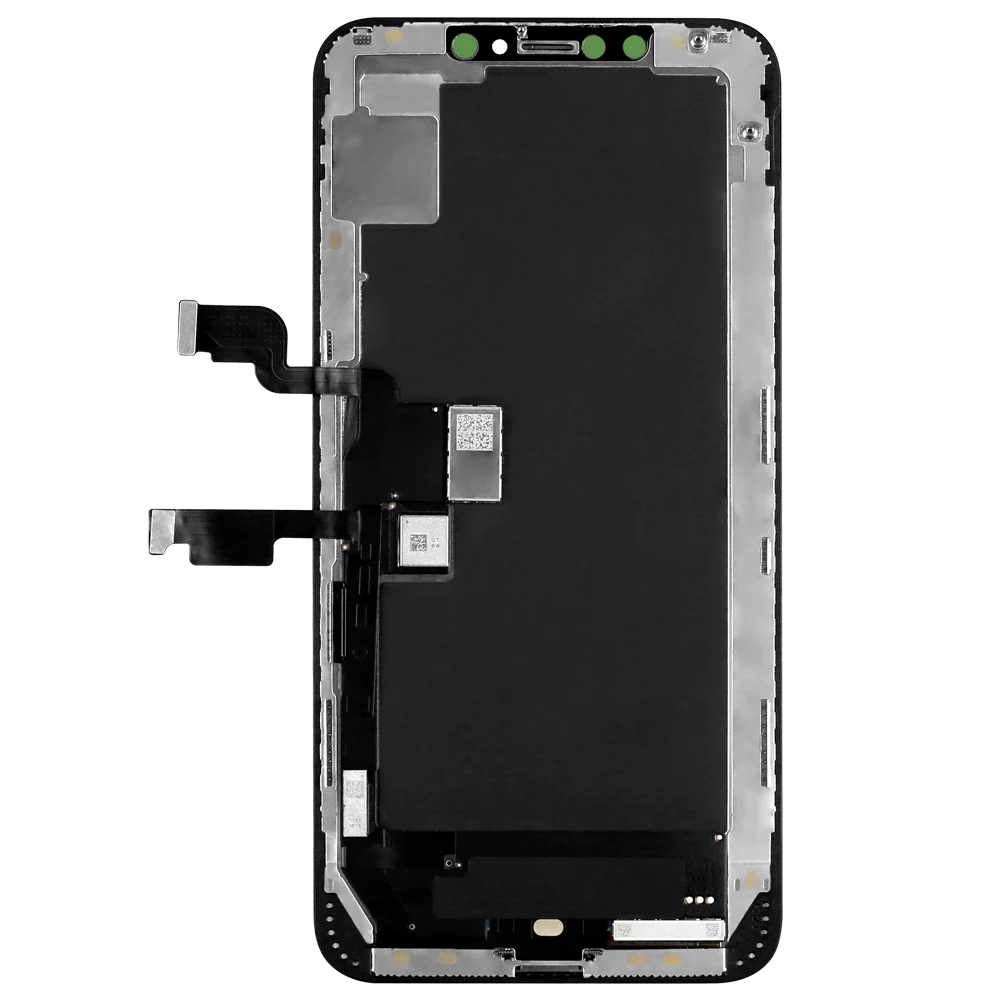
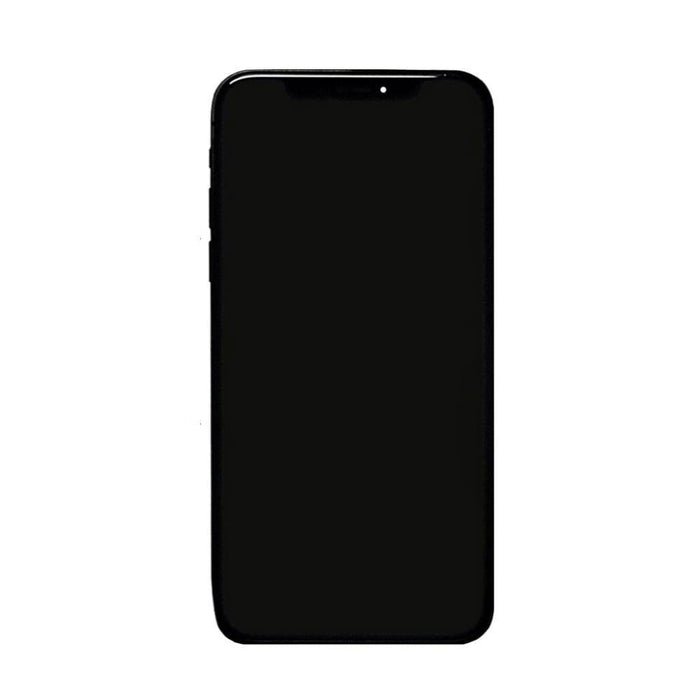
iPhone XS Max LCD Screen Replace your damaged or unresponsive iPhone XS Max screen with this high-quality aftermarket LCD assembly. Although the original iPhone XS Max LCD Screen features an OLED screen, this LCD version offers a cost-effective alternative with reliable performance and solid display quality.
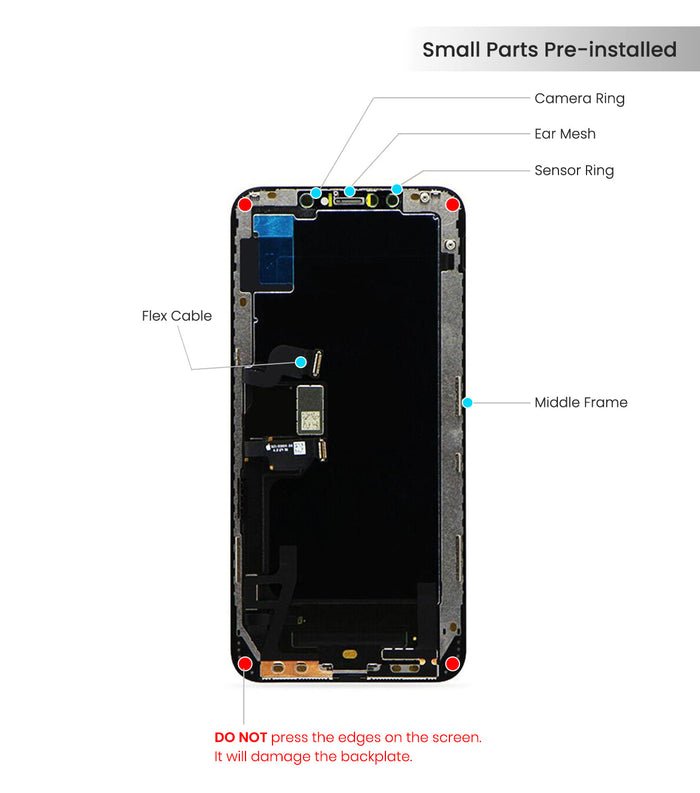
The assembly includes both the iPhone XS Max LCD Screen and digitizer, ensuring accurate touch response and a clean, consistent display. It’s a perfect option for users who need a quick, functional fix without the premium price tag of OLED replacements.
Why Choose Our iPhone XS Max LCD Screen Assembly Replacement?
Affordable LCD solution for a large display
Responsive digitizer for smooth touch interaction
Designed to fit all iPhone XS Max LCD Screen models
Fixes a wide range of screen issues effectively
Ideal for budget repairs and DIY projects
Restore your iPhone XS Max LCD Screen usability with this dependable aftermarket LCD screen—an economical solution for a big-screen experience.
The iPhone XS Max LCD Screen Screen Assembly is the heart of your device’s visual experience. It delivers crisp visuals, accurate colors, and responsive touch performance. Over time, due to accidental drops, scratches, or wear, the LCD screen may develop cracks, dead pixels, discoloration, or unresponsive touch areas.
A high-quality LCD screen assembly replacement restores your iPhone XS Max to its original clarity and responsiveness. Whether you use your phone for work, gaming, multimedia, or everyday tasks, a functional iPhone XS Max LCD Screen assembly ensures your device performs reliably and looks pristine.
Why Replace Your iPhone XS Max LCD Screen Assembly?
Common issues that indicate a need for replacement include:
-
Cracked or Broken Screen – Physical damage impacts touch functionality and display quality.
-
Dead Pixels or Black Spots – Damaged LCD panels result in uneven visuals or flickering.
-
Unresponsive Touch Areas – Hinders smooth interaction and navigation.
-
Color and Brightness Degradation – Faded colors or dim displays affect multimedia and gaming.
-
Screen Flickering or Lines – Indicates damaged internal components or connectors.
Replacing the iPhone XS Max LCD Screen assembly restores the display’s clarity, touch functionality, and color accuracy, bringing your device back to a like-new condition.
Features of iPhone XS Max LCD Screen Assembly Replacement
Our replacement assembly is engineered to meet or exceed Apple’s original specifications:
-
High-Resolution LCD Panel: Clear and vibrant visuals for everyday use.
-
Precise Touch Responsiveness: Smooth touch and swipe interaction across the entire screen.
-
Durable Build: Resistant to minor scratches and impacts.
-
Full Compatibility: Works with Face ID, True Tone, and all iOS display features.
-
Pre-Assembled Components: Comes with digitizer, frame, and protective layers for easy installation.
This ensures a seamless, like-new user experience with accurate colors and reliable touch performance.
Step-by-Step iPhone XS Max LCD Screen Assembly Replacement Guide
Replacing the iPhone XS Max LCD Screen assembly requires precision and professional tools:
-
Power Off Device: Turn off your iPhone XS Max LCD Screen completely to prevent electrical damage.
-
Remove Screws and Display Assembly: Use a pentalobe screwdriver to remove screws near the Lightning port and carefully lift the display using suction cups and plastic prying tools.
-
Disconnect Internal Components: Detach battery and display connectors with care to avoid damage.
-
Remove Damaged iPhone XS Max LCD Screen Assembly: Unscrew and remove the old assembly, taking care with Face ID sensors and other connectors.
-
Install Replacement Assembly: Align the new iPhone XS Max LCD Screen assembly, reconnect all connectors, and ensure proper placement of Face ID and sensors.
-
Test Before Final Assembly: Power on the device and verify display clarity, touch responsiveness, and Face ID functionality.
-
Secure Screen and Screws: Once confirmed, reattach the display and secure screws, performing a final functionality check.
Professional installation ensures durability, preserves Face ID, and prevents further damage to internal components.
Benefits of a New LCD Screen Assembly
-
Restored Visual Clarity: Enjoy sharp, vibrant images and videos.
-
Reliable Touch Functionality: Smooth and responsive interaction for typing, swiping, and gestures.
-
Face ID Compatibility: Maintains secure facial recognition functionality.
-
Durable and Reliable: Resistant to scratches and minor impacts.
-
Cost-Effective Solution: Restores full functionality without replacing the entire device.
Troubleshooting Common Issues
-
Screen Flickering or Lines: Check connections, ensure screws and cables are properly seated.
-
Face ID Not Working: Ensure TrueDepth camera and sensor alignment during installation.
-
Unresponsive Touch: Verify digitizer connections and ensure flex cables are securely seated.
-
Color Accuracy Issues: Confirm that the iPhone XS Max LCD Screen assembly is calibrated and high-quality.
-
Dead Pixels: Rare in premium assemblies; inspect installation and screen quality before final assembly.
Technical Specifications
-
Display Type: iPhone XS Max LCD Screen
-
Resolution: High-definition for iPhone XS Max LCD Screen
-
Touch Technology: Capacitive multi-touch
-
Color Accuracy: Supports True Tone and wide color gamut (P3)
-
Durability: Scratch-resistant, reinforced glass
-
Compatibility: iPhone XS Max LCD Screen (all variants)
-
Included Components: Digitizer, iPhone XS Max LCD Screen, frame assembly
Maintenance and Care Tips
-
Use a Screen Protector: Safeguard against scratches and minor impacts.
-
Clean Gently: Use microfiber cloths, avoiding harsh chemicals.
-
Avoid Excessive Pressure: Heavy pressure can damage the iPhone XS Max LCD Screen or digitizer.
-
Keep Device Away from Extreme Temperatures: Prevent damage from heat or cold.
-
Update iOS Regularly: Optimizes touch sensitivity and display calibration.
FAQs – iPhone XS Max LCD Assembly Replacement
Q1: How long does replacement take?
A: Professional replacement typically takes 45–60 minutes.
Q2: Will Face ID still work?
A: Yes, if installed correctly, Face ID functionality is fully preserved.
Q3: Can I replace it myself?
A: Technically yes, but improper handling can damage the screen or internal components. Professional installation is recommended.
Q4: How durable is the replacement iPhone XS Max LCD Screen assembly?
A: High-quality assemblies resist scratches and minor impacts, providing long-lasting performance.
Q5: Does True Tone and color accuracy work after replacement?
A: Yes, our assemblies support True Tone, wide color, and accurate visual performance.
Advanced Installation Tips for iPhone XS Max LCD Screen Assembly
Replacing the iPhone XS Max iPhone XS Max LCD Screen screen assembly is delicate and requires precision. Follow these tips for a professional-quality installation:
-
Work in a Static-Free Environment: Use an anti-static mat or wrist strap to protect internal circuits.
-
Organize Screws and Components: The XS Max contains multiple screws and connectors of varying sizes. Keep them organized to prevent mix-ups.
-
Inspect Internal Components: Before installing the new iPhone XS Max LCD Screen assembly, check the logic board, connectors, and battery connections for dust, corrosion, or damage. Clean carefully with isopropyl alcohol if needed.
-
Handle Face ID Carefully: TrueDepth sensors are sensitive. Ensure proper alignment to retain Face ID functionality.
-
Test Before Final Assembly: Connect the new assembly, power on the device, and verify display clarity, touch response, and Face ID before securing the display permanently.
Understanding LCD Technology in iPhone XS Max
The iPhone XS Max LCD Screen panel is designed for sharp visuals, vibrant colors, and smooth touch interaction:
-
High-Resolution Display: Delivers crisp images and videos for all applications.
-
Capacitive Touch Technology: Enables accurate swipes, taps, and multi-touch gestures.
-
True Tone Support: Adjusts white balance based on ambient light for natural visuals.
-
Color Accuracy: Supports wide color gamut (P3) for media editing, gaming, and photography.
-
Durable Construction: Scratch-resistant glass protects the internal LCD and digitizer.
Replacing a damaged iPhone XS Max LCD Screen assembly restores these advanced features, ensuring your device looks and functions like new.
Common Issues After LCD Replacement and Troubleshooting
Even with a high-quality replacement, minor issues can occur:
-
Flickering or Lines on Screen:
-
Cause: Loose connections or improperly seated cables.
-
Solution: Recheck connector alignment and ensure screws are properly tightened.
-
-
Face ID Not Working:
-
Cause: Misaligned TrueDepth sensor.
-
Solution: Verify sensor placement and reconnection.
-
-
Unresponsive Touch Areas:
-
Cause: Digitizer connections not properly seated.
-
Solution: Inspect and securely reconnect flex cables.
-
-
Color Accuracy Problems:
-
Cause: Low-quality assembly or misaligned display.
-
Solution: Use high-quality replacement and verify calibration.
-
-
Dead Pixels:
-
Cause: Rare in premium assemblies.
-
Solution: Inspect screen before final assembly and replace if necessary.
-
Advanced Display Calibration Tips
After installation, proper calibration ensures peak performance:
-
Brightness Calibration: Adjust auto-brightness settings to optimize display visibility and battery life.
-
True Tone Verification: Ensure True Tone functions correctly in different lighting environments.
-
Color Accuracy Test: Use photos and videos with known colors to verify visual fidelity.
-
Touch Sensitivity Adjustment: Test multi-touch and 3D Touch gestures for responsiveness.
-
Pixel Health Check: Detect dead or stuck pixels and ensure uniform display quality.
Comparison of Aftermarket vs OEM LCD Assemblies
| Feature | OEM Apple LCD | High-Quality Aftermarket LCD |
|---|---|---|
| Resolution & Display Type | High-definition LCD | High-definition LCD |
| True Tone & HDR Support | Yes | Yes |
| Touch Sensitivity | High | Equal or Enhanced |
| Durability | Moderate | Reinforced & Scratch-Resistant |
| Price | Premium | Cost-Effective |
| Professional Installation | Recommended | Strongly Recommended |
High-quality aftermarket assemblies match or exceed OEM performance while offering a cost-effective solution for device repair.
User Benefits of Replacing the LCD Screen Assembly
-
Restored Visual Clarity: Crisp, vibrant images and videos.
-
Reliable Touch Functionality: Smooth, uninterrupted interaction for typing, swiping, and gestures.
-
Face ID Compatibility: Maintains secure facial recognition.
-
Durable and Reliable: Scratch-resistant and built to last.
-
Cost-Effective: Restores full device functionality without replacing the entire phone.
Advanced Tips for Heavy Users
-
Gamers: Responsive LCD ensures precise touch during gameplay.
-
Content Creators: Accurate color reproduction is essential for photo/video editing.
-
Professionals: Clear visuals and responsive touch aid productivity apps.
-
Travelers: Durable assembly withstands minor impacts and scratches while on the go.
Extended FAQs – iPhone XS Max LCD Assembly Replacement
Q6: Can I replace the assembly myself?
A: Yes, but improper handling may damage internal components. Professional installation is highly recommended.
Q7: How long will the replacement assembly last?
A: With proper care, 2–3 years or longer depending on usage.
Q8: Does it support True Tone and HDR?
A: Yes, the high-quality assembly fully supports True Tone, HDR, and wide color (P3).
Q9: Will the replacement affect battery or performance?
A: No, if installed properly, the LCD assembly does not impact battery life or device performance.
Q10: How do I prevent future damage?
A: Use screen protectors, avoid drops, clean gently, and protect from extreme temperatures.
Real-Life Case Studies and User Experiences
Case Study 1 – Professional User with Cracked Screen
David, a business professional, dropped his iPhone XS Max, resulting in a cracked LCD screen and unresponsive touch areas. After installing our premium LCD assembly:
-
Display clarity was fully restored
-
Smooth and responsive touch across all areas
-
True Tone and HDR features worked flawlessly
-
Face ID functionality was fully retained
Case Study 2 – Mobile Gamer with Delayed Touch
Sara, a mobile gaming enthusiast, experienced lag and flickering after her XS Max screen was slightly damaged. Post-replacement:
-
Gaming touch responsiveness was fully restored
-
Colors and visuals became vibrant and accurate
-
Device reliability improved, preventing further performance issues
Case Study 3 – Content Creator and Photographer
Ali, a content creator, relied heavily on his iPhone XS Max for photo and video editing. The replacement assembly:
-
Restored accurate color reproduction
-
Allowed professional-level media editing
-
Increased confidence in device durability for fieldwork
These real-world examples demonstrate how a high-quality LCD assembly replacement can restore functionality, clarity, and reliability in everyday and professional use.
Understanding Pixel Technology in LCD Screens
The iPhone XS Max LCD screen uses advanced pixel architecture to deliver high-definition visuals:
-
High-Density Pixel Arrangement: Provides sharp and detailed images.
-
Capacitive Multi-Touch: Ensures precise gestures and swipes.
-
True Tone Integration: Adjusts white balance according to ambient lighting.
-
Wide Color Gamut Support: Reproduces vibrant, accurate colors for multimedia and editing.
-
Durable Glass Overlay: Protects the LCD layer while providing scratch resistance.
Replacement assemblies maintain these technologies, ensuring a premium visual experience.
Advanced Display Calibration After Replacement
Proper calibration ensures maximum performance:
-
Brightness Adjustment: Optimize auto-brightness for visual comfort and battery efficiency.
-
True Tone Verification: Confirm correct color temperature adjustments in varying light conditions.
-
Color Accuracy Test: Use reference images or videos to verify accurate color reproduction.
-
Touch Sensitivity Check: Test all gestures, swipes, and 3D Touch functionality.
-
Pixel Health Assessment: Detect dead or stuck pixels to ensure uniform display quality.
Calibration ensures that your replacement LCD screen functions at or above OEM performance levels.
Comparison Between Aftermarket and OEM LCD Assemblies – Advanced Insights
| Feature | OEM Apple LCD | High-Quality Aftermarket LCD |
|---|---|---|
| Resolution & Display Type | High-definition LCD | High-definition LCD |
| Color Accuracy | Factory-calibrated | Professionally calibrated |
| True Tone & HDR Support | Yes | Yes |
| Touch Sensitivity | High | Equal or enhanced |
| Durability | Moderate | Reinforced & scratch-resistant |
| Price | Premium | Cost-effective |
| Professional Installation | Recommended | Strongly recommended |
High-quality aftermarket assemblies provide reliable, durable, and visually accurate displays at a more affordable price.
Extended FAQs – Power User Edition
Q11: Can the LCD assembly handle high-frame-rate videos smoothly?
A: Yes, premium assemblies support smooth video playback and gaming performance.
Q12: Will battery life be affected?
A: No, a properly installed assembly does not impact battery efficiency.
Q13: Can I use the device comfortably outdoors?
A: Yes, the high-brightness LCD ensures readability even in direct sunlight.
Q14: How can I prevent image retention or ghosting?
A: Avoid prolonged static images at high brightness and enable auto-brightness.
Q15: How long does a replacement assembly last?
A: With proper care, 2–3 years or longer, depending on usage intensity.
Maintenance Tips for Long-Term Performance
-
Use Screen Protectors: Safeguard against scratches and impacts.
-
Clean Gently: Use microfiber cloths; avoid harsh chemicals.
-
Avoid Excessive Pressure: Heavy pressure can damage the LCD or digitizer.
-
Temperature Awareness: Keep the device away from extreme heat or cold.
-
Regular iOS Updates: Optimize touch sensitivity and display performance.
Following these tips ensures your replacement assembly maintains peak visual quality and responsiveness over time.
Conclusion – Why a Premium LCD Assembly Replacement is Essential
Replacing your iPhone XS Max LCD screen assembly with a high-quality unit is more than a repair; it is an investment in your device’s:
-
Visual Clarity: Restores sharp, vibrant images and videos.
-
Touch Performance: Ensures smooth interaction for typing, gestures, and gaming.
-
Face ID Functionality: Maintains secure facial recognition.
-
Device Longevity: Protects internal components and prevents further damage.
-
Cost Efficiency: Restores full functionality without needing a new device.
Combined with professional installation, calibration, and careful maintenance, a premium LCD screen assembly replacement ensures your iPhone XS Max operates like new, delivering a reliable and immersive experience for daily use, professional work, gaming, and content creation.
Advanced User Tips
-
Gamers: Enjoy precise touch and smooth swipes for an optimal gaming experience.
-
Content Creators: Accurate color reproduction ensures professional-level photo and video editing.
-
Professionals: Clear visuals and responsive touch improve productivity in apps and multitasking.
-
Travelers: Durable assembly resists minor impacts and scratches while on the move.
Quick Maintenance Tips
-
Use tempered glass or film protectors to prevent scratches.
-
Clean the screen gently with a microfiber cloth; avoid harsh chemicals.
-
Avoid pressing hard on the display to protect the LCD and digitizer.
-
Keep the device away from extreme temperatures.
-
Regularly update iOS to maintain touch and display optimization.
Short FAQs
Q1: Can I replace the screen myself?
A: Possible, but professional installation is recommended to avoid damage.
Q2: Will True Tone and HDR work after replacement?
A: Yes, premium assemblies support both features fully.
Q3: How long will the replacement last?
A: Typically 2–3 years or more with proper care.
Q4: Does it affect Face ID?
A: No, if installed correctly, Face ID functionality is fully preserved.
Conclusion
A high-quality iPhone XS Max LCD Screen Assembly Replacement restores:
-
Crisp, vibrant visuals
-
Smooth, responsive touch
-
Full Face ID and True Tone functionality
-
Device reliability and longevity
This replacement is a cost-effective, safe, and professional solution that keeps your iPhone XS Max performing like new.


Reviews
There are no reviews yet.